
Why Your Instagram Chat Is Purple and How to Change It Back
Why Your Instagram Chat Is Purple and How to Change It Back
Your Instagram chat or text is purple because of a theme, Vanish Mode or the default gradient. How to change it back, and what Lead means.
- 1Why Is My Instagram Chat or Text Purple All of a Sudden?
- 2Does a Purple Instagram Chat Mean the Chat Is Encrypted?
- 3Why Do You and Your Friend See Different Chat Colors?
- 4How Do I Get the Grey Instagram Chat Bubbles Back?
- 5Is a Dark Purple Instagram Chat Vanish Mode?
- 6What Does Lead Mean on Instagram Messages?
- 7Does a Purple Instagram Chat Mean You Have Been Blocked?
- 8Quick Takeaways
The Short Answer: A purple Instagram chat is almost always a chat theme, Vanish Mode, or the default gradient Instagram has shipped since the Messenger merge. It has nothing to do with encryption, and blocking never changes anyone’s colors. Check the thread for a theme-change message first.
Your Instagram chat is purple for one of four reasons. The color is cosmetic in every case. Nothing about a purple bubble changes who can read your messages.
The reason this question is so confusing is that the pages answering it disagree with each other. One says purple means end-to-end encryption, another says it means Vanish Mode.
A third says purple marks nothing more than the messages you sent. They cannot all be right, and the most popular one is the one that has aged worst.
The answer I keep having to correct is the one about encryption, because it is both the most confident and the most wrong. Instagram switched that feature off in May 2026. A page telling you purple means your chat is encrypted is describing something the app no longer does.
Below is the triage I use, then the exact taps to get your grey bubbles back. Every step here works on a phone, because that is where you are reading your DMs.

Why Is My Instagram Chat or Text Purple All of a Sudden?
A purple Instagram chat, or purple text in your DMs, comes from one of four things: a shared chat theme, a personal color setting, Vanish Mode, or the default purple-blue gradient Instagram applies to everyone.
Purple text usually means the bubbles around the messages you send, and the same four causes apply to them. Which one you have is decided by where the purple appears.
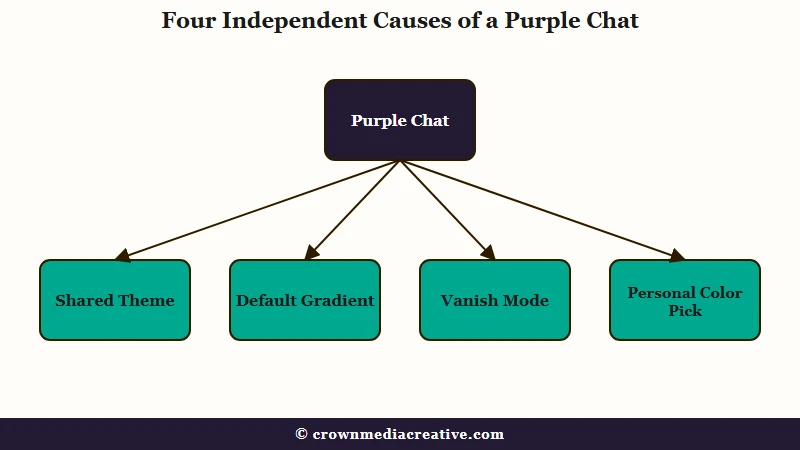
The first thing I check is whether the whole inbox turned purple or just one thread. One thread means somebody set a theme. Every thread means it is the default gradient or an app update.
Scroll up inside the affected chat and look for a small system line in the middle of the thread. Instagram writes one every time a theme changes, in the form “X changed the theme to Y”. That line is the single fastest way to settle this, and almost none of the other guides on this question mention it.
| What you see | Likely cause | Fix |
|---|---|---|
| One chat purple, theme message in thread | Someone set a shared theme | Change the theme back |
| Every chat purple after an update | Default gradient rollout | Set Theme to Direct Classic |
| Dark purple with a dotted background | Vanish Mode is on | Swipe up to exit |
| Only your own bubbles purple | You picked a color, not a theme | Reset under Colors and Gradients |
| Purple word “Lead” beside a name | Chat label on a business or creator account, sometimes added by Instagram | Swipe left on the chat, tap More, then Edit label |
Does a Purple Instagram Chat Mean the Chat Is Encrypted?
No. Instagram ended support for end-to-end encrypted DMs on May 8, 2026, so no bubble color can indicate encryption today.
Any guide telling you otherwise was written before that change and never updated.
That one is my least favorite answer on the internet right now, because it was wrong even before it went stale. Encryption on Instagram was always opt-in, buried behind a four-step menu almost nobody used. It was never the reason a normal chat looked purple.
Meta’s own statement when it announced the removal was blunt about the reason. “Very few people were opting in to end-to-end encrypted messaging in DMs,” the company said, pointing anyone who wanted encryption toward WhatsApp instead.
The Electronic Frontier Foundation confirmed the shutdown days after it took effect, describing the feature as “opt-in, and therefore rarely used”.
Purple has never carried a privacy meaning. Treating it as a security signal is the one mistake on this list that can cost you something real, because it encourages the kind of message nobody would send over an open channel. With encryption gone, treat every DM, purple or not, as readable by Meta.
Why Do You and Your Friend See Different Chat Colors?
Instagram has two separate color controls, and only one of them changes what the other person sees.
A Theme applies to both people. A Color or Gradient applies only to you.
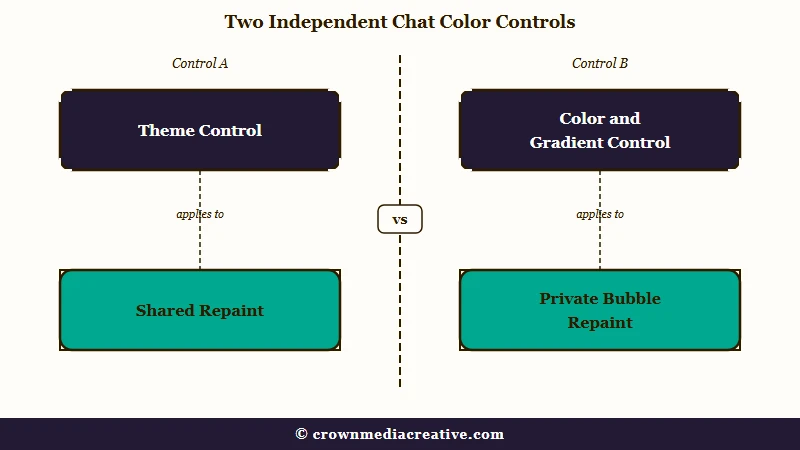
This is the split that cost me the most time before I understood it. It explains the situation that makes people think something is broken, where one person swears the chat is purple and the other insists it is still grey.
Selecting a full Theme updates the background and bubbles for everyone in the conversation, and Instagram announces it in the thread. Picking from the Colors and Gradients row further down the same menu changes your own bubbles and nothing else. The receiver’s bubbles and background stay exactly as they were.
Before: You tap a purple swatch under Colors and Gradients, then ask your friend if the chat looks different. They say no. You assume the app is glitching.
After: You tap Theme instead and choose a purple theme. A line appears in the thread saying you changed it, and your friend sees the same purple you do.
Staged rollouts add a second layer to this. Instagram ships interface changes to some accounts before others, so two people in one conversation can genuinely sit on different default styles for weeks. Chat colors arrived that way themselves: when Instagram announced them in September 2020, it said they were rolling out “in a few countries around the world” first.
There is no setting that forces two people’s chat styles to match, which is the same pattern behind your share list order shifting without warning.
How Do I Get the Grey Instagram Chat Bubbles Back?
Open the chat, tap the name at the top, tap Theme, and choose Direct Classic.
That restores the plain grey layout for both people in the conversation.
I use the Theme menu here rather than the color picker. The color picker only repaints your side, so the chat still looks purple to the person you are messaging. There is no global setting either, since themes are set per conversation, so repeat these steps in each chat you want grey.
- Open the conversation you want to change.
- Tap the contact’s name or the “i” icon at the top of the screen.
- Tap Theme.
- Choose Direct Classic for grey bubbles, or Default to return to Instagram’s baseline.
- Check the thread for the confirmation line that the theme changed.
There is a shortcut. When Instagram posts that “X changed the theme” line, the message itself carries a tappable button that opens the theme picker directly, which saves you the trip through the menu.
One thing that will not work is clearing your cache or reinstalling the app. A theme is stored on Instagram’s servers against the conversation, not on your handset, so it survives a reinstall and comes straight back.
| Purple state | Who sees it | Announced in chat | How to undo |
|---|---|---|---|
| Shared theme | Both people | Yes, a system line in the thread | Theme, then Direct Classic |
| Color or gradient | Only you | No | Reset under Colors and Gradients |
| Default gradient | Everyone on that build | No | Set a theme per chat |
| Vanish Mode | Both people | Yes, an on-screen notice | Swipe up from the bottom |
Is a Dark Purple Instagram Chat Vanish Mode?
If the background is dark with a dotted pattern and a banner reading “You’re in vanish mode”, that is Vanish Mode.
Messages sent inside it disappear once viewed and the chat is closed.
Vanish Mode is the one I trigger by accident most often myself, because it turns on with a swipe gesture inside an open conversation. A stray scroll is all it takes.
Do not rely on the dark background alone to identify it. Instagram’s ordinary dark mode looks similar, so the banner at the top is the thing to check. If there is no banner, you are looking at a theme or dark mode.
To exit, place your finger just above the message box and swipe upward. On iPhone you release straight away; on Android you hold until the on-screen circle fills, then release. Both people get a “Vanish mode is off” confirmation.
Do not treat it as private, either. The other person can still report a vanish-mode message for up to 14 days after it disappears, and the report sends that message from their device to Instagram for review. A report filed after 14 days arrives without the message, according to Instagram’s page on reporting vanish mode chats, which also says vanish mode may be unavailable in Japan and Europe.
If your chat is going dark rather than purple and none of this matches, that is a different problem covered in Instagram going black.
What Does Lead Mean on Instagram Messages?
Lead is one of five chat labels Instagram gives business accounts and some creator accounts, and a purple Lead beside a name means that chat was filed as a possible customer, either by the account owner or automatically by Instagram.
Instagram’s help page on chat labels lists the five as Lead, Booked, Ordered, Paid and Shipped, and says you need a business or creator account to use them.
This is the one purple I am glad to see in my own inbox, because it can point at money.
One manual route is a swipe left on a chat, then More, then Add label. The same menu has Edit label for changing one, and labeled chats can be filtered so your customer conversations sit together.
A Lead label sorts your inbox and stops there. What you do with those conversations afterwards decides whether they turn into income, and a repeatable system for turning DMs into customers does more for that than any inbox filter.
Instagram can also add the label on its own. On some business and creator accounts, a line appears in the thread that starts “Auto-detected outcome”, and the chat is labeled based on what was said in it.
It does not always guess well. In March 2026 one X user posted that Instagram had labeled a conversation about art with a friend as a lead, and had no idea what the label meant. If Lead sits on a friend’s chat and nobody with access to your account added it, Instagram’s detection put it there.
The other tag people ask about sits at the top of the thread instead. Business chat in the header of a thread means you are messaging a business account, according to Instagram’s page on how business chats work.
That page also says Meta may use what you share in business chats to personalize ads and improve features such as translations and AI. The business gets suggested replies and actions based on automatic processing of your messages, so keep anything personal out of those threads.
Does a Purple Instagram Chat Mean You Have Been Blocked?
No. Blocking, restricting, and muting have no effect on the color of your messages or your chat background.
Nothing about the color reflects the state of your relationship with the other person.
Blocking is the fear behind most of these questions, and my answer is short. Color and account status are handled by completely separate parts of the app, and they never touch. A name that has turned into the word null is a different signal, and what null means on Instagram covers when that one does point to a block.
Purple also does not mean you are talking to a verified account, that someone likes you, or that your account has been compromised. If you want the real signals for whether someone has limited what you can see, muting someone on Instagram covers what each control hides and what it leaves visible.
The one case worth a second look is a color change alongside genuine warning signs, such as logins you do not recognize or messages in your outbox you never wrote.
That combination points at a compromised account, and a restriction on your account covers what Instagram shows when it flags something for real.
Quick Takeaways
- Purple is cosmetic in every case, and no bubble color on Instagram has indicated encryption since May 8, 2026.
- Scroll the thread for a “changed the theme” system line first, since that single check settles most cases in seconds.
- A Theme changes the chat for both people; a Color or Gradient changes it only for you, which is why two people often disagree about the color.
- Tap the name at the top, choose Theme, then Direct Classic to get plain grey bubbles back.
- A dark dotted background with a banner is Vanish Mode, and reinstalling the app fixes none of these because themes are stored server-side.
- A purple Lead beside a name is a chat label on business and creator accounts, and Instagram can add it automatically, even to a friend’s chat.

