
How to Mute Someone on Instagram and What It Will Not Hide
How to Mute Someone on Instagram and What It Will Not Hide
Muting someone on Instagram hides their posts and stories, but not their reposts. Here is what mute covers, what it misses, and how to close the gaps.
- 1What Does Muting Someone on Instagram Hide?
- How to Mute or Unmute Someone’s Story on Instagram
- 2Why Do You Still See Reposts From Someone You Muted?
- 3Can You Mute Reposts on Instagram at All?
- 4Does Instagram Tell Someone You Muted Them?
- 5Why Won’t Instagram Mute Notes From Someone You Muted?
- 6Which Mute Controls Are Missing on Desktop?
- 7How Do You See Every Account You Have Muted?
- 8What Happens to Your Reach When People Mute You?
- 9Quick Takeaways
The Short Answer: To mute someone on Instagram, open their profile, tap Following, then Mute, and switch on Posts, Stories or both; the person is never told. For their story alone, tap and hold their picture in the story bar at the top of your feed, tap Mute, then tap Mute stories. Reposts are the gap: the mute menu has no toggle for them, so a muted friend who reposts heavily can still fill your feed.
If you want to mute someone on Instagram, the taps take about five seconds, and the exact steps are at the end of the first section below.
You mute someone, feel relieved, and then keep seeing their stuff anyway.
There is a specific reason for that. Instagram’s mute controls were built for a version of the app that did not have a repost button.
The button arrived in August 2025. The mute menu still has no toggle for it.
Most of the mute advice I could find stops at the toggles and never mentions this. So this covers the four things mute really controls, the three places it leaks, and what to do about each one.

What Does Muting Someone on Instagram Hide?
Muting hides four things: their feed posts, their stories, their notes, and their activity bubbles on reels.
Each is a separate toggle inside the same mute menu. Turning on one does not turn on the others.
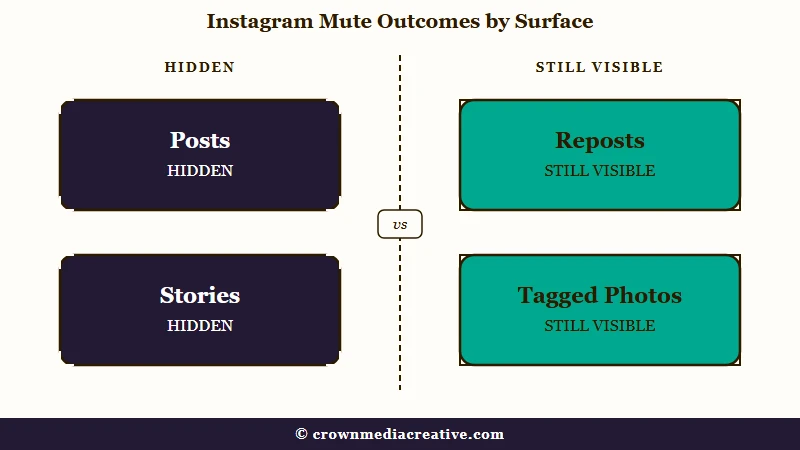
The four toggles are the part I always check first, because people flip one and assume they got all of them. If you mute posts but not stories, their story ring stays at the top of your feed all day.
Muting is one-directional and invisible. Your follow stays intact, your follower counts do not move, and the other person’s experience of your account is untouched. They can still see your posts, message you, and view your stories exactly as before.
What are activity bubbles: The small profile pictures that float over a reel showing which people you follow liked, commented on, or reposted it.
| Surface | Muted by the mute menu? | Notes |
|---|---|---|
| Feed posts | Yes | Separate toggle |
| Stories | Yes | Separate toggle, mobile only |
| Notes | Yes, with a catch | See the notes section below |
| Activity bubbles on reels | Yes | Separate toggle |
| Reposts in your feed | No | No toggle in the mute menu |
| Direct messages | No | Muted separately in the chat |
| Tagged photos and mentions | No | Still notifies you |
| Their profile and search | No | Still fully visible to you |
How to Mute or Unmute Someone’s Story on Instagram
Tap and hold their picture in the story bar at the top of your feed, tap Mute, then tap Mute stories. That two-step route is the one Instagram’s story mute help page gives for iPhone and Android.
If they have no story up right now, their picture is not in the bar to press, so go through their profile instead:
- Open their profile from one of their posts or from Search.
- Tap Following below their profile info.
- Tap Mute.
- Turn on the toggle next to Stories, and the one next to Posts as well if you want both gone.
From a post in your feed, tap the three dots next to it, then Hide, then the Mute option with their username, and pick Mute Posts or Mute Posts and Story.
To unmute someone’s story, start from their profile, because a muted story no longer sits in the bar for you to press and hold. Instagram’s route is four steps:
- Open their profile from a feed post or from Search.
- Tap their profile picture in the top left to open their stories.
- Tap Options in the top right.
- Tap Unmute story.
That route needs them to have a story up. Switching the Stories toggle back off under Following, then Mute, works at any time, and nobody is told either way.
A story mute on its own is narrow. Instagram’s help page says you will still see their posts in your feed and the notes they share. Their story also stays one tap away on their profile, and opening it puts your name in their viewer list like any other view.
Plenty of people lean on it anyway. In a September 2026 r/Instagram thread asking “do you mute ig stories?”, one user said they had about 80% of the accounts they follow muted.
Keeping your own stories away from one person is a different setting: tap the menu on your profile, then Story, live and location, then Hide story and live from. If you think someone has done that to you, the guide to telling if someone hid their story from you covers the checks that work.
Why Do You Still See Reposts From Someone You Muted?
Because mute has no repost toggle. Instagram shipped the repost button and the mute controls for it in the same announcement, but the mute it shipped covers activity bubbles in the Friends tab, not reposts landing in your main feed.
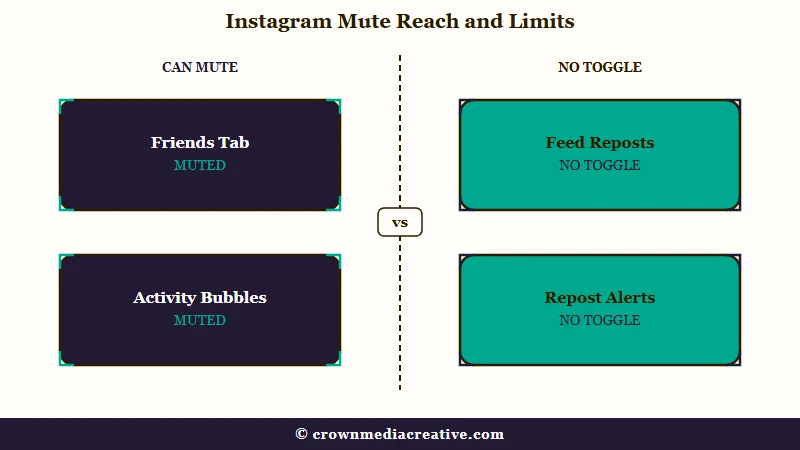
This is the gap that bothers me most about mute, because the two things get confused constantly. Meta’s own launch announcement from August 6, 2025 says the company is “rolling out controls for what’s shown in the Friends tab, including the ability to hide your own likes and comments on reels, and to mute activity bubbles from specific people you follow.”
The scope there is narrow. That control governs the Friends tab and activity bubbles, while a repost is a post and lands in the ordinary feed like any other post.
TechCrunch’s coverage of reposts describes the same split, with reposts appearing in friends’ feeds and in a new Reposts tab on the profile.
So the mute you applied is working. It is silencing everything it was built to silence. Reposts were never in that list.
That still held in September 2026. People on r/Instagram who had muted an account’s posts were still seeing its reposts, in threads from late August and September 16.
Before: You mute a friend, still see six of their reposts a day, and assume the mute broke or Instagram ignored it.
After: You know mute never covered reposts, so you stop re-toggling settings and go straight to the options that do work.
Can You Mute Reposts on Instagram at All?
Not from the mute menu. It has no repost toggle, so the standard options are blunt: unfollow, block, mute their activity bubbles to cut the reel clutter, or turn activity bubbles off everywhere.
Check one more route before any of those. A September 11, 2026 r/Instagram post says the usual advice is to tap the reposter’s profile picture and turn their reposts off, and a September 27 post agrees that “it is possible to block reposts of that individual user”. Instagram’s repost help page mentions only a Report option on that profile picture’s long-press menu and warns that reposts may not be available to everyone, so if your app has no such switch, the options above are what is left.
Blocking is the one I keep landing on when a single account is genuinely flooding a feed. It is heavier than the situation usually deserves, which is exactly why a repost toggle belongs in the mute menu.
There is a global switch worth knowing about. Under Settings and privacy, then Content preferences, a toggle called “Hide activity bubbles in feed and reels” turns off the floating profile pictures everywhere, and the app needs a restart before it takes effect. That kills the bubble clutter for everyone at once, not just the person you muted.
Worth noting that other platforms did solve this. Bluesky ships a control that hides reposts from one specific account while you keep following them, described as a smaller lever than mute, block, or unfollow.
TikTok gives you a Reposts toggle under notification settings, though that only silences the alert rather than filtering your feed. Instagram’s mute menu offers neither.
Does Instagram Tell Someone You Muted Them?
No. Instagram sends no notification, no badge, and no signal of any kind. Instagram’s help documentation on muting states plainly that “Instagram won’t let them know you muted them.”
The silence is the whole point of mute for me, and it is the reason it beats unfollowing for anyone you have to see at work or at family dinners. Unfollowing changes a public follower count. Muting changes nothing anyone else can inspect.
The one indirect tell is behavioural. If you stop viewing someone’s stories entirely, a person who watches their viewer list closely may notice your name has gone missing. The same logic applies to the story viewer list order, which people over-read constantly.
That anxiety runs both ways on this app, and it is usually misplaced. The same question drives whether an accidental like notifies, where the mechanics turn out to be far narrower than people assume.
Restrict is the setting people mix up with mute, and it works on the other person instead of on your feed. Instagram’s Restrict help page says a restricted account’s new comments on your posts stay visible only to them unless you approve them, and your chat with them moves to Message Requests. For a quieter feed, mute is the one you want.
Why Won’t Instagram Mute Notes From Someone You Muted?
Because muting posts, stories, or messages does not carry over to notes. Instagram’s help center is explicit: “muting someone’s messages, posts or stories will not apply to notes they share. You will still see notes they share on Instagram.”
Notes are where my own mutes leak most often, because the carve-out is not obvious anywhere in the interface. You mute a person from their profile, then their note keeps sitting at the top of your inbox the next morning.
Notes have their own mute path. Press and hold the note itself at the top of your messages, then choose Mute notes. It is a separate gesture on a separate surface, and it is not in the profile mute sheet on every app version.
Which Mute Controls Are Missing on Desktop?
Story mute and notes mute do not exist on a computer. Instagram’s help pages for both carry the same line, “This feature isn’t available on computers,” while the main mute and message-mute pages do list desktop support.
Desktop is where I stop recommending mute as a solution, because the capability ladder is uneven and nothing in the interface warns you. The notes mute page is narrower still, listing only Android and iPhone, so an iPad will not do it either.
This one is worth stating carefully because the guides currently ranking contradict each other on it. One says desktop can mute posts and stories; another says posts and stories are both mobile-only. Both are half right: posts and messages work on desktop, stories and notes do not.
| Mute type | iPhone and Android | iPad and Lite | Desktop browser |
|---|---|---|---|
| Posts | Yes | Yes | Yes |
| Messages and calls | Yes | Yes | Yes |
| Stories | Yes | Yes | No |
| Notes | Yes | No | No |
| Reposts | No | No | No |
How Do You See Every Account You Have Muted?
Instagram keeps a full muted list under Settings, and it is the fastest way to audit mutes you forgot about. The list shows every account you have muted and lets you adjust each one individually.
I audit mine about twice a year, usually after wondering why someone dropped off my feed entirely. Here is the sequence:
- Open your profile and tap the three-line menu in the top right.
- Tap Settings and privacy.
- Scroll to Muted accounts and open it.
- Tap any account in the list to open its profile.
- Tap Following, then Mute, then toggle off whichever surfaces you want back.
Unmuting is as quiet as muting. Nobody is told, and the content simply returns to your feed on the next refresh. If you are auditing your feed anyway, clearing your Instagram search history is the other cleanup people usually want at the same time.
What Happens to Your Reach When People Mute You?
A mute costs you reach and shows up in no analytics anywhere. Instagram reports impressions and follower counts, but it has never exposed a mute metric, so an account can be muted by a large share of its followers and read as healthy right up until the reach falls.
My take is that this is the strongest argument for owning an audience rather than renting one. A follower who mutes you is still counted as a follower, which makes the follower number a worse health signal than most creators treat it as.
Unfollows at least leave a visible dent in a number you can watch. Mutes leave nothing, which is why a slow reach decline with a flat follower count is so hard to diagnose. Creators who want a channel that cannot be silently muted usually end up building an email list they own instead.
The reader-side version of this is worth knowing too. Muting a lot of accounts trains your feed and your Explore page toward what you really engage with, so it is a genuine curation tool and not only a conflict-avoidance one. That is the same mechanism behind your Instagram watch history.
Quick Takeaways
- To mute just someone’s story, tap and hold their picture in the story bar, then tap Mute and Mute stories. Unmuting starts from their profile.
- Muting hides posts, stories, notes, and activity bubbles, and each one is a separate toggle you have to turn on.
- Reposts are the real gap. Instagram shipped the repost button in August 2025, and the mute menu still has no toggle for it.
- The person is never notified, which is what makes mute safer than unfollowing for people you cannot avoid.
- Story mute and notes mute do not work on a computer, so do your muting on a phone.
- If reposts from one account are drowning your feed, tap the small profile picture on one of their reposts first, since some users report a per-person switch there. Without one, unfollowing or blocking are the fixes that work.

