
Instagram Watch History Only Goes Back 30 Days and Skips Posts
Instagram Watch History Only Goes Back 30 Days and Skips Posts
Instagram Watch History keeps 30 days of Reels and nothing else. See what the log records, what it misses, and who else can reach it.
- 1Where Is Instagram Watch History and What Does It Show?
- 2Why Does Instagram Watch History Only Go Back 30 Days?
- 3Does Instagram Watch History Include Photos and Feed Posts?
- 4Why Is Watch History Missing From My Instagram Account?
- 5Is Instagram Watch History Accurate?
- 6Can Anyone Else See What You Watched on Instagram?
- 7How Do You See Instagram Watch History Older Than 30 Days?
- 8How Do You Delete Reels From Your Instagram Watch History?
- 9Frequently Asked Questions
- How far back does Instagram Watch History go?
- Does Instagram Watch History show photos I viewed?
- Can someone tell I watched their Reel?
- Why is Watch History not showing in my Instagram settings?
- Is Instagram Watch History proof that someone watched something?
- Can I get my watch history from the data download instead?
- 10Quick Takeaways
The Short Answer: Instagram Watch History lives under Your Activity and holds the Reels you watched in the last 30 days. It does not hold feed photos, it does not go back further, and nobody else can see it. The data export that promises more has a documented hole in exactly the place you want it.
Instagram Watch History is the fastest way to find a Reel you scrolled past and cannot name. It sits four taps deep in your settings and it works well for what it covers.
The trouble starts when the Reel is five weeks old, or when it was a photo carousel rather than a Reel. Then the log is empty and it looks broken, when the truth is that it was never built to hold either one.
The gap between what people expect from this feature and what it stores is the part I keep having to explain. Most pages answering this question stop at those four taps and never say where the log ends.
Below is the full shape of it: where it is, what it records, why it looks incomplete, whether it can be trusted as evidence, and what the official data download does and does not give you.
Where Is Instagram Watch History and What Does It Show?
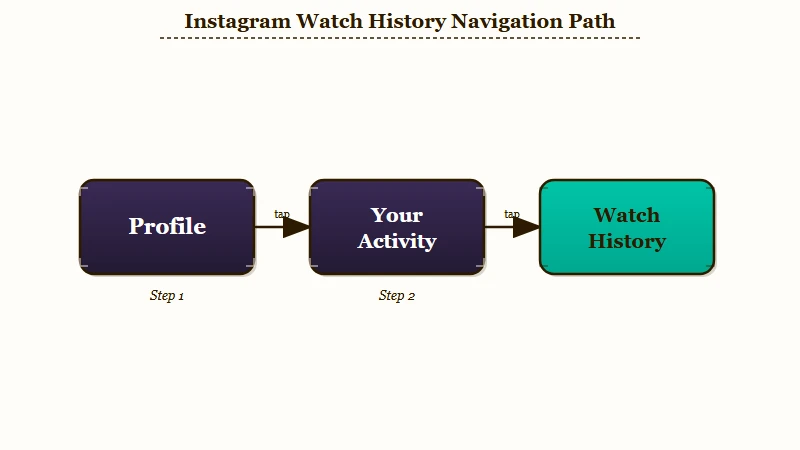
Instagram Watch History is at Profile, then the three-line menu, then Your Activity, then Watch History. It shows every Reel you watched in the past 30 days, sorted by date, and it is mobile only.
Adam Mosseri announced the feature in late October 2025, and The Independent covered the rollout as it reached iOS and Android. Before that there was no chronological list at all, which is why so many older guides tell you to dig through your Saved folder instead.
It is the first place I send anyone who has lost a Reel, because the filters are better than people expect. You can sort oldest to newest, jump to a specific date or date range, and filter the whole list down to one account.
Here is the path, in order:
- Open Instagram and tap your profile picture in the bottom right.
- Tap the three-line menu in the top right corner.
- Tap Your activity, under the “How you use Instagram” heading.
- Scroll to the bottom of that list and tap Watch history.
- Use Sort for date order, or Filter by author to narrow it to one account.
There is no desktop version. If you are on a laptop looking for this menu, you will not find it, and the browser version of Your Activity does not carry the same list.
Why Does Instagram Watch History Only Go Back 30 Days?
The 30-day window is a hard cap set by Instagram. Reels older than 30 days drop off the list permanently and there is no setting, subscription, or workaround inside the app that extends it.
Mosseri’s own words at launch were that you could see “every Reel that you’ve ever watched.” The feature that shipped holds one month. My take is that the wording did more damage than the limit itself, because people go looking for a year of history and conclude the app is malfunctioning when they find four weeks.
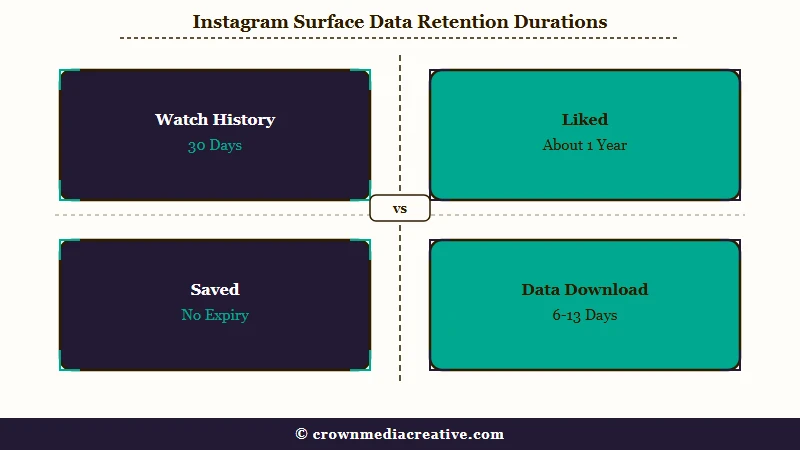
If you want a Reel to survive past 30 days, you have to leave a mark on it while you can still find it. Saving it puts it in your Saved folder with no expiry, and liking it files it in your interactions log, which runs much longer than the watch list.
| What you did | Where it is stored | How long it lasts |
|---|---|---|
| Watched a Reel | Watch History | 30 days |
| Watched a feed photo or carousel | Nowhere in the app | Not stored for you at all |
| Saved a Reel | Saved folder | No time limit |
| Liked a Reel | Your interactions log | Around a year |
| Watched anything, historically | Data download | Roughly 6 to 13 days, with gaps |
Does Instagram Watch History Include Photos and Feed Posts?
No. Watch History covers Reels only. Photos, carousels, and static feed posts you scrolled past are not written to it, so a missing photo is not a bug you can fix.
This is the limit that catches me out more often than the 30-day one. The menu is called Watch History rather than View History for a reason, and the naming is doing quiet work: video is tracked, stills are not.
There is no in-app list of photos you viewed. If you scrolled past a photo you now want to find, your options are the account’s profile grid, your own Saved folder, or search, and none of them is a history log.
The same goes for Stories you watched. Those expire on their own schedule and never enter the Watch History list at all.
Why Is Watch History Missing From My Instagram Account?
Watch History goes missing for four ordinary reasons: an outdated app, a phased rollout that has not reached your account, no Reels watched in the last 30 days, or stale cached account data.
None of these is a ban or a restriction on your account, which is where people’s minds tend to go first. Here is the order I’d check them in, cheapest first.
| Symptom | Likely cause | Fix |
|---|---|---|
| No Watch History entry in the menu at all | App version predates the feature | Update Instagram from the App Store or Play Store |
| App is current, still no entry | Phased rollout, tied to account rather than device | Wait a few days and check again |
| Entry exists but the list is empty | No Reels watched in the last 30 days | Watch a Reel and reopen the list |
| Entry exists on one account, not another on the same phone | Rollout is per account, not per device | Wait it out, switching devices will not help |
| List spins and never loads | Stale cached session data | Log out, log back in, or reinstall |
Reinstalling is the last step for a reason. It clears cached session data, and it also signs you out of every account on the device, so try the cheaper fixes first.
Is Instagram Watch History Accurate?
Watch History reliably logs Reels you opened, but Instagram has never published what counts as a watch. It is a record of activity, not proof of intent, and the timestamps carry known drift.
This is the section I care most about getting right, because this log is being used as evidence in arguments it was never designed to settle. The honest answer has three parts and none of them is a clean yes or no.
First, no dwell-time threshold has ever been documented. Instagram has not said whether a Reel that autoplays for half a second while you scroll gets written to the list, or whether it takes a deliberate stop, and without that figure nobody can say what a given entry proves.
Second, the timestamps drift. A peer-reviewed audit of platform data access found that TikTok and YouTube logged activity within about five seconds of when it happened, while Instagram’s records were off by as much as a full minute, which makes minute-by-minute timeline reconstruction unreliable.
Third, absence proves nothing. Because the list holds 30 days of Reels and no photos at all, an empty result is the expected outcome for most of what a person does on the app.
Can Anyone Else See What You Watched on Instagram?
No. Your Watch History is private to your account. Followers, the creators whose Reels you watched, and the general public cannot see it, and no legitimate third-party tool can retrieve it.
This is the one question here I can answer without a caveat. Passive watching is anonymous on Instagram, and you become visible to a creator only when you take a deliberate action, which is why accidentally liking and unliking is a genuine worry while quietly watching forty Reels is not.
Two surfaces work the opposite way. Stories show the poster a named viewer list, and so do Highlights within their first window, which is covered in who viewed your Highlights. The order of your Story viewers is a separate question people read far too much into.
Anything advertising itself as a Reels viewer tracker is selling you nothing. Instagram’s API does not expose that data to outside developers, so those services either return invented results or harvest the login you hand them.
How Do You See Instagram Watch History Older Than 30 Days?
You request a data download from Accounts Centre, then open the adsandtopics folder. It reaches back further than 30 days, but it is thinner than people expect and has a documented gap.
I’d set expectations low before you request it. The viewing files are filed under adsinformation/adsand_topics, and each entry carries an author name and a timestamp and nothing else.
Before: you open the export expecting a clickable list of everything you watched, sorted by date.
After: you get an account name and a time of day with no link attached, so finding the Reel means opening that profile and scrolling back to roughly the right date yourself.
The bigger problem is what the file leaves out. The same academic audit that measured the timestamp drift tested this directly and found that videos watched in the Reels feed were absent from the export, while the likes attached to those same Reels were recorded normally.
That is the exact content most people are looking for, missing from the one place that is supposed to be complete. The same study found the browsing history returned in these exports clustered around 6 and 13 days rather than any consistent window, so two people requesting on the same day can get very different amounts back.
| Source | Reach | Gives you links | Known gap |
|---|---|---|---|
| In-app Watch History | Last 30 days | Yes, tap to open the Reel | Reels only, mobile only |
| Data download | Roughly 6 to 13 days, inconsistent | No, author and timestamp only | Reels-feed views can be missing entirely |
| Saved folder | No expiry | Yes | Only holds what you chose to save |
Full findings are in the GDPR data-access audit, which tested each platform’s export against recorded browsing sessions on Instagram, TikTok and YouTube.
How Do You Delete Reels From Your Instagram Watch History?
Open Watch History, tap Select in the top right, tick the Reels you want gone, then tap Remove. There is no clear-all button, so removal happens in batches.
I still clear mine occasionally, mostly to keep the list useful rather than out of any privacy worry, since nobody else can read it anyway. The lack of a single wipe button makes this tedious if you are trying to empty a full month.
Removing an entry takes it off your visible list. Instagram has not stated that this unwinds the recommendation signal the view already sent, so treat deletion as tidying the log rather than resetting your feed.
If your goal is a cleaner feed rather than a cleaner log, the controls that matter sit elsewhere in Your Activity, in the same area as clearing your Instagram search history.
Frequently Asked Questions
How far back does Instagram Watch History go?
Thirty days. Reels older than that drop off permanently, and no setting or paid tier extends the window. Saving or liking a Reel is the only way to keep a reference to it beyond the month.
Does Instagram Watch History show photos I viewed?
No. It logs Reels only. Photos, carousels, and static posts you scrolled past are not recorded anywhere you can browse, so there is no list of viewed photos to recover.
Can someone tell I watched their Reel?
No. Creators see a total view count and aggregate reach, never a list of names. Stories and Live are the two places where your identity is shown to the poster.
Why is Watch History not showing in my Instagram settings?
Usually an outdated app. Update Instagram first, then allow a few days for the phased rollout, which is tied to your account rather than your device. An empty list just means no Reels watched in 30 days.
Is Instagram Watch History proof that someone watched something?
It is a record of activity, not of intent. Instagram has never published what duration counts as a watch, and the export timestamps drift by up to a minute, so it cannot settle questions that precise.
Can I get my watch history from the data download instead?
Partly. The export reaches further back but supplies only an account name and timestamp with no links, and a published audit found Reels-feed views missing from it entirely.
Quick Takeaways
- Watch History sits under Profile, the three-line menu, then Your Activity, and holds 30 days of Reels.
- It is Reels only. Photos and carousels you viewed are not logged anywhere you can browse.
- A missing Watch History menu is almost always an outdated app or a phased rollout, not a restriction.
- Nobody else can see what you watched, and any tool claiming otherwise is a scam.
- Save or like a Reel while you can still find it, because that is the only thing that outlives the 30-day window.

