
Accidentally Liked and Unliked on Instagram, Will They Know?
Accidentally Liked and Unliked on Instagram, Will They Know?
Unliking removes the like and the in-app alert, never a push already on their phone. Story likes can notify too, and blocking recalls nothing.
- 1If You Accidentally Like and Unlike on Instagram, Do They Know?
- 2Does Any Instagram Privacy Setting Hide Your Like?
- 3What Happens If You Unlike and Then Like It Again?
- 4Does It Matter How Fast You Unlike?
- 5If I Like and Unlike a Story, Will They Know?
- 6Does Liking a Comment Notify the Post Owner?
- 7What Happens If You Block or Deactivate After Liking?
- 8Quick Takeaways
The Short Answer: Unliking removes the alert inside the app, but it cannot pull back a push notification that already reached their lock screen. Instagram’s own documentation is blunt about this, and none of the four like privacy settings hide the like from the person who posted it.
If you accidentally like and unlike on Instagram, the damage is smaller than the panic suggests and lands in a different place than most guides claim.
The heart went white again within a second, the post looks untouched, and yet you have no idea what landed on their phone.
Most pages answering this question stop at one sentence about push notifications and move on. That leaves out the two things that decide whether you were seen: what your privacy settings do and do not cover, and how each surface behaves differently.
Two rules in Instagram’s own help documentation contradict what the popular answers tell you. Here is what each surface shows, what the settings genuinely protect, and which of the panic fixes I think are worth doing.
If You Accidentally Like and Unlike on Instagram, Do They Know?
They may. Liking fires two separate alerts, and unliking deletes only one of them.
The in-app entry in their Activity tab disappears very soon after you unlike. The push notification on their lock screen stays, because Instagram cannot delete a phone notification once it is sent.
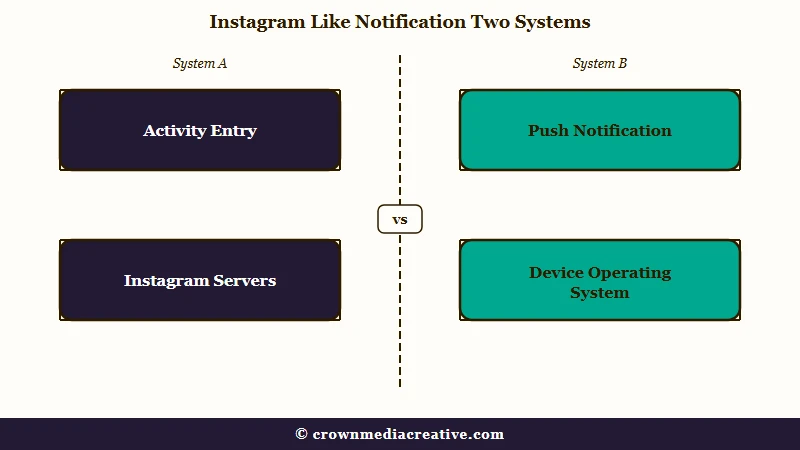
Instagram’s help page on liking and unliking a post states it without hedging. After you remove a like, the alert “will disappear from other people’s Activity”, and the person “will still get a push notification if they have notifications turned on.”
Adam Mosseri, who runs Instagram, described the same split in a Reel he shared on 28 July 2026, as The Express Tribune reported two days later. “When you unlike that photo, we can delete that Instagram notification, but we cannot delete that phone notification,” he said.
He also described what the other person finds, as quoted by IBTimes UK: “So it’ll still say on their lock screen, ‘Adam liked that photo’. But if they tap on it, there’s no record of it anywhere in the app.”
I think people get this backwards. The lock screen banner is the only durable evidence, so everything hangs on whether that person keeps push notifications switched on for likes.
The same gap applies to an accidental follow. The alert goes out when you tap Follow, and undoing it cannot pull it back off their phone.
Before: they glance at their lock screen and see your name next to a like.
After: they tap it, land on the post, and find no like from you anywhere on it.
Does Any Instagram Privacy Setting Hide Your Like?
No setting hides your like from the person whose post it is.
Instagram offers four options for who can see your likes, and all four govern third parties only. The poster is carved out of every one of them.
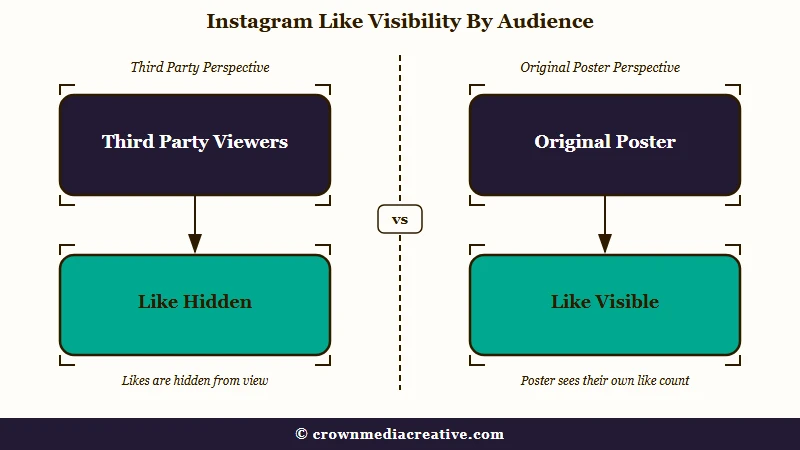
Instagram’s page on who can see your likes closes its settings list with a note. “Regardless of your setting choice, the account that posted the content you liked can see that you liked their post or reel.”
That sentence surprised me more than anything else in the documentation, because the setting is widely treated as a lurking shield. Set it to “Don’t allow anyone to see likes” and you have hidden your activity from every account except the one you were worried about.
The four choices are everyone, people you follow, close friends, and nobody. Each one narrows the audience for your like across the app while leaving the poster’s own view untouched.
| Setting | Who stops seeing your likes | Does the poster still see it |
|---|---|---|
| Allow everyone | Nobody, it stays public | Yes |
| Allow people you follow | Anyone you do not follow | Yes |
| Allow close friends | Everyone outside that list | Yes |
| Don’t allow anyone | All third parties | Yes |
What Happens If You Unlike and Then Like It Again?
Re-liking does not send a second push notification. Instagram’s documentation says that liking, unliking, then liking again produces one Activity alert for the latest like and one push notification for the initial like.
That rule matters because of a habit almost everyone has after a slip. You unlike it, then you are not certain the tap registered, so you go back and tap once more to check, which re-likes the post.
That second tap will not double your exposure on the lock screen, which is the one mercy here. What it does do is bring the Activity entry back and leave it there, because you have now genuinely liked the post again.
Whenever I second-guess whether an unlike landed, I check the heart’s color rather than tapping it, since a filled heart means the like is live. Tapping to verify is what turns a recoverable slip into a permanent one.
Does It Matter How Fast You Unlike?
Speed helps far less than the advice suggests. Instagram’s documentation sets out no grace period, no undo window, and no speed exception.
The push is dispatched on the tap, so the race is against network delivery rather than against a countdown Instagram offers you.
I don’t buy the common instruction to “unlike as fast as possible” as a fix, because it sells a guarantee that nothing in Instagram’s own rules supports. Unliking quickly is still worth doing, since it clears the in-app record either way.
The only configuration that reliably leaves no trace is one you do not control: the other person having push notifications for likes switched off. In that case the in-app alert is the only artifact, and your unlike erases it.
There is one more surface outside Instagram’s reach. Android 11 and later can keep a notification history that logs dismissed notifications for 24 hours, but it is off until the phone’s owner switches it on, per How-To Geek.
If I Like and Unlike a Story, Will They Know?
They might. A story like is private to the person who posted the story, but it can reach them as a notification as well as a heart beside your name on their viewer list.
Unliking removes the heart. It cannot take back a lock-screen alert that already arrived.
Instagram’s help page on liking a story says “Only the person who shared the story can see your like,” and tapping Like again unlikes it. There is no public counter and no third-party visibility.
The heart is not the only trace. Meta’s page on how Instagram ranks notifications, updated 1 July 2026, gives “a user liking a story” as an example of a notification based on user activity.
Story owners on r/Instagram describe receiving them. One wrote in September 2026 that an alert for a story like arrived while the like itself did not show. An update to that post says the like showed up in the story archive 48 hours later.
A story like is also separate from the emoji row. Instagram described likes to TechCrunch in January 2022 as “a way for people to react to stories that only the story author can see.” Other reactions still went to the author’s DMs, per PetaPixel’s launch report.
If you sent an emoji by mistake, unsending it is a different job, covered in our guide on how to undo a Story reaction. A September 2026 r/Instagram post reports that swiping up on a story now likes it, including the upward swipe that leaves the app on an iPhone.
The exposure here is narrower than on a post, and mine is the same advice either way: unlike it and move on, because there is no public record to clean up.
Does Liking a Comment Notify the Post Owner?
Liking a comment notifies the person who wrote it, not the person who posted.
The alert follows the comment’s author, so a misfired comment like does not reach the account whose photo you were looking at.
The catch is that comment likes carry a browsable list. Instagram’s help page on comment likes says you can see who liked a comment by tapping the number of likes below it, so your name sits there until you remove it.
The same page notes that a double tap on a comment likes it, the gesture that likes a post. Commenters do get these alerts, which one September 2026 r/Instagram user quoted as “So and so and 200 others liked your comment”.
My take is that comment likes are the sneakiest surface of the three, because the notification and the visible record point at two different people. You can clear the alert for the commenter and still leave your name under their comment if you do not unlike it properly.
| Surface | Who gets alerted | Visible record after unliking | Push can be recalled |
|---|---|---|---|
| Post or Reel | The poster | None, your name leaves the Liked by list | No |
| Story | Only the person who shared it | None, the heart leaves the viewer list | No |
| Comment | The comment’s author, not the poster | None, your name leaves the comment’s like list | No |
What Happens If You Block or Deactivate After Liking?
Neither one recalls the notification, and blocking also costs you something permanent.
Instagram’s block help page is written for the person doing the blocking: “After you block someone, their likes and comments will be removed from your photos and videos.” Unblocking won’t restore them.
That page says nothing about removing your own like from their post. It does say that people you block “can still see your likes and comments on posts that were shared by public accounts or accounts they follow.”
Deactivating is the reversible one. Your “photos, comments and likes will be hidden until you reactivate it by logging back in,” per Instagram’s deactivation page, and you can only deactivate once a week.
Neither one reaches a push notification that already arrived. That banner is a copy made at the moment of the like, so it keeps your username whatever you do next.
If someone asked me whether to block over an accidental like, I’d say no. Blocking permanently strips their likes and comments from your own posts to hide one tap, and to me it is far more noticeable than the like ever was.
Here is the sequence I would work through instead, in order:
- Unlike the post, story, or comment straight away, and confirm the heart is no longer filled.
- Do not tap it again to double-check, since a second tap re-likes it.
- Leave the privacy settings alone, because they never covered the poster anyway.
- Skip blocking and deactivating unless you wanted to do them for their own reasons.
Most accidental likes end as one banner on their lock screen and nothing inside the app. Our breakdown of the TikTok version covers the same question on a platform where the likes list is private by default.
For the wider question of what other people can observe about your activity, the Instagram story viewer order guide and the explainer on highlight viewers both cover surfaces where the visibility rules surprise people.
If you are tidying up your footprint more broadly, clearing your Instagram search history deals with a record that no privacy toggle touches either.
Quick Takeaways
- Unliking clears the in-app alert very soon after, but a push notification already on their lock screen cannot be recalled.
- None of Instagram’s four like privacy settings hide your like from the person who posted the content.
- Tapping again to check whether the unlike worked re-likes the post, so confirm by the heart’s color instead.
- Story likes are visible only to the poster but can still notify them, and comment likes notify the commenter rather than the post owner.
- Blocking recalls nothing and permanently strips their likes and comments from your own posts.

