
Why Your Instagram Follow Request Disappeared and How to Check
Why Your Instagram Follow Request Disappeared and How to Check
A vanished Instagram follow request was declined, withdrawn, flagged or wiped by a privacy switch. Here is how to tell which one hit yours.
- 1Why Did My Instagram Follow Request Disappear?
- Why Does a Public Instagram Account Say Requested?
- Do Instagram Follow Requests Expire?
- 2How Do You See Who You Requested to Follow on Instagram?
- How Do You Cancel a Follow Request on Instagram?
- 3Why Did Someone’s Instagram Follow Request Disappear?
- Which Account Was the Follow Request Notification For?
- 4Why Does Instagram Say Requested When You Already Follow Them?
- 5Will They Know If You Accidentally Followed Them on Instagram?
- 6Why Are You Getting So Many Instagram Follow Requests From Bots?
- Why Won’t Instagram Let You Accept Follow Requests?
- 7Quick Takeaways
The Short Answer: A follow request that disappears on Instagram was usually declined, withdrawn by the sender, or lost to a block or a closed account. Instagram also removes requests on its own in two documented cases. Requests that flagged accounts send to public profiles are declined after 30 days, and pending requests can be wiped when an account that keeps switching between private and public goes public again.
An Instagram follow request that disappeared leaves two people guessing. The sender watches Requested turn back into Follow, and the person on the other end taps a notification that opens onto nothing.
The usual answer is that requests never expire, and Instagram publishes no expiry for an ordinary request to a private account. Its Help Center does describe two exceptions, flagged follow requests to public profiles and requests to accounts that have switched between private and public too often, and both remove a request without anyone touching it.
I always start with which side of the request you are on, because the sender and the person receiving it see different things and need different fixes.
Senders can start with the causes right below, and if the vanished request was sent to you, skip ahead to the section on someone else’s request.
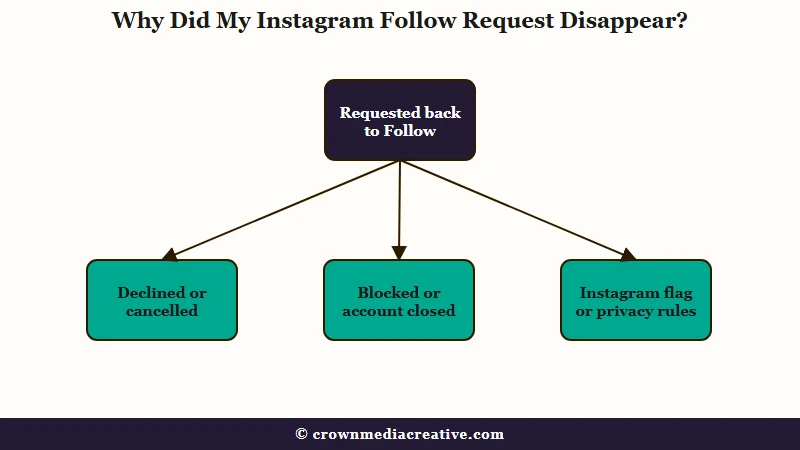
Why Did My Instagram Follow Request Disappear?
Your Instagram follow request disappeared because it was declined, cancelled from your side, lost to a block or a closed account, or removed under Instagram’s flagged-account or privacy-switch rules.
What the profile shows now tells you which one.
When the other person declines, your button just goes from Requested back to Follow, as one r/Instagram reply describes it. No alert comes with the change, so a decline looks exactly like a cancel from your side.
If you do not remember cancelling it, check whether a growth app still has your login, or whether you tapped Requested and then Cancel request by mistake. Here is how I read each state before trying anything else:
| What you see | What most likely happened | What to do |
|---|---|---|
| Requested went back to Follow, and their profile still opens | They declined it, or it was cancelled from your side | Leave it, or send it once more, which puts a new request in their list |
| Their profile will not load, or search cannot find them | They blocked you, or deactivated or deleted the account | Tell a block from a deactivation |
| A public account shows Requested instead of Following | Instagram has flagged your account | Expect a decline after 30 days unless the owner approves it |
| Your sent requests reset after you reactivated your account | Deactivation may have reset them, which Instagram does not document | Send again only the ones you still want |
| They went public and your request vanished without making you a follower | Repeated switching between private and public removed it | Request again later, since the removal happened on their account |
Instagram does not say whether deactivation resets sent requests, and reports split. A February 2026 reply says Requested turned back into Follow after reactivating, while the first answer there expects pending requests to survive.
Instagram’s deactivation page lists only photos, comments and likes as hidden.
Why Does a Public Instagram Account Say Requested?
A public Instagram account says Requested when Instagram has flagged your account as possible spam, a bot or irrelevant, since flagged follows reach public profiles as requests.
The owner has to approve each one by hand, unless they have switched that filter off.
Instagram’s page on unwanted followers puts it in one line: “Even if your account is public, incoming follows from flagged accounts will be sent as a request, which you can approve or deny.” Those requests wait in a Flagged folder under the owner’s Followers list, and any the owner does not approve within 30 days are declined automatically.
That decline is the likely reason a request sits on Requested for a month and then flips back to Follow on its own. When I see Requested on a public profile, the first account I look at is my own, since the flag sits on the sender.
Automated follow-and-unfollow activity is what Instagram has targeted since at least 2018, when it began removing inauthentic follows made through growth apps, per TechCrunch. Its advice to those accounts was to change their password to cut ties with the apps, and that is still the first step if you have ever connected one.
Nothing documented clears the flag from your side. In a 2024 r/Instagram thread about this exact message, neither waiting two weeks nor posting new photos cleared it reliably, so check for a restriction on your account and slow your follow activity down.
If the owner knows you, ask them to confirm you from the Flagged folder under their Followers list.
Do Instagram Follow Requests Expire?
Instagram documents no expiry for an ordinary follow request to a private account, so it stays pending until someone acts on it or one of the two accounts goes away.
Besides the flagged-request decline above, the one other exception sits on Instagram’s page on approval limits. An account that “switches between public and private too many times” can face two penalties:
- A daily cap on how many follow requests it can approve.
- “Removal of existing follow requests if you try to change your account from private to public again.”
The losses can be large. An account that had reached 970,000 followers went private for about six months, collected an estimated 50,000 to 100,000 pending requests, and was deactivated for about three months along the way.
Going public again added only a few hundred followers while 999+ requests still showed, though earlier short private spells had turned 15,000 to 30,000 requests into followers at once.
If you plan to go public, switch once and stay there, because both penalties on that page are tied to repeated switching. An audience that exists only as pending requests may never turn into followers, as that account found on the day it went public.
That is why I point creators toward an email list they own, and the Creator Money Page is a free template that turns your bio link into a sign-up page for that list.
How Do You See Who You Requested to Follow on Instagram?
You see who you requested to follow on Instagram by exporting your account information and opening the pending follow requests file, because the app has no screen that lists them.
The old Access Data screen that did was removed in late 2022, per a November 2022 update, and Gauging Gadgets’ September 2026 guide still finds no regular screen for them.
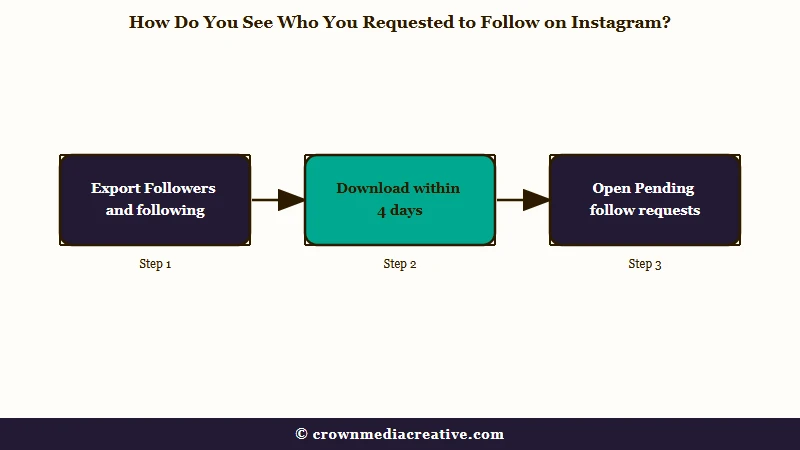
The export takes a few minutes to set up on a phone. These are the steps as Instagram’s export help page lays them out, with one filter added to keep the file small:
- Go to your profile, tap the Menu icon in the top right, then tap Accounts Center (some accounts now see Meta Account instead).
- Tap Your information and permissions, then Export your information, then Create export.
- Choose your Instagram profile, tap Next, and pick Export to device.
- Tap Customize information, clear everything except Followers and following, and pick HTML as the format.
- Tap Start export, enter your password, and wait for the notification or email saying it is ready.
- Download the file from Available downloads, unzip it, open start_here.html and tap Pending follow requests.
If the start page is missing, the file itself usually sits here inside the unzipped folder:
connections/followers_and_following/pending_follow_requests.htmlI pick HTML every time because it opens as an ordinary page in a phone browser, and the Files app on iPhone and Files by Google on Android can both unzip the download. Each name in that list is an account that has not answered your request yet.
Here is what the filter in step 4 changes:
Before: Export everything, all dates, high media quality. The file carries every photo and video you have posted, so it is large and slow to arrive.
After: Export only Followers and following, all dates, HTML. The file is small, and the pending list opens straight from your phone.
Instagram says an export link can take up to 30 days to arrive, and once it is ready you have 4 days to download it. A Followers-only export is small, and Make Tech Easier’s walkthrough says it can take up to a couple of hours to prepare.
How Do You Cancel a Follow Request on Instagram?
You cancel a follow request on Instagram by opening that person’s profile, tapping Requested and choosing Cancel request, which turns the button back into Follow.
The export gives you names, so each cancel happens on the profile, one account at a time.
Instagram offers no bulk cancel, per a developer who published a browser-console script for it in April 2026. Pasting code into your browser console hands it your logged-in session, so I skip scripts like that. I would clear an old backlog a few accounts at a time over several days instead, because a long run of the same action can trip a follow block.
Withdrawing takes the request out of their list, but it cannot recall an alert that already reached their phone. Instagram documents that split for likes on its liking and unliking page, and follow alerts that outlive the follow show up the same way in this r/Instagram reply.
Why Did Someone’s Instagram Follow Request Disappear?
Someone’s Instagram follow request disappears from your list when they withdraw it, their account closes, auto-confirm turns it into a follow, or, if you are public, Instagram files it in your Flagged folder.
Only the last two leave anything you can still find.
A withdrawn request usually starts with a notification. The alert reaches your lock screen the moment they tap Follow, and if they undo it seconds later, the request is gone by the time you open the app. A September 29, 2026 thread shows how easily that happens, after a swipe through Stories landed on Follow for a stranger and the request was deleted at once.
My first check is the Followers list. With auto-confirm on, a private account accepts requests from people it already follows, per Instagram’s auto-confirm page, so that person moves straight into your followers and Instagram sends you a separate notice that it happened.
On a public account, open your profile, tap Followers and look for a Flagged folder. Requests left there are declined automatically, so a real person caught by the filter has a month before their request disappears for good.
A withdrawn request leaves nothing inside the app. A May 2026 post found the requester missing even from the recipient’s own data download. The partial name on the lock screen is the only lead, and searching it by hand is the one route left.
Which Account Was the Follow Request Notification For?
On a phone with several Instagram accounts, a follow request alert can name the requester without naming which of your accounts it was for, so check Follow requests on every account.
Tapping the alert does not always open the right one.
That is what happened in a September 27, 2026 report. The lock-screen alert named only the person, tapping it switched the app to another account, and neither the app nor email showed a request afterwards.
This is the check I run on a phone with several accounts:
- Switch to each account in turn.
- Tap the heart at the top of the feed and open Follow requests.
- On a public account, also open Followers and look in the Flagged folder.
Why Does Instagram Say Requested When You Already Follow Them?
Instagram has not documented why an accepted follow can show as Requested again, so treat it as a display fault first and check your Following list before touching anything.
Two things decide the next step: whether they are in that list, and whether their content still reaches you.
Reports on Reddit share one pattern, where the button says Requested while other parts of the app still treat you as a follower. In an August 2026 case, the account sat in the poster’s Following list and its new post reached the feed. A March 2026 report ties the flip to the other account going public and then private again.
A later reply in that March thread says refreshing fixed it on one account and not on another. In that state I don’t touch the button, because tapping Requested is also how a request gets cancelled. This order costs nothing:
- Open your profile, tap Following and search for their name.
- Close Instagram fully, reopen it and check their profile again.
- Give it a day before cancelling and re-requesting, since a fresh request reaches them as a new alert.
Will They Know If You Accidentally Followed Them on Instagram?
If you accidentally followed someone on Instagram, they may already have a notification, because the alert goes out the moment you tap Follow and undoing it cannot pull it back off their phone.
What stays in the app depends on whether their account is public or private.
On a public account they got a new-follower alert, and unfollowing sends nothing, since Instagram’s unfollow page says “People won’t be notified when you unfollow them.” On a private account they got a follow request instead, and withdrawing it removes the request from their list while any push that already landed stays put, which is how an accidental like behaves too.
Suggested accounts in the Stories row make the mis-tap easy, and they have been showing up there since at least May 2026, per an r/Instagram thread. The September 29, 2026 case came from a grid of suggested accounts among friends’ Stories, where a swipe to the next Story registered as a Follow.
My rule after a mis-tap is to undo it at once and then leave it alone, because every new follow sends a fresh alert. A July 2026 reply says re-requesting and then deleting the request still left the other person with a notification.
Each action on a request leaves a different trace on each side:
| What happens | What the sender sees | What the other person sees |
|---|---|---|
| A request goes to a private account | Requested | A request in Activity, plus a push if notifications are on |
| The sender withdraws it | Follow | The request leaves their list, and a push that already landed stays |
| The owner declines it | Follow again, with no alert | Nothing, unless the sender requests again |
| The owner ignores it | Requested, with no end date | The request waiting in Follow requests |
| Auto-confirm accepts it | Following | A notice that the request was confirmed for them |
| A flagged account follows a public profile | Requested, then Follow after 30 days if never approved | A request in the Flagged folder under Followers |
Why Are You Getting So Many Instagram Follow Requests From Bots?
Bot follow requests hit private accounts in waves, and Instagram’s automatic filter for them, the Flagged folder, is documented only for public accounts, so on a private account you clear them by hand.
Deleting them costs you nothing, and accepting one hands a bot your posts.
A September 24, 2026 post describes a private account buried in bot requests, and another from late August 2026 counts more than 100 new requests in two days.
This is the order I clear them in on a private account:
- Tap the heart at the top of your feed, open Follow requests and tap Delete on each bot.
- Block any account that keeps coming back, and choose the option that also covers “other existing accounts they may have or any new accounts they may create,” per Instagram’s blocking page.
- Skip Confirm on anything you do not recognise, because accepting a request sends that account a notification and opens your posts to it.
On a public account, flagged requests collect in the Flagged folder under Followers, where Delete all requests clears them in one tap. I leave Flag for review switched on, since the worst it does to a real person is hold their request for a month before declining it.
If it keeps catching people you know, turn it off under Menu, then Follow and invite friends.
Why Won’t Instagram Let You Accept Follow Requests?
Instagram can cap daily approvals on accounts that switch between private and public too often, and some accounts hit a fault in 2026 where tapping Confirm does nothing.
Only the first one has a documented cause.
If you toggled your privacy setting several times recently, the daily approval cap described above is the likely reason, and waiting it out is the fix. For the Confirm fault, logging out, clearing the cache and switching to the web version all failed in a September 2026 thread, so skip them.
Instagram Lite on Android was a working stopgap in one August 2026 thread. A reply in a July 2026 thread says it started working again on its own after a while, so waiting is the fallback if Lite is not an option.
Quick Takeaways
- Requested flipping back to Follow means a decline or a cancel, a profile that stops loading means a block or a closed account, and none of those sends the requester an alert.
- Instagram removes requests by itself in two documented cases, flagged requests to public accounts after 30 days and pending requests when a much-toggled account goes public again.
- A request alert with nothing behind it was usually withdrawn, but check your Followers list and Flagged folder before writing it off.
- After an accidental follow, undo it once and leave it, because a second follow sends a fresh alert.
- For the full list of who you requested, export only Followers and following, download it within 4 days, then cancel the stale ones a few at a time.

