
The Instagram Story Refresh Symbol and When It Means Trouble
The Instagram Story Refresh Symbol and When It Means Trouble
The refresh symbol you see on Instagram is a failed Story load, a reshare mark, the Repost button or a clock. See which one you have and how
- 1What Does the Instagram Story Refresh Symbol Mean?
- 2Why Is an Instagram Story Grey With a Refresh Arrow?
- Why Won’t Any Instagram Stories Load After a Logout?
- 3How Do You Get a Grey Instagram Story to Load?
- 4Why Do Only Some People’s Instagram Stories Load Grey?
- Does a Grey Instagram Story Still Count You as a Viewer?
- 5What Do the Two Arrows on Someone’s Instagram Story Mean?
- How Do You Stop People Resharing Your Instagram Story?
- 6Is the Circular Arrow Under an Instagram Post the Repost Button?
- How Do You Undo a Repost on Instagram?
- 7What Does the Clock on an Instagram Story Mean?
- 8What If the Arrow Is Part of the Picture?
- 9Quick Takeaways
The Short Answer: A circular arrow in the middle of a grey or dark Story means the Story failed to load, and it is the only version that needs a fix. Two arrows next to a second account’s name mark a reshare of someone else’s public Story, and the circular arrows under posts and reels are the Repost button. A small clock on someone’s profile picture in the Stories tray means their Story expires within the hour.
The Instagram Story refresh symbol confuses people because Instagram uses circular arrows for several different things, and only one of them is a problem. That one, a grey Story with an arrow in the middle, can still put your name on the poster’s viewer list even though you saw nothing. During a wave of grey Stories in May 2026, none of the reinstalls reported in the main Reddit thread about it cleared the problem.
The first thing I check is where the arrow sits on the screen, because position alone tells you which symbol you have. The fix for a failed Story then depends on a pattern: one person’s Story failing points somewhere different from half your Stories tray failing on a good connection.
Check the table directly below first, since four of its five rows need no fix at all. If your Story is grey, the fixes are in the section on getting a grey Story to load, cheapest check first.
What Does the Instagram Story Refresh Symbol Mean?
The Instagram Story refresh symbol means one of four things, and its position tells you which. It sits in the middle of a grey Story, beside a second account’s name, under a post or reel, or on the corner of a profile picture in the Stories tray.
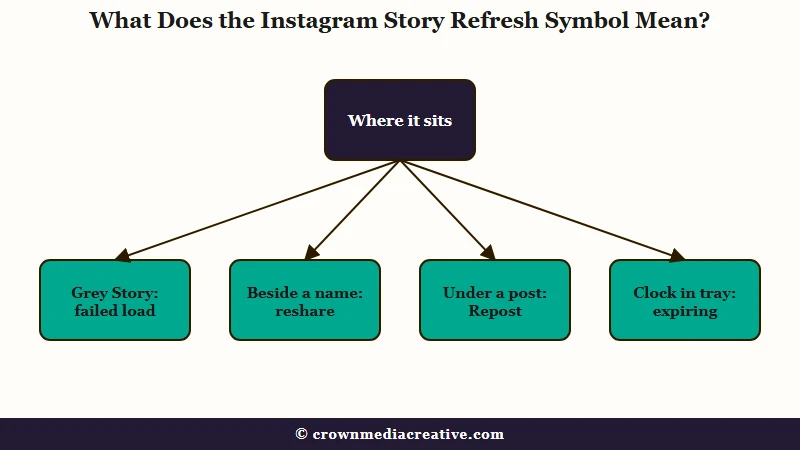
Match the spot on your screen to a row, and the last column tells you what to do.
| Where you see it | What it looks like | What it means | What to do |
|---|---|---|---|
| Middle of a grey or dark Story | One circular arrow, or a spinning wheel | The photo or video did not load | Tap it once, then work through the fixes below |
| On a Story, next to a second account’s name | Two arrows forming a loop | Someone reshared another account’s public Story | Tap the original account’s name to see the source |
| Under a post or reel, between comment and share | Two arrows forming a loop | The Repost button | Tap it to repost, tap it again to undo |
| Corner of a profile picture in the Stories tray | A small clock | The Story expires within the hour | Watch it now if you want to see it |
| On top of a photo that plays normally | Any arrow, drawn or stuck on | Part of the picture the person posted | Nothing, it is decoration |
Rows two and three use the same icon, so I tell them apart by what sits beside it: an account name means a reshare, and the comment and share buttons mean the Repost button.
On a Story, that loop is also easy to misread as a loading arrow. One icon glossary describes the Story version as “two arrows in a square shape” that “indicates that the Story has been reposted from another account’s original Story.”
Why Is an Instagram Story Grey With a Refresh Arrow?
A grey or dark Instagram Story with a refresh arrow in the middle means the photo or video never reached your phone, and tapping the arrow asks the app to fetch it again. When the cause is still in place, the tap does nothing.
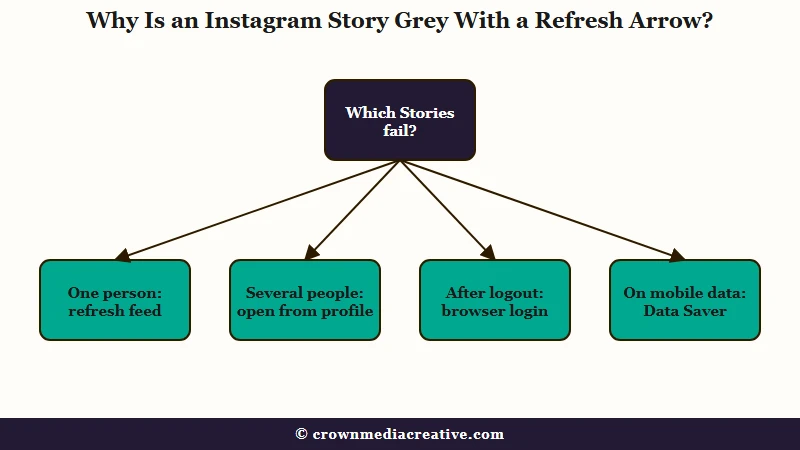
A dead tap is the signal to stop and look at the pattern, because the pattern tells you whose problem it is. Here is how I read it before touching a single setting:
| What you see | Likely cause | Fix |
|---|---|---|
| One person’s Story stays grey, everyone else’s plays | A Story deleted right after posting, or one that just expired | Pull down to refresh the feed, then leave it |
| Several people’s Stories load grey or dark on a working connection | An app bug, like the May 2026 wave below | Open the Story from their profile, then update the app |
| Every Story, your DMs and comments fail right after a forced logout | A security check waiting on your account | Log in on a computer browser and finish any prompt |
| Stories spin or stall on mobile data but play on WiFi | Data Saver or Use less cellular data is on | Turn the setting off |
| Nothing loads anywhere, the feed included | An outage | Wait it out |
The one-person case is the least worrying. Pulling down to refresh usually clears a ring that points at a deleted or expired Story. When the ring survives a refresh, one reply puts it down to a Story deleted a second after it went up.
A grey Story also rules out one worry. A Story hidden from you never shows a ring at all. A ring that opens grey belongs to a Story you are allowed to see, which fits what the guide to hidden Stories lays out.
Why Won’t Any Instagram Stories Load After a Logout?
When every Instagram Story, your DMs and even comments stop loading right after a forced logout, the account may be held on a security check that the app does not show you.
That is the pattern in one May 2026 report. Stories showed nothing but a restart button in the center, DMs never finished loading, and the computer login only said “Your email may not be secure.”
In another case, a browser login flagged the account as at risk, and changing the account email fixed the Stories. That was no answer for another account whose email was never compromised. A browser login is still a quick check, and I run it before anything slower.
How Do You Get a Grey Instagram Story to Load?
You get a grey Instagram Story to load by opening it from the person’s profile instead of the tray, checking it in a browser, turning off the data-saving setting, then updating the app.
I work through them cheapest check first:
- Tap the arrow once and give it a few seconds. If the Story stays grey, back out instead of tapping again.
- Open the Story from their profile. Go to the person’s profile and tap their profile picture. During the May 2026 wave this played Stories that failed from the tray, and the tray often worked again afterwards for that person.
- Check it in a browser. Log in at instagram.com in Safari or Chrome and open the same Story. If it plays there, the Story and your connection are fine and the app is at fault.
- Turn off the data-saving setting. Instagram preloads video by default, and with its data setting on, “videos may take longer to load over a cellular connection,” per Instagram’s data help page. On Android it sits under Menu, Data usage and media quality, Data Saver; on iPhone it is under Menu, Media quality, Use less cellular data.
- Update Instagram. Check the App Store or Google Play for a newer version, since an app update fixed it for some accounts during the May 2026 wave.
- Log in on a computer if every Story fails. Look for a security prompt. If the browser flags the account as at risk but will not let you change the email there, change it in the Instagram app instead.
Reinstalling is the step I skip. None of the reinstalls reported in the main Reddit thread on the May 2026 wave cleared the bug, and the Instagram black screen guide found the same for Stories that show a black frame.
The same grey Story goes two ways, depending on your first move:
Before: A friend’s ring opens onto a grey screen with an arrow. You tap the arrow four times, clear the cache, then delete and reinstall Instagram, and the Story is still grey.
After: You back out, open the friend’s profile and tap their profile picture. The Story plays, which tells you the Story is fine and the tray is failing, so you update the app and stop there.
Why Do Only Some People’s Instagram Stories Load Grey?
When only some people’s Instagram Stories load grey on a working connection, the fault usually sits in the app, as it did in a wave that began around May 10, 2026.
In the main r/Instagram thread, Stories failed on home WiFi, a friend’s WiFi and mobile data alike, on iPhone and on Android too.
Those same Stories played in a web browser, which puts the fault in the app.
In a second thread, three or four of every ten Stories came up grey while the next person’s Story played fine. The bug was mostly fixed by May 29, after later app updates.
Similar reports returned in August, with new ones in mid-month and one account’s Stories stuck behind a spinner after scrolling from one person’s Story to the next.
When several people’s Stories fail at once on a good connection, I expect the lasting fix to come in an app update, as it did in May.
Does a Grey Instagram Story Still Count You as a Viewer?
A grey Instagram Story sometimes puts your name on the poster’s viewer list, even though you never saw the photo or video.
For one viewer during the May 2026 wave, backing out of a dark Story marked it as seen. For another it registered only sometimes.
I would not read anything into a name on your viewer list from a day when Stories were failing, since that person may have seen a grey screen and nothing else. Viewer list ordering has quirks of its own on top of this one.
What Do the Two Arrows on Someone’s Instagram Story Mean?
Two arrows next to a second account’s name on an Instagram Story mean the Story is a reshare of someone else’s public Story, and tapping the original account’s name opens their profile.
What is a reshared Story: A Story that someone copied onto their own Story with Add to Story, carrying the original account’s name so viewers can tap through to it.
Instagram had begun letting anyone reshare a public Story without being tagged by December 9, 2025, when WeRSM reported the change. Before that, you could reshare only a Story that mentioned you.
Instagram’s Help Center says anyone who views a reshared Story “can see who originally posted it and can view the original account,” per its resharing page. Only Stories from public accounts can be reshared, and all teen accounts have Story-to-Story sharing turned off by default.
To me the two arrows on a Story are a credit line, so there is nothing to fix. If a reshared Story will not play, treat it like any other grey Story and use the steps above.
How Do You Stop People Resharing Your Instagram Story?
You stop people resharing your Instagram Story in Settings, under Sharing and reuse, then Stories to stories, where you can pick Everyone, Followers you follow back, or Off.
Public accounts start at Everyone, so anyone can reshare your Story until you change it, per the same resharing page. A private account cannot be reshared this way at all.
Mentions follow their own rule. Anyone you mention can reshare that Story, and Instagram warns that their followers can then see it “even if your account is set to private,” per its mentions page.
For a personal account, I’d pick Followers you follow back, which keeps reshares inside people you chose. On a public creator account I leave it on, since a reshare puts your Story in front of people who do not follow you. Those viewers are gone in 24 hours unless your profile gives them somewhere to land, and a free template for a page that collects emails is one way to set that up from your bio.
Is the Circular Arrow Under an Instagram Post the Repost Button?
Yes, the circular arrows under an Instagram post or reel are the Repost button, and tapping it shares that post to your followers’ feeds and to the Reposts tab on your profile.
Instagram launched reposts on August 6, 2025, for public reels and feed posts, and TechCrunch compared it to the retweet on X. Reposts can show up in your friends’ feeds and sit in a dedicated Reposts tab on your profile.
The Help Center adds two limits: you can repost only content posted by the original creator, and “You cannot repost a repost,” per the repost help page. Creators can also switch reposts off for their own posts, so some public posts cannot be reposted.
I treat a Repost as a public endorsement, since it lands in your followers’ feeds with your name on it.
How Do You Undo a Repost on Instagram?
You undo a repost on Instagram by tapping the Repost button again on the post you reposted, which takes it off your Reposts tab.
Instagram’s own instruction is one line: “You can remove a repost by tapping Repost on the reel or post you reposted,” per the repost help page. To clear several at once, open Menu, then Your activity, then Reposts, select the ones to remove and tap Delete.
Reposts from an account you follow can keep turning up after you mute that person, which the Instagram mute guide walks through.
What Does the Clock on an Instagram Story Mean?
A small clock on the corner of someone’s profile picture in the Stories tray means their Story is about to expire, and it shows up during roughly the last hour of the Story’s 24 hours.
The clock had been spotted by October 2025, in a Threads post describing “a tiny clock icon on people’s profile photos in the Stories bar when their Story’s about to expire. It shows up in the last hour before it disappears.” Instagram has published nothing on it, and Just Jared noted in November that it “doesn’t appear on every story that is expiring soon.”
I like the clock more than any other symbol on this list, since it is the only one that tells you something without a tap. It has no setting and nothing to fix.
What If the Arrow Is Part of the Picture?
An arrow sitting on top of a photo or video that plays normally is part of the Story itself, added by the poster as a sticker or drawing, and there is nothing to fix.
The load-failure arrow sits on an empty grey or dark frame. I look past the arrow first, since a picture behind it means the Story loaded fine.
Quick Takeaways
- Where the arrow sits tells you what it is, and only the arrow in the middle of a grey Story is a fault.
- A grey Story can still mark you as a viewer, so a name on your viewer list from a day when Stories were failing proves little.
- If Stories spin only on mobile data, switch off Data Saver on Android or Use less cellular data on iPhone.
- Stop others resharing your Story under Sharing and reuse, then Stories to stories.
- My first move with any grey Story is opening it from the person’s profile, because one tap shows whether the Story or the tray is broken. After that I update the app and skip the reinstall.

