
Someone Hid Their Instagram Story and the Checks That Work
Someone Hid Their Instagram Story and the Checks That Work
Think someone hid their Instagram story from you? One check settles it in seconds, and most guides get it backwards. Here is the one that works.
- 1How Do You Know If Someone Hid Their Story From You?
- 2Can You Still See Their Highlights If They Hid Their Story?
- How Do You Hide Your Highlights From Someone?
- 3What Does It Look Like When Someone Hid Their Story?
- 4How Do You Check on a Public Account?
- 5What If Their Account Is Private?
- 6Is It a Hidden Story or Just an App Glitch?
- 7Does Instagram Notify Anyone About Any of This?
- 8What Hiding a Story Does Not Touch
- 9Which Detection Tricks Should You Skip?
- 10Quick Takeaways
The Short Answer: Instagram never tells you that someone hid their story from you, so you have to infer it. The fastest check is their Highlights, because Highlights follow the same audience setting as stories.
If their Highlights still open and play for you, you are almost certainly not hidden, and the missing ring usually means they have not posted, posted to Close Friends only, or the app is stale. On a public account, a logged-out desktop browser still shows whether a story is live.
If you want to know if someone hid their story from you, the honest starting point is that Instagram will never confirm it. There is no alert, no greyed-out ring, no setting you can open to see whose list you are on. The feature was built to be silent in both directions.
That silence is why the advice on this topic is such a mess. Instagram passed three billion monthly active users in late 2025, so a question this common has attracted a lot of confident guessing.
The top results tell you to look for missing Highlight bubbles, and that advice is half right in a way that makes it useless. It is stated backwards, and the backwards version fails exactly when you need it most.
So here is the reverse of what everyone else tells you. A missing Highlight proves very little, and a Highlight you can still open is strong evidence that you have not been hidden at all.
That asymmetry is the whole game, and almost nobody states it in the direction that helps. I will explain why it holds, then walk the checks in the order I run them.

How Do You Know If Someone Hid Their Story From You?
You know someone hid their story from you when their story ring is invisible to you but visible to someone else, and their Highlights have also disappeared.
Neither signal is conclusive alone. Together they are close to definitive on a public account.
Instagram’s help page on hiding stories is short and tells you almost nothing about the receiving end. It confirms the control exists, and it confirms that hiding is not blocking, and then it stops. The gap between that page and what a suspicious person needs to know is where every myth on this topic grows.
The first thing I check is not the story ring at all. Story rings vanish for a dozen boring reasons, and treating an empty ring as evidence sends people down a spiral over nothing. Highlights are the more stable signal, and the next section explains the mechanism.
Can You Still See Their Highlights If They Hid Their Story?
No. Highlights follow the same audience setting as stories, so being hidden from someone’s stories also removes their Highlights from your view.
This is documented by Meta, just not on the page you would think to read.
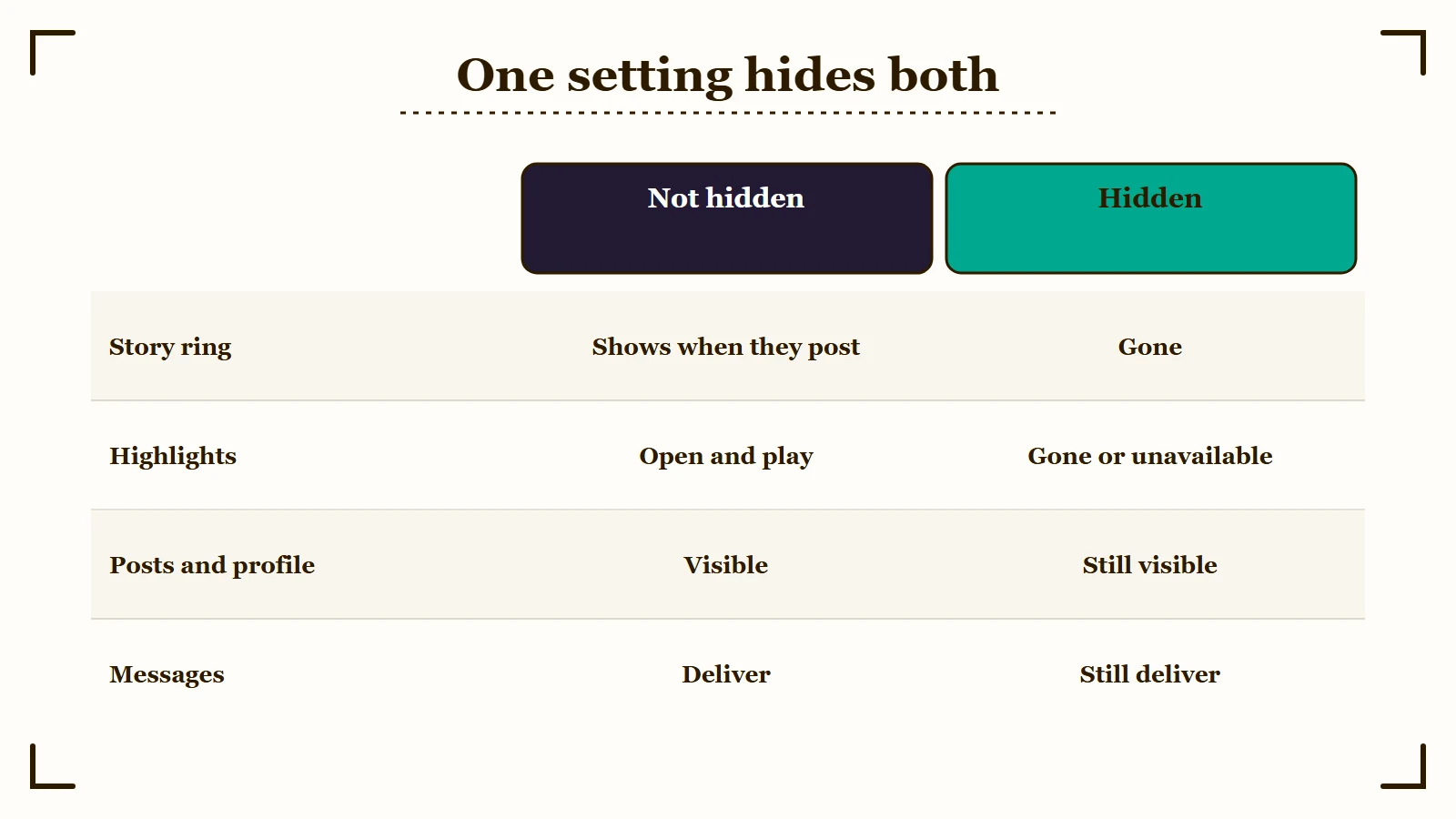
The linkage appears in Instagram’s Highlights help article rather than its story-hiding one, in a single line: those you have allowed to see your story can also see your highlights. That one sentence is doing enormous work, and almost nothing on the first page of search results cites it.
Now turn that around, because the useful direction is the opposite one. If their Highlights open and play for you, you are inside the story audience, which means you are almost certainly not on the hide list. That makes visible Highlights the best negative test you have, and it is the check I trust most.
Reddit reports back this up from both sides of a hide. One user tested it with a work account in 2022 and found their Highlights did not show up for that account while it sat on the hide list. A 2023 thread with 42 comments started when one poster watched a date’s whole Highlights row disappear for several days, then come back, and the date later admitted to the hide.
The test can still mislead. One 2023 poster who hid their stories from a few people heard that one of them still saw the Highlight covers, which opened to “story unavailable”, so open a Highlight instead of trusting the covers. A January 2026 poster could still see Highlights from someone whose story showed on a friend’s account but not on theirs, which is exactly what a Close Friends story looks like to anyone left off the list.
The popular version runs the other way and asserts that missing Highlights mean you were hidden. That inference breaks constantly. Plenty of accounts have no Highlights at all, plenty of people delete them, and a profile that never had Highlight bubbles tells you precisely nothing.
Vague: “Their highlights are gone, so they must have hidden me.”
Specific: “I could see three Highlight bubbles on their profile last week and today there are none, while a mutual friend still sees all three.”
The second version is evidence because it establishes a before state and a control. The first is an anxious guess dressed up as a finding.
How Do You Hide Your Highlights From Someone?
You hide your Highlights from someone by hiding your story from them, since Instagram has no separate audience setting for Highlights. Its hide-story help page gives the path on iPhone and Android:
- Go to your profile and tap Menu in the top right.
- Below Who can see your content, tap Story, live and location.
- Tap Hide story and live from (on iPhone, Hide your story and live videos from specific people).
- Select the people to hide from, then tap Back (Done on iPhone). Anyone already hidden shows as Selected, and tapping a name again unhides them.
There is a shortcut from your own viewer list: tap Options next to their name, choose Hide your story, then tap Hide. The other person gets no notification and simply stops seeing your ring and your Highlights.
The setting is all or nothing. You cannot hide one Highlight from one person, and you cannot hide your stories while keeping your Highlights visible to them, which is why users were still asking Instagram for a separate button in March 2026. Most reports say your older Highlights drop for them too, though a few 2026 guides claim older ones survive a hide.
You can settle that for your own account in a minute. Add a second account of yours to the list, then open your profile from it, and what that account sees is what the hidden person sees. Run the same check before trusting Close Friends to shield a Highlight, because Instagram’s Close Friends help page never mentions Highlights and one March 2026 poster saw a Close Friends Highlight show as public on a second account.
If someone you hid from still saw a story, check timing and accounts first. A view they made before you added them stays in your viewer list, and the list works per account, so a second account of theirs can still watch if it follows you or your account is public.
What Does It Look Like When Someone Hid Their Story?
Being hidden looks like total normality everywhere except the story ring and the Highlights row.
Their profile still opens, their grid posts are still there, you can still like and comment, and your direct messages still send and deliver.
The ring you could open vanishes from every surface at once: around their picture in your story tray, on their profile, beside their Reels, and as a thumbnail in your message thread. Their Highlights usually disappear from their profile at the same time.
That consistency is the part that surprised me. A hidden story does not come and go between surfaces, so if you see their ring in one place and not another, tap it. A ring that opens their story means you are not hidden, and a ring that loads nothing is the rendering artifact covered further down.
How Do You Check on a Public Account?
On a public account you can settle it yourself in under a minute using a logged-out desktop browser.
Instagram still draws the story ring for signed-out visitors, so a logged-out view shows whether a public story is live even when your own account cannot see it.
I tested this on October 20, 2026 in a desktop browser with no Instagram login. NASA and National Geographic, both with stories up, showed the colored ring, while GitHub’s profile picture had no colored ring around it.
Clicking a live ring did not play the story and opened a sign-up prompt instead, reading “Check out natgeo’s story before it disappears.” That confirms a story is up, but the logged-out view will not let you watch it. A NASA Highlight, by contrast, opened and played without logging in.
I still run this one first because it needs nobody else’s help:
- Copy their exact username from their profile.
- Open a private or incognito window in a desktop browser, which is where I ran the test.
- Go to instagram.com followed by a slash and their username.
- Look for a colored ring around their profile picture, and note whether a row of Highlights shows under the bio.
- Compare both against what your logged-in app shows you right now, and open one of their Highlights in the app rather than trusting the covers.
A ring on the logged-out view and no ring in your app is the clean result, once a force close and reopen has ruled out a stale app. Also check that you did not mute their story yourself, since Instagram’s story mute page says you won’t see a muted story at the top of your feed. If those are ruled out and none of their Highlights play for you in the app, that gap points to a targeted hide, and you have your answer without asking anyone.
No ring in either place means something much duller: they have not posted a story in the last 24 hours, or they shared it to Close Friends only, which a logged-out visitor never sees. Not posting is by far the most common explanation, and it is worth sitting with before assuming anything personal.
What If Their Account Is Private?
On a private account you cannot verify this alone, and no tool or trick changes that.
Private stories are locked server side to approved followers, so a logged-out browser and every third-party viewer site return nothing regardless of your status.
I do not like this answer either, and it is still the correct one. The only route left is a mutual friend who also follows them, which means bringing another person into something you may not want to explain.
If you do ask, ask precisely. A vague question gets a vague answer and you end up no wiser than before.
Vague: “Hey, can you see Sam’s story?”
Specific: “Can you open Sam’s profile right now and tell me two things: is there a colored ring around their picture, and do you see any Highlight bubbles under their bio?”
The second question gets you both signals at once, from an account you know is inside the audience. My rule is to ask for the Highlights alongside the ring every time, because the Highlights half is the part that survives them not having posted.
Is It a Hidden Story or Just an App Glitch?
If their Highlights open and play but the story ring is missing, the cause is almost always an empty story slot, a Close Friends story you are not on, or a stale app.
A hide takes both away because they share one audience setting, and Instagram’s Close Friends page confirms that a story shared to that list reaches nobody else.
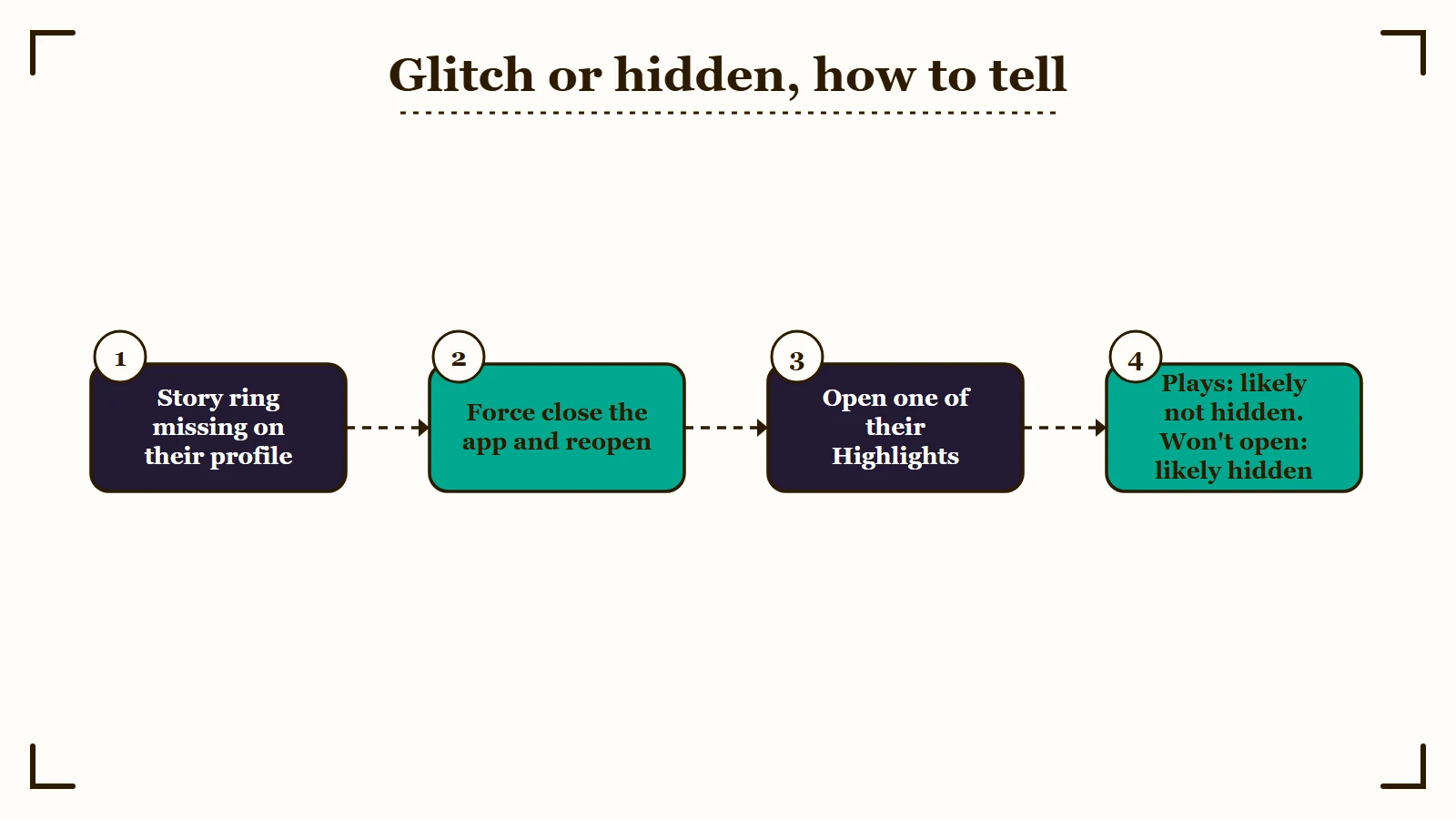
Instagram caches profile data aggressively, and a stale cache produces exactly the symptom people panic about. My first move is always to force close the app, wait a few minutes, and reopen the profile, which clears most of these.
The guide to Instagram showing a black screen covers the deeper version of this when the app itself is misbehaving.
Here is the whole diagnosis in one table.
| What you see | What it almost certainly means | What to do |
|---|---|---|
| No ring, Highlights still open | Almost certainly not hidden. They have not posted, posted to Close Friends only, or the app is stale | Force close and reopen, then stop worrying |
| No ring, Highlights all gone, they had them before | Consistent with being hidden | Confirm with a logged-out check or a mutual friend |
| Highlight covers show but each one opens to “story unavailable” | Consistent with being hidden, as reported on Reddit in 2023 | Ask a mutual friend to open the same Highlight |
| No ring anywhere, and none for anyone else either | They have not posted a story | Nothing to do |
| Ring visible but opens to a black screen | Rendering bug, not a privacy setting | Clear the cache or update the app |
| Profile will not load at all, or shows user not found | Blocked, not hidden | Different problem entirely |
Does Instagram Notify Anyone About Any of This?
Instagram sends no notification in either direction. The person hidden is never told, and the person doing the hiding is never told that anyone worked it out.
Nothing visible changes on the hider’s side either. Their follower count does not move, their messages still arrive, and the hidden person keeps appearing as a normal follower. The whole feature is designed to avoid a confrontation, which is precisely why it leaves you guessing.
Checking a logged-out profile cannot put you in their viewer list, because a signed-out visitor cannot open the story at all. That is the main reason I point people to the logged-out check before anything involving a second account.
Viewing a story the normal way does register you in their viewer list, and how story viewer order works explains what that list does and does not reveal about you.
If you are on the other side of this, who viewed your Highlights covers what your own Highlight viewer list does and does not show.
What Hiding a Story Does Not Touch
Hiding a story only removes stories and Highlights. Posts, profile, direct messages, and Notes all continue exactly as before.
Notes are the one that catches people out, because they sit at the top of the inbox and feel story-adjacent.
Notes run on a completely separate rule. They are visible to mutual followers, so a person hidden from every story you post can still read your Note. In my view this is the single most misunderstood corner of Instagram privacy, and stopping it means unfollowing them, blocking them, or sharing the Note with Close Friends only, none of which the story control does.
Muting is the same mechanism pointed the other way, and the two get confused constantly. When you mute someone, that is your own choice about your own feed, and it does nothing to what they can see of you. Being hidden is the reverse, and the breakdown of what muting will not hide covers that side in full.
| What they did | Their stories | Their posts and profile | Their Notes and messages |
|---|---|---|---|
| Hid their story from you | Gone, and Highlights with them | Fully visible, you can like and comment | Unaffected, Notes still visible |
| Blocked you | Gone | Profile not found in search, follows removed | New messages fail to deliver |
| Restricted you | Still visible | Visible, but your comments show only to you | Your messages go to their message requests |
| You muted them | Hidden by your own choice | Visible if you go looking | Notes still show unless you mute notes separately, messages unaffected |
Which Detection Tricks Should You Skip?
Skip anonymous story viewer sites, and skip anything promising a list of who hid you.
No such list exists in Instagram’s system, so any product claiming to surface one is inventing its output.
Third-party viewer sites fail on the case you care about. They can only fetch public stories, whose ring a logged-out browser already shows you for free, and they return nothing for private accounts, the only situation where you needed help. I would not hand credentials to one for a result you can get yourself in thirty seconds.
The burner account route is worse than it looks. A brand new account cannot see a private profile without being approved, and requesting to follow someone in order to check whether they hid a story from you is a bigger signal than the one you were trying to read.
One genuinely useful oddity is worth knowing. On some profiles a story ring still renders around the person’s picture next to a comment they left. The same thing happens in your chat list after you open their profile and back out of it, even when their story is hidden from you.
Tapping that ring loads nothing. That dead tap is the tell that you are looking at a rendering artifact rather than real access.
Quick Takeaways
- Highlights that still open are the strongest evidence you have not been hidden, because Highlights follow the story audience. Missing Highlights prove far less.
- Instagram notifies nobody, in either direction, so every method here is inference rather than confirmation.
- On a public account, a logged-out desktop browser still shows the story ring, so it settles the question in under a minute with no one else involved. Clicking that ring opens a sign-up prompt instead of playing the story.
- On a private account you genuinely cannot know alone, and a mutual follower is the only honest route.
- Ring gone but Highlights still playing is rarely a hide, so force close the app before reading anything into it.
- To hide your own Highlights from someone, hide your story from them under Story, live and location. There is no setting for Highlights alone.

