
Instagram Share List Order Changed and Who Ends Up on Top
Instagram Share List Order Changed and Who Ends Up on Top
Your Instagram share list reordered to people you never message. Here is what sets that order, why the usual fixes fail, and what to try.
- 1What Decides the Instagram Share List Order?
- 2Why Did My Share List Suddenly Fill With Strangers?
- What Does It Mean if Someone Is at the Top of Your Share List?
- 3Does the Instagram Share List Show Who Views Your Profile?
- 4Which Share List Fixes Work and Which Do Not?
- 5How Do I Push One Person Back to the Top?
- 6Is This the Same Algorithm as the Rest of Instagram?
- 7Quick Takeaways
The Short Answer: The Instagram share list order is set by private signals like who you message and how recently, not by who looks at your profile. A name near the top says more about your own messaging than about that person’s interest in you. When the list fills with strangers, that is a ranking fault on Instagram’s side, and no setting on your phone controls the order directly.
You tap the paper plane on a reel, and the Instagram share list order is wrong. The three people you send things to every day have dropped somewhere down a long list, and the top row is full of accounts you have never messaged.
That is the moment to go looking for an explanation. The ones you find are bad. Half say a stalker is climbing your list, and the other half tell you to clear your cache and reinstall the app.
My position is that the stalker theory is wrong, and the cache-and-reinstall routine mostly wastes your time. This is a ranking problem that happens on Instagram’s servers, so most of the fix list you were given was aimed at the wrong machine.
What Decides the Instagram Share List Order?
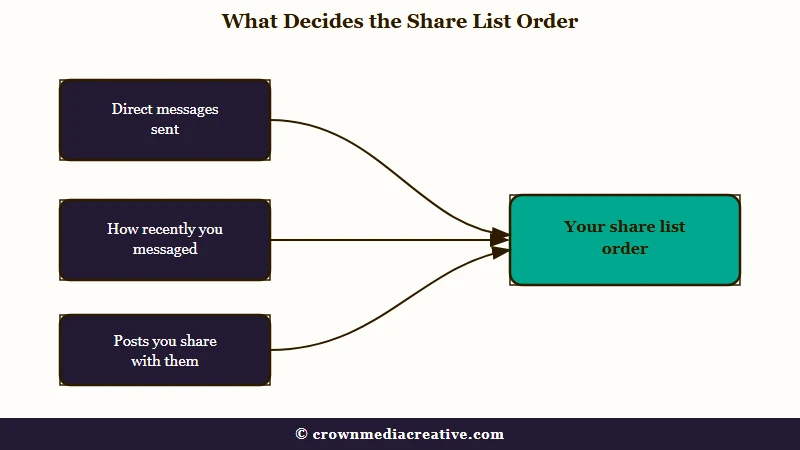
The Instagram share list order is decided by your private messaging history, mainly who you send direct messages to and how recently you sent them. Instagram has never published the formula, so every ranked list of signals you find online is inference rather than documentation.
What is the share sheet: The row of accounts Instagram offers when you tap the paper plane icon to send a post, reel, or story to someone.
The gap between what Instagram documents and what blogs assert is wider than it looks. Meta’s Transparency Center lists ten Instagram system cards, covering Feed, Stories, Explore, Reels Chaining, Search, Feed Recommendations, Suggested Accounts, Notifications, Comments and the Threads feed. Not one of them covers Direct messages or the share sheet.
Instagram’s own help article on sharing a post to a chat says no more. It tells you to pick a person or group “from the list below” or use Search, and never says how that list is ordered. So everything written about the order, this article included, is inference from what people observe.
| Signal | Status | What it means for your list |
|---|---|---|
| Direct messages sent | Strongly indicated, not published | The people you message most sit at the top when the list is behaving. |
| How recently you messaged | Strongly indicated, not published | A person you spoke to this morning outranks one you spoke to in March. |
| Posts you send them | Strongly indicated, not published | Sharing is itself a message, so it feeds the same history. |
| Who views your profile | No supporting evidence | Nothing demonstrates this moves the share list. See the section below. |
| Close Friends and Favourites | Separate features | These control story privacy and feed order, not share sheet position. |
The last row catches people out constantly. Close Friends is a story audience list, and adding someone to it does not promote them on the share sheet.
The order can also change with the post you are sharing. One r/Instagram poster in September 2026 saw the list reshuffle between an ordinary reel from their feed and a reel they had reposted, while the reposted reel and an ad produced the same order. That fits a list Instagram computes fresh each time you tap share.
Account privacy is not a documented input either. Where Instagram’s sharing help mentions privacy, it covers who can open what you send. A private account’s post sent in a chat is visible only to that account’s followers, and the poster is not notified.
Why Did My Share List Suddenly Fill With Strangers?
Your share list fills with strangers when Instagram’s server sends back a badly ranked list and it overwrites the correct one your phone had already drawn. The giveaway is that the right names appear for a moment first, then get replaced.
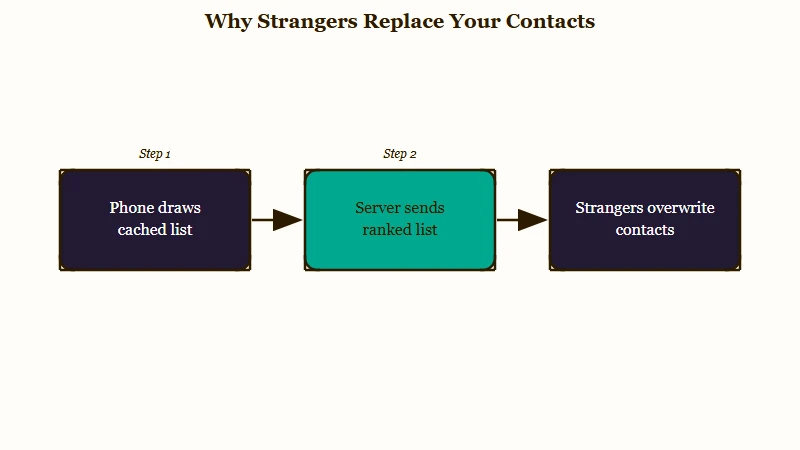
As far as the reports show, the share sheet draws in two stages. Your phone shows a list immediately from what it already holds, then the server’s ranked list arrives and replaces it.
When the second stage returns something wrong, you can watch the swap happen. On the r/Instagram reordering thread, the sheet is described going back to unfamiliar accounts mid-session, seconds after an app update appeared to fix it.
Other posters describe the same swap on opening the sheet, with the right contacts showing for a split second before the list refreshes into unfamiliar ones. Seeing it both mid-session and on opening is the strongest sign I have found that the list is drawn twice.
Once you have seen that, a lot of confusing behaviour lines up. It explains why the desktop site can stay correct while the phone app is scrambled, and why a fix seems to work and then undoes itself an hour later. It also explains why sharing to someone repeatedly does not lift them back up.
Before: You assume the list is a stored contact list on your phone that has been corrupted, so you clear the app’s data to rebuild it.
After: You treat the list as a ranking that arrives fresh from Instagram every time you tap share, which means clearing data on your phone is unlikely to change what the server sends back.
What Does It Mean if Someone Is at the Top of Your Share List?
Outside a reordering episode, the person at the top is usually the one you message most, or most recently. During an episode the top slots mean very little, and they are no sign of mutual interest, because deactivated accounts and long-dead group chats land there too.
The reports get specific. In a March 2026 thread, one person’s only regular share contact had dropped to 55th, and in August 2026 another poster found a group chat silent since 2017 sitting second or third.
The September 2026 version of the question is about one person climbing into the first row. One poster had someone they had not messaged in months, with no mutual followers, near the top of both the share list and the block suggestions list. Replies guessed at profile visits and physical proximity, and Instagram documents neither.
Does the Instagram Share List Show Who Views Your Profile?
No. Nothing has ever demonstrated that profile views move your share list, and the reports that seem to support it fall apart on inspection. Group chats and deactivated accounts appear in the same top slots, and neither of those can view a profile.
I do not buy the stalker explanation, and the reason is that it cannot account for what people find in their own top slots. Group chats show up there, and so do dead accounts: an October 2024 poster found deactivated profiles with no picture and names like account_564641 in their top row.
A group chat has no profile-viewing behaviour to measure. If profile views were the main driver, a group thread would rarely reach the top row, yet reports keep finding one there.
There is a real finding underneath the myth, and it belongs to a different feature. In early 2017, small experiments on story viewers used fresh accounts to repeatedly watch someone’s stories and browse their profile, never liking or messaging. Those accounts climbed toward the top of the story viewer list.
That result is about story viewers, and it has been quietly transplanted onto the share sheet ever since. The experiment was real, which is why the transplant is so persuasive, but it measured a different surface.
Instagram gives you no way to see who views your profile, which is worth remembering whenever an app claims otherwise. If you want the neighbouring question handled properly, the order of your story viewers works on its own separate logic.
Which Share List Fixes Work and Which Do Not?
Most of the standard fixes do nothing reliable, because Instagram computes the ordering on its servers. The cheap step with the most direct success reports is force-stopping the app and clearing its cache on Android, and even those wins may be Instagram correcting the list at the same moment.
Here is what I would try, in the order I would try it, and I want to be blunt that the ceiling on all of it is low:
- Send a direct message to each person you want back at the top, since messaging is the strongest signal available to you.
- Use Search at the top of the share sheet in the meantime, which Instagram’s own help gives as the way to reach anyone the list does not show.
- Wait without changing anything. Several episodes have resolved on their own, some within a couple of hours, though one March 2026 poster said theirs had been stuck for months.
- Check the same share sheet on the desktop site, which tells you whether the fault is confined to your phone.
- Update the app, then reopen the share sheet twice, watching whether the list changes after the first draw.
- On Android, force stop Instagram and clear its cache, but not its storage, which would log you out. Three people in the May 2025 thread credited this step.
- Stop there. Reinstalling and clearing all app data are the two steps with the worst effort-to-result ratio of all the common fixes.
The table below sets the advice you will find elsewhere against what each step actually targets. Only the last row feeds the ranking directly, and none of the others reliably changes the order.
| Commonly recommended fix | What it targets | Realistic outcome |
|---|---|---|
| Force stop and clear cache (Android) | Local storage on your phone | Three success reports in the May 2025 thread, no guarantee |
| Uninstall and reinstall | Local storage on your phone | Failed in nearly every 2026 report I found, and you lose your logins |
| Log out and back in | Your session | Helped a few people, failed for more |
| Turn off contact syncing | Contact upload permission | Worth doing for privacy, rarely changes the order |
| Add people to Close Friends | Story audience settings | Wrong feature entirely |
| Message the person directly | Ranking signal | The only step that feeds the real input |
The force stop drew the most direct success reports in the threads I read. In the May 2025 thread, one person said the list came back about a minute after clearing the cache and force-stopping the app, and two more later replied that it worked for them too. Across these threads, logging out, reinstalling and even contacting support failed for other people, and one April 2026 poster said clearing the cache changed nothing, so treat it as a one-minute gamble.
Contact syncing deserves one caveat, because it is the one item on that list I would still switch off. Turning it off is sound on privacy grounds regardless of whether it reorders anything, and there is no cost to trying it.
How Do I Push One Person Back to the Top?
Send them direct messages and keep sending them. Message frequency and recency are the clearest inputs you control, and the ranked list itself has no pin, favourite, or manual sort.
The tools are thin. Instagram has never shipped a way to reorder the ranked list, and the only removal I found reported working is blocking the person outright. Pinned chats do not carry over either, judging by one May 2025 commenter’s wish that the list “honoured pinned DMs”.
The same commenter pointed to the nearest workaround at the time, a share shortcut that saved chosen people as “a single tiny emoji-icon button” in the share sheet. By November 2025 another r/Instagram poster was asking whether share list shortcuts had been removed. If your app still shows a shortcut option when you tap Share, it is the closest thing to a pin, since one tap selects everyone saved in it.
During an episode, sharing posts alone may not move anyone: posters in March 2025 and March 2026 both said repeated shares left the list where it was. The March 2025 poster later saw it “slowly adjusting” toward the people they messaged.
A January 2024 comment gives the most specific recipe: unfollow, refollow, open their profile through search, like 2 or 3 posts, add to Close Friends, add to Favourites, then wait 24 hours. It worked for that poster, but six moves at once cannot show which one counted. Close Friends alone did nothing for a July 2025 poster.
Muting is a separate control, and nothing shows it moving anyone on the share sheet, so read the mute settings on Instagram for what it does hide. The suggestions under Instagram’s main search bar are a separate list again, and clearing your Instagram search history covers how to empty it.
Is This the Same Algorithm as the Rest of Instagram?
No. The share sheet ranks people for you to send to, while the feed and Explore rank posts for you to see, and Meta publishes no system card for the first kind. They are separate systems, which is why a change to one leaves the other untouched.
Instagram serves around three billion monthly active users, per Statista’s Instagram user figures, so a ranking change that affects a small percentage still sweeps up a very large number of people on the same day. That is why these episodes arrive in waves.
The r/Instagram record goes back to at least January 2021, with clusters in October 2024, March 2025, May 2025, October 2025, March 2026, June 2026 and September 2026. The largest threads I found are a March 2025 thread now at 266 comments and a May 2025 thread at 155. On June 18, 2026, a fresh thread collected 17 comments while older threads filled with “just happened to me” replies.
If it is the content side you are trying to understand rather than the share sheet, how Instagram ranks posts covers that separately. And if the wider sense that the app knows too much is what brought you here, whether Instagram listens to you takes on that question directly.
Quick Takeaways
- The share list ranks mainly on private messaging history, who you message and how recently, and it can reshuffle with the post you are sharing.
- It appears to draw twice, and watching the correct names get replaced by strangers is the clearest sign the fault sits on Instagram’s side.
- A name at the top is no sign of interest or profile visits, since group chats and deactivated accounts land there too.
- Reinstalling and Close Friends target the wrong thing, while a force stop plus cache clear on Android costs a minute and is worth one try.
- Message the people you want back at the top, use Search in the share sheet meanwhile, and expect anything from hours to months.

