
How to See Your Comments on TikTok When the Menu Is Missing
How to See Your Comments on TikTok When the Menu Is Missing
TikTok comment history still exists. Where Activity Center sits now, why some accounts lost it, and what the data download does and does not give you.
- 1How Do You See Your Comments on TikTok Right Now?
- 2Why Do Different Guides Give Different Menu Paths?
- 3What If Activity Center Is Missing From Your Settings?
- 4Why Is Your Comment History Empty or Showing an Error?
- 5Why Do Single Comments Disappear From the List?
- 6Can You See Your TikTok Comment History on a Computer?
- 7How Do You Download Every Comment You Have Made?
- 8Quick Takeaways
The Short Answer: Comment history still exists. It sits inside Activity Center, which TikTok has moved between menus and appears to have switched off for some accounts as a test. If the menu is gone, request your data instead, which TikTok says can include your comment history, though the newest 24 to 48 hours may be missing.
You go looking for a way to see your comments on TikTok, you tap through Settings, and the menu everyone told you about is not there. One guide points to Activity Center. Another points to Content and Display.
A third says the feature does not exist at all. They are describing the same app, and each was right on the day it was written.
Nobody explains that, so five minutes of searching leaves you more confused than when you started.
The answer I keep giving is duller than people expect, and it saves them from a pointless reinstall. TikTok moved this feature, then appears to have started switching it off for some accounts as a test.
Below is where it lives now, how to work out which version of the app you have, and the one method that returns your comments even when the menu is gone.

How Do You See Your Comments on TikTok Right Now?
Comment history lives at Profile, then the three-line menu, then Settings and privacy, then Activity Center, then Comment history.
On some builds Activity Center sits under the Content and Display heading. On others it sits under Account.
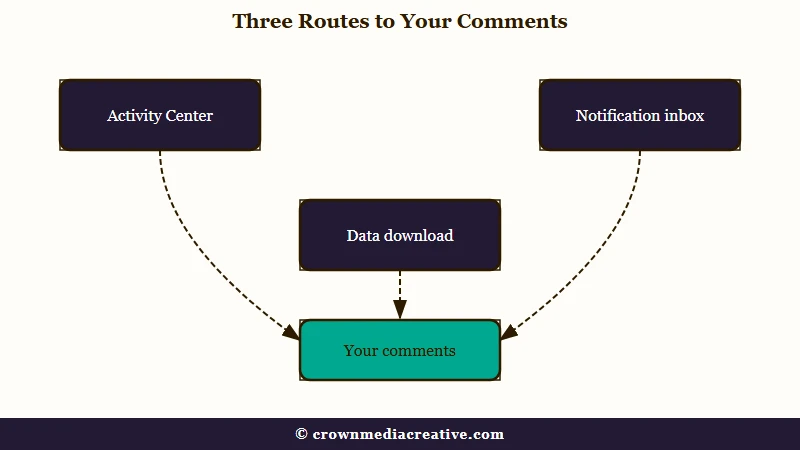
The destination is identical either way, but the heading you scroll to differs, so a guide written against one build reads as wrong on another.
There is a third route that predates both and still works on many accounts. Open your Inbox, tap Activity Notifications or All Activity, then filter to Comments. It shows comments tied to notifications rather than a complete log, so treat it as a shortcut and not a replacement.
That same inbox is where replies to your comments arrive, since comment history lists only what you wrote. If what worries you is a like you tapped by mistake, accidentally liking an old TikTok is a separate problem with its own fix.
The path I hand people first is the Settings one, because it is the only one that gives you a real list you can scroll. Here is how the three compare.
| Route | Where to tap | What you get | Catch |
|---|---|---|---|
| Activity Center | Settings and privacy, then Activity Center, then Comment history | A scrollable list of comments with links to the videos | Missing entirely on some accounts |
| Notification inbox | Inbox, then All Activity, then Comments | Comments attached to recent notifications | Partial, and it thins out fast |
| Data download | Settings and privacy, then Account, then Download your data | Your comments with their dates, as TXT or JSON | Can take a few days, and the newest 24 to 48 hours may be missing |
In Activity Center each entry links back to the video it was posted on, which the downloaded file may not do. The list is private to your own logged-in account.
The comments themselves stay visible on the videos where you left them, so anyone who can see those videos can find them, just not as a list. For the same question about saves, whether TikTok tells anyone you saved their video covers what a bookmark reveals.
Why Do Different Guides Give Different Menu Paths?
Because TikTok has moved this feature at least twice and appears to be testing it account by account.
Guides written in 2023 point to Content and Display. Newer ones point to Activity Center. Both described the app correctly on the day they were published.
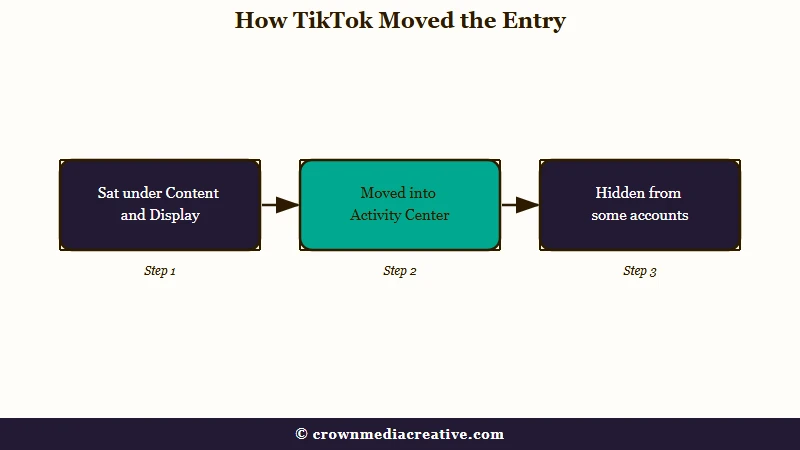
On current builds Activity Center sits underneath the Content and Display heading. That is why a 2023 guide naming that section and a 2026 guide naming Activity Center can both send you to the right screen. Older layouts put the history entry directly under Content and Display with no Activity Center wrapper at all.
TikTok’s own Help Center is split as well. Its article on restoring deleted posts reaches Activity Center through Settings and privacy, while its Screen time article opens it straight from the profile menu.
Neither article mentions comment history. Across the 203 English help articles I could read on October 9, 2026, the phrase appears only as a category inside the data download, so none of them documents where the comment list lives.
Comment history is not present or absent by app version alone. In a 68-comment thread, one person has Activity Center gone on one of their accounts and working on the other, while another has both intact but the Favorites tab moved.
Same phone, same app build, two different results. That detail is what moved me off the bug theory, because a fault in the app would not pick one of your accounts and spare the other.
A server-side test explains it. One poster in a follow-up thread says TikTok support told them it is not a bug but part of an experiment. Treat that as one person relaying a support reply rather than a company statement, because TikTok has never announced it.
It still fits the evidence better than anything else on offer. A feature toggled per account is precisely what produces two accounts on one phone behaving differently.
What If Activity Center Is Missing From Your Settings?
Stop reinstalling. If the feature has been switched off for your account, clearing the cache, updating, logging out, or deleting the app cannot bring it back, because nothing on your phone is the cause.
I want to save you the twenty minutes, so here is what will not work: reinstalling, switching from wifi to data, changing your region, or making a new account to check. The last one wastes the most time and teaches you nothing, since a fresh account can land in a different test group anyway.
Three things are worth trying, and each takes under a minute. Open the three-line menu itself, since TikTok’s Screen time help reaches Activity Center straight from there. Then search the Settings screen using the magnifying glass at the top and type comment, since the entry sometimes survives in search when it has been dropped from the visible menu.
Finally, check any second account you own, because the difference between them tells you immediately that this is account-level and not device-level.
If the menu and the search both come up empty, try TikTok’s help chat before giving up on the app. The 68-comment thread linked earlier, from late 2025, has one commenter’s steps: Settings, then Help Center, then Chat with us, then ask “where can I find my watch history”.
The reply links into Activity Center, the screen that holds comment history, and two people in that thread say it worked for them. A third got the link but found no comment history inside. If that happens to you, skip to the data download further down, which does not depend on the menu existing.
Why Is Your Comment History Empty or Showing an Error?
A missing menu and an empty list are different problems with different causes. Sorting out which one you have saves you from applying a fix aimed at the other.
One failure state is worth naming because it looks like a connection problem and is not. Comment history opens, then returns a network error every time, on wifi and on mobile data, and survives a reinstall. That is the screen failing to load its data, not your signal.
The habit I fall back on is checking these in the same order every time, from cheapest to most disruptive.
| Symptom | Likely cause | What to do |
|---|---|---|
| Activity Center is not in Settings at all | Feature switched off for your account | Try TikTok’s help chat, then the data download |
| Activity Center is there, Comment history is not | Menu moved under a different heading | Scroll both Content and Display and Account sections |
| Comment history opens but shows a network error | Server side load failure | Wait and retry later, a reinstall will not fix it |
| The list loads but looks short | Older or removed comments dropped from the view | Request your data download and search the comments file |
| One comment you remember is gone | The video or the comment was removed | See the section below, it is usually not you |
TikTok publishes no cutoff for how far back comment history goes. The widely repeated 180-day figure belongs to watch history, a different feature, and applying it to comments is a common mix-up.
Why Do Single Comments Disappear From the List?
Comment history reads live from videos that still exist. A comment can drop off the list without you doing anything wrong.
Three things remove a comment from that view. The creator deleted the video, the creator deleted your comment from their post, or the account you commented on was removed. In all three cases the entry is gone from the app even though you never touched it.
A deleted video is not always gone for good. TikTok’s help says a deleted post stays in its system for up to 30 days, and that restoring one brings back “all associated comments and likes”. So your comment returns if the creator restores the video in time.
None of that is a strike against you, and I want to be clear about that, because the assumption people jump to is a shadowban. A separate thing worth ruling out is moderation, which does hit comments and has its own signature.
If comments you post keep vanishing shortly after you post them, that is a filtering problem rather than a history problem, and why TikTok flags your comments covers what triggers it.
The same goes for comments removed over specific words, which follows its own pattern and is worth reading if your older comments are disappearing in batches rather than one at a time. TikTok’s word bans goes through what gets caught.
Can You See Your TikTok Comment History on a Computer?
Not as a browsable screen. TikTok’s help gives browser steps for settings such as Screen time, but it documents no comment history screen on any device. People who go looking on a browser find a profile that looks like they have never commented.
Some guides do describe a desktop path through Settings. I would not spend time on it, because the browser walkthrough below ends at the data download and never reaches a comment list.
The route that works from a computer is the data download. In a browser, a January 2025 New York Times walkthrough, republished by The Seattle Times, puts it under your profile icon, then Settings, then Download your data under Data in the Privacy menu.
TikTok’s own help documents only app routes, so request it from your phone if the browser menu has moved. Either way, open the file on your computer, which also lets you search your comments rather than scroll them.
That search limitation catches people out. TikTok gives you no search box inside comment history, so if you are hunting one specific comment from months ago, scrolling is the only in-app option and the file is the shortcut.
Before: scrolling comment history for ten minutes trying to spot one reply about a recipe
After: open the downloaded comments file, press Ctrl+F or Cmd+F, type “recipe”, land on it with the date you posted it
How Do You Download Every Comment You Have Made?
The data download returns your comment history as text, each comment with the date you posted it, and it works whether or not Activity Center is on your account.
It is the fix I trust when the menu is gone, and it is the only method that survives every failure state above.
In an example export a developer posted on GitHub, each comment entry carries the date, the text, a photo field reading N/A and a url field left blank. So the file reliably gives you the text and the date, but you cannot count on it to name the video.
To find the video behind a comment, match its timestamp against the watch history in the same download, which gives a link for each video it lists. The entry just before the comment’s time is the likeliest match, provided your watch history reaches back that far.
Access to your own data is a legal right in a number of places. California’s Attorney General says you “may request that businesses disclose to you what personal information they have collected, used, shared, or sold about you”. Businesses there have 45 calendar days to answer, so the in-app tool is how TikTok meets that obligation at scale.
Here is the sequence:
- Open your Profile and tap the three-line menu in the top right.
- Go to Settings and privacy, then Account, then Download your data.
- Choose which information to include, then pick TXT if you want to read it yourself, or JSON if you plan to run it through a spreadsheet or script.
- Tap Request data and close the app. TikTok says the file may take a few days to prepare.
- When TikTok notifies you, return to the same screen, open the Download data tab and tap Download.
- Unzip the folder and open the comments text file, then use Ctrl+F or Cmd+F to search it.
TikTok’s data request help says the finished file stays available for up to 4 days, so download it the day you are told rather than the following week. And since the newest 24 to 48 hours can be missing, a comment you posted this morning may need a second request a couple of days later.
One thing the download will not do is delete anything. There is no bulk delete for comments you have written on other people’s videos, so removing them means opening each video and deleting one at a time.
TikTok’s comments help does describe a bulk delete of up to 100 comments at once, but only for comments on your own posts. If it is a message rather than a comment you are trying to pull back, unsending a TikTok message works differently and is faster.
Quick Takeaways
- Comment history was not removed. It sits in Activity Center, which TikTok’s own help reaches two ways and which has moved between the Content and Display and Account sections.
- If Activity Center is missing from your Settings, that points to an account-level test, and reinstalling cannot fix it.
- The data download works on every app build and is the only way to search your comments, though the file may not say which video each comment was on.
- The 180-day limit people quote applies to watch history, not comment history.
- Download the file within TikTok’s 4-day window, knowing the newest 24 to 48 hours may be missing.

