
Does TikTok Notify When You Save a Video and Who Can See It
Does TikTok Notify When You Save a Video and Who Can See It
TikTok notifies creators when you favorite a video, with your username attached. Saving it to your camera roll stays anonymous. See what each button does.
- 1Does TikTok Notify When You Save a Video?
- 2Why Does Every Answer Online Contradict the Last One?
- 3Can People See Your Saved Videos on TikTok?
- 4Can You See Who Saved Your Video on TikTok?
- 5Does Downloading a TikTok to Your Camera Roll Notify Anyone?
- 6How Do You Stop People From Downloading Your Videos?
- 7Does Sharing a TikTok Link Reveal Who You Are?
- 8What Does a Save Do for the Creator?
- 9Quick Takeaways
The Short Answer: It depends which button you pressed, and TikTok’s own labels call both of them a save. Tapping the bookmark, which TikTok also calls the Saved button, adds the video to your Favorites and sends the creator a notification with your username on it. Using Share then Save video to pull the file onto your phone tells them nothing at all.
Every answer you find for “does TikTok notify when you save a video” seems to contradict the one before it. Three pages say yes, the creator gets pinged. Two say no, saving is completely private.
They are all correct. They are just answering different questions without telling you so.
TikTok uses the word “save” for two different actions that behave in opposite ways. One attaches your name to a notification, and the other is invisible.
Almost nobody bothers to separate the two, which is why this question has stayed muddy since 2022.
The inversion still catches me out. Bookmarking a video never downloads anything and never leaves the app, so it feels like the quiet, private option. It is the one that puts your username in front of the creator.
Below I break down all five ways you can hold onto a TikTok and what each one shows the creator. I also cover who else can see what you saved and how to check who has been saving your own videos.

Does TikTok Notify When You Save a Video?
The bookmark icon is the save that notifies, sending the creator an alert with your username. Downloading the video to your camera roll or sending it in a DM sends no named alert. A repost is the gray area: creators report repost alerts that TikTok’s repost help does not mention, so assume the creator can see one.
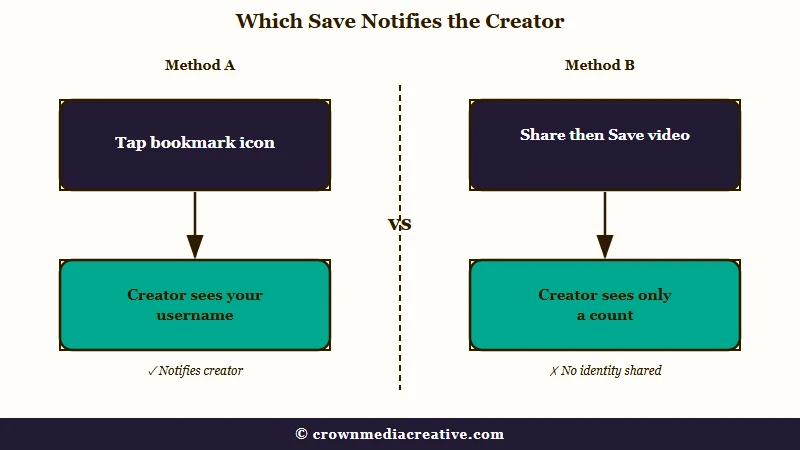
The bookmark is what TikTok’s Favoriting help calls the Favorite button, and it sits on the side of the screen “directly below the comment button.” TikTok’s Collections guide adds that it is “also called the Saved button,” and the Favorites tab it fills is “also called the Saved tab.” Tap it and the creator gets a notification carrying your username.
The download is a different path. You open the Share sheet, then pick Save video, and an MP4 with a watermark drops into your phone’s gallery. That one is anonymous.
On a tablet the two buttons sit even closer. TikTok’s help says that on a tablet you favorite by tapping Share and choosing “Favorite from the Share menu options,” the same menu that holds Save video.
My rule for anyone worried about this is simple. If the video stayed inside TikTok, assume the creator can see you did it. If the file left TikTok and landed on your phone, assume they cannot.
| What you tapped | Does the creator get a notification? | Can they see your username? | What they see instead |
|---|---|---|---|
| Bookmark icon (Favorites) | Yes | Yes, by name | A named entry in their activity feed, lately worded “saved your video” |
| Add to a Collection | Yes, the favorite triggers it | Yes, by name | The favorite only, never the folder name |
| Share then Save video | No | No | A download counter that ticks up by one |
| Repost | Not in TikTok’s repost help, but creators report repost alerts | Yes, the repost carries your name and photo | Your repost in For You feeds and on your profile |
| Send in a DM or copy link | No | No, not to the creator | A share count, but the person you sent it to sees your profile |
Removing the favorite afterwards is not a reliable undo. The notification fires the moment you tap the bookmark, and unfavoriting does not guarantee the entry disappears from a feed the creator may already have seen.
TikTok’s repost help covers posting, replying to and removing reposts, and never mentions an alert to the creator. Creators describe one anyway, like an April 2026 poster whose “notifs say that 3 people has reposted my video.”
Saving a video you found through someone’s repost still alerts the original creator. The person who reposted it is where a like and a favorite part ways: a like on a repost can send them “liked a video you reposted,” while a favorite reportedly sends them nothing.
The best report comes from a user who tested it with a second account, replying in March 2026 to a February thread asking exactly this: “Nothing pops up.” Liking someone’s repost is the riskier tap, because that one can reach the reposter by name.
Why Does Every Answer Online Contradict the Last One?
The contradiction comes from vocabulary, and TikTok’s own labels feed it: the bookmark is also called the Saved button, and the download option is Save video. News sites use “save” to mean bookmarking, while download tool blogs use it to mean pulling the file onto your device. Both are reporting accurately about different buttons.
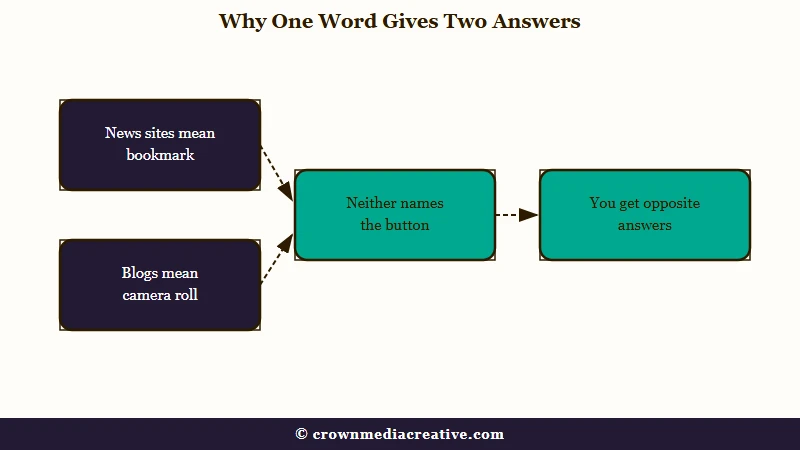
TikTok’s help pages show the clash in their own words. The download guide says “Tap Save video,” while the Collections guide calls the bookmark “the Favorite button (also called the Saved button).”
TikTok began naming the people who favorite a video in October 2022, and the confusion dates from that week. Before the change, favoriting was anonymous and creators saw only a total count.
Mashable reported the change on November 1, 2022, under the headline “Warning: TikTok notifies creators when you favorite their video.” Gizmodo and Tubefilter ran the same story the same day.
A TikTok spokesperson told Mashable the company was “exploring new methods for deeper community engagement and creator analytics.”
Read those headlines quickly and you conclude that saving a TikTok is no longer private. Read a download tool’s guide and you conclude the opposite.
Neither one tells you which button it means, and that missing sentence is what I blame for four years of confusion.
Vague: “I saved their video, will they know?”
Specific: “I tapped the bookmark icon on their video” (they will know, by name) versus “I opened Share and tapped Save video” (they will not know anything).
Once you name the button, every source on the topic agrees with every other one.
Can People See Your Saved Videos on TikTok?
No one can browse your saved list: TikTok’s help says “Only you can see the content you have favorited.” The creator of each video you save still learns about that one save, because the bookmark sends them your username. A collection becomes visible to others only when you share it or make it public.
Search this question and TikTok’s own site argues with itself. On September 25, 2026, the top Google results in the US included tiktok.com topic pages saying saved videos “are now public.” Another tiktok.com page lower down said your overall list of saved videos is private.
Those topic pages are automated roundups built from user videos, so neither line is official TikTok guidance. The official answer is in TikTok’s Favoriting help: favoriting “saves it to your private Favorites collection,” and “Only you can see the content you have favorited.”
Each save still reaches the creator, one video at a time. TikTok’s notifications help lists “Likes and Favorites” as a filter in every account’s activity inbox, which is where a single save shows up with your name on it.
TikTok announced Shared Collection on December 8, 2025. Two people who follow each other can save into one collection together, and TikTok says those collections “can stay just between friends and family, or they can be made available to the TikTok community.” It is open to accounts over 16.
An ordinary Collection you keep to yourself stays private, name included. The creator of a video you file away learns about the favorite, but never which folder it went into or what you called it. That matters when people name Collections things like “outfits to copy” or a specific person’s name.
Sharing a collection does not open the rest of your Favorites. The same Collections guide has you select one collection and tap Share at the top, and it notes that “other people won’t be able to view private content.”
The mechanics still trip people up. Adding a video to a Collection favorites it first, so the notification fires either way, and you cannot file something away quietly by routing it through a folder instead of the bookmark.
Collections have been unreliable for a while, and if yours refuse to accept new videos, fixes for TikTok Collections cover each cause separately.
Liked videos are a separate list with a separate switch, and TikTok hides them from your profile by default when you create an account. You can change that under Settings and privacy, then Privacy, then Liked videos, choosing Everyone on a public account, Followers on a private one, or Only you.
Favorited videos need no matching switch, because TikTok’s help treats that list as private to you. If someone says they saw what you saved, check your Liked videos setting and any collection you shared or made public before anything else.
Watching leaves a trace of its own. If you follow the creator and you both have Post view history turned on, TikTok shows them that you viewed the post.
A like or comment counts as a view there even with your own setting off. The feature only covers posts from the last 7 days and people aged 16 and over with fewer than 5,000 followers.
Can You See Who Saved Your Video on TikTok?
You can see the usernames of people who favorited your video, but only in the mobile app, and only by scrolling your notifications. There is no dashboard that lists them and no way to do it in a browser.
The path is buried, which is why so many creators assume the feature does not exist. Here is where I go to check mine:
- Open the TikTok app on your phone. This does not work on the desktop site.
- Tap Inbox at the bottom of the screen.
- Tap Activities.
- Tap All activity and choose Likes and Favorites from the filter.
- Scroll. Favorites appear as named entries mixed in with your likes.
What you get is a chronological feed. If a video was favorited two hundred times last month, you are scrolling two hundred entries to find them, and there is no per-video breakdown anywhere in TikTok Studio.
The aggregate number is easier. Tap into any of your videos and the count sits under the bookmark icon, but tapping that number shows you nothing. My honest read is that TikTok built the notification and never built the reporting layer to go with it.
One detail that surprises people: a private account does not protect you here. Favorite someone’s video from a locked-down profile and the creator still gets your username.
The alert’s wording seems to have shifted from favorite to save. In January 2026 a creator described alerts reading “2 people favorited it,” and by late July another user noticed TikTok saying “so & so saved your vid.” In September a new creator kept getting “so and so has saved your video.”
If a notification tells you someone saved your video, it came from the bookmark icon. A reply in another September thread says it fires “just when the video is bookmarked on the app.” Downloads never produce a named alert, so a save alert with a username on it always means a favorite.
Photo posts carry their own wording. A June 2026 poster who had posted a photo with text on it quoted the alert as “added your photo to their Favorites,” with the favoriting account’s username in front.
Does Downloading a TikTok to Your Camera Roll Notify Anyone?
No. Downloading a video to your phone is anonymous, whether you use TikTok’s own Save video button, a third-party downloader, or a screen recording. The creator sees a download counter increase and nothing else.
This holds for every download route. TikTok cannot see what a third-party site does with a public video, and screen recording happens entirely on your device, so the app has no way to register it.
Screenshots and screen recordings work the same way. TikTok sends no alert for either one, on iPhone or Android, on a video or in a DM.
The counter is the only trace. It moves by one and carries no name, which is exactly the behaviour people wrongly assume applies to favorites too.
Likes follow their own rules again, and liking then unliking a TikTok is worth reading before you panic about a stray tap.
How Do You Stop People From Downloading Your Videos?
Turning off Video downloads in your privacy settings removes the Save video button from your posts for everyone. It applies to your whole back catalogue at once, and it does not touch screenshots, screen recording, or link sharing.
The toggle sits under Settings and privacy, then Privacy, then Downloads. Flip it off and three things stop at once, according to TikTok’s own support documentation.
People can no longer save your videos to their device, convert them into live photos or GIFs, or push them straight to some third-party platforms.
Three limits are worth knowing before you rely on it:
| What you might expect | What really happens |
|---|---|
| It protects videos already downloaded | It does not. Anything saved while the setting was on stays on that person’s device permanently. |
| It stops people sharing your video | It does not. Copying the link and sending it in a DM still works normally. |
| Everyone can turn it on | Private accounts and users under 16 have downloads locked off by default and cannot switch them on. |
That last row catches out a lot of younger creators who go looking for a setting that is already forced on for them.
The gap I would flag hardest is screen recording. Downloads off does nothing to stop it, and a screen recording is indistinguishable from a native download once the file is on someone’s phone.
Does Sharing a TikTok Link Reveal Who You Are?
By default, sharing a link shows your profile to the person you send it to. The creator hears nothing about it. TikTok attaches your profile to shared links so the recipient sees a card reading that you shared a video with them.
Link sharing is the exposure that bothers me most here, because it runs sideways instead of up to the creator. You send a video to a group chat and your profile rides along with it.
A link you text to a friend can also land in their TikTok inbox. TikTok’s sharing help says that when you send a post through another platform, “we’ll also send that post to them on TikTok, provided they tap the shared link and allow direct messages from others.”
The setting to turn this off exists, though TikTok has moved it between menus more than once. Look under Settings and privacy for “Display profile when sharing links,” and check the Privacy and the Interactions sections if it is not where you expect.
If the toggle will not stick, paste the link into a browser first, let the video load, then copy the clean URL and delete everything from the question mark onward. That strips the tracking parameters that carry your identity.
Sent something you regret in a DM instead? Unsending a message on TikTok has its own set of rules about what the other person still sees.
Saving a video someone sent you in a DM follows the same split as everywhere else. The sharing help routes the download through Share, then “Save photo or Save video,” which stays anonymous, while the bookmark on that video still alerts its creator.
What Does a Save Do for the Creator?
A save feeds TikTok’s recommendations. TikTok’s own explainer lists your likelihood to “Finish, skip, or favorite a video” among the interactions its system predicts, next to likes, shares and comments. It publishes no weight for any of them, so there is no official figure for how much a single save helps.
A save is a person telling the recommendation system the video was worth keeping, and to me it says more than a double tap does.
Once you know what the number is for, the thin reporting stops annoying me. TikTok needs the figure for ranking, and the named notification was added for engagement, so nobody ever built the middle layer creators keep asking for.
Public reposts are a poor proxy for reach, too. A lot of sharing happens through DMs, copied links and other apps where nothing is visible, so the reposts you can count are only part of how far a video traveled.
Quick Takeaways
- The bookmark, which TikTok also calls the Saved button, notifies the creator by name, lately worded “saved your video.” The Share then Save video route does not notify anyone.
- TikTok’s help says only you can see your Favorites. A collection becomes visible to others only when you share it or make it public.
- A repost can alert the creator even though TikTok’s repost help does not say so. Favoriting a repost alerts the original creator, and one tester found the reposter gets nothing.
- Every contradictory answer online comes from the word “save” meaning two different buttons. Name the button and the confusion disappears.
- Creators can see who favorited a video, but only by scrolling Inbox, then Activities, then All activity filtered to Likes and Favorites in the mobile app.
- Turning off Video downloads is retroactive across your catalogue, but it cannot claw back files already saved and does nothing about screen recording.
- Sharing a link exposes your profile to the recipient by default, and the creator is never told. Turn off “Display profile when sharing links” or strip the URL after the question mark.

