
Instagram Added a Restriction to Your Account and Why It Returns
Instagram Added a Restriction to Your Account and Why It Returns
Instagram added a restriction to your account and it came back after you verified. Here is what triggers it and which fix holds. Start with these checks.
- 1What Does We Added a Restriction to Your Account Mean?
- 2Why Does the Restriction Come Back After You Verify?
- 3Is This the Same as We Restrict Certain Activity?
- 4What Exactly Does the Restriction Block?
- 5How Do You Check Why Instagram Restricted Your Account?
- 6Which Fixes Work and Which Ones Do Not?
- 7How Long Does an Instagram Restriction Last?
- 8Frequently Asked Questions
- Why did Instagram restrict my account for no reason?
- Does verifying my ID remove the restriction permanently?
- Why can’t I send messages on Instagram after this notice?
- Can a Facebook page cause my Instagram restriction?
- Is this the same as someone restricting me on Instagram?
- How long does an Instagram restriction last?
- 9Quick Takeaways
The Short Answer: Instagram added a restriction to your account comes from Instagram’s safety system rather than its spam limiter. It fires on the content and accounts you have interacted with, and identity checks lift it without switching it off. That is why it comes back the next day.
You open Instagram and a grey card is sitting on the screen. It says Instagram added a restriction to your account, and underneath it tells you that you cannot send messages, or that you cannot interact with certain accounts.
There is no list of what you did. There is a button offering to verify your identity, so you tap it, upload a photo of your driving licence, and the block lifts within minutes.
Then it is back tomorrow morning. When someone shows me this notice, the first thing I check is which of Instagram’s two restriction systems sent it, because that single answer decides whether waiting will help you or waste your week.
What Does We Added a Restriction to Your Account Mean?
The notice means Instagram’s safety system flagged what you interacted with, and it has nothing to do with how fast you post.
The full wording is the giveaway: your account was restricted “because of content or accounts you’ve interacted with,” and the message adds that the precaution helps the community, “especially our younger” users.
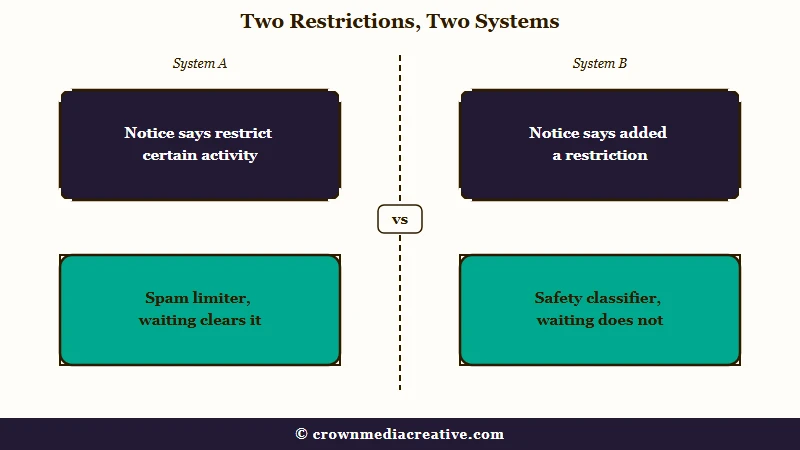
That last clause is the most useful thing on the screen, and it is the first line I read. It tells you the block came from the machinery Meta built to keep adults and teenagers apart, not from the anti spam limiter that catches people who follow 300 accounts in an hour.
The distinction changes everything about what to do next. A spam limiter counts your actions and then forgets them. The safety classifier is not counting anything at all, it has formed a view about who you are, and that view outlives the block it just placed on you.
Why Does the Restriction Come Back After You Verify?
It returns because the classifier is guessing your age from behaviour, and your ID answers a different question.
Meta has said outright that it is “building technology to proactively find accounts belonging to teens, even if the account lists an adult birthday,” and that this technology will “place suspected teens into Teen Account settings.”
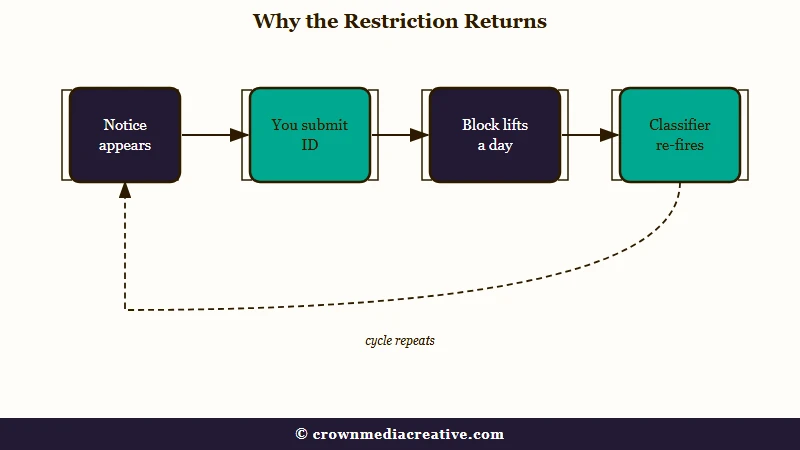
Read that carefully. The system is designed to override the birthday on file, which means submitting a document proving your birthday does not retire the thing that flagged you.
This is the part that bothers me. Your ID clears the immediate block, the classifier re-runs on your next session, reaches the same conclusion it reached yesterday, and the card comes back. Accounts stuck in this loop see it daily, and some see it several times a day.
Meta has also conceded the system misfires. In a dated update to its Teen Accounts announcement, the company said an earlier age check “didn’t work as well as we’d hoped and inadvertently locked out some parents and guardians who shared devices with their teens,” and that it moved to placing suspected teens into teen settings “regardless of the listed birthday.”
If you share a phone or tablet with a child in your house, you are the documented failure case. Know that before you spend another week appealing.
Is This the Same as We Restrict Certain Activity?
No, and telling them apart is the check I run before anything else.
Instagram shows two different messages that both use the word restriction, and nearly every guide online answers the wrong one.
| What the notice says | Which system it is | What helps |
|---|---|---|
| We restrict certain activity to protect our community | Spam rate limiter | Stop the fast actions and wait a few hours to a few days |
| Try again later | Spam rate limiter | Same, waiting clears it |
| We added a restriction to your account, because of content or accounts you’ve interacted with | Safety classifier | Waiting does not reliably clear it, work through the checks below |
| You cannot interact with certain accounts | Safety classifier | Same as above |
The spam limiter is triggered by rapid following, liking or commenting, and by growth tools that automate those actions. It behaves like a cooldown, and patience genuinely works on it. Our breakdown of Instagram follow limits covers the numbers behind that one.
The safety classifier is a different animal. Waiting does nothing for it, because nothing about waiting changes the signals it read.
What Exactly Does the Restriction Block?
It blocks interaction rather than posting, and it rarely blocks everything at once.
The effects cluster into a short list: sending direct messages, following people, being followed back, appearing in search, having your comments visible to others, viewing follower and following lists, and sharing links.
The mechanism behind the interaction half is public. Under Meta’s teen rules, teenagers cannot follow or message accounts that regularly share age-restricted material, and the block runs in both directions, so the adult account on the other side loses the ability to reach them too.
The partial lift is the detail I would not skip. Verification often restores one capability and leaves the others in place, so the ability to follow comes back while your name is still missing from search and your comments stay hidden.
If your comments vanished rather than your DMs, comments disappearing on posts has other causes worth ruling out first.
How Do You Check Why Instagram Restricted Your Account?
Start with Account Status, which is the only place Instagram shows its own record of what it thinks you did.
I go there before touching any setting, because everything else is guesswork until you have read it.
Work through these in order:
- Open Account Status from your profile menu and read every entry, including old ones you assumed had expired.
- Check the Facebook Profile or Page linked to your Instagram. A flag on the linked account alone can restrict the Instagram side, and it will keep doing so until you clear it there.
- Open your connected apps and revoke anything you do not recognise, especially old growth or scheduling tools.
- Confirm the birthday and profile details on file, since unverified age details are themselves a restriction trigger.
- Look at your recent interactions rather than your recent posts, because the notice names interactions specifically.
Step two is the one people miss. A restricted Facebook Page attached to the same login will regenerate the Instagram restriction after every appeal, and no amount of ID checking on the Instagram side touches it.
If you do appeal, be specific. Vague appeals get automated replies.
Before: “Please fix my account, I did nothing wrong.”
After: “My account was restricted on 3 September under ‘content or accounts you’ve interacted with’. I am 32, my birthday on file is correct, and I have submitted photo ID twice. The restriction has returned three times since. Please review the age classification on this account.”
The second version names the exact notice, the exact date, and the exact decision you want reviewed. That gives a reviewer something to act on.
Which Fixes Work and Which Ones Do Not?
Most of the popular advice for this notice is aimed at the spam block, and I would skip it.
Clearing your cache, reinstalling the app, switching to mobile data and reloading the page do nothing to a classifier decision stored on Meta’s side.
Two pieces of standard advice collide here. Third party guides tell restricted users to confirm their age to lift the limit, which is sound for the plain unverified-details case. Meta’s own update says its age verification gate misfired badly enough to withdraw it, so treat “just verify your age” as a first attempt rather than a cure.
The honest picture is that some of these restrictions have no clean user-side fix. If the classifier has decided your account looks like a teenager’s, or looks like something a teenager should not reach, you are waiting on Meta to change its mind about you.
That is also the case for keeping a route to your audience that Instagram cannot switch off overnight. An account that disappears from search, loses its comments and cannot share a link has lost most of what makes it findable, which is the argument for building a list you own before you need it. Small brand pages get hit by this too, not just personal accounts.
How Long Does an Instagram Restriction Last?
My honest answer is that nobody can give you a reliable number for this one.
Spam blocks have a published shape and clear in a few hours to a few days. The safety restriction has no stated duration, and Instagram does not tell you what it is measuring or when it will stop.
Verification produces an immediate lift measured in minutes, and it holds for about a day before the classifier re-fires. Accounts that break the loop usually do so after fixing something structural, most often a flagged linked Facebook Page or a connected third party app.
Separate out any reach problems that arrive at the same time. Slower growth after a restriction can be its own issue, and how the feed ranks posts explains what is normal, while fast growing accounts get flagged covers the enforcement side.
Meta is still tightening this machinery, and TechCrunch reported that under-18 accounts now default to PG-13 aligned content with stricter interaction rules attached. More classification means more of these notices arriving on accounts that have done nothing wrong.
Frequently Asked Questions
Why did Instagram restrict my account for no reason?
The notice fires on interactions, not posts, so the trigger is often invisible to you. Asking a follower their age, or engaging with an account Instagram classifies as age-restricted, is enough. Check Account Status for the record Instagram keeps.
Does verifying my ID remove the restriction permanently?
No. Identity verification lifts the current block, often within minutes, but it does not stop the classifier re-running. On affected accounts the restriction commonly returns within a day.
Why can’t I send messages on Instagram after this notice?
Direct messaging is the capability this restriction blocks most often. The block governs who you are allowed to contact rather than how fast you were sending, so waiting it out does not reliably restore it.
Can a Facebook page cause my Instagram restriction?
Yes. A flagged Facebook Profile or Page linked to the same account can restrict the Instagram side on its own, and it will keep regenerating the block until you resolve it on Facebook.
Is this the same as someone restricting me on Instagram?
No. When a person restricts you, you can still message them and their profile looks normal to you. This notice comes from Instagram itself and blocks capabilities across your whole account.
How long does an Instagram restriction last?
Spam blocks clear in a few hours to a few days. This safety restriction has no published duration, and it recurs until the underlying signal changes.
Quick Takeaways
- The notice naming “content or accounts you’ve interacted with” comes from Instagram’s safety system, so waiting will not clear it.
- Meta says it places suspected teens into teen settings regardless of the birthday on file, which is why an ID check lifts the block without ending it.
- Sharing a device with a child is a failure case Meta has publicly acknowledged.
- Check Account Status first, then the linked Facebook Page, which is the recurrence cause people most often miss.
- If your comments and search visibility are still missing after a lift, the restriction was only partly removed.


Instagram added a
restriction to your account comes from
Instagram’s safety system rather than its spam limiter. It fires on the content and accounts you have interacted with, and identity checks lift it without switching it off. That is why it comes back the next day.
Account Details:
Hello Support Team, my Instagram account has been disabled, and I believe this was a mistake. I follow all Community Guidelines and Terms of Use. Please review my account and restore access as soon as possible. Thank you.”
Username: [devil___mind__set980]
Registered Email: [@gmail.com]
Phone Number: []
Can do help for me
Hello Team,
I am writing to appeal for my disabled account [@vickey.khepar]. I understand you work hard to keep Instagram safe. If I posted something wrong unknowingly, I sincerely apologize for that.
I assure you it will not happen again in the future. Please give me one more chance to use my account correctly.
Please review my appeal.
Full Name: [vickey.khepar]
Username: [@vickey.khepar]
Email: [[email protected]]
Hello support team ,my Instagram account has follow all community guidelines and terms of use please review my account and restore access as soon as possible thank you
Username: surya_._bhai_._1111
Registered email:[email protected]
Phone number 9316168193
Hello support team ,my Instagram account has follow all community guidelines and terms of use please review my account and restore access as soon as possible thank you
Username: surya_._bhai_._1111
Registered email:[email protected]
Phone number 9316168193
This is a gentle follow-up to my previous email sent 24 hours ago regarding my hacked and disabled account *sahil.___.011*
>
> My account is still disabled and I have not received any update. My case is urgent as my personal data is at risk.
>
> Please check my case:
> *Username: sahil.___.011*
> *Reference: #1109432401811145 & #1723957512040575*
> *Original Email: [email protected]*
>
> I am still ready for ID verification.
>
> Kindly update me.
>
> Thank you,
> Sahil Sargara
Hello Support Team, my Instagram account has been disabled, and I believe this was a mistake. I follow all Community Guidelines and Terms of Use. Please review my account and restore access as soon as possible. Thank you.”
Username: [devil___mind__set980]
Registered Email: [@gmail.com]
Phone Number: []
Reply