
What Does Null Mean on Instagram, and Does It Mean Blocked?
What Does Null Mean on Instagram, and Does It Mean Blocked?
Null on Instagram is a name or message that failed to load. Here is how to tell a block from a gone account, an outage or the old
- 1What Does Null Mean on Instagram?
- 2Where Did You See Null on Instagram?
- 3Does Null on Instagram Mean Someone Blocked You?
- How Do You Tell a Block From a Gone Account?
- 4What Happens to Comments When an Account Is Deactivated or Deleted?
- Did Meta’s June 2026 Age Check Glitch Hit the Account?
- 5Why Does Everyone on Instagram Show as Null at Once?
- 6Why Does Instagram Add Null to Messages You Share?
- 7Should You Delete a Null Comment on Your Post?
- 8When Has Null Shown Up on Instagram Before?
- 9Frequently Asked Questions
- Does null on Instagram mean someone blocked you?
- Why does a comment on my Instagram post say null?
- Why does Instagram add null when I share something in a chat?
- Is Instagram down when everyone shows as null?
- Does null mean an Instagram account was deleted?
- How do you get rid of null on Instagram?
- 10Quick Takeaways
The Short Answer: Null on Instagram means the app asked for a name or a message and got nothing back, so it printed the programmer’s word for an empty value. One old comment showing (null) points to a block, an account that is gone, or a display glitch, and a logged-out check tells you which. Many names turning to (null) at once is an Instagram glitch or outage, and a stray null under something you shared into a chat came from an Android share bug.
What does null mean on Instagram when it shows up where a friend’s name should be? The first worry is a block, and sometimes that is the answer. Where the null appears tells you whether it is.
I sort every null case with one question before anything else: is it one name, or is it everywhere? One name on an old comment is about that one account. A whole feed of (null) names is Instagram breaking, and nothing on your phone caused it.
It also arrives in waves. Google Trends shows US searches for “null instagram” peaking in the week of August 18, 2024, when (null) replies spread across the app. The next two busiest weeks ran from June 14 to 27, 2026, just after a Meta outage.
Find where you saw it in the table below, then run the one check listed for it.
What Does Null Mean on Instagram?
Null on Instagram means the app expected a name or a message and got an empty value instead. Instagram’s help pages on deactivated, deleted and blocked accounts never mention it, so it is not a status Instagram shows on purpose.
Null is the programmer’s word for “no value here,” and it leaks onto the screen when an app forgets to handle a missing name. On Instagram it comes in two forms.
Comment names turn into (null) in parentheses. A chat gets a separate line that reads null on its own, with no parentheses.
My first read on any null is that something failed to load. The label only tells you something about a particular person when it sits on one of their old comments.
Where Did You See Null on Instagram?
Where the null shows up decides what it means. A single old comment points at one account, while a feed full of (null) names means Instagram itself is failing to load people’s details.
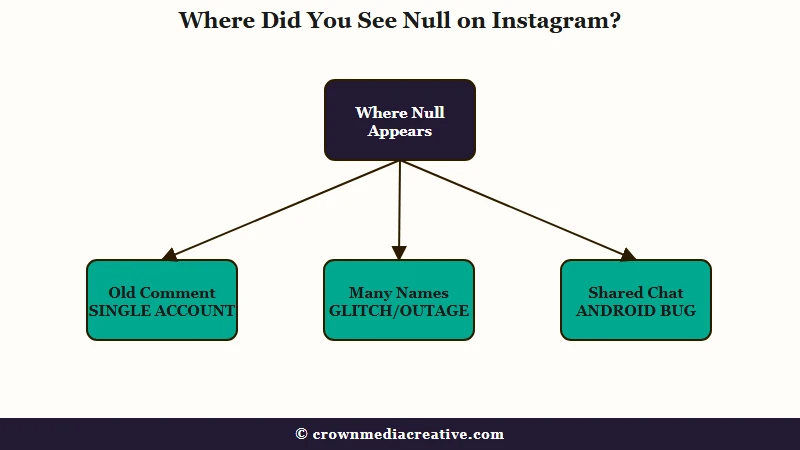
| Where you see null | Likely cause | What to do |
|---|---|---|
| One old comment on your post shows (null) as the name | A block, an account that is gone, or a display glitch | Check their profile while logged out |
| Your replies and other people’s replies all show (null) | An app-wide Instagram glitch | Wait, then update the app |
| Many names show (null) at once, sometimes with logouts | A Meta outage | Don’t log out on purpose; wait it out |
| A separate null message under a link or video you shared into a chat | Instagram’s Android share bug | Paste the link inside Instagram instead |
| Automated replies from a tool like ManyChat post from (null) | The same app-wide glitch | Nothing to change in the tool |
The first row worries people most, since it is the only one tied to a single person. I’d run its check first, because it takes under a minute.
The other rows all trace back to Instagram itself, and each one has a date and a known cause further down.
Does Null on Instagram Mean Someone Blocked You?
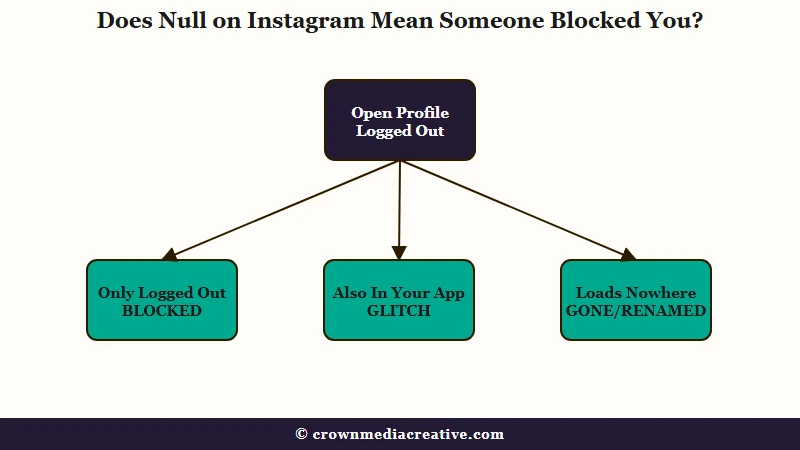
Null on Instagram can mean someone blocked you, in one specific case: that person’s old comment still sits on your post, but their name now reads (null). A block hides their profile from your accounts, so a check from outside them settles it.
Instagram’s help pages are written for the person doing the blocking, so “your” in them means the blocker. Its page on blocking says a blocked person’s likes and comments “will be removed from your photos and videos.”
A second page, on what stays visible, adds that blocked people “can still see your likes and comments on posts that were shared by public accounts or accounts they follow.” Read from your side as the blocked person, that rule describes the (null) comment.
If someone blocks you and your account is public, the comment they left on your post can stay where it is. Instagram never says how their name should look to you there.
In an August 2025 post on a Spanish-language developer forum, a developer described an ex’s encouraging comment that was still on the post two days after the block. The name on it showed as the plain text (null), with no username at all.
In a January 2026 case, the person seeing (null) could not reply while other people could. I don’t treat (null) on its own as proof of a block, and the check below is what tells a block apart from an account that has gone.
How Do You Tell a Block From a Gone Account?
A block can reach more than one of your accounts. Instagram’s block settings page says blocking someone “will block their account, other existing accounts they may have or any new accounts they may create.” A second account of yours can come up empty too, as in a December 2025 report.
Run the check from outside every account you own:
- Work out whose comment it is. The wording or an old notification usually gives it away.
- Open a private tab in your phone’s browser, stay logged out, and go to instagram.com/ followed by their username.
Then read the result:
- Profile loads, but you cannot find it in your app: that account blocked you.
- Profile loads and shows in your app too: you are not blocked, so the (null) is a display glitch.
- No profile at all: the account is deactivated, deleted or suspended, or the username changed. Try any newer name you know.
No private tab handy? Ask a friend to search the name. If they find it and you cannot, you get the same answer.
If their profile shows up fine but their stories stopped appearing for you, the hidden story checks fit better than a block test.
What Happens to Comments When an Account Is Deactivated or Deleted?
Instagram hides a deactivated person’s comments until they log back in, and a deleted account’s content stops being visible to other people during the 30 days before permanent deletion. A (null) comment that stays visible does not fit either rule.
| If the account was | What Instagram says about its content | Where Instagram says it |
|---|---|---|
| Deactivated | Photos, comments and likes “will be hidden until you reactivate it by logging back in” | Deactivation page |
| Deleted | Content “is not accessible to other people using Instagram” in the 30 days after the request, and removal “may take up to 90 days” | Deletion page |
So if the logged-out check finds no profile, the comment has outlasted its account and Instagram has not caught up with it yet. When one of these bothers me, I delete it rather than wait for Instagram to tidy it up.
Did Meta’s June 2026 Age Check Glitch Hit the Account?
Meta introduced an age check on May 7, 2026 to find and remove users under 13. From Sunday, June 14, a glitch in it locked people out of Facebook, Instagram and Threads worldwide, the Taipei Times reported.
Flagged accounts get deactivated until their owner proves their age, per TechCrunch. If a friend’s account vanished in mid-June and the logged-out check finds nothing, ask whether they saw an age check or an appeal screen. Accounts also get disabled for other reasons, such as growing too fast.
The accounts locked out in Taiwan included a YouTuber and a TV channel. If your income depends on reaching followers, keep a list you control outside any one app.
Why Does Everyone on Instagram Show as Null at Once?
When many names turn to (null) at the same moment, Instagram is failing to load account details for everyone, and nothing about your account caused it. It happened across the app from August 20 to 22, 2024, and again during the Meta outage of June 12, 2026.
The August 2024 wave began on the evening of August 20, US time. A Reddit thread from that night shows creators’ replies, and people’s own replies, turning to (null) on posts and Reels. The glitch arrived alongside typing lag and phones running hot, which points at the app.
Businesses running comment automations saw the same thing. In a ManyChat forum thread on August 21 and 22, automated replies were posting from a (null) profile. Hand-typed and automated replies broke within hours of each other, which puts the fault on Instagram’s side.
The June 12, 2026 outage went further and knocked services offline. It started around 9:30 a.m. Eastern Time and took down Instagram, Facebook and Messenger, per Tom’s Guide. Reports on the outage tracker Downdetector peaked at 110,000 for Facebook and 10,000 for Instagram.
The whole outage lasted about four hours, and Instagram was the slowest to recover. A Reddit post from 9:53 a.m. Eastern Time described users showing as (null) and people getting logged out.
I leave my settings alone during a wave like this and work through this order instead:
- Open a few posts from different accounts. If the (null) names are everywhere, the problem is Instagram’s.
- Check Downdetector, or ask someone else to open the app. Meta has no public status page for Instagram itself, as Tom’s Guide pointed out during the June outage.
- Don’t log out on purpose. Some people were logged out during the June 12 outage, so logging out to reset the app can leave you stuck at the login screen until the fix lands.
- Update the app if names come back for everyone else but not for you.
Why Does Instagram Add Null to Messages You Share?
On Android, sharing a link, photo or video into an Instagram chat from another app’s share button sent a separate null message along with it. Reports began in December 2024, and if it happens to you, pasting the link inside the Instagram chat avoids it.
A developer bug report from December 19, 2024 shows the extra null on Android 12. A second developer called it “an Instagram-side bug” that hit shares from the phone’s own photo gallery too, and the reporter’s iPhone test came back clean: “in ios it works correctly.”
That matches a Reddit thread from December 21, 2024, where shares from Reddit and TikTok picked up the extra null. Pasting the link inside Instagram did not trigger it, and neither did saving a video and sending it from Instagram’s own chat.
Reinstalling is the step I skip here, since a January 2025 report shows it failing several times. The first three steps avoid the bug because nothing goes through the Instagram icon in another app’s share menu, and the fourth cleans up after it:
- In the other app, tap Share, then Copy link instead of picking Instagram.
- Open the chat in Instagram, paste the link and send it.
- For a photo or video, save it to your phone first, then send it with the gallery button inside the Instagram chat, not the share button in your phone’s gallery app.
- If a null already went out, tap and hold it in the chat and tap Unsend. Instagram’s unsend page warns that people “may have already seen your message.”
Before: In TikTok, tap Share, pick Instagram, choose a friend and send. Your friend gets the video, then a second message that just says null.
After: In TikTok, tap Share, then Copy link. Open your chat with that friend in Instagram, paste and send. The link arrives on its own.
In the December 2024 thread, the original poster saw it clear on its own on January 11, 2025, while another commenter still had it that day. If the extra null comes back for you, pasting still gets around it. The share button has other quirks too, including your share list order.
Should You Delete a Null Comment on Your Post?
Delete a (null) comment if it bothers you, with the same tap and hold you use on any comment on your post. Instagram’s help page confirms you can remove other people’s comments from your own posts.
Instagram’s comment help page says “On your own Instagram posts, you can delete both your and other people’s comments.” The steps take a few seconds:
- Open the post and tap the comment icon.
- Tap and hold the (null) comment.
- Tap Delete.
These comments can act strangely. In a July 2026 report, the reply button was greyed out, yet tapping the name still opened a reply, and the post owner could not take back their own like on it.
I leave the kind ones up, since a compliment does no harm sitting there. If comments are missing entirely rather than showing (null), why Instagram hides comments covers the filters behind that.
When Has Null Shown Up on Instagram Before?
Null has hit Instagram in dated waves since August 2024, and each wave had its own cause. Matching the date you saw it to one of them tells you whether Instagram itself was at fault.
| When | Where null showed up | What was behind it |
|---|---|---|
| August 20 to 22, 2024 | Names on comments and replies, including automated replies | An app-wide Instagram glitch |
| December 2024 into January 2025 | A separate null message under things shared into chats on Android | An Instagram-side bug in the Android share flow |
| June 12, 2026 | Names across the app, plus some logouts | A Meta outage of about four hours |
| Any time, with reports since August 2025 | One old comment, tied to one account | A block, a gone account or a glitch; only the logged-out check tells them apart |
My rule for all of it: run the logged-out check the moment a single name turns to (null), because that is the only version that says anything about a person.
Everything else on the list is Instagram’s to fix, and pasting links by hand covers the chat version in the meantime.
Frequently Asked Questions
Does null on Instagram mean someone blocked you?
Only in one case, when one person’s old comment on your post shows (null). Check their profile in a logged-out tab: loads there but not in your app means a block, loads in your app too means a glitch, and loads nowhere means the account is gone or renamed.
Why does a comment on my Instagram post say null?
The app could not load the name of the person who wrote it. That happens when they blocked you, when their account is gone, or during an app-wide glitch like the one from August 20 to 22, 2024.
Why does Instagram add null when I share something in a chat?
Sharing into a chat from another app’s share button on Android added a separate null message, a bug that began in December 2024. Copy the link instead, paste it into the Instagram chat, and unsend any null that already went out.
Is Instagram down when everyone shows as null?
Many names turning to (null) at once, sometimes with logouts, points to an outage or an app-wide glitch. That matches the Meta outage of June 12, 2026, so don’t log out on purpose, check Downdetector or ask a friend, and wait for the fix.
Does null mean an Instagram account was deleted?
Not by itself. Instagram hides a deactivated person’s comments and makes a deleted account’s content invisible to others, so a (null) comment that is still visible fits a block or a glitch better than a deleted account. The logged-out profile check tells you which.
How do you get rid of null on Instagram?
Delete a (null) comment on your post by tapping and holding it, then tapping Delete. Unsend a stray null in a chat the same way, and during an outage, wait for Instagram’s fix.
Quick Takeaways
- A single (null) name on an old comment is the only version that says anything about a person, so check that profile in a logged-out tab first.
- A profile that loads logged out but not in your app means a block; one that loads nowhere is deactivated, deleted, suspended or renamed.
- Skip testing from a second account of your own, since a block can extend to your other accounts.
- A screen full of (null) names is Instagram’s fault, as on August 20 to 22, 2024 and June 12, 2026, so leave your settings alone.
- If a stray null follows links you share into a chat, paste the link inside Instagram instead of using the share button.

