
Instagram Says Invalid Credentials When You Change Your Password
Instagram Says Invalid Credentials When You Change Your Password
Instagram says invalid credentials when you change your password? Find the screen you are on, then use the fix that fits it.
- 1What Does Invalid Credentials Mean on Instagram When Changing Your Password?
- What Do Instagram’s Help Pages Say About Password Changes?
- 2Why Does the Change Password Screen Reject a Password You Know?
- Why Does a Second Account Reject the Password You Always Use?
- 3Why Won’t Instagram Accept a New Password After Flagging Your Account?
- How Do You Get Out of the Forced Password Change Loop?
- 4What Should You Do When a Password Reset Says Invalid Parameters?
- 5What Makes the Invalid Credentials Loop Worse?
- 6How Do You Keep This From Happening Again?
- 7Frequently Asked Questions
- Why does Instagram say invalid credentials when I change my password?
- How do I change my Instagram password without the current one?
- Why does Instagram keep making me change my password?
- Why can’t I log in to Instagram after changing my password?
- Does invalid credentials mean my Instagram account was hacked?
- What does invalid parameters mean on Instagram?
- Why is my Instagram password reset not working?
- 8Quick Takeaways
The Short Answer: Invalid credentials on an Instagram password change means the form rejected what you entered, and the screen you are on decides why. On the Settings screen, open a private browser window and tap Forgot password? on the login screen, so you never log out of the app before the reset link arrives. On the forced change screen after a flag, or when a reset keeps failing, stop retrying and start a fresh reset in a web browser.
What does invalid credentials mean when you change your Instagram password? It depends on which of four cases you are in. Three different screens throw this error, and on the Settings screen the cause splits again depending on whether the account signs in through another profile you own.
In that second-account case, typing more carefully rarely helps, which is why so many people get stuck retrying it.
Instagram’s help center explains the stuck version, though never on one page. Its password change page tells you to “Enter your current password and then enter your new password.”
A page on shared logins describes a change that began in early 2026. It warns that if login sharing is switched off, “You may not be able to log into your accounts until you create a password.”
Put those two sentences side by side and the loop stops looking random to me. An account that has only ever signed in through another account you own may have a password you have never typed, or none at all. A form that checks the current password then has nothing you can match.
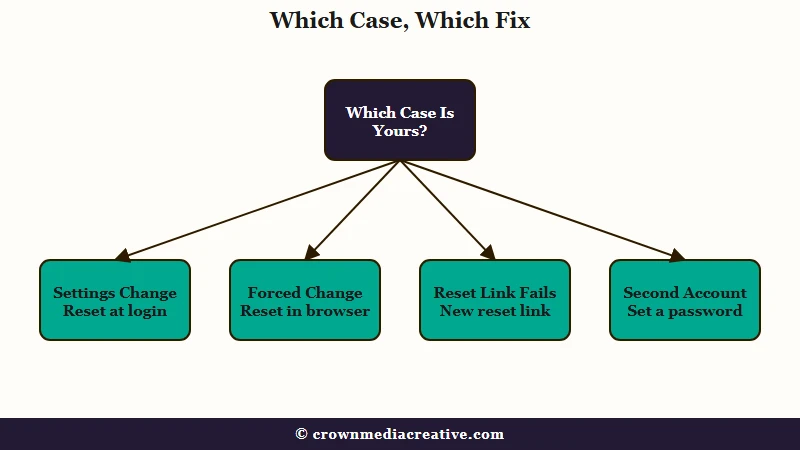
I always name the screen first, because the wrong fix burns attempts. The table below covers all four cases, and the sections after it take each one step by step.
What Does Invalid Credentials Mean on Instagram When Changing Your Password?
Invalid credentials on an Instagram password change means the form could not verify what you entered. On the Settings screen that is the current password of the account you picked, while on the forced change and reset screens the error can land on a brand-new password that meets every rule.
What is Accounts Center: Meta’s settings hub that links your Instagram, Facebook and other Meta accounts and holds the password and security settings for each one.
| Where you see the error | What it usually means | What to do |
|---|---|---|
| Accounts Center > Password and security > Change password | The current password does not match the account you picked | Reset from the login screen in a private browser window, without logging out of the app first |
| A forced “change your password” screen after a flag | The flagged session keeps refusing new passwords | Leave the screen and reset from a web browser |
| The reset flow that starts at Forgot password? | The link expired, or the email’s log in option was used. One reader also traced it to starting the lookup from a username | Request a fresh email and choose the reset option inside it |
| The Settings screen, on a second account that signs in through your main one | The form wants that account’s own password, which you may never have typed | Use a reset link to set one |
The last row is the one I suspect first whenever an account was created from inside another profile.
What Do Instagram’s Help Pages Say About Password Changes?
None of these pages names the error, but together they show the route that skips the old password. Every quote below comes from Instagram’s own help center.
| Help page | What it says | What it means for this error |
|---|---|---|
| Change your Instagram password | “If you’re logged out of your account and can’t remember your password, you can request to reset it from the login screen.” | The documented way around the old password starts at the login screen |
| Recover your Instagram password | “A link will be sent to either your email or phone to help reset your password.” | The link only helps if you can still open that email or phone, so check before logging out |
| Recover your Instagram password (same page, second passage) | “If you’re not able to reset your password this way, visit this page on your desktop or mobile browser to secure your account.” | The page it links, instagram.com/hacked, is the fallback when a reset fails |
Why Does the Change Password Screen Reject a Password You Know?
The Change password screen rejects a password you know when it is an older password for this account, or another account’s password. A saved password can fill the box with the old one, and a second account that signs in through your main one keeps its own.
Instagram lists the same steps for the app, iPad, Instagram Lite, a phone browser and a computer. Every version asks for your current password before the new one, so this form only works when you know that exact account’s password and type it exactly.
Type it by hand once before trying anything else. A password manager or keyboard suggestion can fill in a password from before your last change, and I never trust a filled box on this screen.
The new password matters too. Instagram’s note on strong passwords suggests “a combination of at least 6 numbers, letters and punctuation marks (like ! and %),” and meeting it keeps a weak new password off the list of suspects.
When the current password is the problem, this is the order I use:
- Type the current password by hand, once, ignoring any saved suggestion.
- If it fails, check that you can still open the email inbox or the phone number on the account, because the reset link goes there.
- Open instagram.com in a private browser window and tap Forgot password? on the login screen, so the app stays signed in while you wait for the link.
- Look the account up by phone number or email, open the link Instagram sends, and choose the reset option.
- Set a new password that follows the strong-password note, then log back in on every device, typing it by hand the first time.
The failed-reset page says that if you can’t get into the email you registered with and never linked Facebook, Instagram is “unable to give you access to the account.” That is why I check the inbox before I log out of anything. If that inbox is gone for good, try instagram.com/hacked, the page Instagram’s reset help points to when a reset fails.
Why Does a Second Account Reject the Password You Always Use?
What is a single login: An older Instagram setting that let several of your accounts sign in with one password. Instagram no longer lets you add new accounts to one.
Some Instagram accounts were added from inside another profile and have always signed in through it. Instagram’s single-login page says each account on a single login “will also keep their individual passwords.”
The I Can’t Log In page adds that you have to use the password “for the account that you’re logging in to.” So the password you type every day may belong to the main account, and the second account’s own password may be one you have never typed. A newer setting, separate from single login, has the same effect: the shared-login page says that, starting early 2026, “all accounts will be able to log into each other by default.”
That early-2026 timing lines up with the search data, though it proves nothing by itself. Google Trends records no US interest in “invalid credentials instagram” at all between July 2025 and February 2026, after a short burst that June. From March 2026 it registers interest every single week, and it has not gone quiet since.
Whether the second account has a password you never typed or none at all, the change form asks for one you can’t produce. The reset link does not ask for one at all.
In an r/Instagram thread about this error, one commenter suspected exactly that: “it’s a second account on my primary login and doesn’t have its own password.” I treat that as the first thing to rule out, because it changes the fix from typing to resetting.
Two questions tell you whether this is your case, and neither needs a settings menu. Was this account added from inside another profile rather than signed up for on its own? And have you ever typed a password for this account specifically, as opposed to the one you use for your main profile?
If the answer to the first is yes and the second is no, stop typing and go straight to a reset. Here is the order that works on a phone:
- Open Accounts Center, then Password and security, then Change password, and read the account list carefully. Pick the exact account showing the error, not the main profile you usually manage.
- If you cannot recall ever setting a password for that account, close the form. More attempts on it will not help.
- Open instagram.com in a private browser window and tap Forgot password? on the login screen.
- Look the account up by the email address or phone number attached to that account, not the ones on your main profile. This is the step people miss.
- Open the link, choose the reset option, and set a password that belongs to this account alone.
If the account is part of an Instagram single login, the single-login page says that once you change that account’s own password, “you won’t be able to add it back” to that login. From then on, it signs in with its own password, and I take that trade every time, since an account you can log into beats one stuck in a loop.
Why Won’t Instagram Accept a New Password After Flagging Your Account?
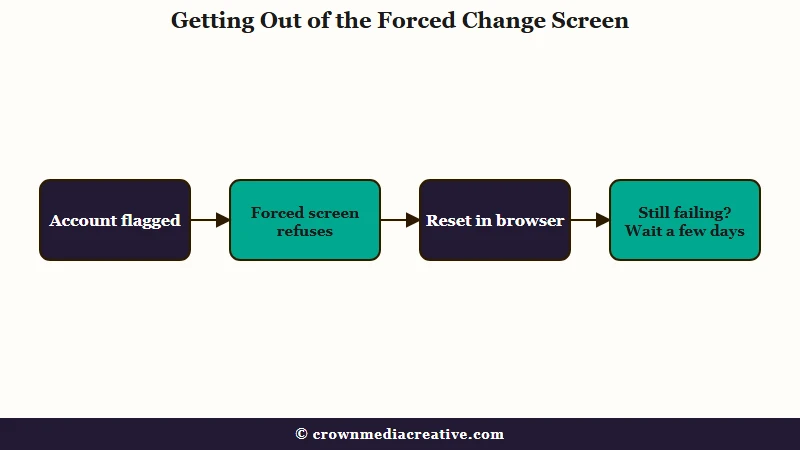
Instagram forces a password change when it thinks your login was shared or taken, and the forced screen can refuse every new password you try. The best first move is to leave that screen and start a fresh reset from the login page in a web browser.
Instagram has pushed flagged accounts into password changes for years. When it began removing fake likes and follows in 2018, its announcement said it would ask people using those apps to “secure their account by changing their password.” TechCrunch reported that they would be “told to change their passwords” through an in-app message.
The same screen follows other flags. One owner put the flag down to liking too much. Another was flagged as compromised and kept getting the change window on different devices.
A third owner subscribed to the blue checkmark, and days later got a notice claiming the password had gone to a follower service. In all three, the change kept coming back as invalid credentials.
My read is that the flag decides whether this screen accepts anything, which is why retrying it rarely helps. If Instagram disabled the account after a growth spurt, the fast-growth disable guide covers that case. A restriction notice is a separate problem, covered in the restriction warning guide.
How Do You Get Out of the Forced Password Change Loop?
This is the sequence I would hand anyone stuck on the forced screen:
- Stop submitting new passwords there, and close the app.
- On a computer or in your phone’s browser, open instagram.com and tap Forgot password? on the login screen.
- Enter the phone number or email on the account and send the link.
- Open the email or text, choose the option to reset your Instagram password, and set a new one.
- Log in on the web first, then in the app, typing the new password by hand.
- If the link never arrives or keeps failing, go to instagram.com/hacked in a browser, the page Instagram’s help names for when a reset does not work.
The browser route is the fix posted in a 2023 thread on the reset version of this error: “I went to the actual instagram website and changed my password there. It worked.”
It is not a sure thing. The owner flagged for liking too much tried both the app and a browser and got invalid credentials on both.
Someone else in that owner’s thread let it sit for a few days, tried again, and the change went through. When a browser reset fails too, I stop for a few days instead of burning more attempts.
What Should You Do When a Password Reset Says Invalid Parameters?
Invalid parameters on an Instagram password reset means the form rejected the request itself. Request a fresh reset email and choose the reset option inside it, the step Instagram’s help calls out. If a texted code keeps failing, one reader looked the account up by phone instead of username.
On the reset form, the same failure sometimes appears as invalid parameters instead of invalid credentials. The same failed-reset page gives two rules that matter here. The previous email “may have expired,” so ask for a new one, and choose “reset your Instagram password” inside it, because the page says: “Do not choose to log in from the email.”
In a June 2026 thread, the owner tapped “Login as” in the email instead and landed on an expired link, then waited about a week and a half before Instagram let them back in.
Before anything drastic, one more thing is worth a minute. A commenter in that same 2023 thread said the error cleared when they looked the account up by phone number instead of username before asking for a text code. Instagram’s help lists username, email and phone as equal ways in, so treat this as one person’s workaround rather than documented behaviour.
Before: tap Forgot password? > type your username > ask for the code by text > “invalid parameters”
After: tap Forgot password? > type your phone number > ask for the code by text > the code arrives
If your Instagram and Facebook accounts are linked, the failed-reset page offers another way in. Tap Reset using Facebook.
If the reset email arrives for a different profile, the page says the account you want was likely “registered with a different email address.” I run through every old email and phone number before I give up on an account.
What Makes the Invalid Credentials Loop Worse?
Retrying the same form and handing your password to outside apps both make this loop longer. Space your reset requests out instead of sending them back to back.
These are the moves I avoid:
- Hammering resets. Facebook’s password help says “you can only reset your password a certain number of times a day,” while Instagram’s own password help does not mention a limit.
- Giving your login to a follower or growth app. Instagram’s announcement says people who use those apps “share their username and password,” one of the reasons it gives for asking accounts to change passwords.
- Using app cloners or sideloaded copies of Instagram. They put your login inside a third-party app, the kind of access Instagram already treats as a risk.
- Opening a new account in frustration. The owner flagged as compromised made a new account, which leaves every old follower behind.
I don’t reinstall for this error either. On a flagged account, a reinstall only clears what is stored on your phone, while the flag sits on the account itself.
If a burst of likes or follows set off your flag, the follow limit guide shows the pace that tends to trip it.
How Do You Keep This From Happening Again?
Give every account its own password and keep a working email and phone number on it, so the next reset link reaches you. Two-factor authentication adds a second lock on top.
- Give each account its own password now, through a reset link, while you can still log in. This matters most for any account you added from inside another profile.
- Check that the email and phone number on the account still reach you, so the next reset link has somewhere to land.
- Turn on two-factor authentication under Accounts Center > Password and security.
- Keep follower and growth apps away from your login.
A password loop can keep a creator away from their followers for a week or more, and that is the risk I plan around. I keep an email list for that reason, since Instagram cannot lock that part of an audience, and an email-first bio link is an easy way to start one.
Frequently Asked Questions
Why does Instagram say invalid credentials when I change my password?
Instagram says invalid credentials when the change form cannot verify what you typed. On the Settings screen that means the current password of the exact account you picked, while forced changes and resets can reject new passwords too. Use Forgot password? on the login screen instead of retrying.
How do I change my Instagram password without the current one?
Use a reset link. Open instagram.com in a private browser window and tap Forgot password? on the login screen, without logging out of the app first. Instagram sends a link to your email or phone that sets a new password without the old one.
Why does Instagram keep making me change my password?
Instagram forces a password change when it suspects your login was shared or taken, including by apps that sell followers. It said in 2018 that it would ask those accounts to change passwords. Finish the change through a fresh reset link in a browser.
Why can’t I log in to Instagram after changing my password?
A saved login still holds the old password until you type the new one by hand. Instagram’s help also says you have to use the password for the account you’re logging in to, so a second account that signs in through your main one needs its own password.
Does invalid credentials mean my Instagram account was hacked?
The error alone only shows that a form rejected an entry. If Instagram also emailed you that your email address changed, its help says tapping Secure my account in that message may undo it. If a reset still fails, its recovery page is instagram.com/hacked.
What does invalid parameters mean on Instagram?
Invalid parameters is the same family of error, and it shows up on the reset form. Request a fresh reset email and choose the reset option inside it, not the log in button. If a texted code fails, one reader cleared it by looking the account up by phone.
Why is my Instagram password reset not working?
A stalled reset usually traces to the email or the link itself. Ask for a fresh email if the last expired, and choose the reset option inside it, not the log in button. If nothing works, try instagram.com/hacked.
Quick Takeaways
- Invalid credentials means the form rejected your entry. On the Settings screen, type the current password by hand once, and if it still fails, reset from the login screen instead of retrying.
- A second account that signs in through your main one checks its own password, so use a reset link to set one.
- On the forced change screen after a flag, stop retrying and run a fresh reset in a web browser.
- In a reset email, choose the reset option, since Instagram’s help says not to use the log in button.
- If you only do one thing, stop retrying the screen that keeps failing and request a fresh reset link in a browser. If that fails too, go to instagram.com/hacked or wait a few days.

