
How to Recover Deleted Instagram Posts When Restore Fails
How to Recover Deleted Instagram Posts When Restore Fails
Restore a deleted Instagram post from Recently deleted in a few taps. If it isn't there or Restore shows a network error, here's what still works.
- 1How Do You Recover Deleted Instagram Posts From Recently Deleted?
- Does a Restored Instagram Post Go Back to the Same Spot?
- 2Why Is My Deleted Instagram Post Not in Recently Deleted?
- How Do You Find an Archived Instagram Post?
- Can You Get Back an Instagram Post That Instagram Removed?
- Where Do Instagram Posts Go When They Vanish Without Being Deleted?
- 3Why Does Instagram Say Network Error When You Restore a Post?
- Why Doesn’t Instagram Send the Code to Restore a Post?
- 4How Do You Get Back Instagram Posts a Hacker Deleted?
- 5Can You Recover Deleted Instagram Posts After 30 Days?
- 6Quick Takeaways
The Short Answer: Open your profile, tap Menu, then Your activity, then Recently deleted. Pick Posts or Reels and videos, tap the post, tap the three dots and tap Restore twice. Deleted posts and reels wait there for 30 days, and Instagram’s steps cover only its Android and iPhone apps.
To recover deleted Instagram posts, open Recently deleted in the app within 30 days and tap Restore. Instagram’s help page gives only one reason a post could be missing from that folder: it may be “older than 30 days.”
Posts deleted only days earlier have gone missing too, in May 2026 and again in August 2026. Restore also fails with a “network error” that switching wifi does not fix, a complaint that goes back to at least February 2026.
When a post goes missing, the first thing I check is whether it was deleted at all. Archived posts, posts Instagram removed and uploads that never finished all vanish from your grid the same way, and each one comes back a different way.
If more than 30 days have passed since you deleted it, Instagram has nothing left to restore. Skip ahead to the after-30-days section, because your only copies now live outside the app.
How Do You Recover Deleted Instagram Posts From Recently Deleted?
You recover deleted Instagram posts from Recently deleted, a folder under Your activity that holds posts and reels for 30 days. Open it in the phone app, tap the post, then tap Restore twice.
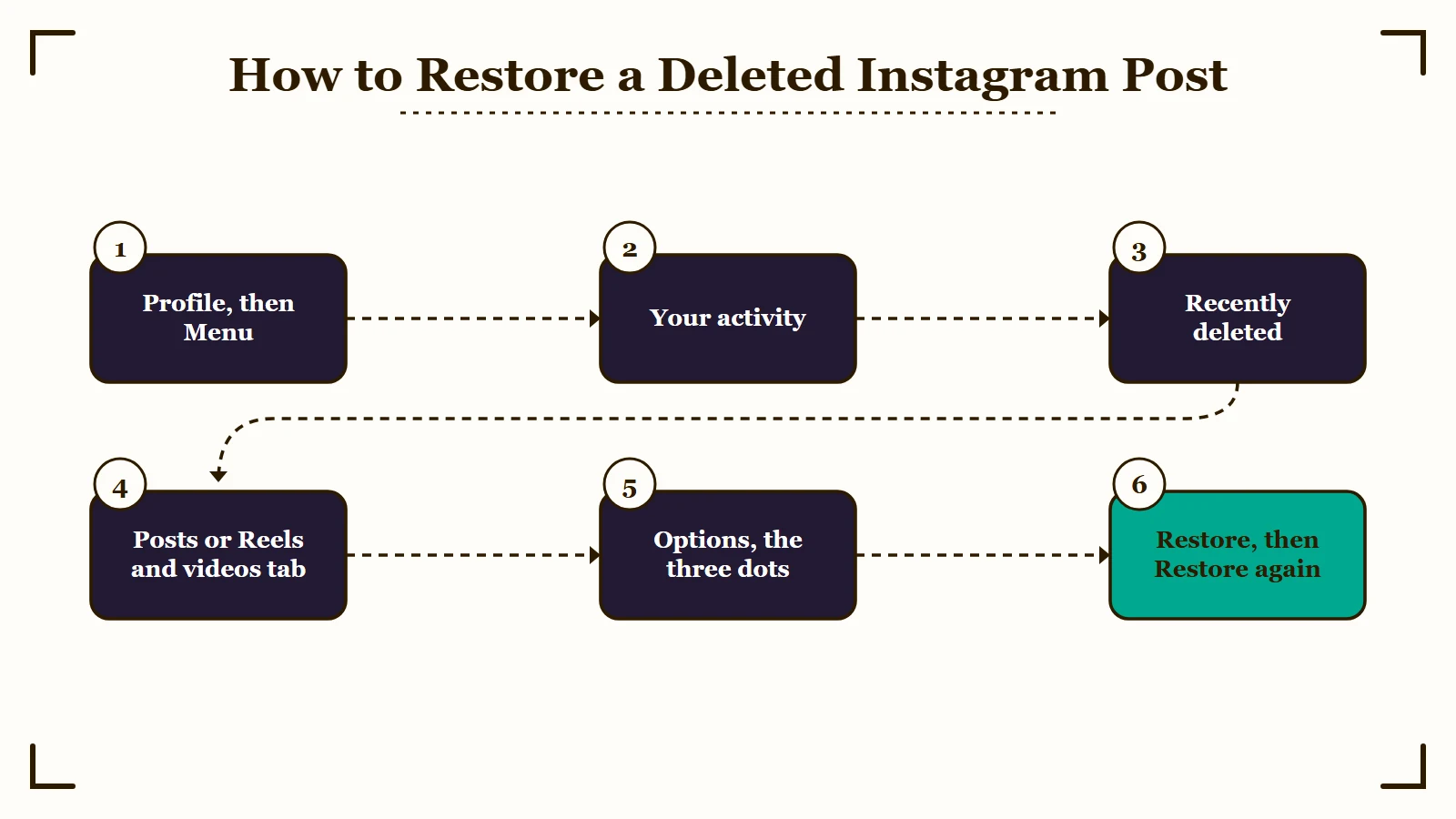
These steps come from Instagram’s own page, and they read the same on Android and iPhone:
- Tap your profile picture in the bottom right, then tap Menu in the top right.
- Below How you use Instagram, tap Your activity.
- Below Removed and archived content, tap Recently deleted.
- Tap Posts or Reels and videos at the top.
- Tap the post you want back, then tap the three dots for Options.
- Tap Restore, then tap Restore again to confirm.
Instagram may stop you at that point and ask for a security code. It added that check in February 2021, and its launch post explains why: “hackers sometimes delete content when they gain access to an account.”
Older guides still send people to Settings, then Account, then Recently Deleted, which was the path at launch. Today it sits in Your activity, a tab Instagram rolled out worldwide in February 2022 with recently deleted content inside it, per TechCrunch.
I don’t bother with a computer for this. Instagram gives steps for the Android and iPhone apps only, and the page opens with “Make sure you’re using the latest version of the Instagram app to see your recently deleted content.”
If Recently deleted is missing from the menu entirely, update the app first. Instagram also notes that the options may not appear if you haven’t deleted anything recently.
Stories run on a shorter clock. A deleted story stays for up to 24 hours unless it was in your stories archive, in which case it gets the full 30 days.
Does a Restored Instagram Post Go Back to the Same Spot?
Instagram doesn’t say, and the only original-spot return it documents is for archived posts. Inside a carousel, a deleted photo that gets restored was going back to its old position as of March 2026.
An archived post “keeps all its likes and comments,” per Instagram’s archive page. It returns “to its original spot on your profile” when you show it again, per the show on profile page.
Instagram’s restore page makes neither promise for deleted posts, which is why archive is the safer move for me whenever a post might come back later.
For carousels, a photo deleted and then restored used to land at the end. In March 2026 it was going back to its old position instead. In the same thread, someone found a drag-to-reorder option under Edit and then lost it the next day, which looks like a slow rollout.
Why Is My Deleted Instagram Post Not in Recently Deleted?
A post can be missing from Recently deleted because it was archived instead, removed by Instagram, never finished uploading or filed under Reels and videos. Some deletions never reach the folder at all. Instagram’s help page names only one reason, an age over 30 days.
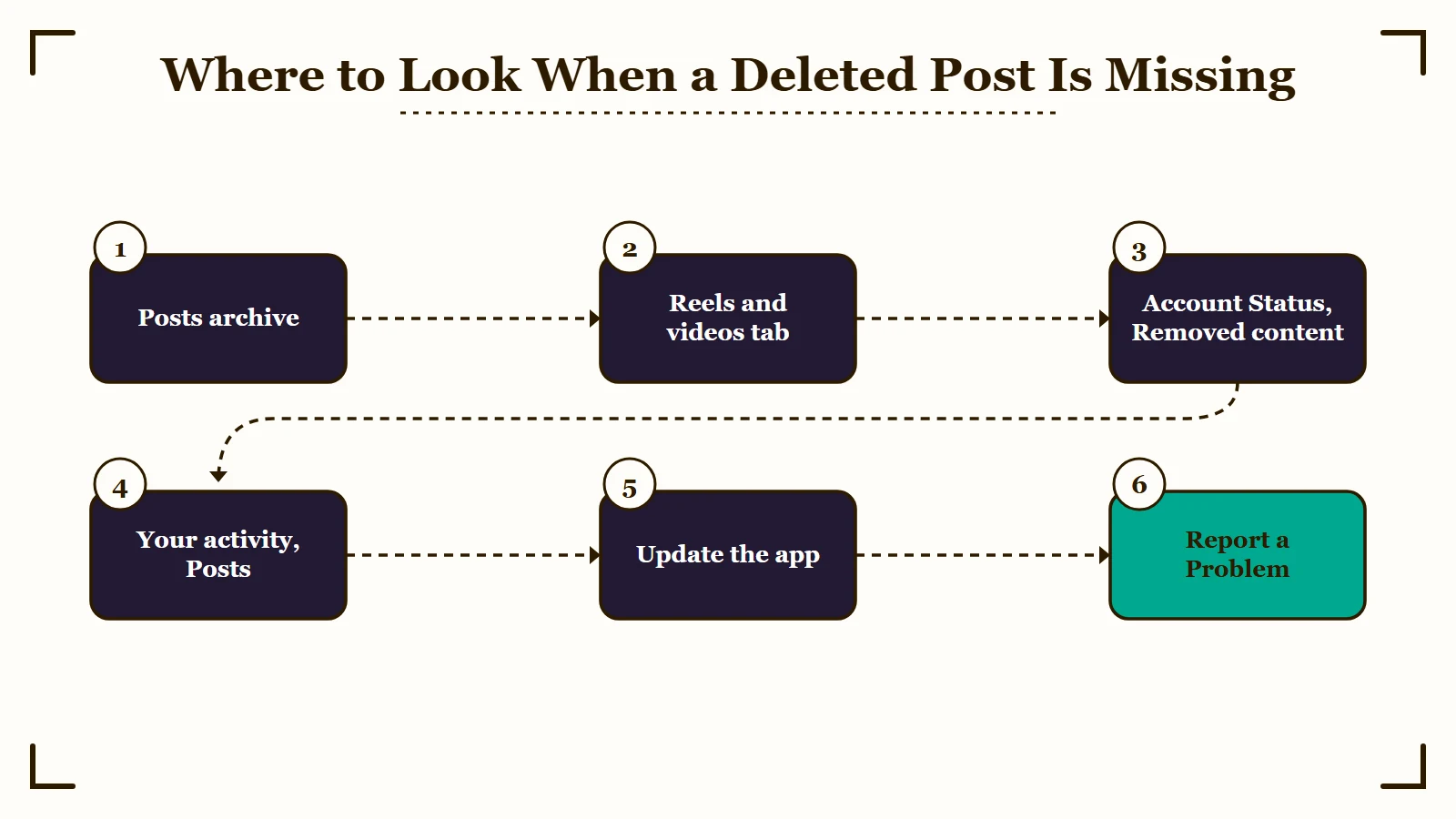
My first stop is the archive, because Archive and Delete sit in the same Options menu above every post, per Instagram’s archive and delete steps. The slip runs both ways: one person deleted a post they meant to archive, so a post you think you deleted may be sitting in your archive.
| What happened to the post | Where it is now | What brings it back |
|---|---|---|
| You archived it | Archive, under Posts archive | Show on profile |
| You deleted a Reel or video | Recently deleted, under Reels and videos | Switch tabs at the top |
| Instagram removed it | Account Status, under Removed content | Request a review |
| The upload never finished | Nowhere on Instagram | Your camera roll, then post again |
| It dropped off your grid | Still on your account | Your activity, then Posts |
| You deleted it over 30 days ago | Gone from the app | A copy outside Instagram |
If you know you deleted it inside 30 days and neither tab shows it, update the app, since Instagram’s restore page says you need the latest version to see recently deleted content. A post deleted the same day still never appeared in May 2026, while an older deleted photo sat in the folder with 4 days left. When that happens, report it the same day from Help, then Report a Problem.
A post that failed to upload never reached Instagram, so Recently deleted can’t hold it. In an April 2026 thread, failed posts skipped drafts too, so check your camera roll for the original and see why uploads stall before you post it again.
If the missing post belonged to someone else, Recently deleted won’t have it, because the folder only holds your own content. Check your saved posts instead, and if it’s gone from there too, the owner removed it or hid it from you.
Posts deleted by someone who got into your account still land in Recently deleted. The hacked-account section below covers what to do first.
How Do You Find an Archived Instagram Post?
You find an archived Instagram post under Menu, then Archive, but that screen opens on your stories archive. Tap Stories archive at the top and switch to Posts archive.
- Go to your profile and tap Menu in the top right.
- Below How you use Instagram, tap Archive.
- Tap Stories archive at the top, then tap Posts archive.
- Tap the post, tap Options, then tap Show on profile and confirm.
Can You Get Back an Instagram Post That Instagram Removed?
Yes, if Instagram agrees it made a mistake. Ask for a review from Account Status, under Removed content, and Instagram says the post “will be reposted” if the review goes your way.
Instagram describes Recently deleted as the home for content you choose to delete, so look for a removed post in Account Status instead. Go to your profile, tap Menu, and below More info and support tap Help, then Account Status (some versions list Account Status right under More info and support). Tap Removed content, tap the post, tap Request a review, pick a reason and submit.
Instagram’s review page warns that it “may take up to 90 days to hear back,” and some content types can’t be reviewed at all. If the review fails, the same page says you may be able to take it to the Oversight Board, the independent body that reviews Meta’s moderation decisions.
Where Do Instagram Posts Go When They Vanish Without Being Deleted?
Some vanished Instagram posts are still on your account and only missing from the grid. Look for them under Your activity, then Posts, before you decide they are gone.
That list sits below Content you shared in Your activity, per Instagram’s delete page. Work through these checks in order when a post disappears and you never deleted it:
- Open Your activity, then Posts. If the post is listed there, go back to your grid and refresh. That brought vanished posts back for three people in one thread, 12 at once for one of them, while three others there never found theirs in the list.
- Request a copy of your data. A post still on your account should be in the export, and one person in that thread salvaged vanished photos that way.
- Restart the app. For one commenter whose posts were vanishing a row at a time, restarting solved it.
- Report it. Go to Menu, then Help, then Report a Problem, and add a screenshot of the gap in your grid, which Instagram’s report page says helps.
Some cases leave no trace at all. A Reel with 2.2 million views disappeared from one account with nothing in Archive, Recently deleted or Account Status.
Why Does Instagram Say Network Error When You Restore a Post?
Instagram’s Restore button can fail with a “network error” and a second pop-up reading “We restrict certain activity to protect our community.” That second message is Instagram’s activity limit, so switching wifi or reinstalling the app does not clear it.
That exact pop-up appears in a May 2026 thread. In an October 2026 thread, the error said the video wasn’t restored and to check the connection. A browser login, a reinstall, mobile data and a VPN all failed to fix it.
The same pop-up shows up when Instagram limits fast following or liking, and this restriction guide separates it from the “We added a restriction” notice. Waiting usually clears that limit within days, but on Restore it has failed for weeks at a time, and no fix below works for everyone.
Waiting it out is the advice I trust least here, because the 30-day clock keeps running while you wait. I go down this list in order and check the days-left count on the post each time:
- On a creator or business account, empty the Minimum age setting. It sits under For professionals, then Creator tools and controls, or Business tools and controls on a business account. Clearing it unblocked Restore for two people in July 2026 in one long-running thread, and did nothing for a third. Skip it if your account promotes alcohol or anything else that legally needs an age gate.
- Clear anything in Account Status without a green check. Archiving flagged content and removing links unblocked Restore for one person in that same thread, while another account already showed three green checks and stayed stuck. Instagram’s under-18 availability page lists the same kind of fixes for a flagged account, such as updating “your bio and links.”
- Try another device or app. The poster of a February 2026 thread got a restore through by logging in on a friend’s phone. A partner’s iPhone and the Instagram Lite app for Android each worked for someone in an April 2026 thread, and an iPad beat an iPhone in the long-running thread. Other phones and an iPad still failed for several people in those threads, so give it one try and move on if it fails.
- Report it, and tap “Let us know” on the pop-up. Open Help, then Report a Problem, or shake your phone on the Restore screen, which Instagram’s report steps also allow. The April thread’s poster restored everything right after tapping “Let us know” over and over, while someone in the May thread kept tapping it with no change.
- Try Restore once a day. A Reel came back about four days later for one commenter in the October thread. In the long-running thread, one person was still blocked when the 30 days ran out and lost the posts, while another got a restore through and found the post hidden from everyone else.
Before: Restore fails, so you reinstall the app, switch to mobile data and log in on a laptop. The same two pop-ups come back every time, and three of your 30 days are gone.
After: On a creator or business account, you blank the Minimum age setting, clear Account Status and tap Restore once. Blanking that one setting was the whole fix for two people in the long-running thread. If the pop-ups come back for you, you report it and try again tomorrow, with most of the 30 days still on the clock.
In the May thread, the block hit someone whose account didn’t have the reorder option yet, so they had been deleting and restoring carousel photos to reorder them. Don’t delete anything else while Restore is blocked, since in these threads the block stopped every restore in the folder, not just one post. Once a restore works, check the post from a friend’s phone.
Why Doesn’t Instagram Send the Code to Restore a Post?
The restore code goes to the email address or phone number saved on your account. When it never arrives, check those details in Accounts Center, look in your spam folder, and switch between text and email.
Codes that never came by text or by email held up a restore for three days in an October 2025 case. The contact details live under Menu, then Accounts Center (or Meta Account on newer versions), then Profiles and personal details, per Instagram’s personal details page.
If a hacker swapped those details, the code goes to them. Fix the account using the steps in the next section before you ask for another code.
How Do You Get Back Instagram Posts a Hacker Deleted?
Posts a hacker deletes land in Recently deleted like any other deletion, and they stay restorable for 30 days. Secure the account first, then restore the posts with the fewest days left.
Instagram built its identity check for this case. The 2021 launch post says it asks people to prove “they are the rightful account holders when permanently deleting or restoring content.” That should stop an intruder from emptying the folder, unless they also control your email or phone.
The check does not stop the deleting itself. One account lost more than 300 Reels and posts in a single break-in in August 2026, with two-factor authentication turned on.
I would lock the account down before restoring a single post, because restoring into an account the intruder can still open puts everything back within their reach:
- If you’re locked out, start at Instagram’s hacked account page.
- Log out every other session and change your password.
- In Accounts Center, under Profiles and personal details, confirm the email and phone number are yours.
- Open Recently deleted and restore the posts with the fewest days left first.
Can You Recover Deleted Instagram Posts After 30 Days?
No. After 30 days the post drops out of Recently deleted, and Instagram offers no other way to restore it. Its data download leaves deleted items out, so any copy left lives outside Instagram, in your camera roll, a cloud backup, your editing app or Facebook.
Instagram keeps copies a while longer for its own use. Its deletion page says the process “may take up to 90 days to complete” and that backup copies kept for disaster recovery can outlast that. Some information is also kept longer for legal issues.
Download your information won’t reach those copies either. Instagram’s export page says deleted information “will not appear when you access or download your information,” so don’t count on a data request to bring a deleted post back.
I don’t buy the pitch of paid Instagram recovery apps. They can only search files stored on your own phone, and the post you deleted lived on Instagram’s servers.
| Place to check | What it may hold | The catch |
|---|---|---|
| Your camera roll | The original photo or video | A clip filmed inside Instagram may never have been saved there |
| Google Photos or iCloud | Anything your camera roll backed up | Only if backup was switched on |
| Your editing app | Projects and exports from apps like CapCut or Meta’s Edits | Only if you kept the project |
| Posts and Reels you shared there | Only if you cross-posted when you published | |
| Instagram’s data download | Posts still on your account | Leaves deleted items out, takes up to 30 days, and the file expires after 4 days |
The Facebook copy is worth a look even for posts that vanished on their own. Reels that disappeared from Instagram in a September 2026 case were still up on Facebook.
For next time, turn on Save original photos under Menu, then Archiving and downloading, and every photo you post also lands in your phone’s library, per Instagram. Some versions call it Save original posts, and this camera roll guide covers that switch and the one for stories.
Two things can’t come back at any point. Deleted messages “cannot be restored,” per Instagram’s restore page. Nobody can restore another person’s deleted post either, since the deletion page says that content “is not accessible to other people using Instagram” during its 30 days.
Quick Takeaways
- Recently deleted sits under Menu, then Your activity, and keeps posts and reels for 30 days, though Instagram documents it only for its Android and iPhone apps.
- A post missing from Recently deleted may be archived, removed by Instagram, never uploaded or dropped from the grid, so check the Reels and videos tab, Archive, Account Status and Posts under Your activity.
- A “network error” on Restore paired with “We restrict certain activity” is an activity limit. Before you count on waiting, clear Account Status, plus the Minimum age setting on a creator or business account.
- Posts a hacker deleted get the same 30 days, so secure the account, then restore the posts with the fewest days left.
- After 30 days only copies outside Instagram remain, and the data download leaves deleted posts out.
If your post is in Recently deleted, I’d try Restore today, and if it errors, clear Account Status, plus the Minimum age setting on a creator or business account, before the next attempt. If it isn’t there, check the archive before anything else. Once the 30 days are up, go to your camera roll and Facebook, and leave the paid recovery apps alone.

