
Find Saved Posts on Instagram and Unsave Them After the Update
Find Saved Posts on Instagram and Unsave Them After the Update
Saved posts and Reels live in Saved under your profile menu. Find them and unsave one or many now that the bookmark can open a panel.
- 1How Do You Find Saved Posts and Reels on Instagram?
- 2Why Can’t You Unsave a Post on Instagram Anymore?
- 3How Do You Unsave a Post on Instagram?
- 4How Do You Unsave All Saved Posts on Instagram at Once?
- 5Why Are Your Instagram Saved Collections Not Showing?
- Why Can’t You Add People to an Instagram Collection Anymore?
- 6Why Did a Saved Post Disappear on Instagram?
- 7Can People See What You Save on Instagram?
- 8Can You Search Your Saved Posts on Instagram?
- 9Quick Takeaways
The Short Answer: Tap your profile picture, then the three-line menu at the top right, then Saved, where All holds every post and Reel you saved. To unsave one, open it and tap the filled bookmark, and if a panel opens instead, tap the bookmark on the Saved row at the top of that panel, then Unsave. To clear many at once, use Select inside Saved and tap Unsave.
To find saved posts on Instagram, you still go to Saved, the private grid that only you can see. Its filters now split Reels from photos, so a saved video no longer has to hide among hundreds of pictures.
Unsaving is the part that changed. Since mid-September 2026, Instagram has reworked the save button in steps, and on recent versions a tap on the bookmark of a saved post can open a collections panel instead of removing the save. One October 8 post on Reddit’s r/Instagram forum says the latest update “just prompts me to turn it into a collection/folder.”
The Saved grid is where I would do all of this cleanup right now, because its bulk controls are still there on the version that broke the button. A single post now takes up to three taps, and the next sections show which three.

How Do You Find Saved Posts and Reels on Instagram?
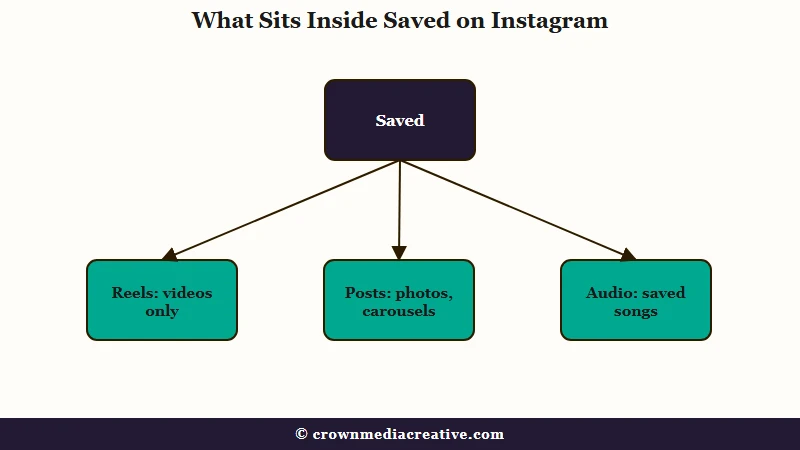
You find saved posts and Reels on Instagram in Saved: tap your profile picture, tap the three-line menu at the top right, then tap Saved under How you use Instagram. Saved Reels sit in the same grid as your saved photos.
These are the app steps from Meta’s help page on saving:
- Tap your profile picture at the bottom right of the app.
- Tap Menu, the three lines at the top right.
- Under How you use Instagram, tap Saved.
On a computer, Meta’s steps are to click your profile picture, then click Saved. The same page says a saved post is “visible to you from a private section of your profile,” so nobody else browses this grid.
On current versions, Saved has a row of filters across the top. All shows every save with the newest first, Collections shows your folders, and Reels, Posts and Audio split the rest by type. Some accounts also see Series, which looks tied to the episodic Reels Meta began testing in June 2026 with an option to save a series for later, per TechCrunch.
When someone tells me a saved video has vanished, the Reels filter is the first place I send them. A few hundred saved photos can bury one Reel deep in All, and the filter shows Reels alone.
Saving a Reel works a little differently from saving a photo. Meta’s page says to tap Options, the three dots, then Save, and the Reel joins the same Saved grid.
| What you want to see | Where to tap inside Saved |
|---|---|
| Every save, newest first | All |
| Only saved videos | Reels |
| Photos and carousels | Posts |
| Songs you saved for later | Audio |
| Folders you made | Collections |
| Episodic Reels | Series, on some accounts |
Why Can’t You Unsave a Post on Instagram Anymore?
On some recent Instagram versions, a tap on the save button opens a panel about collections instead of removing the save, so unsaving takes another tap inside it. The change arrived in steps between mid-September and early October 2026.
The dated reports below trace those steps, all posted by users on Reddit’s r/Instagram forum. They come from both iPhone and Android accounts, and each date links to its thread.
| Date (2026) | What changed |
|---|---|
| Sep 15 | New collections stopped offering a way to add collaborators, so a shared collection could not be started. |
| Sep 21 | Every save opened a Start a collection or New collection screen, and existing collections were not offered. |
| Sep 29 | A post could go into only one collection, and tapping save again offered only an unsave option. |
| Sep 30 | Unsaving sent the Saved grid back to the top and made each section load again. |
| Oct 5 | The collection screen opened on every save, and clearing the cache, clearing data and reinstalling did not stop it. |
| Oct 8 | Tapping the bookmark on a saved post asked for a collection instead of unsaving it. |
One of Meta’s help pages still describes the old flow. The collaborative collection page still says to “Tap Add people to this collection,” with room for up to 250 people, which is the option missing from new collections in the September reports.
Another Meta page already describes unsaving as more than one tap. The collections help page says to “tap Saved below the post, tap Saved again and then tap Unsave,” and that sequence fits the panel newer versions open.
What bothers me is that the usual phone fixes barely help here. Clearing the cache, clearing app data and reinstalling left the collection screen in place in the October 5 report, and a reinstall helped only for a while in a September 21 thread.
Those results point to a change made on Instagram’s side. For now the fix is a workaround, and the next two sections cover the two that still work.
How Do You Unsave a Post on Instagram?
To unsave a post on Instagram now, open it and tap the filled bookmark. If a panel opens, tap the bookmark on the Saved row at the top of the panel, then tap Unsave if asked. That is the order Meta’s collections help page gives.
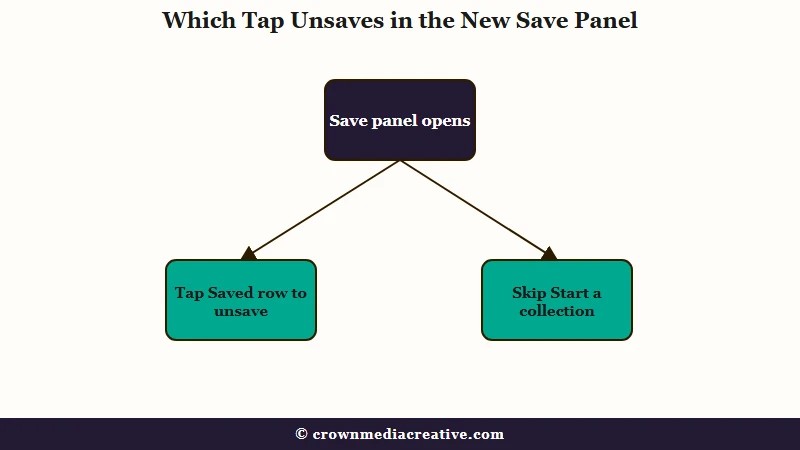
The panel looks like a sign-up screen for collections. A September 21 screenshot from Android shows the layout. At the top sits a row reading Saved and Private with a filled bookmark at the right, then the line “Collect the posts you love” and a large Start a collection button.
Here is the order I use for a single post:
- Open the post from Saved, or wherever you see it.
- Tap the filled bookmark below the post.
- If the bookmark empties and no panel appears, the post is unsaved and you are done.
- If the panel opens, tap the bookmark on the Saved row at the top, and leave Start a collection alone.
- Tap Unsave if Instagram asks you to confirm. Meta’s Android steps call this button Remove from saved.
On a Reel, Meta puts the save button in the Options menu, the three dots, so check that menu first when you want to undo a saved Reel.
If the panel’s bookmark does nothing, close the panel and remove the post from the Saved grid with the steps in the next section. That route works for one post as well as fifty, and I find it faster even for a single save because you never leave the list you are cleaning.
Before: You tap the bookmark once and expect the save to disappear, but the panel opens instead. You tap Start a collection because it is the biggest button on the panel, name it, and the post lands in a brand new collection while staying saved.
After: You tap the bookmark, then the bookmark on the Saved row at the top of the panel, then Unsave. The post leaves All and every collection it was in.
How Do You Unsave All Saved Posts on Instagram at Once?
You unsave many posts at once from the Saved grid: open All, tap Options, the three dots, then Select, tick the posts and tap Unsave. Newer versions may label the option Manage, and a big backlog takes a few rounds.
I clear a big backlog with Select in rounds and check each round before starting the next, because unsaves on Instagram do not always stick. The steps:
- Open Saved and tap All.
- Tap Options, the three dots at the top right, then Select. Some versions call this Manage.
- Tap each post you want gone. Some versions add a button to select all and then hit unsave, though it did not work for the poster of a July 2026 post.
- Tap Unsave at the bottom and confirm.
- Wait a minute, pull down to refresh, and check that the posts stayed gone.
Where you tap decides whether a post leaves Saved or only moves inside it. Meta’s collections page notes that after Remove or Delete collection, “your posts will still be saved in all posts.”
| What you tap | What happens to the posts |
|---|---|
| Unsave, from All, Reels or Posts | Removed from Saved and from every collection |
| Remove, inside a collection | Out of that collection, still saved in All |
| Delete collection | Folder gone, posts still saved in All |
| Move to collection | Moved to another folder, still saved |
On Android, Meta’s steps call the in-collection Remove button Remove from saved, yet those posts still stay in All.
If the grid jumps back to the top after every single unsave, do your one-at-a-time unsaving from the Posts or Reels filter instead of All. That bug has been around since at least June 2026, per this June thread, where one reply also found that unsaving on a computer avoids the jump. A reply from early October gives the same advice, “Go in posts or reels and unsave from there.”
If unsaved posts return after a refresh, the change did not stick on Instagram’s side. That happened on two accounts in a July 29 report, for bulk and single unsaves alike, so work in smaller rounds and check each one before moving on.
When a post refuses to leave one collection, unsave it fully and save it again into the right one. That trick comes from a 2025 thread where a post removed from a collection “just reappears when I refresh.”
I don’t trust the Chrome extensions and phone apps that promise to unsave everything for you. They run your logged-in account on autopilot, and Instagram’s Terms of Use bar accessing information “in an automated way without our express permission,” even while you are logged in.
If you meant to clear likes rather than saves, that happens on another screen. Your activity, then Likes, removes likes and leaves saves untouched, and if you worry a stray like notified someone, see accidental likes and unlikes.
Why Are Your Instagram Saved Collections Not Showing?
If saved collections won’t open on a computer, the likely cause is a bug in Instagram’s web version. Collections stopped loading on instagram.com in early August 2026 while the app opened them, with reports into September. Open them on your phone instead.
Collections stalled in the app for a few days for some people, while the web failure ran for weeks. In one Reddit thread that began on August 10, someone still got “something went wrong” in Safari on September 1.
My fix for a collection that won’t open on a laptop is to stop fighting the browser and open it on the phone. Every post in it also stays saved under All while the collection itself won’t load.
If the save panel keeps pushing Start a collection, your collections still exist. Open Saved, tap Collections, open the one you want, then tap Options and Add to collection and pick the saved posts to file there, per Meta’s collection steps.
Why Can’t You Add People to an Instagram Collection Anymore?
Since mid-September 2026, the New collection screen on many accounts has had no option to add people, so you can’t start a shared collection there, even though Meta’s help page still lists that step. Older shared collections still take saves, but the chat shortcut went missing for some.
Older shared collections keep working. In one September 15 thread, saving to an existing collaborative collection still sent each post to a friend by DM, while a new collection could only be named. The bookmark beside posts in DMs, used to add them to shared collections, did go missing in a September 16 thread.
Shared collections arrived in March 2023 as a way to save posts with friends in a group chat or a one-on-one DM, per TechCrunch. Anyone who can view one can add or remove posts and can delete it “regardless of who created it,” and a private collection can’t be shared later, according to Meta’s page on collaborative collections.
Why Did a Saved Post Disappear on Instagram?
A saved post disappears from Instagram Saved when the person who shared it deletes it, because your save only points to their post. Meta says a post deleted by its creator “will no longer be visible to anyone on Instagram.”
A save from an account that later goes private stops opening unless you follow it. Meta’s collection notes apply the same rule inside shared collections, where a private account’s post shows to “only people who follow that account.” Saves also vanish while a creator’s account is deactivated, because Meta’s deactivation page says its “photos, comments and likes will be hidden until you reactivate it.”
Two more causes are easy to miss. Each account has its own Saved, so check the account switcher if a save seems gone. Saving a post also never puts a copy on your phone, and the camera roll settings that copy your own Stories and posts work separately.
If you watched a Reel but never saved it, Saved will not have it. Instagram’s watch history is the place to look, and it only reaches back 30 days.
I treat Saved as a reading list that can lose pages, since nothing in it belongs to me. To keep a record anyway, open the menu, then Accounts Center or Meta Account, then Your information and permissions, Export your information and Create export.
Choose the information you want and JSON as the format. When your export is ready, you have 4 days to download it, and Meta’s export page warns it may take up to 30 days to email you the link. The file, saved_posts.json, lists each save as a link with the time you saved it, without the posts themselves, per a guide from Siloe, an app that organizes saved posts.
Can People See What You Save on Instagram?
No. Meta says only you can see the posts you’ve saved, and the person who posted can’t tell that you saved it. Creators see saves only as a count in their insights, and the one exception is a collaborative collection, which everyone in that chat can see.
Meta’s post insights page folds saves into Interactions, “the number of actions people take when they engage with your content, such as likes, comments, saves and shares.” The help page on saving adds that when you save someone’s post, “they’re not able to tell that you’ve saved it.”
Saved posts do show up for anyone logged into your account, since they see what you see. If you think someone else has access, log them out of Instagram and change your password.
That privacy is why I still park ideas in Saved, panel and all.
Can You Search Your Saved Posts on Instagram?
Instagram’s Saved screen has filters and collections but no search box in its standard version. A screenshot from October 8, 2026 showed a search icon at the top of Saved, which suggests Instagram is testing one.
If you don’t see a magnifying glass at the top of your Saved screen, you don’t have it yet. The screenshot, credited to Ahmed Ghanem, who posts about Instagram tests, was shared on Reddit’s r/Instagram on October 8.
I name my collections after what I will hunt for later, like recipes or gift ideas, because that is the closest thing to search Saved offers today. Until search reaches your account, these habits make saves easier to find:
- Go to the creator’s profile if you remember who posted it, which is faster than scrolling Saved.
- Use the Reels, Posts and Audio filters to cut the grid down by type.
- File saves into collections from inside each collection with Options, then Add to collection.
- Request your data export and look up saves by date in the saved_posts.json file.
Quick Takeaways
- Saved sits in your profile menu, and its Reels, Posts and Audio filters narrow the grid.
- On some recent versions a tap on the bookmark opens a panel, so tap the bookmark on its Saved row, then Unsave.
- For many posts, use Select in All and tap Unsave, then refresh to check each round stuck.
- Remove and Delete collection leave posts saved in All, and only Unsave takes them out of Saved.
- Skip bulk-unsave extensions, since Instagram’s Terms bar automated access even while you are logged in.
If neither the panel nor Select removes a save, update the app first. If it still fails, open the menu, tap Help below More info and support, then Report a Problem, as Meta’s reporting steps describe. Keep an eye on the top of Saved too, since the search icon spotted on October 8 may reach your account next.

