
Instagram Mixed Aspect Ratio Not Working or Missing and the Fix
Instagram Mixed Aspect Ratio Not Working or Missing and the Fix
Instagram's Mixed aspect ratio option vanishes when you add a video or music, and schedulers never had it. Find your case and the fix that works.
- 1Why Is the Instagram Mixed Aspect Ratio Not Working on Your Carousel?
- 2Where Is the Mixed Aspect Ratio Option on Instagram?
- 3Why Does the Mixed Option Disappear When You Add a Video or Music?
- 4Did Instagram Remove the Mixed Aspect Ratio From Your Account?
- 5Why Do Mixed Ratio Photos Still Get Cropped After Posting?
- 6Can You Post Mixed Aspect Ratios From Desktop, Business Suite or a Scheduler?
- 7Frequently Asked Questions
- Did Instagram remove the mixed aspect ratio option?
- Why does the mixed ratio option disappear when I add a video?
- Can I post a mixed aspect ratio carousel from a computer or a scheduling app?
- Why do my old mixed ratio posts look cropped now?
- What photo sizes does Mixed keep without cropping?
- Does adding music break mixed aspect ratio on Instagram?
- 8Quick Takeaways
The Short Answer: The Mixed option only appears for a photo-only carousel with photos of different shapes, on a phone, on an account and app install that currently have the feature switched on. Add a video or a music track and it drops out. Post from a computer, Meta Business Suite or any scheduler and it never existed. Photos taller than 3:4 or wider than 1.91:1 get cropped even with Mixed selected.
When the Instagram mixed aspect ratio is not working, one of three different things is wrong. The Mixed button is missing from the crop menu, or it is there and the finished post crops every slide to one shape anyway. The third case is posting from a place where Mixed never existed at all.
Each one has a different fix, which is why the advice you find elsewhere keeps failing. Update the app, clear the cache, reinstall. That loop misses the common causes and helps only when one phone’s install has lost the option.
Instagram’s own help page for multi-photo posts never mentions the Mixed option. It still says the orientation you choose applies to every photo, and Meta’s two documents on photo sizes disagree with each other about the tallest shape allowed.
I stopped waiting for Meta to explain it, so below is the diagnosis I use, then the exact taps for each case, all of them on a phone.
Every fix here is current as of October 2026 on the iPhone and Android apps. Where a workaround stopped working this summer, this page says so instead of pretending it still holds.
What is Mixed aspect ratio: A crop setting on Instagram carousel posts that lets each photo keep its own shape, portrait next to landscape next to square, instead of cropping every slide to match the first one.
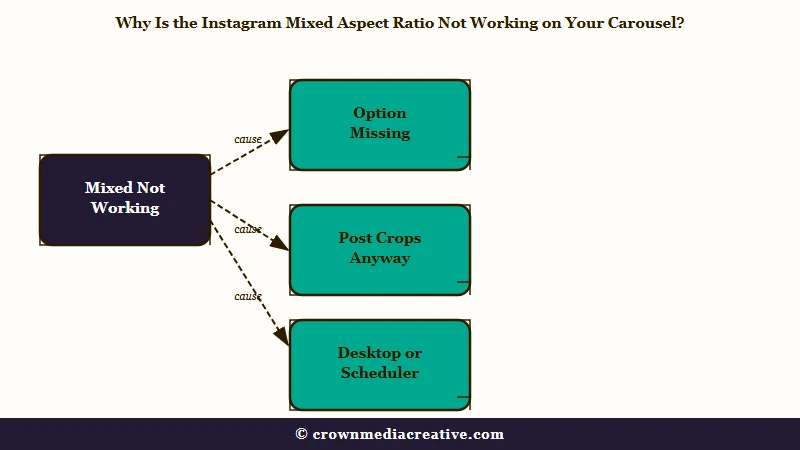
Why Is the Instagram Mixed Aspect Ratio Not Working on Your Carousel?
The Instagram mixed aspect ratio is not working because of one of three faults. Either the option is absent from the crop menu, the option is present but the published post crops anyway, or you are posting from a computer or scheduler where Mixed does not exist.
Sort yourself into a row of this table before you touch a setting. The wrong fix costs you an afternoon and a deleted post, because Instagram cannot change a carousel’s crop once it is live.
Its own help page on multi-photo posts says you cannot add photos or videos after sharing, and the crop choice is locked the same way.
| Symptom | Likely cause | Fix |
|---|---|---|
| Crop icon offers Portrait and Square but no Mixed | Every photo you picked has the same shape, so there is nothing to mix | Add one photo with a different orientation, or pick Original |
| Mixed vanishes the moment a video joins the selection | Instagram applies one crop to any carousel with video in it | Post photos only, or pad the video to your photos’ shape first |
| Mixed was there last week and is gone on one account | Meta switched the feature off for that account or that install | Test a second account on the same phone, try the draft-and-Edit trick below, then wait |
| Mixed selected, preview correct, post crops to one shape | Music was added, or the photos sit outside 1.91:1 to 3:4 | Remove the music, crop the photos to 3:4 or 4:5 before uploading |
| Old mixed posts turned cropped or stretched overnight | A server-side change re-rendered old carousels, as in December 2025 | Wait, the last wave reversed itself in six to eight weeks |
| No Mixed on desktop, Business Suite or a scheduler | Meta’s publishing API, the pipe every scheduler uses, crops every slide to match the first one | Post from the phone app, or pad every slide to one ratio |
The first three rows are the option being absent. The next two are the option being present and losing anyway. The last row is a different product with different rules.
The row I send most people to is the video one. The moment a clip is in the selection the button is gone, and nothing about your app or your account is broken.
Where Is the Mixed Aspect Ratio Option on Instagram?
The Mixed aspect ratio option is on the editing screen, not the photo picker. Select your photos, tap Next, then tap the crop icon at the bottom left of the first slide. Mixed only shows when the photos differ in shape.
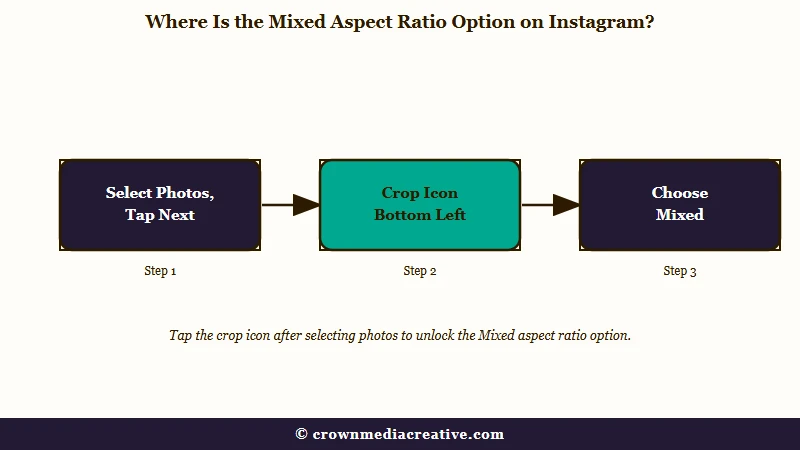
Instagram moved this control to the second step in late 2024, per one r/Instagram thread from that November, which is why it is so easy to miss on the picker screen.
The picker has a single crop toggle that applies to everything. That is the rule from 2017, when galleries first got landscape and portrait formats and every photo in a post had to share one orientation.
Here is the sequence I give people, and step 4 is the one that decides whether Mixed appears:
- Open Instagram, tap the plus button, and choose Post.
- Tap the multi-select icon and pick your photos. Include at least one portrait and one landscape shot.
- Tap Next.
- Tap the crop icon at the bottom left of the first slide.
- Choose Mixed. Portrait and Square force one shape onto every slide.
- Tap Next again, check every slide in the preview, then tap Share.
What the menu says depends on what you picked. When every photo shares one shape, Instagram shows Portrait or Square, and sometimes Original, because there is nothing to mix. Lindsey Gamble’s write-up of the March 2025 rollout described exactly that behaviour, and it still holds.
The order you tap photos in changes the menu too. In a 2024 thread the first photo had to be portrait for Mixed to show; in a 2026 thread picking a landscape photo first brought the icon back.
My rule is to pick the landscape shot first, every time, so the menu has no excuse.
Why Does the Mixed Option Disappear When You Add a Video or Music?
Mixed disappears on video carousels because Instagram applies one crop to any carousel that contains a video, and it breaks on music because adding a track re-renders the slides, mostly on Android. Both are app behaviour, and neither one means your account is broken.
Add a clip and the crop icon offers one shape for everything. That has been true since the feature launched. A June 2025 r/Instagram thread documented it and found the workaround: pick the photos only, choose Mixed, then use the add button at the bottom left of the edit screen to bring in the video.
That workaround is the one Google’s answer box still recommends, and since mid-July 2026 it has been failing. One thread from August 8 dates the break to between July 10 and July 14, and a September 5 post ran the exact photos-first sequence and watched every landscape photo revert to portrait. An October 16 post from an iPhone 17 hit the same wall.
If you need the video, make it the same shape as your photos before you upload. Pad a landscape clip to 4:5 or 3:4 with black bars in any editor and leave the photos alone. I would rather post the clip as a second post than accept a cropped carousel, and that is my default now.
Instagram’s own Edits app can do that padding now. Since October 7, 2026, its carousel editor on iPhone combines photos and videos on one canvas, lets you scale and rotate each one, and posts straight to Instagram, per PetaPixel’s report. Android support is still coming, and Instagram has not said whether each slide keeps its own shape there, so treat it as a padding tool for now.
Music is the quieter trigger. Since September 2024 the r/Instagram thread from that July has collected the pattern, mostly on Android: choose Mixed, add a track, and the landscape slides zoom in or crop to portrait after posting. Skip in-app music on mixed carousels.
There is one clever route if you want both. Turn one portrait photo into a short muted video clip, add that clip to the carousel, then add your music. That January 2025 workaround stopped the music from breaking the layout for the person who found it, and it costs nothing to try.
Did Instagram Remove the Mixed Aspect Ratio From Your Account?
Instagram has not announced removing Mixed, but it switches the option off for some accounts and some app installs in waves. December 2025, June 2026, July to August 2026 and mid-October 2026 each brought a round of “mixed ratio gone” complaints, and in earlier rounds the option mostly returned within weeks without any fix.
The newest round arrived around October 15, 2026. One iPhone 17 owner said Mixed disappeared after the app auto-updated that day, and a post the same day reported Mixed gone along with the button that turned a photo on its side.
If your rotate button went too, turn the photo in your phone’s own editor before you pick it in Instagram. On iPhone that is Photos, Edit, Crop, then the rotate button, per Apple’s guide, and on Android, in Google Photos, it is Edit, Crop, then Rotate, per Google’s help.
Two paired reports show the switch can sit on the account or on the install. On August 3, 2026 one account lost Mixed while the poster’s other account kept it. On January 31, 2026 the reverse happened: the same account could not post Mixed from its own iPhone but could from a husband’s Samsung.
The first case points at the account, since the poster’s other account still had Mixed, so an update, a cache clear or a reinstall cannot reach it. In the January case the same account worked on another phone, which points at the install, and there a reinstall is a coin flip. It brought Mixed back in February 2026 and did nothing a week later, in that same thread.
I do not tell anyone to reinstall until both tests below point at the install. It is the triage order that works for an Instagram black screen too.
Run these in order:
- Log into any other Instagram account on the same phone and start a photo-only carousel. If that account has Mixed, yours has been switched off, and only Meta can switch it back.
- Log into your account on someone else’s phone. If Mixed appears there, your install is the odd one out and a reinstall is worth the ten minutes.
- Try the draft trick. Pick your photos, save the post as a draft, reopen it, and tap Edit. In March 2026 that brought the option back for one poster.
- Shake the phone with Instagram open and send a report. Nothing else reaches Meta.
Then wait. The December 2025 wave, the biggest one, hit new and old posts alike.
Landscape slides in old carousels were cut down or stretched while the same posts displayed fine when shared to Facebook, per the thread tracking it. It repaired itself for the original posters between January 23 and February 6, 2026, six to eight weeks after it started, though some people still had it later in February.
What will not help: re-uploading the photos, downgrading the app, or making a new account. A fresh account in 2024 lost the option after three carousels, per the same 2024 thread, and Meta has said nothing about any of these waves since the March 2025 rollout announcement.
Why Do Mixed Ratio Photos Still Get Cropped After Posting?
Mixed keeps a photo’s shape only inside Instagram’s supported range, which is 1.91:1 wide to 3:4 tall. A 2:3 portrait, a 9:16 screenshot or a panorama gets cropped no matter what you selected, and the feed, the profile grid and the desktop site each render the result differently.
Instagram’s help page on image resolution puts the limit in numbers. At 1080 pixels wide, a photo keeps its ratio between 566 and 1440 pixels tall, and anything else “will be cropped to fit a supported ratio.” That 1440 figure is the 3:4 support Instagram’s head, Adam Mosseri, announced on May 29, 2025, quoted by 9to5Mac: “if you upload a 3:4 image, it’ll now appear just exactly as you shot it.”
Most of the guides you will find still say 4:5 is the tallest shape, and so does Google’s answer box. Meta’s own publishing API developer reference still says 4:5 too. Instagram’s help center and its API disagree with each other, and the app does what Mosseri said.
Before: A 2:3 portrait from a mirrorless camera, exported at 1080 by 1620 pixels and dropped into a Mixed carousel. Instagram trims 180 pixels of height to reach 3:4, and the preview never warns you.
After: The same photo exported at 1080 by 1440, which is 3:4, from Lightroom or the phone’s crop tool, with the framing chosen by you. Mixed keeps it whole. A landscape wider than 1.91:1 gets the same treatment, padded to 1080 by 566 by you instead of cropped by Instagram.
That range covers every photo you share, so a single photo follows the same rule as a carousel slide. A lone 9:16 screenshot is cropped to fit on upload, and padding it to 3:4 with borders before you post is the only way to keep all of it.
To choose the crop yourself, Instagram’s crop steps are Edit, then Adjust, then pinch and drag the photo inside the frame. If a post looks whole in your feed but cut on your profile, that is the 3:4 grid thumbnail covered below.
The other reason a correct post looks cropped is where you are looking at it. In an r/photography thread from August 2026, the profile grid showed every image whole while the main feed cropped the same carousel. The desktop site has its own display bug for mixed posts that the iOS app does not.
The feed is a different renderer from the grid, and how the feed ranks posts has nothing to do with which crop it shows.
One post-publish crop control exists and it is smaller than it sounds. Adjust preview, in the three-dot menu on the post, changes only the 3:4 thumbnail on your profile grid. It does nothing to the feed, and nothing in the app changes a live carousel’s crop, so a wrongly cropped post is a delete-and-repost job.
Deleting slides from a live carousel and restoring them to reorder strips Mixed and puts black borders on the portraits, per a January 2026 report. Instagram’s multi-photo help page now describes a built-in reorder, under the three-dot menu, Edit, then a long press, but it does not say whether Mixed survives the move.
The crop itself happens at upload, which puts it in the same family as Stories that refuse to save and photos that post darker than your camera roll. In each case the file on your phone is fine and only Instagram’s copy changed.
Can You Post Mixed Aspect Ratios From Desktop, Business Suite or a Scheduler?
No, Mixed aspect ratio exists only in the Instagram phone app. Meta’s publishing API, used by every scheduling tool, crops each carousel item to the first one’s shape and defaults to square, and Business Suite applies the same one-shape rule. The API caps carousels at 10 slides, not 20.
What is the publishing API: The connection Meta provides so tools like Buffer and Sprout can post to Instagram for you. It has its own carousel rules, and they are stricter than the app’s.
This one is written down, which makes a change. Meta’s content publishing documentation says carousel images “are all cropped based on the first image in the carousel, with the default being a 1:1 aspect ratio”, and limits a carousel to 10 items. The app allows 20.
Buffer’s help center repeats the rule and adds that the crop “is the same in Buffer and Instagram”, which has not been true of the app since 2025. Sprout Social’s help center says the same and blames the API for its 60-second video cap.
And Meta Business Suite still warns that anything taller than 4:5 will be auto-cropped, against the 3:4 the app accepts, per an August 2026 report.
| Where you post | Mixed option | Crop rule | Slide cap |
|---|---|---|---|
| Instagram app on a phone | Yes, photo-only carousels, when the account has it | Each photo keeps its shape between 1.91:1 and 3:4 | 20 |
| instagram.com on a computer | No | One orientation for every slide, per Instagram’s help page | 20 |
| Meta Business Suite | No | One shape for all slides, warns above 4:5 | Not stated by Meta |
| Buffer, Sprout, Metricool and other schedulers | No | Every slide cropped to the first one, default square | 10 |
Two ways around it. Pad every slide to one ratio before uploading, which is what every scheduler expects anyway and what I still do for client carousels that must go out on a timer.
Or schedule the post as a reminder and publish from the phone when the notification fires, the same route scheduling from a Facebook profile falls back to whenever a feature is app-only.
Frequently Asked Questions
Did Instagram remove the mixed aspect ratio option?
No, Instagram has never announced a removal. The option is switched off for some accounts and installs in waves, most recently in mid-October 2026, and earlier rounds usually ended within weeks. Test a second account on the same phone to confirm it is your account.
Why does the mixed ratio option disappear when I add a video?
Instagram applies one crop to any carousel that contains a video, so Mixed leaves the menu the moment a clip is selected. The photos-first workaround from 2025 has been failing since mid-July 2026. Pad the video to your photos’ shape, or post it on its own.
Can I post a mixed aspect ratio carousel from a computer or a scheduling app?
No. The desktop site, Meta Business Suite and every scheduler apply one shape to every slide, and the publishing API behind schedulers crops all slides to the first image and defaults to square. Post mixed carousels from the phone app, or pad every slide to one ratio first.
Why do my old mixed ratio posts look cropped now?
A server-side change in December 2025 re-rendered published carousels, cutting or stretching landscape slides, and reversed itself after six to eight weeks. Deleting and restoring slides to reorder a live carousel strips Mixed for good, so avoid that trick.
What photo sizes does Mixed keep without cropping?
Anything between 1.91:1 wide and 3:4 tall at 1080 pixels wide, so 566 to 1440 pixels of height. Photos taller than 3:4, such as 2:3 or 9:16, and panoramas wider than 1.91:1 are cropped even with Mixed selected. Crop or pad them yourself first.
Does adding music break mixed aspect ratio on Instagram?
Often, and mostly on Android. Adding a track can zoom or crop landscape slides after posting even though the preview looked right. Post the carousel without music, or add the music to a muted video clip made from one of the photos.
Quick Takeaways
- Mixed only shows for photo-only carousels with different photo shapes, on a phone, on an account that currently has it.
- A video or a music track removes Mixed or crops the slides after posting, and the photos-first video workaround has been failing since July 2026.
- Instagram keeps shapes only between 1.91:1 and 3:4, so crop 2:3 and 9:16 photos to 3:4 yourself before uploading.
- Desktop, Meta Business Suite and every scheduler force one shape onto every slide, so post mixed carousels from the phone app.
- If the option vanished from one account and not another, wait it out. The December 2025 wave fixed itself in six to eight weeks.

