
Can’t Follow People on TikTok? Why It Unfollows Them
Can’t Follow People on TikTok? Why It Unfollows Them
When TikTok unfollows someone the moment you tap Follow, the follow never saved. Which block you hit, how long each one lasts, and what has cleared them.
- 1Why Does TikTok Automatically Unfollow People You Just Followed?
- 2Did You Get an Error Message or Did the Follow Just Vanish?
- 3How Long Does a TikTok Follow Block Last in Practice?
- 4How Do You Test Whether the Block Is on Your Account or Your Device?
- 5Why Do Cache Clearing and Reinstalling Not Fix This?
- 6What Fixes Have Worked for a Silent Follow Block?
- 7Why Did Your TikTok Suddenly Follow Thousands of Accounts?
- 8Quick Takeaways
The Short Answer: There are two versions of this problem and they need opposite responses. If TikTok showed you a notice about following too fast, you tripped its spam limit, which usually lifts within a day or two. If the button flipped back with no message at all, a restriction is sitting on your account, your device or your network, and clearing the cache is unlikely to touch it.
When TikTok automatically unfollows someone the moment you tap Follow, the tap reached TikTok and TikTok declined it. Your screen caught up a few seconds later. When every tap ends that way, you can’t follow people at all until the block is lifted.
Almost every page on this subject treats it as one problem with one checklist. Clear the cache, update the app, reinstall, restart the phone. That loop fixes the version of this that would have cleared on its own anyway, and it does nothing for the version that keeps people stuck for months.
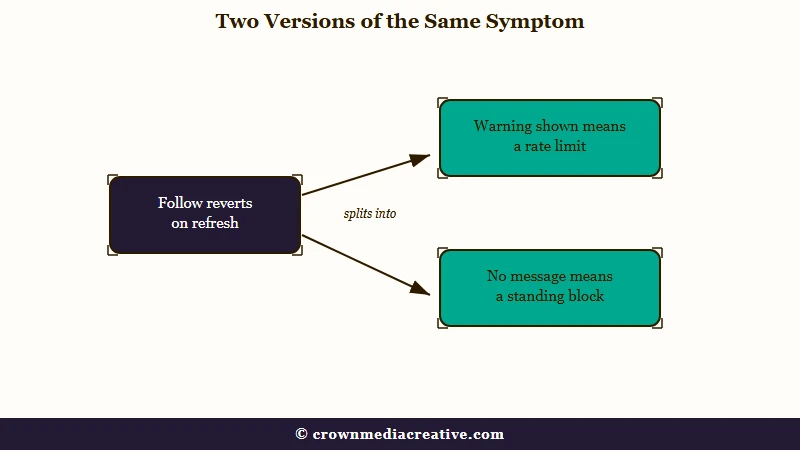
Start with one question: did TikTok say anything to you? The answer splits this into two problems with different causes and different fixes. Almost nothing written about it makes that split.
Everything below was rechecked in October 2026 against TikTok’s help pages, its own enforcement data and the newest reports from people stuck in this.
Why Does TikTok Automatically Unfollow People You Just Followed?
TikTok automatically unfollows people you just followed when its spam systems reject the follow on the server while your screen has already shown it as accepted. The follow never completed. Refreshing the page shows you what TikTok recorded, which is nothing.
TikTok’s systems do this at enormous scale. The raw data behind its Community Guidelines Enforcement Report counts 5,979,079,449 fake follow requests prevented from January to March 2026, about 66 million a day. The same file puts the third quarter of 2021 at 2,078,453,724, the figure NATO StratCom’s analysis quoted at the time, and the count has stayed between 4.8 billion and 21.5 billion a quarter since 2022.
A filter blocking tens of millions of follows a day produces false positives, and the people caught in them are the ones searching for this. TikTok also removes follows after they register, 6,148,957,496 fake followers in that same quarter, so a follow that vanishes days later is a different event from one that flips back in seconds.
The first thing I rule out is the boring cause: the following ceiling. TikTok’s help never states one, but the cap people report hitting is 10,000 accounts, and at that number every new follow bounces until you unfollow someone. If that is you, nothing else on this page applies.
Did You Get an Error Message or Did the Follow Just Vanish?
The visible error and the silent revert are two different problems. A notice about following too fast is a spam limit that usually lifts within a day or two. A silent revert is a standing restriction that waiting will not reliably clear.
TikTok’s help article on the “too fast” notices says the one about following appears “if you follow a lot of accounts too quickly.” It adds: “To prevent spam, we may temporarily disable a person’s account under these circumstances.” The wording I read on October 10, 2026 names no duration at all.
A 24-hour figure does turn up in TikTok’s support replies, including ones sent to people whose follows reverted with no notice. A ticket answer quoted on r/TikTok in May 2026 reads: “We’ve detected some unusual engagement behavior on your account, so your follow function might be temporarily unavailable as a result.” Its first suggestion is to “Avoid using the ‘Follow’ button for 24 hours.”
For the silent case, TikTok’s following and unfollowing help offers only a generic list: switch between Wi-Fi and mobile data, refresh your following list several times, clear the app video cache and update the app. If that fails, it asks you to “send us feedback with additional details and screenshots.”
This split is the first question I ask, because it decides everything after it. Read the table before trying any fix.
| What you saw | What it usually means | What helps |
|---|---|---|
| A “following too fast” notice | A rate limit you tripped by moving fast | Stop following for a day or two, then resume slowly |
| Following count is exactly 10,000 | The reported ceiling on total accounts followed | Unfollow some accounts first |
| Button flips back on refresh, no message at all | A standing restriction on the account, device or network | Escalation to a human reviewer |
| Only accounts with millions of followers work | The same standing restriction, partly applied | Escalation to a human reviewer |
| Follows revert only on the PC website | A block on that surface, or on the account itself | Try the phone app before changing anything else |
| Your following count jumped on its own | A connected app or a compromised account | Revoke app permissions, then secure the account |
How Long Does a TikTok Follow Block Last in Practice?
A follow block that came with a “too fast” warning usually clears within a day or two. A silent restriction has no published duration at all, and people stuck in one report months rather than hours. That gap is why the standard advice fails.
I have no patience for the 24-hour figure being applied to every case, because the silent version does not respect it. In a long-running r/TikTok thread on this, open since December 2024, people report about six months, a year and about two years without following anyone, with support no help the whole way through. A cooldown would have expired long before that, so these accounts are carrying a flag that support has not cleared.
There is a second reason the timing advice misleads people. A brand-new account can hit this on its very first follow, which rules out speed as the cause. One returning user in that thread said a fresh account could not follow anyone for two weeks, and the block was back after a month away.
A new account in a September 2026 r/TikTok post saw something stranger. Its follows and likes were gone on a second visit, yet its For You feed still started showing related videos, and editing the bio drew a “you’re editing too fast” notice.
How Do You Test Whether the Block Is on Your Account or Your Device?
Two quick tests separate an account-level restriction from a device or network one. Try following an account with millions of followers, then try your account on a different phone or network. The results tell you which layer is flagged.
These are the tests I run before touching a single setting, because each takes under a minute and together they rule out most of the usual checklist.
- Try a very large account. Accounts with roughly ten million followers or more often still work while ordinary accounts bounce. If the big ones stick and the small ones revert, the restriction is real and it sits on your side rather than in the app.
- Sign in on someone else’s phone. If your follows hold there, your account is fine and your device or network is what TikTok has flagged.
- Switch off any VPN and change networks. Shared and rotating IP addresses get scored as automated traffic, so a VPN or a busy public connection can produce this on a clean account.
- Compare the app against the website. The restriction is not always applied to every surface, and one working surface is a strong sign your account is intact.
Test two is the one that surprises people. The poster of a February 2026 r/learnTikTok thread was still stuck four months later, then followed people by logging into a friend’s phone. That means the flag can sit on the device or its connection rather than on the profile.
A run of r/TikTok and r/learnTikTok posts in August and September 2026 describes follows undoing themselves a few seconds after clicking Follow on the PC website. The cases include a year-old account following about 30 people and a screen recording from someone with no phone. The only advice those threads offered was to follow from the phone app or to wait a few days.
Why Do Cache Clearing and Reinstalling Not Fix This?
Clearing the cache and reinstalling cannot fix a rejected follow because the follow was never stored on your phone. Your device drew the button in its new state before TikTok answered, so there is no local data to clear.
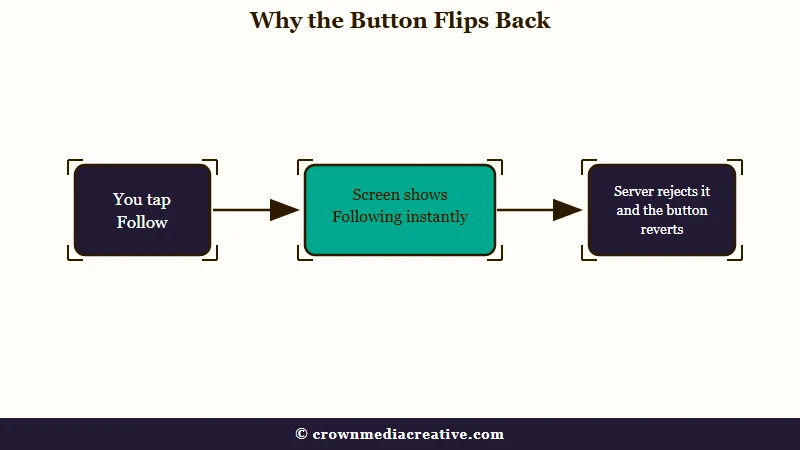
What is optimistic UI: A design pattern where an app instantly shows the result you expect, then quietly corrects itself if the server disagrees.
Every major app works this way, and it is the reason the button feels instant. Duolingo’s engineering team describes the tradeoff in its write-up on frontend prediction. The interface commits to the likely outcome so the product feels fast, and it has to roll back when the prediction turns out wrong.
The app does tell you the truth in the end, and the delay is what misleads you. The rollback arriving a few seconds later is the correction, so the follow never existed on TikTok’s side even for a moment.
This is the same mechanism behind liking and unliking a video and behind comments that get flagged after they appear to post. Once you know the pattern, the fix list on most pages reads as advice for a problem you do not have.
Clearing the cache only helps in the rarer case of a display fault, a following list that shows wrong while the follows themselves are saved. TikTok’s own checklist fits that case better than a rejected follow, since it opens with “If you are having trouble with your following or follower list.”
What Fixes Have Worked for a Silent Follow Block?
A silent block has to be lifted on TikTok’s side. The in-app support chat with a specific complaint category has cleared it for some people, and a ticket with a screen recording is the next step when the chat blames unusual engagement.
The order I use here matters, because the first route is free and takes two minutes and the second one costs you a screen recording.
- Open Settings and privacy, then Report a problem.
- Scroll to the bottom and start the chat under the option for more help.
- Choose Interaction, then I cannot follow others.
- If the automated reply says it has fixed a feature error, test a follow before closing the chat.
- If it reports unusual engagement on the account instead, escalate to a ticket and offer a screen recording of the button reverting.
The chat route comes from a May 2026 reply in the long-running r/TikTok thread on this problem, and the next reply shows the other branch, a bot that reported “unusual engagement” instead. That branch is where the recording earns its place, because TikTok’s own help asks for “additional details and screenshots” once its checklist fails.
Even a reply does not guarantee the fix holds. One user who got the 24-hour answer in May 2026 could follow for a week before the block returned.
Before: “It unfollows people I follow. I have tried every way to fix it and it’s still not working, how do I fix this.”
After: “Since 3 September, every account I follow reverts to Follow within 15 seconds on refresh. It happens on the app and on the mobile site, on wifi and on cellular, with no VPN. I have followed 4 accounts total this month. Screen recording attached.”
The first version is a real February 2026 ticket, and TikTok closed it with a template: “we can confirm this isn’t a bug. Sometimes, certain app behaviors may result in limited access to specific features.” The second gives a reviewer dates, a count that rules out spam, the surfaces tested and proof, which leaves far less reason to bounce it.
Adding a phone number to the account is worth trying too, though results are mixed. In the long-running r/TikTok thread on this problem, one new account could follow the moment its number was added in December 2025. Another verified a number in January 2026 and still could not, and a third could not find the setting at all.
Why Did Your TikTok Suddenly Follow Thousands of Accounts?
A following count that climbs on its own is the opposite problem and a more urgent one. People report counts jumping from about 100 known accounts to 1,300, and refilling to 10,000 a day after they unfollowed thousands, sometimes with no unfamiliar logins.
This one is not your doing, and it is the case I would escalate fastest. One user in an r/TikTok thread running since May 2025 unfollowed 2,000 to 3,000 accounts over a few days and was “magically back to 10k” the next day, a number nobody reaches by hand overnight.
Changing your password does not undo it, because the follows are already recorded and a new password does not reverse them. In a February 2026 thread one user found no suspicious logins and no linked services, and another said the random follows stopped on their own, so nobody has pinned down a single cause.
Check your authorised apps first, then your active sessions under Settings and privacy, Security & permissions, Manage devices, then your recovery email and phone. If any of those look wrong, treat it as a compromise and work through recovering a hacked account rather than a following problem. TikTok’s May 2026 reply to a can’t-follow ticket asks for the same checks: log out of “any unrecognized devices” and make sure the account “isn’t linked to any unauthorized third-party apps or follower growth tools.”
The silent block hits a new brand account hardest. It cannot follow the creators or customers it wants to reach, and nothing in the app says the flag is there or when it will lift.
That is the strongest argument I know for building an audience you own outright next to the platform one, since a flag you cannot see or appeal should not decide who you can reach.
If you also cannot post or sign in cleanly, the restriction may be broader than following, and a locked TikTok account is a different fix path.
Quick Takeaways
- Check whether TikTok showed you a message first, because the loud version and the silent version need opposite responses.
- A “following too fast” notice usually clears within a day or two. TikTok’s help names no duration.
- A silent revert with no message has no published time limit and has left people stuck for months.
- Try following an account with millions of followers, then try your account on another phone, before changing any setting.
- If follows revert only on the PC website, try the phone app before anything else.
- If the following count jumped on its own, treat it as a security problem and check authorised apps before anything else.

