
Why Is My TikTok Lagging When Every Other App Runs Just Fine
Why Is My TikTok Lagging When Every Other App Runs Just Fine
TikTok lagging while every other app runs fine? Here is how to tell a server outage from a phone problem, and the fixes that genuinely work.
- 1Why Is TikTok So Slow When Your Other Apps Are Fine?
- 2How Do I Tell If TikTok Is Down or If It’s My Phone?
- 3Does Clearing the TikTok Cache Fix Lag?
- 4Why Does TikTok Keep Buffering Partway Through a Video?
- 5Why Does Turning Off WiFi Fix TikTok Instantly?
- 6Why Does Only One of My TikTok Accounts Lag?
- 7Why Did TikTok Get Laggier in 2026?
- 8How Do I Fix TikTok Lagging and Speed It Up?
- 9Quick Takeaways
The Short Answer: TikTok lag starts in one of three layers: TikTok’s own systems, the network route between you and them, or your phone. Each one needs a completely different fix. If Instagram Reels and YouTube play fine on the same phone, work out which layer broke before you touch a single setting.
Why is my TikTok lagging when every other app on the same phone runs fine? People ask it in those exact words, and it has three different solutions depending on which layer broke.
You open TikTok, the first video hangs on a grey frame, and the comments spin forever. Then you swipe to Instagram and everything loads instantly. That combination drives people slightly mad, because it rules out the two things everyone tells you to blame.
Most troubleshooting guides hand you the same list of twelve fixes regardless of what is broken. About half of those fixes cannot possibly help if the fault sits on TikTok’s side of the wire.
I want to give you the diagnostic first and the fixes second. Within about thirty seconds you will be able to tell whether the problem is TikTok’s servers, your network route, or your phone, and you will know which popular fixes to skip entirely.
Why Is TikTok So Slow When Your Other Apps Are Fine?
TikTok can be slow or stutter while every other video app runs perfectly because it uses its own delivery network, its own caching behaviour, and its own servers. Reels working proves nothing about your connection to TikTok.
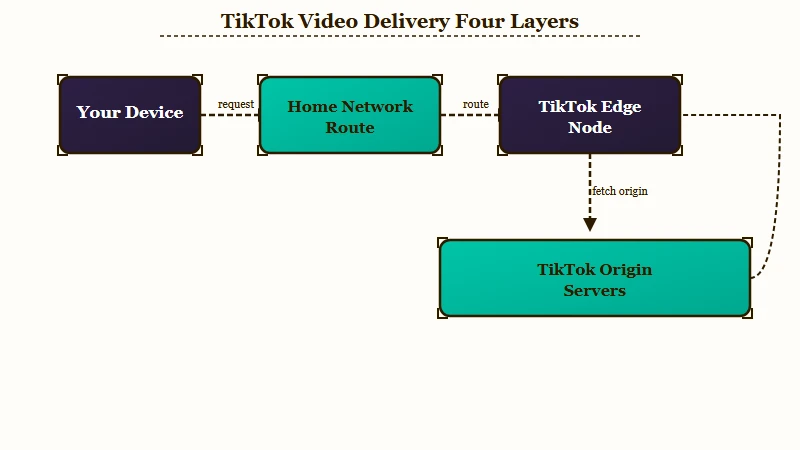
Each video app takes its own route to your phone. TikTok runs a large in-house delivery network alongside outside providers such as Akamai, and Netify’s map of the service says that in-house network “is often hosted inside Internet Service Provider (ISP) networks”. When I read it on 17 October 2026, Netify counted 2,234 addresses on that in-house network and 77,530 on Akamai, with TikTok’s cloud servers mostly on Volcengine (628), Zenlayer (107) and Oracle Cloud (81).
What that means in practice: your phone can have a clean, fast path to YouTube and a congested or broken path to the specific TikTok node serving your videos. Same wifi, same router, completely different journey.
The way I see it, this single fact explains most of the confusion. People treat “everything else works” as proof their setup is fine, and that is the assumption to drop first.
How Do I Tell If TikTok Is Down or If It’s My Phone?
Check whether the failure is universal or personal before you change any setting. If likes, view counts and comment sections are failing alongside playback, the fault is server-side and nothing on your phone will fix it.
Google search data from January 2026 shows searches for “how to clear tiktok cache” jumping to 8,100 in a month when the actual fault was a data centre failure hundreds of miles away. Thousands of people scrubbed their phones clean for a problem their phone had no part in.
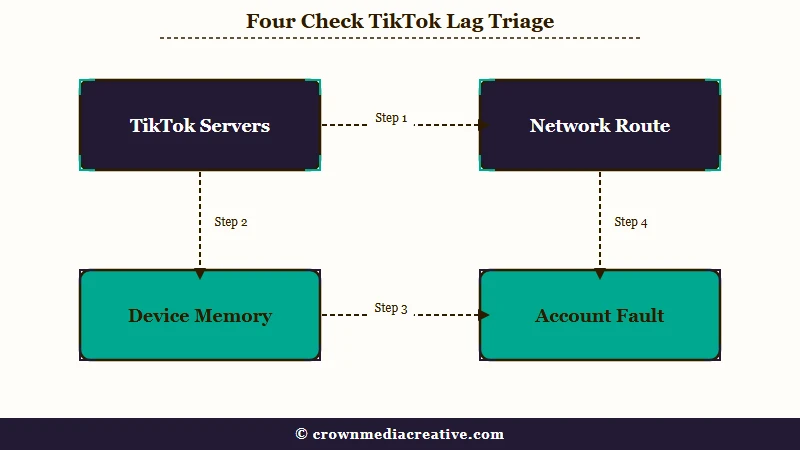
I use a quick symptom triage instead. Match what you are seeing to the column on the left to find the layer.
| What you are seeing | Where the fault is | What genuinely helps |
|---|---|---|
| Views, likes and comments all fail to load, uploads stall | TikTok servers | Nothing local. Wait it out. |
| Force closing helps for about two minutes, then it returns | Your phone’s memory | Restart the device, update WebView, free storage |
| Switching off wifi onto mobile data fixes it instantly | Your network route | Change DNS, restart router, or stay on data |
| Only one of your accounts lags, others are fine | Your account on TikTok’s side | Log out fully, wait, log back in |
| Video plays then freezes around the one minute mark | Delivery or connection speed | Lower playback quality, check the route |
| Video freezes mid-play but restarts the moment you nudge the progress bar | The app’s video player | Nudge or scroll to restart it, then install the next update |
If you take nothing else from the table, take the first row. It is the one that saves you the most wasted effort.
Does Clearing the TikTok Cache Fix Lag?
Clearing the cache can help, but it is not the first thing to try. TikTok’s own troubleshooting page lists it fourth, after restarting, updating and checking your connection, and suggests it when connectivity is not the problem or the app is taking up too much storage.
TikTok caches the videos you scroll past so playback starts instantly, and its help says clearing that cache “removes temporary files that may be causing issues.” Expect clips you have already watched to load from scratch the next time they come round.
On the cache, I agree with TikTok. I clear it when storage is tight or when restarting, updating and checking the connection have not helped, never as the opening move.
There is a real hazard sitting next to this one. On Android, the “Clear data” or “Clear storage” button lives directly beside “Clear cache”, and it behaves nothing like it.
Before: Settings, Apps, TikTok, Storage, then tapping Clear data because it sounds more thorough. After: Settings, Apps, TikTok, Storage, then tapping Clear cache only, leaving Clear data alone.
Your drafts live on the phone. They are not backed up to TikTok’s servers and they do not follow you to a new device, so Clear data, a reinstall, or a factory reset erases them permanently.
The safest route is TikTok’s in-app tool: Profile, the Menu button, Settings and privacy, then Free up space, where you tap Clear next to Cache and Clear again to confirm. Cache, Downloads and Drafts sit on separate rows of that screen, so clearing Cache leaves your drafts alone.
Why Does TikTok Keep Buffering Partway Through a Video?
Buffering partway through a clip often means the app has played the opening chunk it preloaded and cannot fetch the rest fast enough. On longer videos that tends to happen near the one minute mark. A different fault produced the same symptom in May 2026, so check which one you have.
Watch what happens next time. The video opens instantly and plays smoothly, which feels like proof your connection is fine, and then it stalls at roughly the same point every time. That is the preloaded segment running out.
A fast speed test does not settle it. The test measures the route to the test server, and TikTok may serve your video over a different one, which is how the same connection can stream YouTube without a stutter.
A one minute stall usually points at the route or the servers. A phone too weak to play the video would struggle from the first second. Dropping playback quality in the app’s data saver settings helps here, because a smaller file needs less throughput to stay ahead of you.
The May 2026 wave behaved differently. US searches for “why does tiktok keep buffering” went from 10 in April to 2,400 in May and back to 110 in June, while searches for “tiktok down” did not rise at all.
An r/TikTok thread started on 15 May by someone who had already cleared the cache and updated the app drew dozens of replies, and one reads: “It’s not internet based buffering. The video starts playing again instantly if you just slightly scroll to a different spot of the video.”
Others said the same freeze hit on wifi and mobile data alike, and replies saying it was still happening kept arriving into late August. A clip that restarts the instant you nudge the progress bar points at the app’s player, because a weak connection would leave it stalled after the nudge too. If yours behaves that way, nudge the bar or scroll away and back to restart it, and install the next app update when it arrives.
Why Does Turning Off WiFi Fix TikTok Instantly?
Switching to mobile data forces a fresh connection through a completely different route, which sidesteps a bad path between your provider and TikTok’s servers. It is a diagnostic as much as a fix.
If mobile data cures it in seconds, your phone is fine and TikTok is up. The break sits in the middle, usually in how your home network resolves and routes to the nearest TikTok node.
I would not live on mobile data to work around this. Restart the router first, and if it keeps happening, change the DNS on your router or phone to a public resolver, which often hands you a healthier route.
Separate this from a reach problem, because the two feel similar from the creator side. If your videos load fine but nobody is seeing them, that is a different diagnosis entirely and why your TikTok views drop covers that ground properly.
Why Does Only One of My TikTok Accounts Lag?
Lag can attach to a single account while other accounts on the same phone run perfectly, which points at account-level processing rather than your device. Users with three profiles regularly report one crawling and two behaving.
Your feed is generated per account. When the profile data, recommendation processing or verification state behind one account gets stuck, that account gets a slow experience while the others sail past on identical hardware.
What I would try here is a full log out, which is the only local lever worth pulling: sign out, wait a few minutes, and sign back in. If signing back in is where things break down rather than playback, that is a separate problem and getting locked out of TikTok walks through the recovery path.
Why Did TikTok Get Laggier in 2026?
US TikTok now runs on Oracle infrastructure under the TikTok USDS joint venture, and two data centre incidents in early 2026 produced the biggest spikes in outage searches of the past year. Outage complaints have eased since: US searches for “tiktok down” fell to 9,900 a month in August and September 2026, below the 12,100 to 14,800 of late 2025.
The first hit landed in late January 2026, when severe winter weather knocked out power at a major Oracle data centre. On 26 January the joint venture posted on X that it was “working to restore our services following a power outage at a U.S. data center,” a statement TechCrunch carried that day. It announced restoration on 1 February.
If your follower count fell that week too, the likelier cause is the wave of US users who deleted the app after the January takeover, as why you lose TikTok followers explains. That guide also shows how to tell a counting glitch from people really leaving.
The second came on 3 March 2026 at 13:24 UTC, centred on Oracle’s US East region in Ashburn, Virginia, producing connection timeouts, errors and raised latency. TechCrunch covered the second outage, and the joint venture warned on X that creators might see lags in posting.
What convinces me these were infrastructure failures rather than app problems is how precisely the search record tracks them. “TikTok down” ran at about 12,100 searches a month through 2025, hit 246,000 in January 2026, settled, then spiked again to 49,500 in March. “TikTok not working” went from roughly 4,400 to 110,000 across the same January.
Plenty of users assumed an active server migration from overseas was the cause, but US user data had been housed domestically well before operations transferred, so the migration explanation does not hold. These were data centre failures.
Users also floated deliberate throttling of certain topics during the transition. TikTok denied it, and reporting at the time treated the weather and infrastructure explanations as genuine.
Nothing on that scale has repeated since March. A smaller outage hit on the evening of 30 September 2026, when see.news cited 2,679 Downdetector reports at 8:35 p.m. ET and a disruption of about 42 minutes, with no cause named by TikTok.
The app has kept shipping through the autumn. Apple’s App Store listing puts the current iPhone build at version 47.1.0, released on 7 October 2026, with release notes that say only “Squashed bugs for better experience.”
That version number is worth checking against your own before you blame anything else. The 43.x.x line that broke search results for some accounts sits four major versions back now, so a phone that has not updated in months is running code TikTok has already moved past.
The app’s own size has quietly grown into the storage advice everyone repeats. That same listing reports an app size of just over 1 GB (1,054,171,136 bytes) before you have watched a single video, about 50 MB more than the August build. TikTok’s video cache stacks on top of that.
On a handset that is already close to full, a gigabyte of app plus a multi gigabyte cache leaves very little free storage. An app with nowhere to cache has to refetch video it would otherwise have kept on disk. Apple still lists iOS 14.0 as the minimum, so the app installs on hardware going back several generations.
How Do I Fix TikTok Lagging and Speed It Up?
Work from the outside in: confirm the servers are healthy, then test the network route, then fix the phone. Doing it in the other order wastes the most time.
TikTok’s own troubleshooting page starts on the phone instead: restart the app and phone, update, check the connection, then clear the cache. I move the connection test up because it takes seconds and tells you whether the phone is even the problem. Here is the sequence I would run, in this order:
- Check whether likes, comments and view counts are also failing. If they are, stop here and wait, because the fault is not yours.
- Turn off wifi and load TikTok on mobile data. If it works, the problem is your network route.
- Still broken on mobile data? Restart the phone, which clears the memory pressure that makes force closing work for only a couple of minutes. If the battery is low, TikTok’s help also suggests closing apps you are not using and dimming the screen.
- Update TikTok from the app store, and your phone’s software too, which TikTok’s help also recommends. Specific releases have shipped real regressions, with the 43.x.x line breaking search results for some accounts.
- On Android, update Android System WebView too, the system component apps use to display web content inside themselves. It is the one cause on this list that iPhones do not share.
- Free up device storage until you have several gigabytes spare, then use the in-app Free up space tool. Never the Android Clear data button. The app alone accounts for about a gigabyte of what you are clearing around.
- Lower video quality in data saver settings if stalls keep landing mid video.
- Log out of the affected account fully, wait a few minutes, then log back in.
Steps one and two take under a minute together and they decide whether steps three through eight are even worth attempting. If nothing on the list works, TikTok’s help says to tap “Need more help?” at the bottom of its troubleshooting article and submit a ticket.
| Fix | Android | iPhone | Risk to drafts |
|---|---|---|---|
| In-app Free up space | Settings and privacy, Free up space | Settings and privacy, Free up space | None, safe |
| System clear cache | Apps, TikTok, Storage, Clear cache | Not available, use the in-app tool | None, safe |
| Clear data or Clear storage | Avoid entirely | No equivalent button | Deletes all drafts permanently |
| Delete and reinstall | Last resort only | Last resort only | Deletes all drafts permanently |
If your uploads are the thing hanging rather than playback, that behaves differently again, and private videos stuck under review explains what is happening there. Odd interface faults that survive every fix on this list, like buttons that stop responding, tend to be app bugs, and the TikTok collections glitch is a good example.
Quick Takeaways
- If likes, comments and view counts fail alongside playback, the fault is on TikTok’s servers and no phone fix will touch it.
- Other apps working fine proves nothing, because TikTok runs its own delivery network and its own routes.
- Clear the cache after restarting, updating and checking your connection, which is the order TikTok’s own troubleshooting page uses.
- Never tap Clear data or Clear storage on Android, since your drafts live only on the phone and vanish with it.
- Test mobile data before changing any settings, because it separates a network routing problem from a device problem in about ten seconds.
- A clip that freezes mid-play and restarts the moment you nudge the progress bar points to an app fault, as in May 2026, so install the next update rather than reset your router.

