
Is Kicksta Legit and Worth It Once You Read the Fine Print
Is Kicksta Legit and Worth It Once You Read the Fine Print
Is Kicksta legit? It is a real company, but its own terms put the Instagram ban risk on you. See the costs, the cancel rules and who should
Bottom Line: Kicksta is a real, registered company that delivers the automation it sells, so it is not a scam that takes your money and vanishes. It works by logging into your Instagram and following, liking and unfollowing people for you, which Instagram says can get an account limited, disabled or terminated. Its own terms put that risk on you, so test it on monthly billing or skip it if the account pays your bills.
Is Kicksta legit? As a business, yes: Kicksta is run by a registered San Diego company and has sold Instagram growth since at least 2018.
The harder question is what it does to your account while it works. Kicksta logs in as you and follows, likes and later unfollows people in your niche, so some of them follow you back. Instagram’s own help center warns that apps which get followers this way can cost you the account.
Kicksta’s own words settled the follower question for me. Its public replies to reviewers confirm that new accounts start in a “growth pod,” which promotes them through outside communities, and that it does not directly filter the followers those pods bring. Its terms also say it cannot protect you from fake followers.
Each claim below links to its source, most of them Kicksta’s own pages, so you can check the fine print yourself.
Is Kicksta Legit?
Kicksta is legit as a business: a registered US company with a published address, public terms and a growth service on sale since 2018. Its weak point is customer trust, at 1.9 out of 5 on Trustpilot.
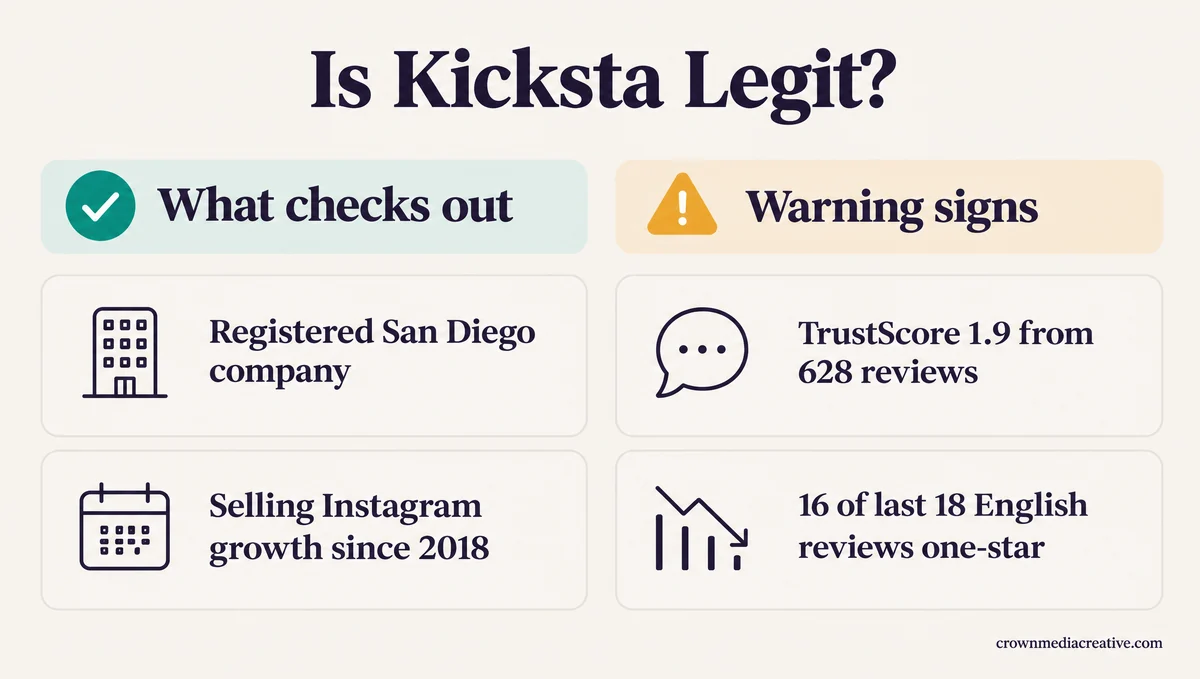
Kicksta’s terms of service name the company behind it as Galvin and Mathews Trade LLC, at 715 J St. in San Diego, California.
The earliest archived copy of kicksta.co, from July 2018, already sells “real followers for Instagram,” and today’s pricing page claims more than 47,500 paying customers.
A scam takes payment and delivers nothing. Kicksta delivers the automated follows and likes it sells, and it answers complaints in public, so the scam label does not fit.
Its reputation is another matter. Trustpilot gives it a TrustScore of 1.9 from 628 reviews, split mostly between 258 one-star and 222 five-star ratings.
The trend worries me more than the average. Of the 18 English reviews posted in the 12 months to October 14, 2026, 16 are one-star and 2 are five-star.
Kicksta has claimed that Trustpilot profile and replies to most one-star reviews in detail. Those replies explain more about how the service works than its marketing does.
How Does Kicksta Work?
Kicksta works by logging into your Instagram with your password and following people who follow the accounts and hashtags you pick. It likes up to three posts of anyone who follows back, then unfollows the rest.
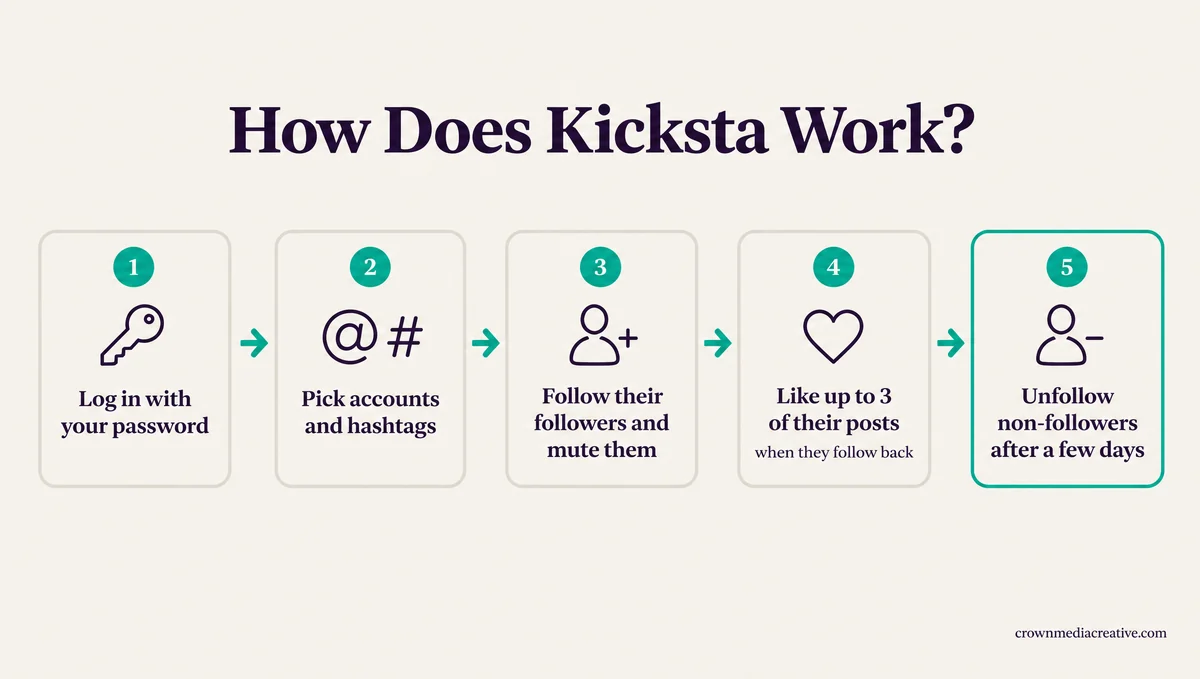
The unfollow step surprises me most, because Kicksta later unfollows the accounts that did not follow you back, and that clean-up can pause new activity for days. Here is the full cycle as Kicksta’s guide and pricing page describe it:
- You connect your Instagram username and password. Kicksta’s pricing page says “Instagram has no official way for a service to engage on your behalf without it.”
- You add sources, the accounts and hashtags your audience already follows: up to 10 on the Growth plan and up to 30 on Advanced.
- A warm-up of 24 to 72 hours starts slowly, then activity builds day by day.
- Kicksta follows people from those sources as you and mutes them, so they stay out of your feed.
- When someone follows back, Kicksta likes up to 3 of their posts.
- After a few days it unfollows the accounts that did not follow back, which keeps your following count from ballooning.
That unfollow phase can be large. In a reply to one customer, Kicksta explained more than 11 days without new activity as “the unfollow phase of your growth cycle.” For that account, the phase meant “removing previously followed accounts, in your case nearly 1,000 users.”
None of this runs on your phone. Kicksta’s security page says every follow and like is “performed through real mobile devices” on its own proxy network, with a login location you choose.
Automated following and unfollowing is the activity Instagram’s follow limits exist to slow down. Kicksta says it works within those limits, and its terms admit that is also why it cannot guarantee how much activity your account gets.
Are Kicksta Followers Real?
Kicksta followers are a mix. People from your chosen sources who follow back are real accounts, but Kicksta’s terms will not promise real individuals. New accounts also start in a growth pod whose followers Kicksta does not directly filter.
Kicksta’s FAQ says it attracts “real people who choose to follow you, which is the opposite of buying fake accounts or using spam bots.” Its terms of service are less sure: “We do not guarantee the number of followers You will receive and if they will be real individuals.”
The same terms go further: “We cannot protect You from spam, fake, or inactive followers, as it is not always possible to avoid them.” Kicksta’s replies to reviewers point to its growth pods.
A review from April 2026 describes the pattern: new followers arriving in batches of 10 to 15 every few hours, accounts less than a day old, and about half of them with exactly 6 posts. Kicksta’s reply suggested the account may have been using its Growth Pods feature, which promotes accounts “through external communities.”
The same reply says “we don’t directly control or filter those users, so we can’t influence their quality in the same way,” and advises turning growth pods off. Every new account starts in one. In a reply to a yearly-plan buyer, Kicksta said new sign-ups are “automatically placed into a default growth pod” that “all new accounts enter before custom targeting is added.”
That timeline matches a February 2026 comment describing 50 followers in one trial day, none with more than 6 posts. A March 2026 reply describes the same accounts, then real ones interacting toward the end of the trial.
Kicksta’s terms also cover a “Boost Network” package that gives “an immediate increase in follower count through active accounts” which are “not based on targeted engagement criteria,” with sales final once delivery starts. It is not on the pricing page today, and instant, untargeted followers are the opposite of what the marketing promises.
My rule with any growth tool is to open ten of the newest followers and look. Instagram’s About this account panel shows each account’s date joined and former username count, so a day-old account stands out fast.
Kicksta’s guide says the more relevant your sources, the more relevant your followers, so the sources you pick do more than any setting:
Vague: big general hashtags like #instagood or #photooftheday that every kind of account uses
Specific: three accounts your ideal follower already follows, such as a local wedding planner, a bridal shop and a venue if you shoot weddings
Can Kicksta Get Your Instagram Account Banned?
Kicksta can get an Instagram account restricted or banned. Instagram says accounts that use apps like it to gain followers “may be disabled or terminated,” and Kicksta’s terms leave any restriction on you.
Instagram’s page on apps that offer followers says “None of these services are affiliated with or endorsed by Instagram.” It adds, “If it looks like you’ve shared your login details with one of these apps, we may remove any likes or other engagement that they generated.”
Accounts that keep using them “may notice that certain parts of their Instagram account are limited,” the page says. It ends that section with “If you use one of these apps to gain likes or followers, your account may be disabled or terminated.”
This is long-standing policy. Instagram began removing the likes and follows these apps generate in November 2018, when TechCrunch reported it may also limit features for people who kept using them.
Kicksta’s marketing and its terms of service describe that risk very differently:
| What Kicksta’s marketing says | What Kicksta’s terms say |
|---|---|
| A ban is “highly unlikely,” per its FAQ | “The Customer uses the Service at their own risk” |
| The risk is “extremely low,” per its security page | The company “is not responsible for any restrictions on the Customer’s Account that Instagram/TikTok may enforce” |
In a reply to a customer whose account was permanently deactivated, Kicksta wrote that “Instagram’s algorithms can still flag or temporarily disable accounts that use any third-party tools.” It refunded that customer’s last charge. I keep my own main account away from any tool that needs its password, and Kicksta needs it.
Other reviews cover the rest of the range, from an account repeatedly restricted and locked in October 2026 to one temporarily blocked in December 2025.
Expect login alerts as well. The security page says you choose the login location, yet the terms say connecting means you “consent to a login from one of Our hubs, which may be in a different geographical region.” A 2022 post describes 4 or 5 Instagram notices in the first month asking whether a login was theirs.
Instagram’s page on data-scraping restrictions lists having “provided your username and password to a third-party app or website (like apps that offer likes or followers on Instagram)” as one reason. If a notice has already appeared, this restriction guide covers what to do next.
How Much Does Kicksta Cost?
Kicksta costs $69 a month for the Growth plan or $129 a month for Advanced, dropping to $39 and $79 a month when you prepay a year. Monthly and quarterly plans start with a 7-day trial that needs a card.
| Plan | Monthly | Quarterly | Yearly |
|---|---|---|---|
| Growth | $69 a month | $49 a month, billed $147 every 3 months | $39 a month, billed $468 a year |
| Advanced | $129 a month | $99 a month, billed $297 every 3 months | $79 a month, billed $948 a year |
| Trial | 7 days | 7 days | None, starts paid |
Growth covers up to 10 sources, automatic likes on follow-backs, a weekly audit and growth analytics. Advanced raises that to 30 sources and adds a gender filter, a welcome DM and a Close Friends adder.
The trial includes every Advanced feature, and Kicksta extends it if you see no growth in your first 7 days. It turns into a paid plan automatically unless you cancel before it ends.
I would start on monthly billing and nothing longer, because the cheaper quarterly and yearly plans are the ones its terms make non-refundable.
How Do You Cancel Kicksta?
You cancel a paid Kicksta plan through its support team and keep the written confirmation. Its terms say dashboard cancellation of an active plan is “only available 48 hours before renewal,” and without a confirmation email or chat reply, the plan renews.
Kicksta’s FAQ says to start from Settings and that “There are no cancellation fees.” The terms add that “Active Subscription cancellations are managed exclusively by the Support Team” and require “an official confirmation email from the vendor or a direct live chat confirmation from a Support Agent.” Treat that Settings button as step one of several.
The same terms give three different time limits in different clauses: 48 hours before renewal, 24 hours and 8 hours. Cancel at least two days early and all three are covered.
Trials are the exception, since the terms let you cancel one from the dashboard at any time. A September 2025 review says the app refused to cancel a trial and pointed to support chat instead.
Pausing does not count. The terms say switching off interactions on your dashboard “does not cancel the subscription and related charges.”
A yearly-plan buyer who tried to cancel minutes after paying $468 found the cancel button routed to support, waited nearly six days for billing to respond and was offered a 50 percent refund.
Send something like this through live chat or to [email protected], and save the reply:
Please cancel my Kicksta subscription and stop all future billing.
Account email: [email protected]
Instagram username: @yourhandle
Please reply with written confirmation that the subscription is cancelled.
Can You Get a Refund From Kicksta?
Refunds from Kicksta are at its discretion. Its terms make quarterly and yearly plans non-refundable, and a refund for service that was “not as expected” is only considered within 30 days of the first purchase.
The terms say refund requests “are reviewed on a case-by-case basis” and that the policy “does not serve as a guarantee of any payment reimbursement.” Cancel a prepaid plan late, and in what the terms call “extreme circumstances” the time left can become “non-refundable credits” at Kicksta’s discretion.
The terms also ask customers to contact Kicksta for refunds and not to file “any fraudulent claim to chargeback or dispute charges against the Company.” In the section on Boost Network purchases, a bank dispute brings “immediate cancellation of the customer’s active subscription and permanent account blacklisting.”
Who Should Use Kicksta?
Kicksta suits someone with one small, public Instagram account they can afford to lose, who will check the new followers closely. Anyone whose income or client trust rides on the account should skip it.
My take is that Kicksta only makes sense where the account is expendable. If a restriction would cost you bookings or clients, the follows are not worth the risk.
| Your situation | Use Kicksta? | Why |
|---|---|---|
| Small public hobby or side account | Maybe | The account is low stakes, and targeted follow-backs come from your niche |
| Business account that brings in clients | Skip | Instagram warns that accounts using these apps can be disabled |
| Brand-new account replacing one you lost | Wait a few weeks | Kicksta’s guide suggests a few weeks of manual posting before switching it on |
| You need TikTok or Threads | Not Kicksta | It sells Instagram plans only |
| You want a big follower number fast | Skip | Fast, untargeted followers are the kind Kicksta says it does not directly filter |
For TikTok, Threads or several platforms at once, SMTasker is the tool built for that work, and it carries the same automation risk.
If you go ahead, these steps keep the downside small:
- Start the Kicksta trial on monthly billing, since its terms make quarterly and yearly plans non-refundable.
- Add your sources the day you connect, because new accounts sit in a default growth pod until targeting is set.
- Ask support to switch off growth pods, the fix Kicksta itself suggests to customers unhappy with follower quality.
- Check new followers with About this account during the first week, and stop if day-old, six-post accounts keep arriving.
- Cancel through support at least two days before renewal and keep the written confirmation.
- After you stop, change your Instagram password, as Instagram advises anyone who shared it with one of these apps, then log out every other session.
The slower route still works without handing over a password. Trial reels show a new reel to people who don’t follow you first. Following and liking accounts in your niche by hand is the same tactic Kicksta automates, at a pace you control.
What Are Kicksta’s Pros and Cons?
Kicksta’s pros are a real company, targeting you control and a 7-day trial. Its cons are the password it needs, the account risk, pod followers it does not directly filter and cancellation rules that favor the company.
The password is the con that weighs most for me, because it is what lets Kicksta act as you.
Pros:
- A registered US company with a published address and public terms, selling Instagram growth since at least 2018.
- You choose the sources, up to 10 on Growth or 30 on Advanced, so targeted follow-backs come from your niche.
- A 7-day trial with every Advanced feature on monthly and quarterly plans, extended if the first week brings no growth.
- It answers complaints in public and has refunded some customers.
Cons:
- It needs your Instagram password and logs in from its own hubs, possibly in another region.
- Instagram’s rules put any account using it at risk, and Kicksta’s terms leave that risk with you.
- Kicksta does not directly filter followers from its pods, and its terms will not promise real individuals.
- Cancelling a paid plan runs through support, and prepaid plans are non-refundable.
- Its Trustpilot score is 1.9 from 628 reviews, with 16 of the last 18 English reviews at one star.
Is Kicksta Worth It?
Kicksta is worth it only for a low-stakes Instagram account, tested on monthly billing with growth pods switched off. For any account you cannot afford to lose, skip it.
I don’t buy the claim that a ban is “highly unlikely” when Kicksta’s own contract says you use it at your own risk. The company is real and the targeting can bring real people, but the password, the pods and the cancellation rules all tilt the deal toward Kicksta.
Kicksta’s best case looks good on paper. Its own guide showcases a graphic designer who went from 1,240 to 6,800 followers in 4 months on the Growth plan, while its terms say “results are never guaranteed.”
If your account fits the low-stakes profile, try Kicksta on monthly billing and watch the first week closely.
Quick Takeaways
- Kicksta is a real San Diego company, so it is not a scam, but its own terms say you use it at your own risk.
- Skip it for any account that brings in income or clients, since it only fits a low-stakes account you could afford to lose.
- It logs into your Instagram and automates follows, likes and unfollows, the activity Instagram tells users to avoid.
- Set your sources the day you connect, then check the first week of new followers with About this account.
- Cancel through support two days before renewal, keep the written confirmation, then change your Instagram password.

