
How to Remove Followers on TikTok and Whether They Find Out
How to Remove Followers on TikTok and Whether They Find Out
How to remove followers on TikTok, whether the person is told, and how to clear hundreds of bots, checked against TikTok's own help pages.
- 1How Do You Remove Followers on TikTok?
- Can You Remove Followers on TikTok From a Computer?
- Why Does a Removed Follower Still Show Up on TikTok?
- 2Will Someone Know If You Remove Them as a TikTok Follower?
- 3Is Removing a TikTok Follower the Same as Blocking Them?
- 4Can You Remove All Your Followers on TikTok at Once?
- Can You Block Multiple Accounts at Once on TikTok?
- Are TikTok Follower Remover Apps Safe to Use?
- 5How Do You Stop Bot Accounts From Following You on TikTok?
- 6Does Removing Followers Hurt Your TikTok Account?
- 7Quick Takeaways
The Short Answer: To remove a follower on TikTok, tap Profile, then Followers, then the More actions button next to their name, and choose Remove this follower. You can also open their profile and tap Share for the same option, and since TikTok has no bulk remove, each follower comes off one at a time. TikTok lists no alert for a removal, but the person can still tell, because your profile shows them a Follow button again.
Learning how to remove followers on TikTok is the easy part, since the app gives you two short routes and a few taps per account. The questions that come after are harder. Will the person find out, and what do you do when the list holds hundreds of bots?
TikTok’s own removing followers page answers the first question with silence. It lists the taps and never mentions notifications, though TikTok’s blocking page does promise silence for blocks.
If bots are the reason you’re here, I’d skip to the bulk section, since tapping through them one by one is the slowest fix there is.
How Do You Remove Followers on TikTok?
You remove followers on TikTok from your Followers list or from the person’s profile, and both routes end at the same Remove this follower option in the app.
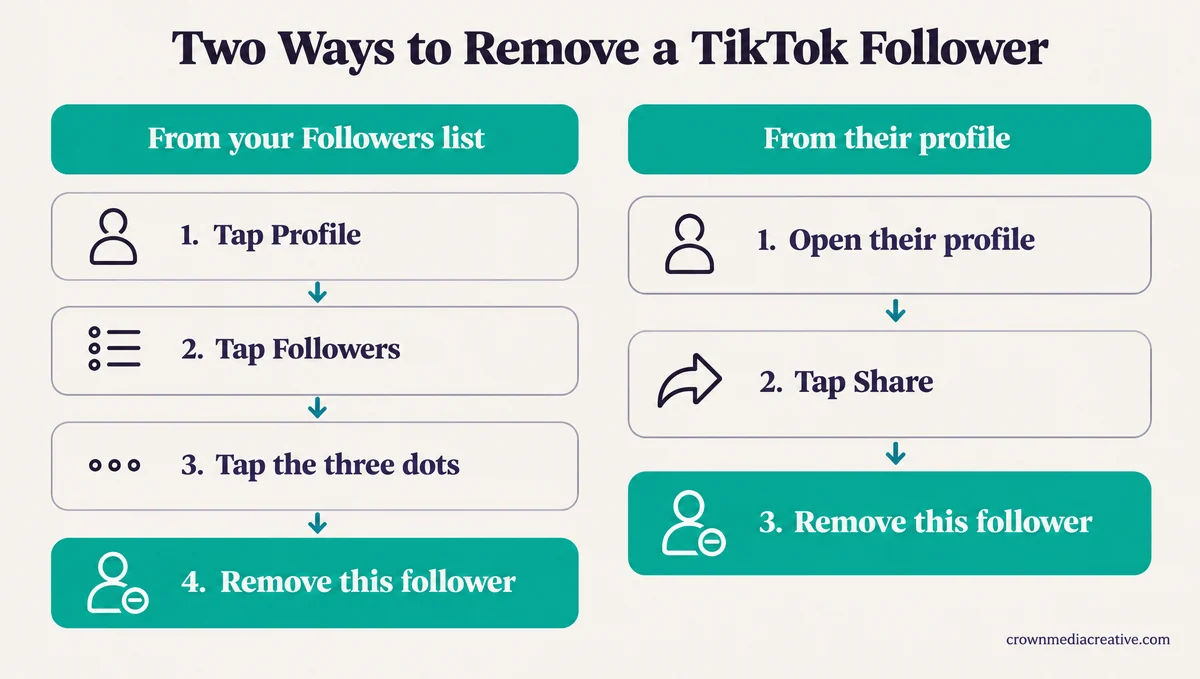
TikTok’s help page on removing followers gives both routes. The list route is the one I lean on when several accounts need to go:
- In the TikTok app, tap Profile at the bottom.
- Tap Followers.
- Next to the follower you want gone, tap the More actions button (the three dots).
- Tap Remove this follower.
The profile route suits a single account you are already looking at:
- Open the person’s profile in the TikTok app.
- Tap the Share button at the top.
- Tap Remove this follower.
The account comes off your Followers list and your follower count drops by one. Remove this follower only covers people who follow you, so if you also follow them, open their profile and tap Following, the unfollow step on TikTok’s following and unfollowing page. That page gives no way to unfollow in bulk either.
Can You Remove Followers on TikTok From a Computer?
Not reliably. TikTok documents follower removal for its app only, so use your phone.
Both routes on TikTok’s removal page start with “In the TikTok app,” and MakeUseOf’s guide called the option “only available on the mobile app” back in 2022. TikTok documents no web route, so if tiktok.com shows no Remove option next to a follower, switch to the app rather than hunting for a workaround.
Why Does a Removed Follower Still Show Up on TikTok?
A removed follower who still shows up is usually a follower list that has not refreshed, or a public account letting the same person follow you again.
TikTok’s troubleshooting steps for a misbehaving follower list are short. Switch between Wi-Fi and mobile data, refresh the list several times, clear the app video cache in Settings and privacy, and update the app.
Drafts are the usual worry with clearing a cache, and TikTok keeps the two apart in the app. Its general troubleshooting page lists Cache and Drafts on separate lines under Free up space, and drafts only go if you tap Manage next to Drafts and delete them.
| What you see | Likely cause | What to do |
|---|---|---|
| The account is still in your Followers list | The list has not refreshed yet | Refresh the list a few times, then switch between Wi-Fi and mobile data |
| They still count in your Friends | Friends are followers you follow back, and the count has not caught up | Unfollow them as well, then clear the app cache |
| They follow you again later | Your account is public, so anyone can follow you | Block them, or switch to a private account |
| Remove this follower is missing on their profile | They no longer follow you, or the profile did not load in full | Check your Followers list for them, then update the app |
A June 2026 thread on r/TikTok shows how stubborn the Friends count can be, with one person still counted after being unfollowed, removed and blocked. If your own follows are the ones snapping back, that is a different problem, covered in why TikTok undoes follows.
Will Someone Know If You Remove Them as a TikTok Follower?
TikTok lists no alert for removing a follower, though only its blocking page promises silence. Assume the person can find out the next time they open your profile.
TikTok’s blocking page is where that promise lives: “People you’ve blocked won’t be notified when you block them.” The removal page has no matching line.
Redact, which sells bulk follower removal, says nothing is sent from your account, whether you remove someone by hand or with its tool. It adds that “TikTok doesn’t publish what it does or doesn’t notify people about.”
Alerts on TikTok change from one action to the next, which is why saving a video can notify the creator while downloading it does not. I treat a removal as something the person can spot, because it leaves three traces:
- Your profile shows them a Follow button again where it used to say Following.
- Your new posts stop reaching their Following feed, because that feed only carries accounts they follow.
- On a private account, your videos vanish for them, since TikTok’s private account rules limit viewing to people you approve.
Is Removing a TikTok Follower the Same as Blocking Them?
No. Removing a follower only takes them off your list, while blocking also stops you seeing each other’s posts, finding each other in search and messaging each other.
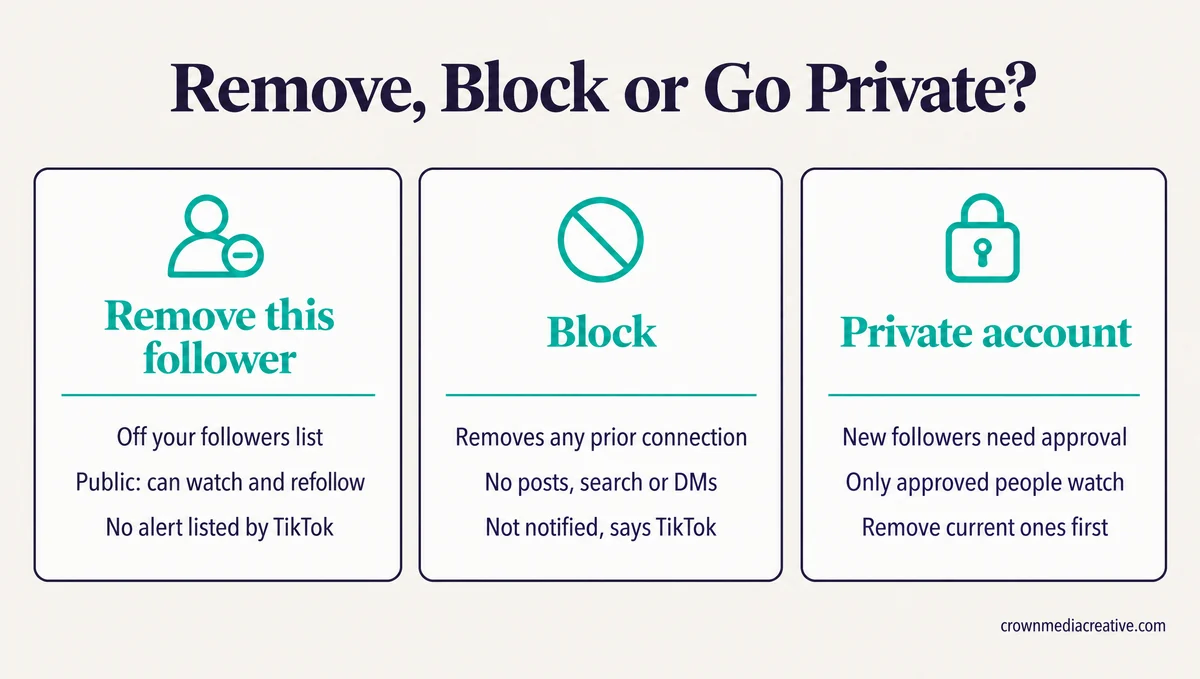
On a public account, a removed follower can still watch your videos and follow you again whenever they like. TikTok’s public and private account page lists “Follow you” and “Watch your videos” among the things anyone can do on a public account.
Blocking goes further. TikTok says it means “you can’t view each other’s posts, find each other’s profiles in search, or exchange direct messages,” and that “any prior connection with them will be removed.” It adds that “You may still see them in multi-host LIVE, Duets posted by others, or shared group chats.”
A private account changes who can follow you from then on. TikTok’s page says that on a private account you approve who can “Follow you,” and it says nothing about clearing the people who already do, so remove those first.
| What happens | Remove | Block | Private |
|---|---|---|---|
| Off your list | Yes | Yes, every connection goes | Not by itself, remove them first |
| Can follow again | Yes if public, with approval if private | No | Only with your approval |
| Can watch your videos | Yes if public, no if private | No | Only people you approve |
| Alert sent | None listed by TikTok | No, TikTok says | Does not apply |
| Undo | They follow you again | Unblock, but the old follow stays gone | Turn Private account off |
Blocking is what I use for anyone I never want back on my videos. For the strangers and bots that never watch anyway, removal does the job with less fuss.
Can You Remove All Your Followers on TikTok at Once?
No, TikTok has no bulk remove, so every follower comes off one at a time. The closest built-in tool blocks commenters in batches, which also removes them as followers.
If you’ve read about a “Delete Followers” button that clears everyone from a computer, TikTok’s help pages list nothing like it. Redact, which charges for bulk removal, puts it plainly: “There is no native way to remove followers in bulk on TikTok.”
Redact also puts the manual route at “4 different clicks per follower removed and about 20 seconds each cycle.” In a September 2026 Reddit thread, an account with about 11k followers wanted to drop to 3k. The reply was blunt: “Unless you want to make a brand new account yeah you’re going to have to go through it manually.”
Before: “I’ll remove all 8,000 by hand this weekend.” At about 20 seconds each, that is roughly 44 hours of tapping.
After: Block the bot accounts in your comments in batches, switch to private so new bots need your approval, then remove the remaining fakes from your Followers list. If most of the 8,000 never watch, a new account is faster than all of that. Before you start the new account, turn your bio link into an email signup with the Creator Money Page, a free Creator Tribune template, so fans who miss your goodbye post can still find you.
Past a few hundred accounts, I’d slow down and start with the comment-section tool below. Redact says TikTok “limits how quickly an account can make changes,” and TikTok’s own too-fast warnings say it “may temporarily disable a person’s account” that likes, comments or follows too quickly.
Can You Block Multiple Accounts at Once on TikTok?
Yes. TikTok lets you block several commenters at once on any of your posts, and each block also removes that account as a follower.
TikTok added the tool in May 2021, letting people “select up to 100 comments or accounts rather than having to go one by one,” per its anti-bullying announcement. TechCrunch’s report that day described the same 100-at-a-time selection for blocking users in bulk.
The current steps, from TikTok’s blocking page:
- In the TikTok app, open one of your posts and tap the Comments button.
- Press and hold a comment, then select Manage multiple comments, or tap the Filters button at the top.
- Select the comments from the accounts you want to block.
- Tap More at the bottom, then tap Block accounts.
- Tap Block to confirm.
It only reaches accounts that commented on your posts. Bots that follow in silence never show up there. This is the tool I reach for when a bot wave floods the comments under one video.
TikTok keeps a list of blocked accounts under Settings and privacy, then Privacy, then Blocked accounts.
Are TikTok Follower Remover Apps Safe to Use?
Follower remover apps carry real account risk. Redact, a paid one, works through your logged-in TikTok session and blocks, then unblocks, every account on your list.
Redact’s own walkthrough shows how one works. The app is free to download, follower removal is a Premium feature, and after you log in to TikTok in its browser window, “Redact picks up the session once you’re in.”
Its method is a mass block followed by an unblock, in its own words “we mass block and then unblock your entire followers list.” Three side effects follow from that, each in Redact’s own words:
- It is all or nothing, with “no way to tick some accounts and spare the rest.”
- Anyone you follow back loses your follow too, because “the block that does the removing cuts the follow in both directions.”
- A few accounts can survive the run, which the tool “has no way of spotting.”
TikTok’s Terms of Service, updated July 15, 2026, say “Do not give others access to your account” without permission. They also bar using “any automated system or software” to extract data from the platform without TikTok’s written approval, and a remover has to read your whole follower list to work.
Check what a tool removes before installing it. The Chrome extension behind tiktok-remove-followers.vercel.app clears the accounts you follow and your Favorites, with no option for followers at all, and its Chrome Web Store listing warns “Use at your own risk.”
I wouldn’t run one on an account I care about. Removing by hand is slow, but nothing else logs into your account to do it.
How Do You Stop Bot Accounts From Following You on TikTok?
You can’t stop bots from finding a public TikTok account, but a private account makes every new follower wait for your approval. Remove the bots already on your list and block the ones that come back.
Bot follows tend to arrive in waves. One account drew about 70 fake follows in a day and a half in September 2026. Another got a flood of fake likes, saves and follows after a viral video, so its owner went private.
The signs are easy to spot once you know them:
- Blank accounts with no posts and no followers of their own.
- Profile photos that never show a face, with one or two videos recycled across several accounts.
- Accounts that post a card asking you to add them on Telegram or Messenger.
- Shop and e-commerce accounts that follow small business pages.
TikTok clears out many of these on its own. Its removal page says it works to “detect and remove spam-like behavior,” and those sweeps are the usual reason follower counts drop overnight.
My routine for a bot wave has four steps:
- Remove the bots you can spot from your Followers list.
- Block any that come back, using the comment-section tool when they comment.
- Switch to a private account until the wave passes, so new follows need your approval.
- Switch back to public once it calms down, if you want strangers to find you again.
Save blocking for commenters and repeat offenders, because blocks may be capped. TikTok’s blocking page mentions no limit, but one Reddit post guessed the cap at around 500 without being sure.
A September 2026 post said a block limit had returned after a stretch without one. If a cap that size exists, five full batches of 100 from the comment tool would reach it, which is one more reason to go private during a wave.
Does Removing Followers Hurt Your TikTok Account?
Removing bots and followers who never watch does not hurt your reach, because TikTok says follower count is not a direct factor in what it recommends. A big cleanup can still cost you features TikTok ties to a follower count, such as going LIVE.
TikTok’s 2020 explainer, How TikTok recommends videos, says “neither follower count nor whether the account has had previous high-performing videos are direct factors in the recommendation system.” The same sentence opens by granting that a video “is likely to receive more views if posted by an account that has more followers,” so keep the followers who watch.
Taking TikTok at its word, clearing out bots that never watch costs your For You reach nothing. The count still unlocks features. TikTok’s LIVE page asks for “1,000 followers to go LIVE (may vary across regions),” and the Creator Rewards Program lists “at least 10,000 followers” among its criteria “to join and collect rewards.”
I check my count against both numbers before any big cleanup, since TikTok ties both features to them. If removing every bot would drop you under either line, decide whether that feature matters more to you than a clean list. If you land under one anyway, growing your followers back starts with posts that turn viewers into followers.
Quick Takeaways
- Remove a TikTok follower from your Followers list or from their profile’s Share menu, using Remove this follower in the app.
- TikTok lists no alert for a removal and promises silence only for blocks, so assume the person can tell from your profile.
- There is no bulk remove, so block commenters in batches and keep paid removers like Redact off any account you care about.
- Check your count against 1,000 (LIVE) and 10,000 (Creator Rewards) before a big cleanup.
- Pick by situation: remove a few by hand, block anyone you never want back, go private while a bot wave lasts, and start fresh only if most of a big list never watches.

