
How to Pause Instagram Reels When Holding No Longer Works
How to Pause Instagram Reels When Holding No Longer Works
A single tap pauses Instagram Reels now, not a long press. Here is what changed, why holding fast forwards instead, and how to mute fast.
- 1How Do You Pause Instagram Reels Right Now
- 2Why Does Holding a Reel Fast Forward Instead of Pausing
- 3How Do You Mute a Reel Without Pausing It First
- 4Why Does Your Friend’s Instagram Pause Differently Than Yours
- 5Can You Get the Old Hold to Pause Gesture Back
- 6Why Does the Reel Jump Back to the Start When You Tap
- 7How Do You Pause Instagram Reels on a Desktop Browser
- 8What Pausing Does to a Creator’s Numbers
- 9Frequently Asked Questions
- How do I pause a reel on Instagram?
- Why can’t I pause Instagram Reels anymore?
- How do I mute an Instagram Reel now?
- Why does holding an Instagram Reel speed it up?
- Can I turn off tap to pause on Instagram?
- How do I pause Instagram Reels on a computer?
- 10Quick Takeaways
What’s Changed: A single tap now pauses an Instagram Reel. Instagram switched the tap gesture from mute to pause on 18 March 2026, so the old press-and-hold trick no longer freezes anything. Holding the left or right edge of the screen fast forwards the video at 2x speed instead.
If you learned how to pause Instagram Reels by pressing and holding the screen, that habit stopped working in March. You press, the video speeds up or nothing happens at all, and the moment you wanted to freeze is already gone.
Most guides still tell you to hold. Two widely shared walkthroughs from February 2026 call tap-and-hold the officially supported method, which was true on the day they went up.
Instagram moved the pause gesture on 18 March 2026. The tap it moved onto was already doing another job before that, and that second half is the part nobody explains.
I have mapped every gesture on the current build below, including the one that quietly turned muting into a three-step job.
You will know exactly which finger movement does what, why your friend’s phone behaves differently from yours, and whether the old gesture can be brought back.
How Do You Pause Instagram Reels Right Now
To pause Instagram Reels, tap once anywhere on the video. Tap again to resume. That is the whole gesture on current builds, and it works on iOS, Android, and the web.
Instagram’s official @creators account announced the change on Threads on 18 March 2026 with the line “Starting today, you now can pause any Reel with a single tap, providing more control, more ways to connect, and more time to enjoy the content you love.” Social Media Today covered the rollout the same day.
What I would flag is the part the announcement skipped. Before this update, a single tap muted and unmuted the audio, so the change did not add a gesture to an empty slot. It took the tap away from mute and handed it to pause.
That reassignment is the real source of the confusion. Anyone whose thumb learned “tap to silence this in a quiet room” now pauses the video in front of them instead.
Why Does Holding a Reel Fast Forward Instead of Pausing
Holding the screen fast forwards the Reel at 2x speed because that gesture was assigned to speed a full year before tap-to-pause existed.
It launched on 28 March 2025, not in the March 2026 update.
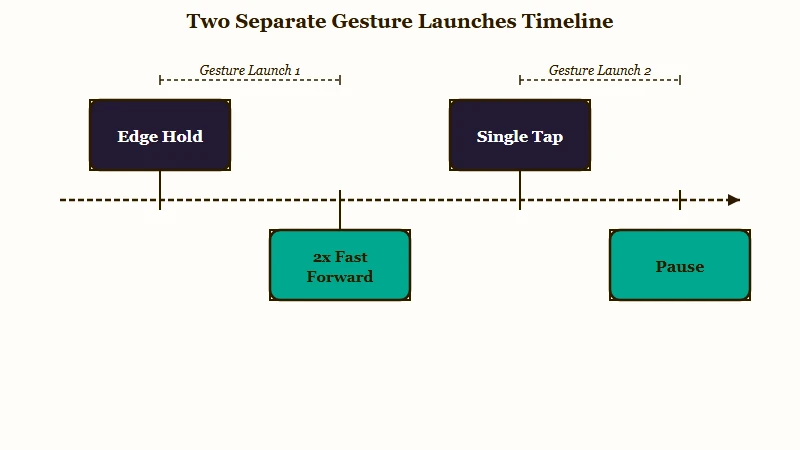
Most guides collapse these into one event. The speed gesture and the pause gesture were separate launches twelve months apart, and treating them as a single change is why so much of the advice out there contradicts itself.
The hit zone matters more than people expect, and it is the detail I would check first if holding seems to do nothing. According to CNET, 2x speed triggers when you hold the far-left edge of the screen or the right edge above the heart icon.
Instagram kept the speed gesture off the heart deliberately. Holding lower on the right side would sit on the like button and the rest of the action rail, so a fast-forward would keep registering as engagement you never meant to give.
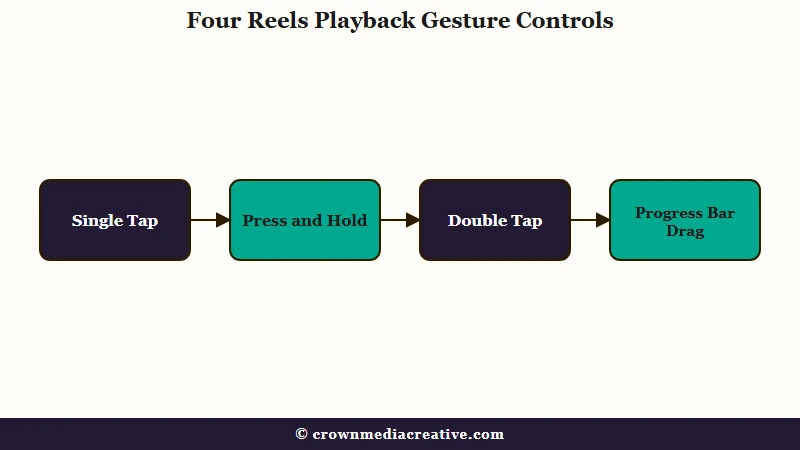
| Gesture | Before 18 March 2026 | Now |
|---|---|---|
| Single tap | Muted and unmuted the audio | Pauses and resumes playback |
| Press and hold, centre | Paused, and hid the caption overlay | Does nothing on most builds |
| Press and hold, screen edge | Played at 2x speed, since March 2025 | Plays at 2x speed, unchanged |
| Double tap | Liked the Reel | Likes the Reel, and delays the pause |
How Do You Mute a Reel Without Pausing It First
Muting now takes three actions instead of one, and the fastest way around it is your phone’s volume button.
The in-app mute control only appears once the Reel is already paused.
This is the change people complain about most, and I think they are right to. Silencing a Reel on a bus used to be one thumb tap.
Before: one tap on the Reel muted the audio instantly, and one more tap brought the sound back.
After: tap the Reel to pause, tap the speaker icon that appears above the play button, then tap the screen again to resume playback. Three deliberate actions to reach what used to take one.
The mute option surfaces only on the paused screen, so there is no way to reach it while the video is still running. Here is the sequence I would use instead when I want silence without stopping the video:
- Press your phone’s physical volume-down button until the media volume hits zero.
- On iPhone, flick the ring or silent switch, or open Control Centre and drag the volume slider down.
- On Android, press volume-down and tap the settings icon on the slider popup to make sure you are lowering media volume rather than ringer volume.
The volume button keeps working the way it always did, and it never touches playback. That is the one control in this whole system Instagram has not moved.
Why Does Your Friend’s Instagram Pause Differently Than Yours
Instagram runs these gesture changes as server-side tests tied to your account, not your app version.
Two accounts logged into the same phone on the same app build can have completely different pause behaviour.
I want to be blunt about what this means, because it saves a lot of wasted troubleshooting. You cannot fix a mismatched gesture by updating the app, clearing the cache, or reinstalling.
None of the standard fixes touch it, since the behaviour is decided on Instagram’s servers against your profile. Users on the same version have documented one account getting tap-to-pause while a second account on the same handset kept tap-to-mute.
With Instagram reporting around three billion monthly active users as of late 2025 per Statista, staged rollouts are the only realistic way to ship an interface change. The cost is that “it works on my phone” stops being useful advice.
| Symptom | Likely cause | Fix |
|---|---|---|
| Tapping mutes instead of pausing | Your account is still on the old server-side test group | Wait for the rollout, no setting exists |
| Holding does nothing at all | You are holding the centre, where the gesture was removed | Tap once to pause, or hold an edge for 2x |
| Holding speeds the video up | You are holding the far-left or right edge above the heart | Move your thumb to the centre and tap once |
| Pause takes a beat to register | The app is waiting to rule out a double-tap like | Expect the delay, or scrub the progress bar |
| Caption overlay will not hide | Long-press clean view was removed | Open comments to shrink the Reel, or screen record |
| Nothing responds on web | The player has not taken keyboard focus | Click the video once, then use the spacebar |
Can You Get the Old Hold to Pause Gesture Back
No. Instagram ships no setting, toggle, or accessibility option that restores press-and-hold pausing.
Anyone telling you otherwise is describing a workaround, not a switch.
I have seen three rollback claims circulating, and they are worth addressing honestly because two of them carry real risk. Sideloading an older Android build and patching the app to expose developer options both appear in user threads.
Both break as soon as the app updates, and sideloading an unofficial build is a genuine account-security risk I would not take for a playback gesture. The third claim, that reinstalling on iOS restores the old behaviour, does not hold: users who tried it report the interface reverting to tap-to-pause the next time they open the app.
The overlay complaint deserves its own note. Long-pressing used to hide captions and icons for a clean view, and that gesture went away with no replacement, which is a real loss for anyone screenshotting recipes or text-heavy Reels.
Opening the comments panel shrinks the video into a cleaner window, which is the closest substitute I have found.
Why Does the Reel Jump Back to the Start When You Tap
The pause registers slightly late because the app waits to see whether your tap is the first half of a double-tap like.
On a short Reel, that pause can land after the video has already looped.
The delay is structural rather than a bug on your device. Tap-to-pause and double-tap-to-like now share the same input, so the app has to hold every single tap open for a moment before deciding what you meant.
Frame-accurate pausing is the casualty. If you are trying to freeze on a recipe card, a set of measurements, or one slide of a text-heavy Reel, the tap often lands a fraction late and the video restarts.
Dragging the progress bar at the bottom of the screen is the reliable alternative. Scrubbing puts you on the exact frame you want and skips the tap-versus-double-tap arbitration entirely, which is what I would use for anything I plan to screenshot.
How Do You Pause Instagram Reels on a Desktop Browser
On desktop, click the video once to pause and click again to resume, or press the spacebar after clicking the player.
Browser playback behaves like a standard video player.
The web version escaped the whole gesture mess, and I would point anyone doing serious frame-by-frame work there first. There is no long-press ambiguity and no double-tap arbitration to wait out.
The one catch is keyboard focus. The spacebar only controls playback once you have clicked the player, and if you have not, the same keypress scrolls the page instead.
If your work depends on pausing precisely, the desktop player is worth the switch. It is also the only surface where the pause control has stayed consistent through both the 2025 and 2026 changes, which matters if you study other people’s Reels that keep pulling views frame by frame.
Playback stutter is a separate problem worth ruling out first. If the video is stalling rather than ignoring your taps, you are looking at a lagging app instead of a gesture problem, and no amount of tapping will fix it.
What Pausing Does to a Creator’s Numbers
Pausing is a watch-time signal, and Instagram has never published how a paused frame is counted.
Treat any specific claim about pause telemetry with suspicion, because none of it comes from Meta.
I looked hard for a documented answer here and there is not one. Several guides assert that pausing inflates or deflates retention, and every one of those numbers is invented.
What is documented is that Reels ranking leans on watch time and completion, so a video people stop to read is being measured on signals nobody outside Meta can see. That uncertainty is a reason to design for the pause rather than against it.
Practically, if your Reel contains text people need to read, give them the time inside the video instead of relying on them freezing it.
Holding a text card on screen for a full beat longer is the change I would make first, and it feeds the same watch-time signals that drive how the Instagram algorithm ranks and shapes what makes a Reel viral.
Frequently Asked Questions
How do I pause a reel on Instagram?
Tap once anywhere on the video to pause it, then tap again to resume. This replaced press-and-hold on 18 March 2026 and works on iOS, Android, and the web.
Why can’t I pause Instagram Reels anymore?
Your account is most likely still in an older server-side test group where tapping mutes rather than pauses. No setting changes this, and updating or reinstalling the app will not move you.
How do I mute an Instagram Reel now?
Tap to pause, tap the speaker icon above the play button, then tap again to resume. To mute without pausing, use your phone’s volume-down button instead.
Why does holding an Instagram Reel speed it up?
Press-and-hold on the left or right edge of the screen triggers 2x playback, a feature that launched on 28 March 2025. Hold the centre and nothing happens.
Can I turn off tap to pause on Instagram?
No. Instagram provides no toggle to disable tap-to-pause or restore the old gesture, and sideloading an older build breaks at the next update.
How do I pause Instagram Reels on a computer?
Click directly on the video to pause and click again to play. You can also press the spacebar, as long as you have clicked the player first so it has keyboard focus.
Quick Takeaways
- One tap pauses a Reel and one tap resumes it, on every platform including the web.
- Press-and-hold on a screen edge means 2x speed, a gesture that shipped in March 2025, a full year before tap-to-pause.
- Muting went from one tap to three actions, so use your phone’s volume button instead.
- No setting restores the old hold-to-pause gesture, and reinstalling the app does not bring it back.
- Drag the progress bar when you need an exact frame, since tapping is delayed by the double-tap like check.

