
Edit a TikTok After Posting Before the 7-Day Window Closes
Edit a TikTok After Posting Before the 7-Day Window Closes
You can edit a TikTok after posting once a day for 7 days for the words, hashtags and cover, and up to 180 days for the location. Here
- 1How Do You Edit a TikTok After Posting?
- 2What Can You Change on a TikTok After Posting?
- Can You Edit Captions on TikTok After Posting?
- Can You Add a Disclosure Label to a TikTok After Posting?
- 3How Long Can You Edit a TikTok After Posting?
- 4Why Can’t You Edit Your TikTok After Posting?
- 5Can You Edit the Video Itself After Posting on TikTok?
- Can You Remove a Song From a Posted TikTok?
- Does Editing a TikTok After Posting Hurt Its Reach?
- 6Quick Takeaways
The Short Answer: Yes, you can edit a TikTok after posting by opening the post, tapping More options (the three dots) and swiping to Edit post. The description, hashtags, mentions and cover can change once a day for the first 7 days, and the location for up to 180 days. The video, the sound and anything typed onto the clip stay locked, so a mistake inside the video means a correction in the description or a delete and repost.
A typo in your caption can sit under a TikTok that is already picking up views, and deleting the post to fix it starts the count from zero. Knowing how to edit a TikTok after posting lets you fix the words, cover and location in place, and the views, likes and comments stay where they are. I use it for typos and missed hashtags, and I leave everything else alone.
TikTok’s editing help page covers effects, covers, drafts and deleting and says nothing about the button for videos. The Edit post steps on TikTok’s accessibility page are only for adding alt text to photos you’ve already posted.
Creators were showing the button off as early as January 2023, and nearly four years later TikTok still spells out the rules in a note on the Edit post screen. Some guides never caught up, and Dexerto’s August 2024 guide still says “there is no way to edit a caption on TikTok.”
How Do You Edit a TikTok After Posting?
You edit a TikTok after posting from the post’s More options menu, where Edit post changes the description, hashtags, mentions, cover and location without deleting anything.
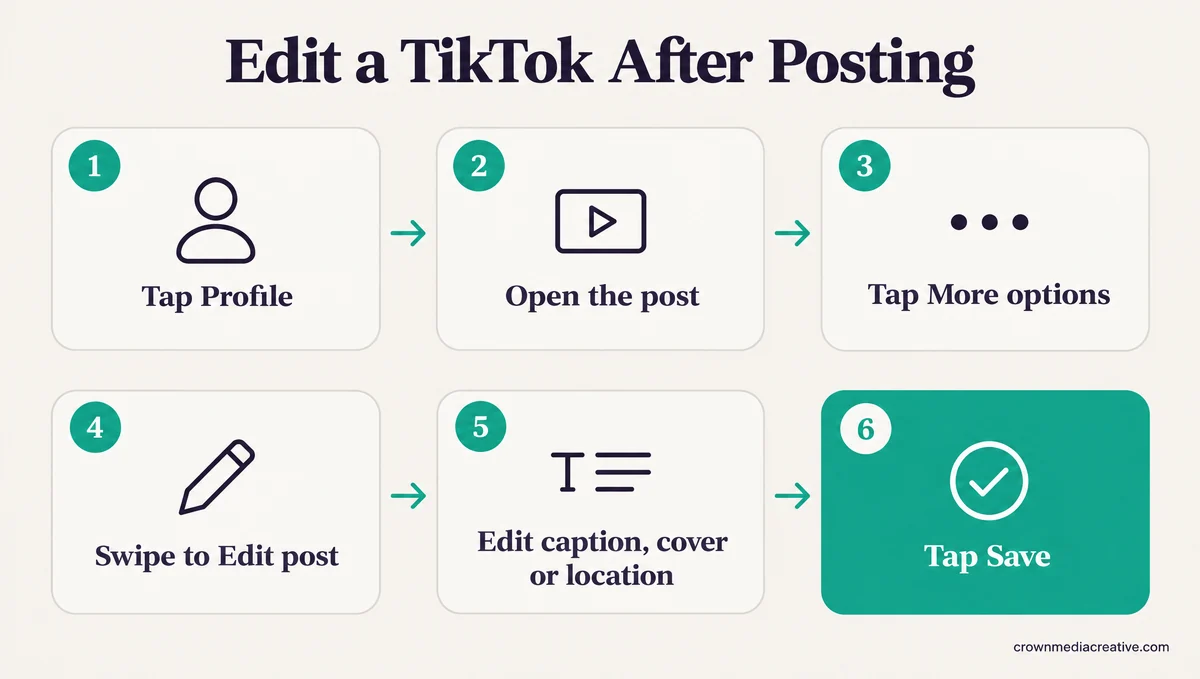
Edit post sits in a row of options you may have to swipe, so it is easy to miss. Here is the order I tap through on my phone, the same path shown in Steph Lee Tech’s walkthrough:
- Open TikTok and tap Profile at the bottom.
- Tap the post you want to change.
- Tap the More options button, the three dots on the side of the post.
- Swipe across the row at the bottom and tap Edit post.
- Change the description, hashtags, mentions, cover or location.
- Tap Save.
The edit replaces the old text on the post you already have, so nothing the post has earned resets. Photo posts get one extra field on that screen, Add alternative text, which takes up to 300 characters per photo, according to TikTok’s accessibility page.
What Can You Change on a TikTok After Posting?
You can change a posted TikTok’s description, hashtags, mentions, cover and location, plus alt text on photos and the auto-generated captions, but never its clips, sound or effects.
| Part of the post | Can it change? | Time limit | Where to change it |
|---|---|---|---|
| Description, hashtags and @mentions | Yes | 7 days, once a day | Edit post |
| Cover image and cover text | Yes | 7 days, once a day | Edit post, then the cover |
| Location tag | Yes | Up to 180 days | Edit post |
| Alt text on photo posts | Yes | None published | Edit post, then Add alternative text |
| Auto-generated captions | Yes | None published | Tap the caption, then Edit captions |
| Clips, sound, effects, text on the video | No | Locked once posted | Delete and post again |
A new cover only changes the thumbnail that shows on your profile and in search, which is how TikTok’s editing page defines a cover. A typo filmed into the first frame stays in the video for good, because changing the cover never touches the clip.
I fix the description first, since TikTok counts captions and hashtags as video information when it recommends posts. If the edit adds hashtags, keep the total to five, the hashtag cap on most accounts since August 2025.
Who can watch a post has no clock on it at all. TikTok’s post privacy steps have you tap More options, then Privacy settings, and pick Everyone, Friends or Only you on a public account, swiping left if the option is out of view.
Can You Edit Captions on TikTok After Posting?
Yes, but “caption” means three different things on TikTok, and only two of them can change after posting.
The description under the video is what most people call the caption, and Edit post changes it. Auto-generated captions, the subtitles TikTok makes from speech, are fixed by tapping the caption on the video and choosing Edit captions, and TikTok’s accessibility page gives that route with no time limit.
Text you typed onto the clip in the editor is part of the video, so it stays as posted. That is the likeliest reason answers to this question disagree so often.
Can You Add a Disclosure Label to a TikTok After Posting?
Partly. TikTok lets you switch on the paid partnership disclosure after posting, but it only documents the AI-generated label as something you set before you post.
For a brand deal, open the post, tap More options, then Ad settings, and turn on Disclose commercial content, according to TikTok’s branded content rules. The same page warns that a published post “will be labeled as Paid partnership or Promotional content and can’t be changed,” so the label type you pick is final.
If a sponsored post went up with no disclosure at all, I’d also add a plain “Ad:” line to the description while the 7-day window is open. The US Federal Trade Commission’s influencer guide warns, “Don’t assume that a platform’s disclosure tool is good enough.”
The AI-generated label works the other way. TikTok’s AI content page only gives steps for turning it on before you post, matching TechCrunch’s launch report that the tool is “available to creators upon uploading the video.”
One creator who forgot it found no way to add it once the video was live.
How Long Can You Edit a TikTok After Posting?
You can edit a TikTok’s description and cover once a day for 7 days after posting, and its location for up to 180 days, according to the note TikTok shows on the Edit post screen.
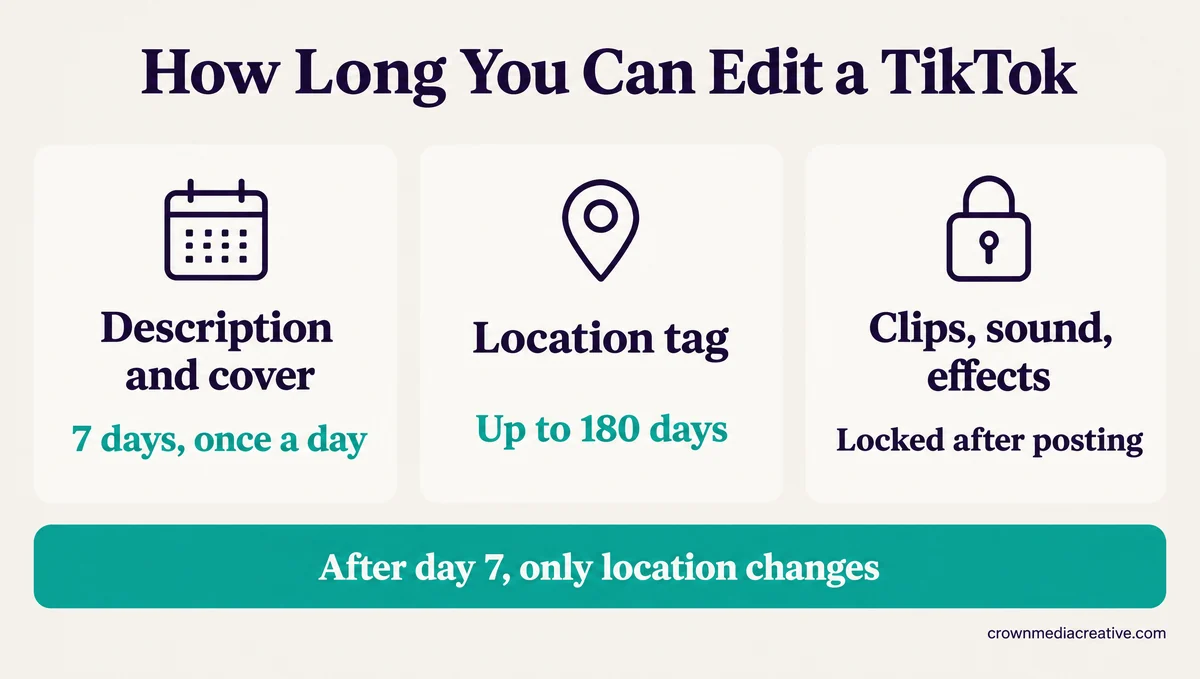
TikTok doesn’t publish these limits in its Help Center, so the screen itself is the source. YouTuber Keenya Kelly read that note aloud in a May 2024 walkthrough: “you can edit your description and cover once a day, edits can be made within 7 days of posting.” The same note said the location “can be edited for 180 days of posting.”
The same video shows what happens on a post older than a week. The Edit post screen still opened, but only the location could change, while the text and cover stayed locked.
The 7-day and once-a-day rules have held since 2023, while the location window looks to have moved once, from 90 days in a 2023 guide to 180 on the 2024 screen.
| When | What changed | Source |
|---|---|---|
| January 2023 | Creators start showing Edit post on live TikToks | @danthomasuk |
| July 2023 | A 7-day window and one edit a day, rolling out by region | The Leap |
| September 2023 | Location editable for 90 days | HighSocial |
| May 2024 | The Edit post note says once a day within 7 days, location for 180 days | Keenya Kelly |
| September 2024 | Delete and re-edit spotted in testing | Social Media Today |
| October 2026 | A creator reports Edit post missing, blamed on a test | r/TikTok |
Once a day means one save per post per day, so put every fix into a single edit rather than saving after each change. I plan around the 7 days rather than the 180, because the description and cover are what shape a post’s first impression.
Why Can’t You Edit Your TikTok After Posting?
You usually can’t edit a TikTok because the 7-day window has closed, you already edited it today, or an earlier edit is still under review. Less often, the button vanishes from every post, which one creator says TikTok’s support chat blamed on testing.
I check the post’s age first, because a closed window can look exactly like a broken button. The table below matches what you see to the likely cause.
| What you see | Likely cause | What to do |
|---|---|---|
| No Edit post on a post older than 7 days, or only Location works | The 7-day window has closed | Change the location if needed, and post any correction as a comment |
| No Edit post on a post you just shared | The post is still processing | Wait a few minutes, then reopen the post |
| Edit post gone from every post, even new ones | An old app version, or a test on your account | Update TikTok, then ask Help Center chat |
| A message like “Previous edits under review” | Your last edit is still being reviewed | Wait, and don’t stack new edits on top |
| Save does nothing on the cover screen | An uploaded cover image is failing to stick | Pick a frame from the video instead of a camera roll photo |
| A second change won’t save the same day | The one-edit-a-day limit | Wait a day and make every fix in one edit |
wikiHow’s list of causes names four: a closed window, a second edit the same day, a post still processing and an old app. The account test is the hard one to spot. On 14 October 2026, a creator whose button vanished said TikTok’s support chatbot put it down to testing, saying the feature “is currently down for some users as they undergo testing.”
To ask TikTok yourself, tap Profile, the Menu button, Settings and privacy, Help Center, then Chat with us, the route on TikTok’s problem reporting page. Update the app first, since an old version is one of the listed causes.
The review message can take hours to clear. A three-day-old account got a message along the lines of “Previous edits under review. Please try again later” for seven hours after a cover change. Only frames from the video itself would stick as the new cover.
The message itself gives no timeline. The same poster later found that an image made in another app would only stick as the cover once they screenshotted it and uploaded the screenshot. Another report describes the Save button on the cover screen doing nothing, with uploads from the photo gallery failing too.
A review of the post itself is a different message, the kind covered in private videos under review, so check which one you are seeing before you wait it out.
Can You Edit the Video Itself After Posting on TikTok?
No. TikTok locks the clips, sound, effects and on-screen text once a video is live, so changing them means taking the post down and sharing a new one through Delete and re-edit or a fresh upload.
No setting reopens the editor while the post stays live, so don’t spend time looking for one. My default for a mistake inside the video is a correction in the description and a comment from me, unless the error is too big for a note to fix.
| Route | What you keep | Best for | The catch |
|---|---|---|---|
| Edit post plus your own comment | Views, likes and comments | A wrong date, price or tag that the description can correct | The video itself still shows the mistake |
| Delete and re-edit | Your in-app edits | Videos built in TikTok’s own editor | The new post starts from zero, and edits made in other apps don’t come back |
| Upload the original file again | Nothing from the old post | Videos edited in another app | Starts from zero, and a copy saved from TikTok can carry a watermark |
| Restore from Recently deleted | The old post’s comments and likes | Undoing a delete you regret | The video comes back unchanged |
Delete and re-edit is TikTok’s built-in shortcut, and TikTok’s Help Center doesn’t mention it. You tap Delete on the post and choose Delete and re-edit, and the post comes down while your project reopens in the editor. Social Media Today spotted it in testing in September 2024 and noted, “That won’t count for edits you’ve made in third party apps, so if you’re using CapCut for your clips, you’re out of luck.”
The option seems to show up only on fresh posts. A November 2024 tutorial by @alexeztechtips says it “only works with recently posted videos,” so a video from last month may not offer it.
If you edited in another app, repost the original file from your camera roll, not a copy saved back out of TikTok. A saved copy can carry TikTok’s watermark, and a watermark is one of the triggers for the unoriginal content flag.
Deleting isn’t final for 30 days. TikTok keeps a deleted post in Recently deleted, under Settings and privacy, then Activity center, and its editing page says that after a restore “you’ll also recover all associated comments and likes.”
Before: You spot “SPRING5” filmed into a video that already has 1,800 views, delete it, fix the text in CapCut and post it again from zero.
After: You leave the video up, use Edit post to add “Code is SPRING15, the video has a typo” to the description, and post the same line as your own comment.
Can You Remove a Song From a Posted TikTok?
No. Edit post doesn’t touch the sound, so swapping or removing a song means Delete and re-edit for a video made in TikTok’s editor, or a fresh upload.
JoinBrands’ reference table lists added music as “Requires a replacement post if it must change,” and Steph Lee Tech’s walkthrough says the clips themselves can’t be edited once a video is posted. I’d leave the sound alone unless the track itself is the mistake, since a repost starts the count again.
Does Editing a TikTok After Posting Hurt Its Reach?
TikTok hasn’t said whether an edit changes reach, and an edit leaves the post’s views, likes and comments in place. Deleting and reposting is the step with a visible cost, because the new post starts from zero.
TikTok’s recommendation explainer counts captions, sounds and hashtags as “video information,” so the description you save is part of what the system reads.
Reposting is where the visible cost sits. In one r/ContentCreators post, a slideshow pulled at just under 100 views to fix a typo had only about 17 views nearly 24 hours after going back up. Each upload also goes through its own review before it spreads, one of the causes behind sudden TikTok view drops.
That is why I only delete when the mistake is too big for a note to fix, and I do it early, before the old post has much to lose.
Quick Takeaways
- Edit post lives in the More options menu and changes the description, hashtags, mentions, cover and location without resetting views.
- Clips, sound and on-screen text are locked, so correct them in the description and a comment, or repost through Delete and re-edit.
- A missing button usually means the 7-day window has closed or the post is still processing, so check the post’s age first. If Edit post is gone from new posts too, update TikTok and ask Help Center chat.
- Deleted posts stay in Recently deleted for 30 days, and restoring one brings back its comments and likes.
- Make every fix in one save before day 7, since after that Edit post only changes the location, for up to 180 days.

