
What TikTok Counts as Low Quality or Unoriginal Content
What TikTok Counts as Low Quality or Unoriginal Content
The "unoriginal, low-quality, and QR code content" notice takes a video off the For You feed while leaving it up. Here is what each line means, which rule
- 1What does unoriginal, low-quality, and QR code content mean on TikTok?
- Does an unoriginal or low quality flag count as a strike?
- 2Low quality and blurry are two completely different problems
- 3The watermark is the one TikTok actually names
- Why was my video flagged as unoriginal when I filmed it myself?
- 4Why this lands when views and payouts climb
- 5Which videos get flagged most
- What counts as unoriginal content on a TikTok LIVE?
- 6How to appeal a low quality or unoriginal flag
- 7How to keep videos eligible
- Can you still post if Content Check Lite flags a video?
- 8How creators are adjusting
You spend hours on an edit. The video climbs, the engagement is strong, and then the notification lands telling you it has been disqualified from monetization for low quality or unoriginal content.
Before you change anything, work out which rule hit you, because TikTok runs two of them and they define low quality differently. One governs whether the For You feed will carry your video. The other governs whether the Creator Rewards Program will pay for it.
Almost nothing written about this separates the two, which is why the advice you find contradicts itself. A monetization disqualification is the Creator Rewards standard, and losing reach with no payout involved is the For You feed standard. If the reason in your analytics reads “Unoriginal, low-quality, and QR code content”, the For You feed standard is the one that hit you.
What does unoriginal, low-quality, and QR code content mean on TikTok?
It is the reason TikTok gives when it rules a video ineligible for the For You feed as unoriginal or low quality, either in the video’s analytics or on the content check screen before posting. A posted video stays up, and TikTok’s guidelines say people “may still find it through search or by going to a creator’s account”, but TikTok stops recommending it on the For You feed.
The full notice, as creators have shared it from the app, reads:
“Unoriginal, low-quality, and QR code content. To maintain the positive experience our users expect from the TikTok platform, unoriginal and low-quality content is ineligible for recommendation. Unoriginal content is content that is just imported or copied from other sources without any new, creative edits. A video may be unoriginal if it has a watermark or logo on it. Low quality content includes very short videos, static images, and videos made only of GIFs.”
The reason sits in the video’s analytics, where TikTok says a warning bar appears at the top of the Performance tab. Its For You feed eligibility help page adds that analytics has to be switched on first (Profile, the Menu button, TikTok Studio, then Get started within Analytics), after which you tap the notification on the post for the full reason.
Two parts of that notice are older than the rule it enforces. TikTok’s For You feed rules have carried no QR code heading in any version since at least May 2024, the guidelines in force since 24 September 2026 do not mention QR codes anywhere, and the notice’s own explanation never mentions them either. The notice’s heading still names them, so take any scannable code out of the video along with watermarks, reused clips and GIF-only stretches.
The low quality line is dated too. “Very short videos, static images, and videos made only of GIFs” matches the list TikTok’s Seller Center published in May 2023 (“Extremely short clips, static images … and exclusively GIF-based videos”), while the current rule names only short clips made from GIFs.
The rule itself sits under a section titled Unoriginal Content and Intellectual Property Rights. The For You feed eligibility standards released on 25 August 2026, in force since 24 September 2026, keep word for word the two ineligible lines of the version that took effect on 13 September 2025:
“Reused or unoriginal content posted without creative edits, such as clips that show someone else’s watermark or logo”
“Low-quality or minimally edited content, such as short clips made from GIFs only”
TikTok adds one further line in the same section: content is also ineligible if it includes unoriginal or reused material without anything new. So for For You feed purposes, the low quality line covers low-quality or minimally edited content, with short clips made from GIFs only as TikTok’s one example, and nothing there covers resolution, lighting or how well the video is shot.
TikTok’s Creator Academy article on its originality policy spells unoriginal out in four parts: content “copied completely from others”, content “largely repurposed from another source without adding any creative edits”, content “combined from multiple sources with little or no additional information and/or content value”, and content “with someone else’s visible watermark or superimposed logo”.
The monetization rulebook is separate and stricter. TikTok’s Creator Rewards Program eligibility page lists the factors it checks when reviewing an account, and its two relevant entries read:
“Unoriginal content: Your account info or video content is copied from others or has minimal original input or edits.”
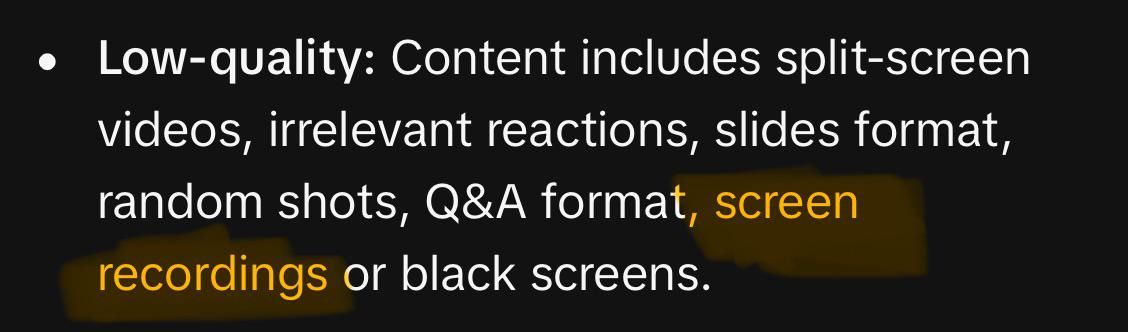
“Low quality: Your account info or video content includes split screens, meaningless reactions, low-quality images, or slide videos.”
That list is where split screens, reaction formats and slideshow posts become a problem, and none of them appear in the For You feed standard.
Does an unoriginal or low quality flag count as a strike?
Nothing in TikTok’s documentation makes a For You feed ruling a strike. Its moderation and appeals article ties strikes to removals (“we remove the content and your account accrues a strike”), and an ineligible video stays up.
Repetition still costs you. TikTok’s guidelines say an account that posts “a lot of content that’s ineligible for the FYF” can itself be made ineligible and harder to find, and Creator Rewards keeps its own tally: 5 video violations in 30 days, or 5 account violations in total, end eligibility. TikTok does not say whether a low quality disqualification counts toward either number.
Low quality and blurry are two completely different problems
If you search this and end up reading about turning on HD uploads, exporting at 1080p instead of 4K, or switching off Data Saver, none of that touches the eligibility flag. That advice fixes a compression and playback problem, which is a separate issue that happens to share a name.
The confusion is not your fault. When we checked on 2 October 2026, Google’s AI Overview for “tiktok low quality content” still opened by telling readers to enable high-quality uploads and export at 1080p instead of 4K, and several of the pages ranking alongside it do the same.
Two different things get called low quality on TikTok:
- Your video looks bad. Soft, pixelated, washed out. This is compression and upload settings, it affects how the video appears, and it has no bearing on whether the For You feed will carry it.
- TikTok has ruled the video ineligible. This arrives as a notification or a status on the post. It is a policy decision about originality and effort, and pixels play no part in it.
Work out which one you have before you change anything. If your reach collapsed but there was no notification, you are probably chasing the wrong problem, and the causes behind views dropping suddenly are usually somewhere else entirely.
The watermark is the one TikTok actually names
Of everything TikTok could have used as its example of unoriginal content, it chose clips that show someone else’s watermark or logo. That is the single most concrete thing in the whole policy and it is the easiest to fix.
Watermarks arrive in more ways than most creators expect. Saving your own video from another platform stamps that platform’s mark on it, downloading from a repost account carries their handle, and some editing apps burn in a corner logo on free plans unless you remove it before export.
A logo you did not notice is enough. The system is matching on visual signals rather than reading your intent, so a two second corner watermark on footage you genuinely filmed yourself still reads as content lifted from somewhere else.
Export from your editor directly rather than saving from another app, and check the corners of the first and last frames before you post. If you edit in CapCut or another app, play the exported file through to the last frame for anything the app added, such as an end card or a template credit.
Why was my video flagged as unoriginal when I filmed it myself?
A logo or watermark left in the footage is the most concrete cause TikTok names and the quickest to check, so rule that out first. Creators who film everything themselves still report the flag landing on some videos and not others: one iPhone creator shooting in 4K at 60 frames per second and editing in CapCut described exactly that pattern on 1 October 2026.
Shared building blocks are the next thing to check. Templates, stock clips and stock effects also appear in thousands of other uploads, and our guide to why TikTok flags original content as unoriginal lists mass-posted templates among its triggers.
Timing is the third. A Minecraft speedrunner whose own voice, gameplay and edit were flagged after a four hour content check suspected that posting the same video to YouTube about ten hours earlier was the cause (r/TikTokMonetizing, March 2026). TikTok has not said whether its matching considers where a clip appeared first.
Why this lands when views and payouts climb
Plenty of creators notice the same timing: a post is fine for days, then gets disqualified once it starts earning properly. The amount of attention on the post is what changed, and TikTok now says so itself.
Its moderation and appeals article says everything uploaded goes through an automated review first, and that “content gets a second look when it gains popularity or when someone reports it”. Creator Rewards adds checks of its own, because TikTok “will periodically review accounts for eligibility”, looking at account information and recent videos.
If you are in the Creator Rewards Program, assume anything that takes off will be checked against the eligibility rules at some point. A video you would not have bothered checking becomes the video most worth checking, so the ones you expect to perform deserve the watermark pass before they go up.
Which videos get flagged most
The formats that get caught are the ones where source footage you did not shoot fills most of the frame. The first two below are named directly in the Creator Rewards wording, so they are not guesswork.
- Split screens and reaction videos where the original clip occupies most of the screen and your camera is a small corner box. TikTok names split screens and meaningless reactions explicitly.
- Slide videos and image posts, which the monetization rules call out as low-quality images and slide videos
- Gaming clips from mainstream titles, since the footage looks identical to thousands of other uploads even when you recorded it yourself. Commentary over gameplay is caught too: a creator posting original rants over gameplay footage was disqualified from Creator Rewards for low quality in September 2026.
- Screen recordings for tutorials, tech and app walkthroughs, where nothing on screen originated with you
- Compilations and trend edits assembled from the same source material everyone else is using, the “combined from multiple sources” case in TikTok’s originality article
None of these formats are banned and plenty of accounts run them successfully. The difference is usually how much of the frame and the runtime belong to you.
Fan edits are the clearest example of the problem. They were the format that made this policy notorious in the first place, and they combine borrowed footage, borrowed audio and an edit style shared by thousands of other accounts.
What counts as unoriginal content on a TikTok LIVE?
A LIVE loses its For You feed slot if it streams “unoriginal content without new or creative edits” or shows “low quality content, such as black, blank, or blur screens”, according to the TikTok LIVE rules in the Community Guidelines in force since 24 September 2026. The same list covers LIVEs built on “repeated or prolonged actions that lack clear objectives or direct interaction”.
Repeat offenses are spelled out for LIVE. TikTok says a creator who “repeatedly shares content that falls short of our FYF standards” can have LIVE visibility or LIVE features temporarily restricted, and that streaming someone else’s content without permission “may also lead to restrictions”.
How to appeal a low quality or unoriginal flag
Appeal a For You feed ruling from the video’s analytics, and a Creator Rewards disqualification from the notice TikTok sends about it. For Creator Rewards, TikTok allows 80 days to appeal a video disqualification and 30 days to appeal an account disqualification.
For a For You feed ruling, TikTok’s help page gives the route: open the post, tap More insights (or the More options button, then Analytics), tap the notification for the ineligible post, then tap Appeal at the top. Answering No to whether the reason made sense lets you send feedback first, and the appeal is still available afterwards.
For Creator Rewards, a video disqualification shows in your Inbox and on the Creator Rewards dashboard, and its appeal starts from the “See details” notice on the video. An account disqualification is appealed from the Inbox notification or from TikTok Studio, then Creator Rewards Program, then Appeal, according to TikTok’s eligibility page.
You can follow a For You feed appeal in the in-app Safety Center, and TikTok says a successful one restores the content and removes the penalty. The warning that a rejected appeal adds a strike has no basis in TikTok’s documentation: it circulates in TikTok videos and Google’s AI Overview for Content Check Lite repeated it on 2 October 2026, but the appeals article describes no penalty for an unsuccessful appeal.
If the appeal is denied, TikTok’s documentation describes no further review inside the app, so treat that post as settled and put your time into the next upload. Before you move on, work out what actually triggered it by playing the video back for a watermark, a logo, a handle in a corner, or a stretch where borrowed footage runs uninterrupted with nothing of yours over it.
Do not repost the same file. It will be assessed the same way and you will have burned a second post on it. Rebuild it with your own footage or narration layered through the whole video.
Screenshot the video’s analytics as soon as the notice appears, since brand partners or managers sometimes ask what the post was doing before it was cut off.
How to keep videos eligible
The goal is making it obvious the video was made by you, for TikTok. Both rulebooks turn on creative edits and original contribution, so the fix is adding genuine input of your own.
- Open with your face or your voice inside the first few seconds
- Keep borrowed footage broken up with cuts, commentary or reactions rather than letting it run untouched
- Add narration or on screen text that only makes sense coming from you
- Build part of the edit with TikTok’s own text, effects and audio tools
- Check every corner of your footage for marks from other platforms before exporting
Showing your face is not a requirement, since neither rulebook asks for it, and our page on whether you have to show your face to get views on TikTok covers the faceless formats that stay eligible.
Length is worth a mention too, given the current wording targets short clips made from GIFs only. A very short post built entirely from found material is the exact shape the rule describes, so give the video enough room to contain something of yours.
Can you still post if Content Check Lite flags a video?
Yes. Content Check Lite shows prompts on the upload page so you can fix the video before posting, and creators who have shared the warning screen show it reading “Content may be restricted” and “You can still post, but modifying it to follow our guidelines may improve visibility.” Posting the flagged version unchanged risks the For You feed ruling the check was warning about.
The check runs only on the web for now. TikTok’s Content Check Lite article says to switch it on in TikTok Studio on the web (your profile, Settings, then “Automatic content check lite”) or to tap Turn on when the pop-up appears during an upload, and it compares the video against the For You feed Eligibility Standards.
A pass is not a guarantee, and TikTok says the check “is only preliminary”. In early September 2026 web uploaders also reported it spinning and then failing with an error, while one of them could still post from the phone app.
How creators are adjusting
The shift most people make is toward formats where being unoriginal is not really possible. Talking head explainers, behind the scenes footage and day in the life posts cannot be flagged as reused, because nobody else has the footage.
Others keep the same subject matter and change the execution, keeping the trend but shooting their own version of it. Planning tools such as Blaze AI help map variations in advance so the ideas are ready before the trend passes.
All of this income sits behind a policy TikTok can rewrite every year. Today’s two-line rule came in with the version released on 14 August 2025 and in force from 13 September 2025, and creators who survive that kind of change tend to be earning somewhere other than one platform’s payout pool. The creator money page covers the routes worth building alongside it.
If your reach is down but no notification ever arrived, this policy is probably not your problem, and TikTok’s guidelines say a video not getting many views “doesn’t necessarily mean it broke a rule”. It is worth ruling out comment level moderation and the ordinary reasons a post underperforms before rebuilding your whole content approach around an eligibility rule.

