
Instagram Story Reactions Changed and How to Undo a Wrong One
Instagram Story Reactions Changed and How to Undo a Wrong One
Instagram Story reactions land in DMs, and the emoji row has changed. See what the other person sees and how to unsend a wrong one.
- 1What Changed in Instagram Story Reactions?
- Can You Change the Emojis in Your Story Reaction Row?
- What Is the Camera Button in the Reaction Row?
- 2What Does Someone See When You React to Their Instagram Story?
- Can Other People See Your Instagram Story Reaction?
- How Do You Check Whether You Reacted to a Story?
- 3How Do You Undo an Instagram Story Reaction?
- What If Unsend Is Missing When You Hold the Reaction?
- Can Someone See That You Unsent a Reaction?
- 4Why Can’t I React to Someone’s Instagram Story?
- 5Why Does Swiping Up on an Instagram Story Leave a Like?
- 6Quick Takeaways
The Short Answer: Instagram Story reactions are the row of emojis that opens from the message box on someone’s Story, and each one lands in that person’s DMs. Since spring 2026 the row has been changing order, and on some accounts a camera for Instants, Meta’s disappearing photos, took one emoji’s place. To take back a wrong reaction, press and hold it in your chat with them and tap Unsend, because Delete for you clears only your own copy.
Instagram Story reactions take one tap to send, and every one of them arrives as a message. The emoji goes into the other person’s DMs beside a small preview of their Story, which is why a laughing face sent by mistake feels so much worse than a stray like.
The row itself stopped sitting still in 2026. In early April, a thread about it asked why the laughing face sat where the heart used to be, and its author had sent one by accident to someone who “was insulted.” Meta then launched Instants, its disappearing-photo feature, on May 13, and one week later a post on X complained that Instagram had swapped a Story reaction emoji for the Instants camera button.
In late July, an r/Instagram thread described the fire emoji gone and a photo reaction in its place, and within days both people in it said their row was back to normal. That on-and-off pattern looks like a test running account by account, so I treat any guide that lists one fixed set of emojis as out of date.
The first place I send anyone who tapped the wrong emoji is their chat with that person, because that is where a reaction lives. Below is what changed and when, what the other person sees, how to undo a reaction properly, and why the row sometimes will not send at all.

What Changed in Instagram Story Reactions?
Instagram Story reactions changed three ways in 2026: the six emojis changed order, the Instants camera took one emoji’s slot, and swiping up on a Story started leaving a like. Each change reached some accounts and not others, and the camera swap has already switched back on some of them.
The starting point was a row of six. Hootsuite’s emoji guide listed them in September 2023 as the crying face, the wow face, heart eyes, the laughing face, clapping hands and fire. A June 2026 thread still describes “six big reactions” at the top of the screen.
Here is the timeline, oldest first:
| When | What changed | Source |
|---|---|---|
| September 2023 | Six emojis in the row: crying, wow, heart eyes, laughing, clapping and fire | Hootsuite |
| Early April 2026 | The laughing face showing up in the first slot, where the heart or fire used to sit | r/Instagram |
| May 13, 2026 | Meta launched Instants, photos sent from the inbox that disappear once viewed | Meta newsroom |
| May 20, 2026 | A Story reaction emoji replaced by the Instants camera button | Post on X |
| June 2026 | Picking an emoji from Google Keyboard in a Story reply made the screen flicker, and nothing sent, until an update cleared it for some people by mid-June | r/Instagram |
| Late July 2026 | Fire emoji gone and a photo reaction in its place, then back to normal for both people in the thread within days | r/Instagram |
| September 2026 | Swiping up on a Story liked it, including when leaving the app on an iPhone | r/Instagram |
The July reversal is what makes me read all of this as a test, since a finished change does not vanish a few weeks after it arrives. If your row differs from a friend’s, that fits a staggered rollout far better than a broken app.
Can You Change the Emojis in Your Story Reaction Row?
Instagram has no setting that chooses or resets the emojis in the Story reaction row, and nobody reporting the 2026 changes has found a way to bring a swapped one back. Any emoji can still reach them if you type it into the message box from your keyboard and send it.
That typed emoji reaches their DMs the same way a tapped one does. Hootsuite’s 2023 guide says a custom emoji you pick that way then shows up in your reaction choices, though nobody reporting the 2026 swaps says it brought a lost emoji back. The April thread asks how to change the default back and gets no fix.
An August reply in that thread says “the reactions available seem to be different for each story.” If that is right, the row may change per Story as well as per account.
What Is the Camera Button in the Reaction Row?
The camera button that replaced an emoji on some accounts is the Instants camera, and it lets you react to a Story with a quick photo instead of an emoji. A report of it surfaced one week after Instants launched.
Meta’s launch post says people who get an Instant “can react with emojis, reply, and send instants back,” so replying with a photo is built into the feature. I’d keep a thumb off that button on Stories from anyone you would not send a selfie to.
What Does Someone See When You React to Their Instagram Story?
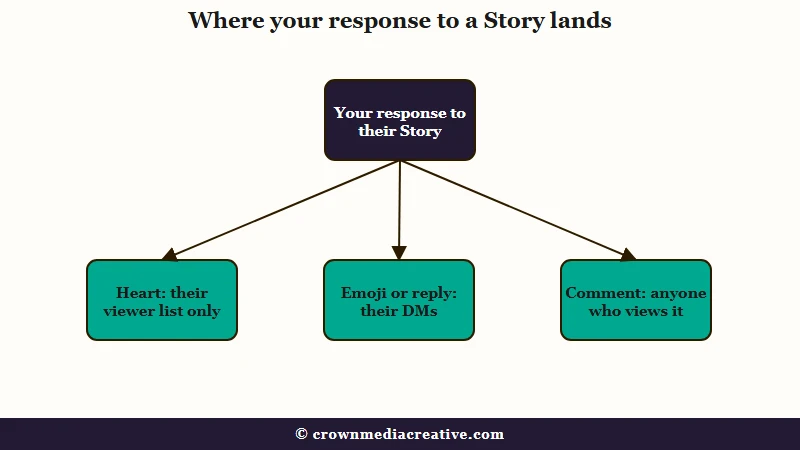
When you react to an Instagram Story, the owner gets your emoji as a DM beside a small preview of the Story, and nobody else who watches the Story can see it. If they do not follow you, it waits in their message requests.
Instagram’s chat help page says that “if someone you don’t follow sends you a message, it’ll appear as a message request in your message requests inbox.” A reaction travels as a message, so a reaction to a stranger’s Story sits in their requests until they open them.
The Story preview in the chat does not last unless the owner saves the Story to a Highlight. After 24 hours, “photos and videos from a person’s story will no longer be visible in conversations,” while “any text that was included with a message will still be visible,” per Instagram’s Story replies page. That is why a reaction can sit in a chat long after the Story it answered has gone.
Each way of responding to a Story leaves a different trail:
| What you did | Where it shows up | Who can see it | How to take it back |
|---|---|---|---|
| Tapped the heart (a Story like) | A heart beside your name on their viewer list | Only the Story’s owner | Tap the heart again |
| Tapped an emoji in the reaction row | Their DMs, with a Story preview | You and the owner | Unsend it from your chat |
| Typed a reply, even a single emoji | Their DMs, with a Story preview | You and the owner | Unsend it from your chat |
| Left a public Story comment | On the Story itself | Anyone who can view the Story | The owner can delete it, and it stays in their archive after the Story expires |
The undo step depends on where the response landed, so I start with the table row that matches the mistake. Reacting also puts you on their viewer list, since you had to open the Story, and anyone who taps the heart gets pinned near the top of it, per the Story viewer order guide.
A Story saved to Highlights keeps its viewer list for only 48 hours from when the Story first went up. The owner can still see who liked it long after that, per the guide to Highlight viewers.
Can Other People See Your Instagram Story Reaction?
No, other people cannot see your Instagram Story reaction, because it travels as a private message between your account and the Story’s owner. Public comments work differently: other viewers can read those.
Story likes are private too. Instagram described them in testing as “a way for people to react to stories that only the story author can see,” per TechCrunch’s January 2022 report. PetaPixel’s launch report noted they show as hearts on the viewer list with no like count.
Instagram opened public comments on Stories in September 2024, per PetaPixel’s coverage, and anyone who can see the Story can read them. You can comment only if you and the creator follow each other, unless they have opened comments to all their followers, per Instagram’s commenting page.
A comment leaves the Story when the Story expires but stays in the owner’s archive, and in any Highlight the Story is saved to, per Instagram’s Story comments page.
How Do You Check Whether You Reacted to a Story?
You check whether you reacted to an Instagram Story by opening your chat with that person, because a sent reaction appears there as your own message with the Story preview. If that chat shows nothing from you, check your message requests and archived chats too before you relax.
One reply in a thread on this exact worry says reactions between people who do not follow each other sometimes end up in those folders. The same reply says Instagram does not send a reaction unless you tap one of the emojis, and that “the animation only plays when you select something.”
On their side, a reaction from someone they do not follow waits in message requests. Silence after a reaction may only mean they have not opened their requests.
How Do You Undo an Instagram Story Reaction?
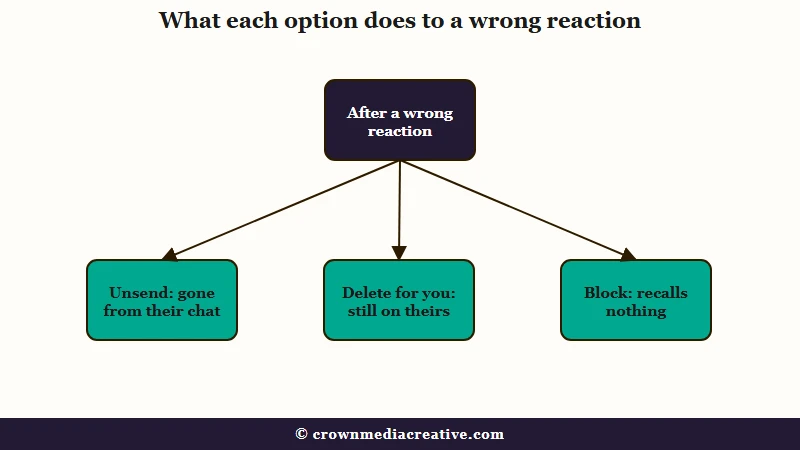
You undo an Instagram Story reaction by unsending it from your chat with that person: press and hold the reaction, then tap Unsend. Unsend is the only option that removes it from their side, so skip Delete for you and leave blocking out of it.
Here is the sequence I walk through with anyone who sent the wrong emoji:
- Tap Messages at the bottom of the app and open your chat with the person whose Story you reacted to.
- Find the reaction. It sits on your side of the chat, attached to a small preview of their Story while the Story is still up.
- Press and hold it until the menu appears.
- Tap Unsend, and confirm if Instagram asks.
Instagram’s unsend page says an unsent message “will no longer be visible to people included in the chat.” The same page warns that “the people you sent it to may have already seen your message,” and that unsent messages can still be included if the chat is reported.
Delete for you is the trap in that menu. Instagram’s page on removing messages says deleting “does not delete them for others in the chat,” and points you to Unsend instead.
Blocking recalls nothing either. In one June 2026 thread, someone blocked the account straight after a mis-tapped laughing face, and the reply was blunt: “blocking them doesn’t undo anything sent.” I would not block anyone over a reaction anyway, since a block says far more than a stray emoji.
What If Unsend Is Missing When You Hold the Reaction?
If Unsend is missing when you press and hold, check that you are holding your own message, then update the app or unsend it from instagram.com in a browser. On a computer, open Messages, pick the chat, click Options next to the message, then click Unsend.
Unsend exists only for messages you sent. A November 2025 thread shows the confusion after a redesign, when holding a message offered only share, bookmark and an emoji reaction.
I reach for the browser route next, because Instagram’s unsend page documents it step by step.
Can Someone See That You Unsent a Reaction?
Someone can see a reaction you unsent if they read it or caught the notification before you pulled it, and Instagram’s unsend page describes no notice telling them you removed it. The sooner you unsend, the smaller that window gets.
Instagram admits the notification gap for likes. Its help page on likes says that if you like a photo by accident and then unlike it, the poster “will still get a push notification if they have notifications turned on.” The unsend page says nothing either way about notifications already sent, so I plan as if a quick reader saw the emoji.
If they did see it, one honest line does more than a long explanation:
Vague: “omg sorry ignore that”
Specific: “Sorry, that laughing face was a mis-tap while I was reading your Story. I wasn’t laughing at it.”
Why Can’t I React to Someone’s Instagram Story?
When someone’s Instagram Story has no message box, they have most likely limited or switched off Story replies, and the reaction row goes with it because it opens from that box. If the box is there but your emoji will not send, look at your phone first, starting with the keyboard.
Instagram’s Story replies page says “anyone who can see your story can reply to it directly with a message” by default. It also says “when you prevent someone from replying, they won’t see that option from within your story,” and the owner sets this under Messages and story replies, then Story replies.
Match what you see to a row:
| What you see | Likely cause | Fix |
|---|---|---|
| No message box on their Story | The owner limited or turned off Story replies | Nothing to fix on your side |
| Picking an emoji from Google Keyboard makes the screen flicker and nothing sends | A glitch with Google Keyboard in Story replies, reported in June 2026 | Copy the emoji, paste it into the box, and update both apps |
| The fire emoji is gone and a camera sits in its place | The Instants camera swap on your account | Type the emoji you want into the box instead |
| Reactions fail along with your normal DMs | A messaging restriction on your account | Wait it out and check why it was applied |
| Your reaction sent but they never answered | It may be waiting in their message requests | Nothing to fix |
In the June thread, reinstalling did nothing for the two people who tried it, while copying the emoji in from another app got it through. The flicker cleared for two people there by mid-June, yet a third still had it on June 24 after updating, and nobody could pin the fix on Instagram or Google Keyboard. My own rule is to try the copy and paste before touching any setting.
If your normal DMs fail too, look at your account before their Story. The guide to account restrictions covers the messaging limits Instagram applies and why they come back.
Why Does Swiping Up on an Instagram Story Leave a Like?
On some accounts, a swipe up on an Instagram Story now leaves a like, and on an iPhone the upward swipe that leaves the app can trigger it. A like is the mildest mistake on this list. Tapping the heart again removes it.
The September thread puts it plainly: “every time I leave the app (on an iPhone) while on someone’s story, it likes it.” Swiping up used to open the reply and reaction panel, which is why the gesture is so easy to fire by accident.
Until Instagram changes the gesture, I close the Story before leaving the app. A Story like stays private to the owner and shows as a heart on their viewer list, and the guide to accidental likes covers what they see after you unlike it.
Quick Takeaways
- Instagram Story reactions are DMs, so Unsend in your chat with that person removes a wrong one, Delete for you clears only your copy, and blocking recalls nothing.
- If they saw it before you unsent it, one plain line naming the mis-tap does more than a long apology.
- The six-emoji row has been changing order since spring 2026, and on some accounts the Instants camera took one emoji’s slot for a while.
- No setting picks the row’s emojis, but any emoji typed into the message box still reaches them.
- If swiping up keeps liking Stories, close the Story before you leave the app, and tap the heart again to remove a stray like.

