
Creator Search Insights Missing on TikTok and Whether It Works
Creator Search Insights Missing on TikTok and Whether It Works
Can't find Creator Search Insights on TikTok? See the list of 40 countries, the spelling bug, the desktop address and what posting from it changes.
- 1What Is Creator Search Insights on TikTok?
- 2How Do You Open Creator Search Insights on TikTok?
- Can You Use Creator Search Insights on a Computer?
- Is There a Separate Creator Search Insights App or APK?
- 3Why Is Creator Search Insights Not Showing on TikTok?
- 4Does Posting From Creator Search Insights Get More Views?
- Why Is Your Feed Full of Creator Search Insights Tutorials?
- 5How Do You Turn a Creator Search Insights Topic Into a TikTok Video?
- Does Creator Search Insights Raise Your Creator Rewards Pay?
- 6Quick Takeaways
The Short Answer: Creator Search Insights is TikTok’s built-in search research tool, and you open it by tapping Search, typing “Creator Search Insights” and tapping View. If the View button never shows up, the usual causes are your country, being logged out, an old app version or a known bug with the singular spelling. Posting from inside the tool files the video under Inspired posts in your analytics, and none of TikTok’s help pages promise extra reach for it.
Creator Search Insights is the TikTok tool behind every “stop posting with the + sign” tutorial in your feed. Those videos tell you to post through the tool instead of the normal + button, and one likely reason they are everywhere is something the tutorials leave out. Since February 2026, TikTok has run an ambassador program that promotes videos about the tool.
Keep using the tool, though. It is TikTok’s own list of what people search for on the app, and the first place I send small creators who run out of video ideas.
Posting from inside it does less than the tutorials claim, and on some phones the tool will not open at all.
What Is Creator Search Insights on TikTok?
Creator Search Insights is a tool built into TikTok that shows what people search for on the app, which searches have too few good videos, and how your own posts perform in search. TikTok launched it on March 13, 2024, and it costs nothing.
TikTok’s help article describes it as “personalized information on topics people are searching for on TikTok.” The topics come from real searches, ranked by popularity and matched to your content and your followers, according to TikTok’s Creator Academy guide. The tool’s team also answers creators on r/TikTokSearchInsights, the official subreddit TikTok runs for the tool, and several answers below come from it.
The tool has six parts, and I lean on the Content gap filter more than any of the others:
| Part of the tool | What it shows you | Who gets it |
|---|---|---|
| Suggested topics | Searches matched to what you already post | Everyone who can open the tool |
| Trending tab and categories | Searches rising right now, filtered by category | Everyone who can open the tool |
| Content gap | Searches with few videos, or few good ones | Everyone who can open the tool |
| Searches by followers | What your own followers search for | Accounts with about 1,000 followers or more |
| Topic detail page | Past-week popularity, a region filter, age and gender of searchers, related videos | Everyone who can open the tool |
| Analytics | Search views, impressions, click-through rate and ranking for your posts | Everyone who can open the tool |
Searches by followers is the only part with a follower minimum. TikTok’s help article says “more than 1000 followers,” while its Creator Academy says “at least 1000,” so expect the filter to appear right around the 1,000-follower mark.
The tool shows between 100 and 500 topics per category, and old topics expire as searches change. Some topics are written by AI, and TikTok warns those “aren’t always precise or accurate,” so watch a few of the related videos before you trust a topic’s wording.
Small niches get noise. An art educator whose audience is mostly young women told TikTok’s team in June 2025 that the tool served “more makeup and dating search topics than art,” with no way to filter them out. The search bar inside the tool is the closest thing to a fix: type your niche and browse what comes back, though some searches return nothing.
Do not confuse it with Creator Search, a separate tool in the standalone TikTok Studio app. TikTok’s guide to Creator Search says it scores topics for popularity and competition, and it lives in a different app from Creator Search Insights.
How Do You Open Creator Search Insights on TikTok?
You open Creator Search Insights from TikTok’s search bar: tap Search, type “Creator Search Insights” and tap View at the top of the results. TikTok Studio has a second route, and on a computer the address is tiktok.com/csi in lowercase.
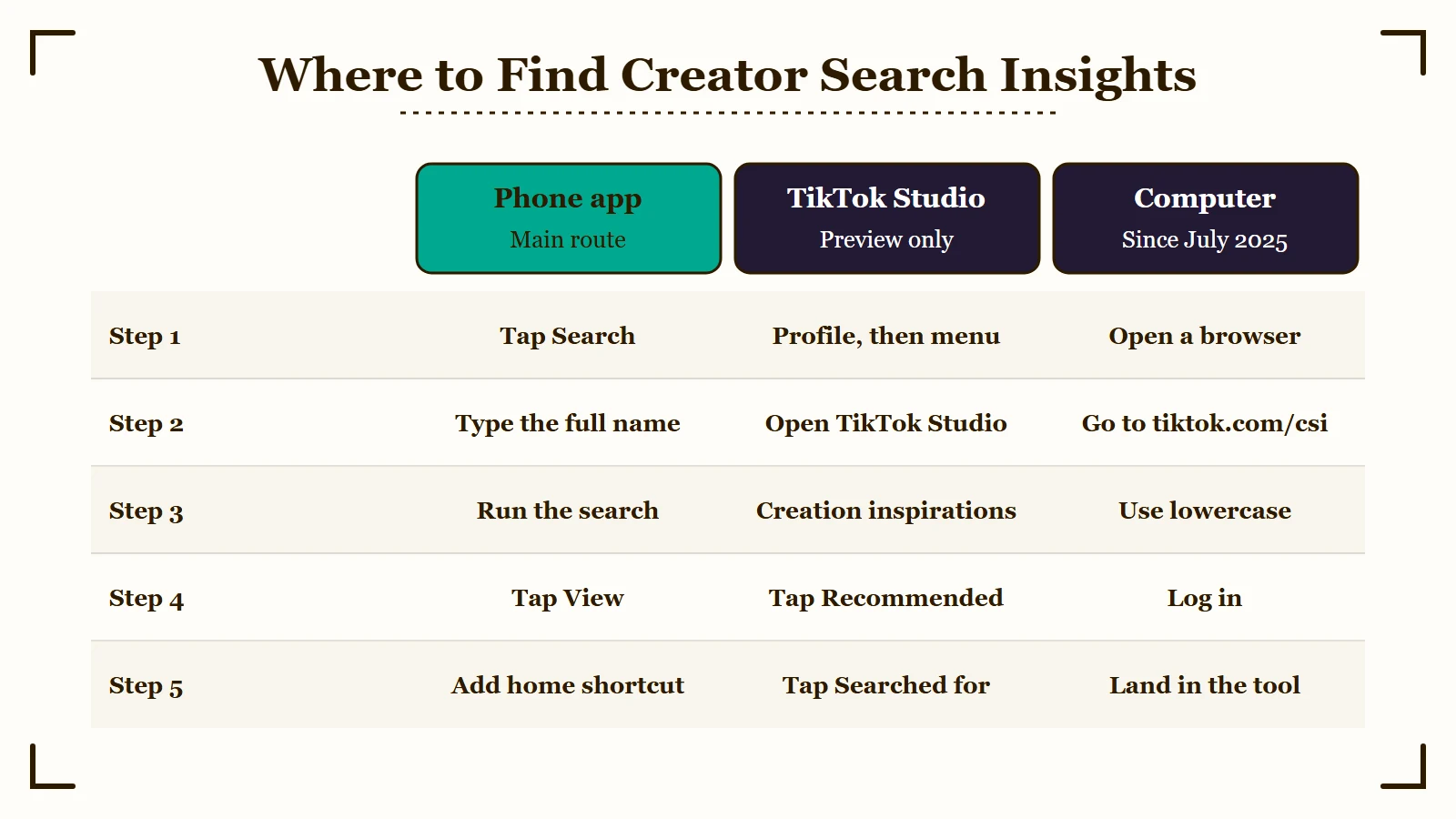
I tell people to type the full name, since the singular version could hide the tool in late 2025. The phone steps are short:
- Open TikTok and tap the Search button in the top corner of your For You feed.
- Type Creator Search Insights, with the s at the end, and run the search.
- Tap View at the top of the results to open your personal homepage in the tool.
- Add the tool’s shortcut to your phone’s home screen, which the tool’s team recommends so you never have to search for it again.
The second route runs through the TikTok Studio menu inside the TikTok app, which TikTok lists “for English-speaking regions.” Go to your profile, tap the menu (☰), open TikTok Studio, scroll to Creation inspirations, tap Recommended, then Searched for. TikTok calls that screen a place to “see popular search topics,” so treat it as a preview.
Google’s AI answer for the tool’s name also sends people to a Creator Tools menu on their profile. That route most likely traces to TikTok’s March 2024 launch post, which said creators “will soon be able to find it directly from Creator Tools, in Settings.” TikTok’s current help and Creator Academy guides don’t mention it, and TikTok’s how-to-find article promises “three simple ways” to open the tool, then lists two.
If you manage several accounts, open the tool on each one, because its topics are built from the logged-in account’s own posts and followers. That holds even when an automation tool such as SMTasker runs the posting side for TikTok, Instagram and Threads accounts on real Android phones. Like any automation tool, it carries a ban risk, so weigh that before you hand it an account.
Can You Use Creator Search Insights on a Computer?
Yes, Creator Search Insights has worked on computers since July 2025. Go to tiktok.com/csi in lowercase and log in, because the capitalized tiktok.com/CSI lands on TikTok’s 404 page.
The tool started as phone-only, and in November 2024 a moderator of TikTok’s subreddit said it was “not available on the pc version.” Desktop support arrived on July 11, 2025, and the tiktok.com/inspiration link from that announcement now forwards to tiktok.com/csi.
On October 5, 2026, the tool’s team posted the address as TikTok.com/CSI in a reply on that same announcement post, and that capitalized spelling redirects to TikTok’s 404 page. The lowercase tiktok.com/csi asks you to log in and then carries you back to the tool.
Is There a Separate Creator Search Insights App or APK?
No. Creator Search Insights lives inside TikTok, and TikTok’s own guide to finding it lists no separate download.
Two look-alikes show up when you search the tool’s name on Google. A TikTok account called creator search insights (@creator.searchinsights) ranks near the top. The bio Google shows for it reads “this is my new account old account band follow all fans,” which is not how TikTok writes.
The Play Store app in Google’s app box, Creator Insights from a developer named Sushanth, sells Instagram and YouTube publishing tools, and its listing never mentions TikTok.
The real support channel is r/TikTokSearchInsights, which calls itself the “Official TikTok Creator Search Insights Reddit” and is run by the tool’s team. Skip any site that offers a Creator Search Insights APK, since the US Federal Trade Commission’s malware advice is plain: “Don’t use unfamiliar websites to download free stuff.” If the real tool still won’t appear, most causes have a fix.
Why Is Creator Search Insights Not Showing on TikTok?
Creator Search Insights usually fails to show because your country is not on TikTok’s list of 40, you are logged out, or your app is out of date. A late-2025 bug could also hide it from anyone who searched the singular “Creator Search Insight.”
My first check is always the country, because no setting fixes that one. TikTok’s Creator Academy says the tool “can be accessed in English” in these 40 countries:
- North America and the Caribbean: United States, Canada, Mexico, Puerto Rico, Dominican Republic
- Central and South America: Guatemala, Honduras, El Salvador, Nicaragua, Costa Rica, Panama, Colombia, Ecuador, Peru, Bolivia, Chile, Argentina, Paraguay, Uruguay, Brazil
- Europe: Great Britain, Ireland, France, Germany, Spain, Andorra, Turkey
- Asia and Oceania: Japan, South Korea, Singapore, Indonesia, the Philippines, Vietnam, Thailand, Malaysia, Australia, New Zealand
- Africa: South Africa, Kenya, Nigeria
That list has not changed since at least November 2024, when TikTok’s own subreddit posted it word for word. Italy, the Netherlands, Poland, Belgium, Sweden, Portugal, Egypt, Saudi Arabia, the UAE, Pakistan and Ghana are among the countries missing from it.
Outside the list, TikTok’s how-to-find guide says to tap “Notify me” to hear when the tool arrives. The list also says “in English,” so if your app runs in another language, switching TikTok to English is a two-minute test, though TikTok does not promise it will work.
| What you see | Likely cause | What to do |
|---|---|---|
| No View button after searching | Your country is not on the list, or you are logged out | Log in, and tap Notify me if you are outside the 40 countries |
| It worked before, now search will not find it | The singular spelling bug, or an old app version | Search the full name, then update TikTok |
| It opens on your phone but not your iPad | An older app or system version on that device | Update the app and the system, and reinstall only after saving your drafts |
| Topics look generic and unrelated to your content | Personalization is switched off | Turn personalization back on in TikTok’s settings |
| No Searches by followers filter | Fewer than about 1,000 followers | Use Content gap until you pass 1,000 |
| A video you posted from it is missing from Inspired posts | Analytics take a while to update | Wait a few days, then ask on the tool’s subreddit |
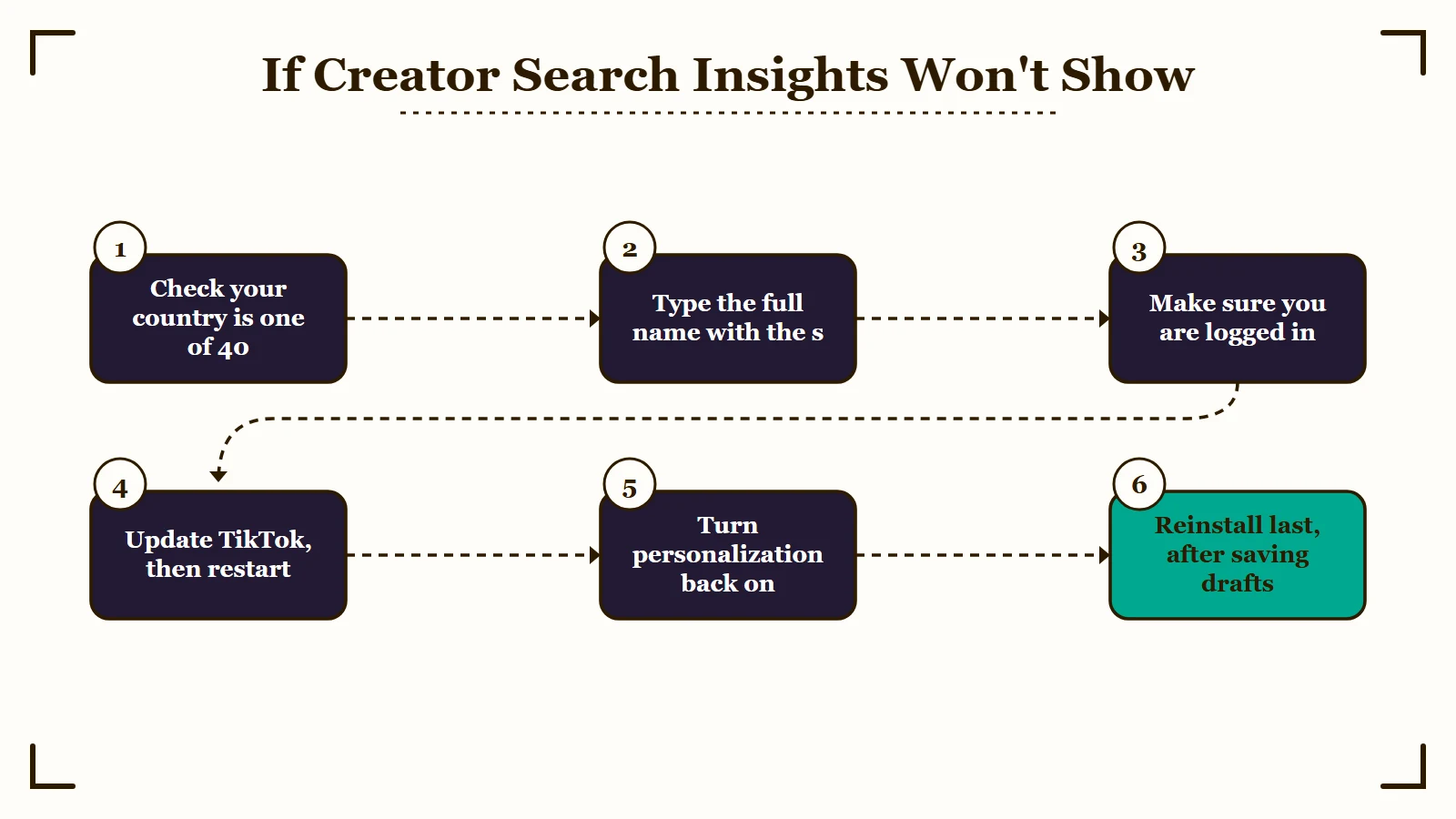
When the tool will not open, here is the order I work through, cheapest step first:
- Search the plural name, “Creator Search Insights.” In October 2025 the tool’s team confirmed that typing “Creator Search Insight” without the s could hide it, and later called the bug an “[URGENT] priority.”
- Make sure you are logged in. TikTok’s how-to-find article says you “must be logged in” for the personalized version.
- Update TikTok from the App Store or Google Play, then restart the phone.
- Turn personalization back on if you switched it off. TikTok’s help article says that with it off, “you won’t be served personalized search topics.”
- Reinstall TikTok as the last step, after posting or saving copies of your drafts. TikTok’s help on drafts lists an uninstall and reinstall as one way drafts get removed. A system update plus a reinstall brought the tool back for the one person in an October 2025 thread who reported trying it.
A video you posted from the tool can also take time to appear in its analytics. When a creator saw “0 posted” a day after posting, the subreddit’s moderator said “it might take a little while” and to come back if nothing changed in a few days. Once the tool opens, the next thing the tutorials push is posting from inside it.
Does Posting From Creator Search Insights Get More Views?
None of TikTok’s help pages say posting from Creator Search Insights boosts reach. Doing it files the video under Inspired posts in the tool’s analytics and adds #creatorsearchinsights to the caption, while TikTok’s own myth list says editing outside its app does not hurt search.
TikTok’s help article documents one difference: an Inspired posts view in the tool’s analytics, listing “posts you’ve made from topics found in Creator Search Insights.” A creator asked the tool’s team on October 12, 2026 whether to post a video from the tool. The team’s answer was that “it really comes down to whether you’d want to view the ‘Inspired Posts’ analytics.”
TikTok’s myth-busting guide to search goes further. It calls the idea that you must edit videos on TikTok to be found in search a myth, and says your “search performance won’t be impacted” by the editing tools you use.
A 2024 moderator post on that subreddit did claim a topic-linked video lets TikTok’s algorithm “categorize and promote your video more effectively.” None of TikTok’s help or Creator Academy pages on the tool repeat that, and the team’s October 2026 answer tied the choice only to the analytics.
I don’t buy the “stop posting with the + sign” pitch, because nothing in TikTok’s help center or Creator Academy backs it. Search ranks mainly on relevance: TikTok’s traffic guide says search “values relevance over video views and engagement,” and its search basics page says relevance comes from captions, on-screen text and hashtags.
The auto-added #creatorsearchinsights tag is optional. A 2024 moderator answer says posts without it “still show up when we are able to identify” the topic.
That same answer calls the tag “the best way to ensure your post is related to the search topic.” I leave it in unless the caption is crowded, though the team said in 2025 that “your content and description can make a much bigger impact” than hashtags.
Results from using the tool run both ways, and these dated Reddit posts show the range:
| When | Where | What the post says |
|---|---|---|
| January 2025 | r/TikTokSearchInsights | No video made in the tool passed 1,000 views, against tens of thousands for regular posts, in a month with over 3 million views |
| March 2026 | r/TikTokShopAffiliate | Some videos drew “500k-1m+ in SEARCH TRAFFIC” and others got “nada” |
| May 2026 | r/TikTokMonetizing | Posting from the tool did “far worse than without it,” and no viral video came from it “UNLESS it was a video about the creator search insights” |
| August 2026 | r/TikTokLounge | After views fell in mid-July, several posts made from Content gap topics passed six figures, mostly through search |
The August post is the strongest case for the tool. A reply under it is a useful check, since the person replying says their most viral recent video came in at 70% search traffic after being posted the normal way. If your own views fell this summer, sudden TikTok view drops have other causes to rule out first.
My rule is to let the tool pick the topic, then post whichever way suits your editing. Post from the topic’s camera button only when you want the video counted under Inspired posts.
Why Is Your Feed Full of Creator Search Insights Tutorials?
TikTok’s own Creator Search Insights team promotes creators’ videos about the tool through an ambassador program that launched in February 2026, which helps explain why tutorials about it keep reaching For You feeds.
The program’s launch post said creators “can get rewarded with more views by creating TikToks about Creator Search Insights.” The team laid out the steps on February 27, 2026. A creator posts a video about the tool and submits its ad code, which lets TikTok run the post as an ad, and the team says it gets “promoted on TikTok within 1-2 weeks.”
Promotion waves began on April 13, 2026, and in June the team wrote that some approved creators “may have gotten over 200,000 views.”
A September 30 post counted over 300 submissions in two weeks. In a reply under it, the team said the promotion pushes a video “out to a mass variety of audiences,” then keeps pushing it to the audiences that watch longest. That works much like a paid TikTok Promote boost.
Approval is not automatic. The team rejects shoppable videos, videos that add the hashtag without being about the tool, and anything that breaks TikTok’s guidelines.
None of this proves any single tutorial is part of the program. It does mean TikTok rewards videos that talk up the tool with extra reach. An October 2026 Reddit post calls those tutorials annoying and quotes their repeated line, “STOP POSTING USING THE + SIGN!”
The August 2026 post in the table above comes from a creator in the program too: on October 1, 2026, they asked the tool’s team how to track the ad codes they had submitted. Weigh their results with that in mind.
How Do You Turn a Creator Search Insights Topic Into a TikTok Video?
You turn a Creator Search Insights topic into a video by picking a rising topic and saying and showing its exact phrase in the first seconds. Put the phrase in your caption, then check Search Analytics a few days later.
The first three seconds are where I spend most of my effort, because that is where the phrase has to land. This is the order I follow with a new topic:
- Start in Content gap, or type your niche into the tool’s own search bar, and pick a topic you can cover well.
- Open the topic’s detail page and check that the past-week popularity line is rising. Switch the region from Global to your own country, then tap “View demographic details” to see the age and gender of the people searching, as TikTok’s detail page guide shows.
- Say the topic’s phrase out loud early, put it on screen, and use it in the caption. TikTok’s Search Analytics guide asks for exactly that: “use this topic and other relevant keywords in your description and text-on-screen.”
- Post from the topic’s camera button if you want the video counted under Inspired posts. Since August 12, 2026, you can load a draft into a topic: tap the camera under the topic, slide to Create, then open Drafts.
- Check Search Analytics after a few days. It reports search views, search view percentage, search impressions, average click-through rate and average search ranking.
The drafts option retires an old workaround for anything saved as a TikTok draft. In 2024 TikTok’s subreddit taught creators to film a longer placeholder clip inside the tool and lay their real video over it.
Here is what step 3 looks like for a topic such as “how to clean white sneakers”:
Vague: Caption “Sunday reset with my favorite pair #fyp #cleantok #creatorsearchinsights” and an opening line of “So I tried something new today.”
Specific: Caption “How to clean white sneakers without bleach in 3 steps #sneakercare #creatorsearchinsights” and an opening line of “Here’s how to clean white sneakers without bleach.”
Keep the extra keywords out of tiny or off-screen text. TikTok’s myth list says stuffing text that way can “get your video flagged for spam.”
Does Creator Search Insights Raise Your Creator Rewards Pay?
Creator Search Insights can raise Creator Rewards pay, because search value is one of the factors behind the program’s Additional Reward. The program runs in 8 countries, counts a search view as qualified only after 30 seconds of watching, and needs 1,000 For You feed views per video.
TikTok’s rewards guide splits pay into a base payout and an Additional Reward, a quality bonus. That bonus weighs search value, “how often your videos are discovered through Search and inspire viewers to watch more,” beside watch time, retention and completion rate. TikTok’s qualified-view rules count search views “with watch times of at least 30 seconds,” against five seconds for other views.
An August 2026 Reddit post says search traffic alone is not eligible for Creator Rewards money. That is only half right.
Search views count once they pass 30 seconds, but the video must still be at least a minute long and reach 1,000 views on the For You feed (full program requirements). You must also live in the United States, the UK, Germany, Japan, South Korea, France, Mexico or Brazil.
That leaves 32 of the tool’s 40 countries, Canada, Kenya and Nigeria among them, with the research tool and no search payout. There, search viewers pay off in other ways, from TikTok Shop sales where Shop runs to followers who join something you own, such as the email list behind a link-in-bio money page.
Quick Takeaways
- Open Creator Search Insights by searching its full name and tapping View, or go to tiktok.com/csi in lowercase on a computer.
- If it will not appear, check TikTok’s list of 40 countries, log in, update the app and turn personalization back on before you reinstall.
- TikTok documents only an analytics difference for posting from the tool, and the “stop posting with the + sign” tutorials line up with a TikTok program that promotes videos about it.
- Search views count toward Creator Rewards after 30 seconds, but only in 8 countries and only on videos with 1,000 For You views.
- Treat the tool as a topic finder: let it pick what you make, then post whichever way suits your editing.

