
Instagram Series and What to Do When Linked Reels Disappear
Instagram Series and What to Do When Linked Reels Disappear
Instagram removes linked Reels on October 28. See what happens to your links, how Instagram Series works, who has it and what to use instead.
The Short Answer: Instagram Series is a Meta test that groups Reels into episodes on their own profile tab, and most accounts do not have it yet. Separately, Instagram removes linked Reels starting October 28: every existing link between Reels disappears, while the Reels, views and insights stay. Instagram has not said Series replaces linking, so without it, pin Part 1, number each part and say in each caption where the next one is.
A pop-up that started showing over the caption screen of new Reels in mid-October has creators asking what replaces it, and the first reply in that thread names Instagram Series. The notice, posted to r/InstagramMarketing on October 15, reads word for word:
“Linking Reels will no longer be available. Starting on 28 October, you won’t be able to link Reels together and existing links will be removed. Your Reels, views and insights will not be affected.”
Instagram’s own Help Center page on linking still teaches Link a reel step by step as of October 23, five days before the cutoff, and it never mentions an end date. The Help Center has no page for Series yet.
I trust the in-app notice over anything else written about this change, because it comes straight from Instagram and it carries a date. The fixes further down work on any account, with or without Series.
Is Instagram Series the Replacement for Linked Reels?
Instagram Series groups Reels into episodes on a profile tab, and Meta has tested it only with select creators since June 2, 2026. Instagram has not named it the replacement for linked Reels.
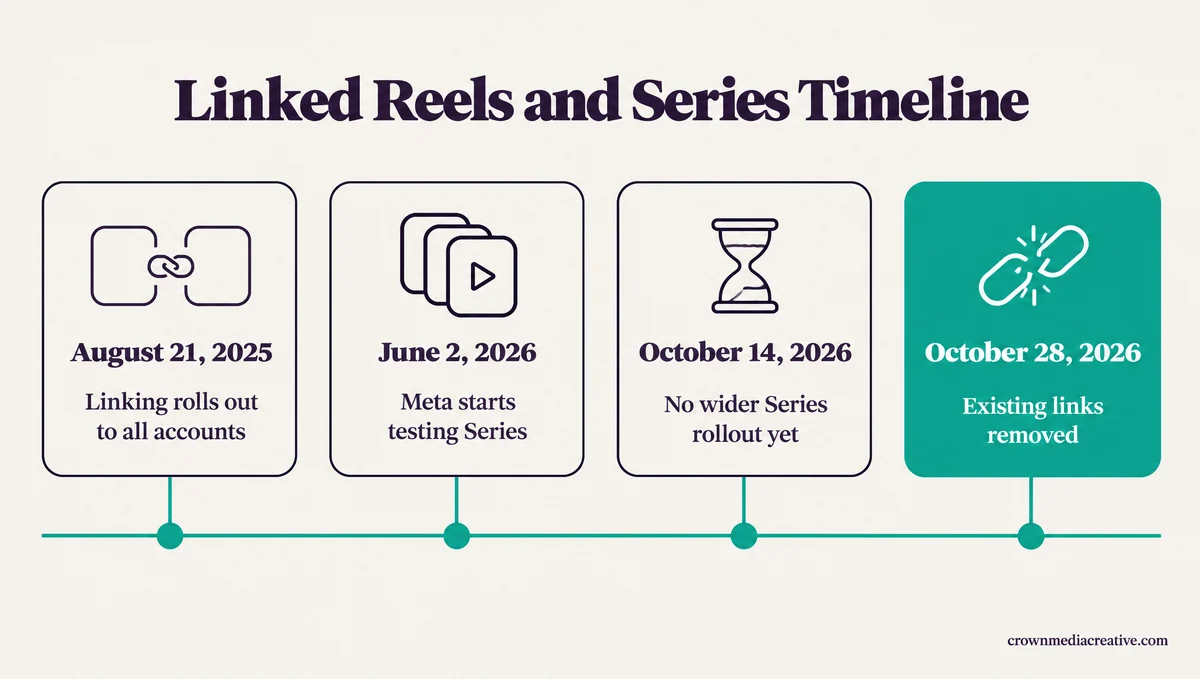
Series fixes the same problem linking did, moving a viewer from one part to the next, which is why it looks like the obvious replacement. Meta started testing it on Instagram and Facebook on June 2, 2026, TechCrunch reported.
Select creators can turn Reels, new and old, into episodes of one bigger story, and each series gets its own page plus a new tab on the creator’s profile. Viewers who find an episode in their feed or the Reels tab get an option to open the full series, and they can save a series to watch later. Some accounts already show a Series folder in Instagram’s Saved section.
Creator economy writer Lia Haberman wrote on Threads on October 15 that a source told her Instagram is “testing new overlapping ways to link content as part of their new video changes.” Her next line reads: “It’s not necessarily related to Series.”
That points to some other way of linking content, still in testing, which Instagram has not shown publicly. I’m not planning a single video around Series until it reaches ordinary accounts, and I’d give the same advice to anyone running a multi-part show.
| Question | Linked Reels | Instagram Series |
|---|---|---|
| What it connects | One Reel to one other Reel | A set of Reels, as episodes |
| Where viewers see it | A button on the Reel, with a title of up to 15 characters | A profile tab and a series page, plus an option to open the full series from any episode |
| Who can use it | All accounts, rolled out from August 21, 2025, in the mobile app only | Select creators in a Meta test |
| Limits | One linked Reel at a time, and none on Close Friends or subscriber-only Reels | No cap published by Meta |
| Status | Ends October 28, 2026, and existing links are removed | Still a test, with no wider rollout announced as of October 14 |
What Happens to Linked Reels on Instagram After October 28?
Starting October 28, Instagram removes every link between Reels, so the button that sent viewers from one Reel to the next disappears. The Reels stay up, and Instagram says their views and insights are not affected.
Nothing you do keeps an existing link alive past October 28, so the useful work happens before it. A Part 1 that goes viral after the cutoff sends its new viewers nowhere unless the Reel itself says where Part 2 is.
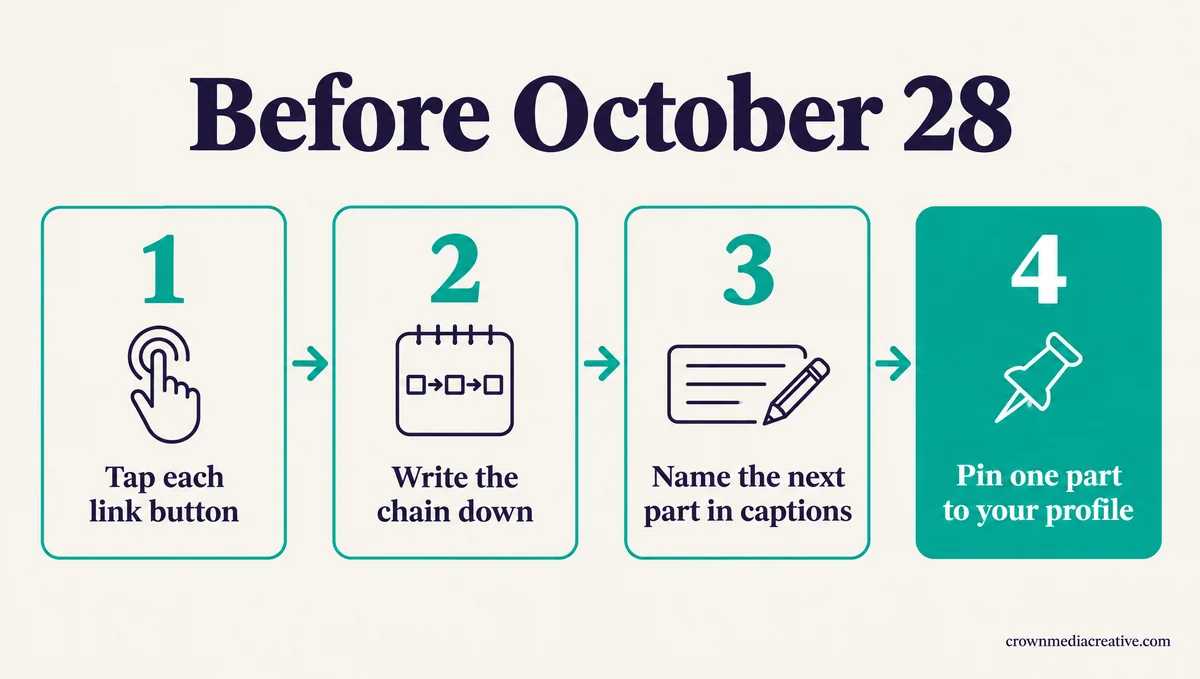
This is the inventory I run on any account with multi-part Reels, and it takes a few minutes per series:
- Play each Reel that shows a link button, and tap the button to see which Reel it opens.
- Write the chain down, Part 1 to Part 2 to Part 3, or screenshot each step, because the links will be gone after October 28.
- Edit each caption so it names the next part and says where to find it. The wording is in the last section.
- Pick the part you will pin to the top of your profile.
Instagram began rolling linking out to all accounts on August 21, 2025. That gives the feature about 14 months before the October 28 cutoff.
Each link was a small button on a Reel, titled with up to 15 characters, that opened one other Reel. The Help Center still lists the same limits: one linked Reel at a time and no linking on Close Friends or subscriber-only Reels.
The notice itself gives no reason for the change. A source told creator economy writer Lia Haberman that Instagram wants to “simplify the overall Reels viewer” experience, and Social Media Today repeated her report on October 15.
At least one account lost the option to add new links weeks before the cutoff while its old links kept working, according to a reply on r/InstagramMarketing.
How Do You Make a Series on Instagram?
To make a series on Instagram, open your profile, tap the + button, pick Series, add a cover, title and description, tap Create, then add Reels as episodes. Only accounts in Meta’s test see the option.
Instagram has no help page for Series, so the steps below follow CreatorFlow’s walkthrough, last updated October 14:
- Update Instagram and open your profile.
- Tap the + (create) button and pick the Series option. If it is missing, your account is not in the test yet, which the next section covers.
- Add a cover photo, then write a title and a description.
- Tap Create.
- Add episodes, either new Reels or ones you already posted, in the order you want them watched.
The title matters most to me, because it is what a viewer reads before deciding to binge. Keep it to one clear promise, such as “Sourdough From Scratch in 5 Days.”
The same guide says creator tutorials give a 25-Reel cap, which Meta has not confirmed and no help page states. Whether you can reorder or remove episodes later, or put one Reel in two series, is unconfirmed too. Older guides that add a long-form video to a series describe IGTV series, a feature that went away with IGTV.
A tool like Vista Social will still publish an episode on schedule. Meta’s API has no series field, CreatorFlow points out, so the Reel goes up as an ordinary one. Once it is live, add it to the series from the app.
Why Don’t You Have the Series Option on Instagram?
Most accounts lack the Series option because it is still a Meta test that began with select creators who already post serialized content. Instagram has published no waitlist, application or follower minimum, and no documented setting turns it on.
That bothers me more than the removal itself: linking was open to every account, and the nearest thing to it is limited to a test group, with no date for anyone else.
TechCrunch reported at launch that Meta was “working with select creators and content producers who have already shared serialized content.” CreatorFlow’s guide dates a wider wave of access to July 15 to 24, 2026, going by the tutorials posted that week. Meta had still announced no wider rollout as of October 14.
Under her October 15 post, Lia Haberman answered someone who never got Series that “it might still roll out to all of us but just no confirmation yet.” The only checks worth doing are updating the app and looking for Series in the + menu on your profile. Meta has not said which account types are in the test, and reinstalling has no documented effect on access, so skip the reinstall and use the fixes below.
How Do You Connect Multi-Part Reels on Instagram Without Links?
Without linked Reels, pin Part 1 to your profile and put the part number on every cover. Then name the next part in each caption and at the end of each video, and keep a Story Highlight for the series.
Pinning Part 1 is the fix I reach for first, because the top of your grid is the first thing a curious viewer sees after tapping your name. The other fixes fill in what the link button used to do:
| What the link button did | What does the job now | Where to set it up |
|---|---|---|
| Sent viewers from one part to the next | A caption line that names the next part and where it is | Three dots on the Reel, then Edit |
| Kept the parts in one place | Part 1 pinned to the top of your grid | Three dots on the Reel, then Pin to your profile |
| Showed which part a viewer was on | “Part 2 of 4” on the cover | The cover editor, before you post |
| Gave viewers a place to binge | A Story Highlight named after the series | Share each part to your Story, then add it to the Highlight |
| Brought viewers back for new parts | A bio link to a page that lists every part | Edit profile, then Links |
The caption does most of the work now, so rewrite any line that leaned on the button:
Before: “Part 2! Tap the link at the bottom for Part 3.”
After: “Part 2 of 4: shaping the dough. Part 3 is pinned to my profile, and every part is listed in the link in my bio.”
Say the same thing out loud in the last seconds of each video. Reach on a Reel can build over a few days, so a pointer inside the video keeps working long after you post. Highlights only hold Stories, so the series Highlight fills up as you share each new part to your Story.
For viewers who want every part in one list, a page in your bio does the job. A free link-in-bio money page, a single page that lists your links and collects emails, also keeps your next series reachable if Instagram changes Reels again.
Watch two things from here. The first is the other way of linking content that Lia Haberman’s source said Instagram is testing. The second is the + menu on your profile after each app update, where Series shows up once an account is in the test.
Quick Takeaways
- My first move on any multi-part show: before October 28, tap each link button and write down which Reel it opens.
- Starting October 28, Instagram removes every link between Reels, and the Reels, views and insights stay.
- Instagram Series groups Reels into episodes on a profile tab, but it is still a test, and Instagram has not called it the replacement.
- If you have Series, build it from the + button on your profile, and add scheduled Reels to the series in the app.
- Without Series, pin Part 1, put “Part 2 of 4” on each cover and name the next part in every caption.

