
See Deleted Messages on TikTok When There Is No Trash Folder
See Deleted Messages on TikTok When There Is No Trash Folder
TikTok has no trash folder for messages. See where a deleted TikTok DM can still turn up, and why recovery apps can't reach it.
- 1Can You See Deleted Messages on TikTok?
- Is There a Recently Deleted Folder for TikTok Messages?
- 2Does the Other Person Still Have Your Deleted TikTok Messages?
- Can You See a TikTok Message Someone Unsent?
- 3Can Your Phone’s Notifications Show a Deleted TikTok Message?
- 4Does TikTok’s Download Your Data File Include Deleted Messages?
- 5Why Did My TikTok Messages Disappear If I Didn’t Delete Them?
- 6Can You Get TikTok Messages Back After Being Banned?
- Can You Recover Messages From a Deleted TikTok Account?
- 7Can a Recovery App Bring Back Deleted TikTok Messages?
- 8Quick Takeaways
The Short Answer: TikTok has no Recently Deleted folder for messages, so a chat you delete is gone from your inbox for good. The copy that usually survives is the other person’s, because Delete for me only clears your side, and a notification may still be sitting on a phone. TikTok’s Download your data file is worth one request, but TikTok never promises it holds deleted chats.
Several of the top Google results for how to see deleted messages on TikTok send you hunting for a folder that isn’t there. TikTok’s own search pages rank on the first page with advice about a Recently Deleted folder, and that folder belongs to the iPhone’s Messages app.
TikTok’s real options are fewer. Which one works depends on who deleted the message, which button they pressed, and whether a phone kept the notification.
My rule with a lost chat is to ask the other person before touching a single setting, since their copy is the one that usually survived. It costs one message and a minute of your time.
The order you try things in matters, because one common fix, reinstalling TikTok, can also delete your drafts.
Can You See Deleted Messages on TikTok?
You can’t see deleted messages on TikTok inside the app, because direct messages have no undo or Recently Deleted folder. A copy can still survive in the other person’s chat, a phone notification or TikTok’s own records.
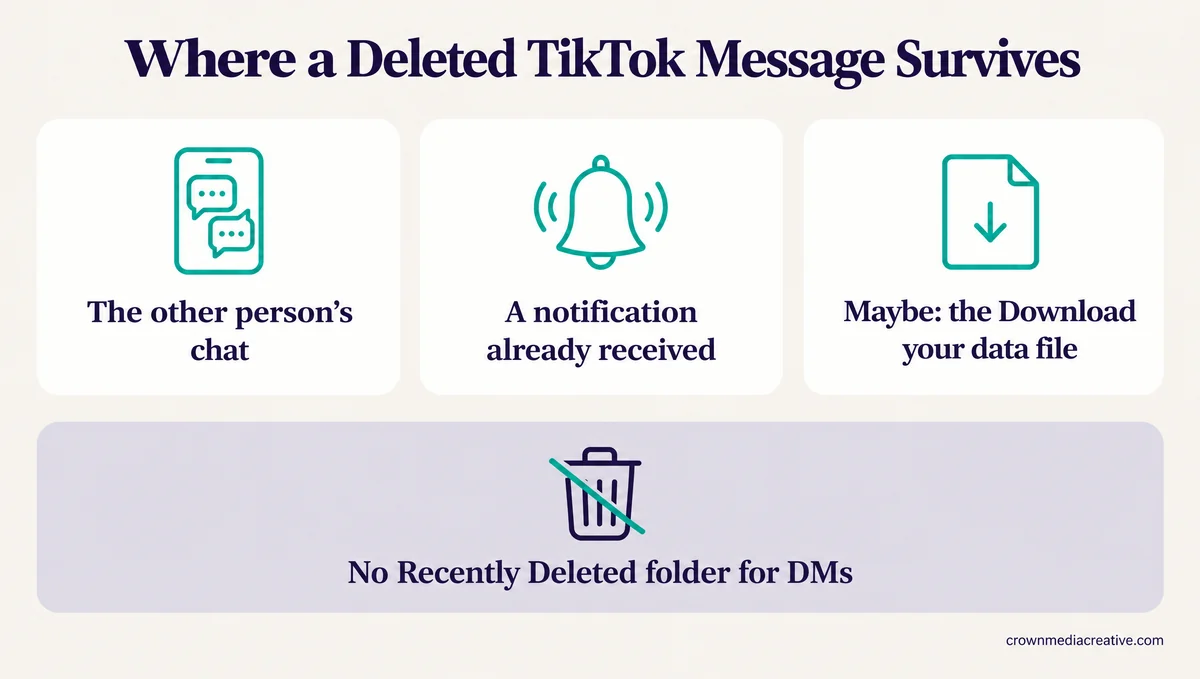
TikTok’s help on direct messages covers deleting a chat, deleting a single message, muting, reporting and blocking. It has no step for restoring a message, and none of the more than 200 articles in TikTok’s English help center describes one.
The missing undo bothers me, because a whole chat goes in a couple of taps on either phone and nothing in the app brings it back.
What you can still see depends on what happened to the message:
| What happened | Can you see it in TikTok? | Where a copy may survive |
|---|---|---|
| You tapped Delete for me | No | The other person’s chat |
| You deleted the whole chat | No | The other person’s chat |
| You tapped Delete for everyone within 3 minutes | No, it left both chats | A notification that already reached them |
| Someone unsent a message to you | No | A notification that already reached you |
| The chat vanished and you deleted nothing | Sometimes, after a fix | Another login, a computer browser, or the data file |
| Your account was banned or age restricted | Not in the app | An approved appeal, or the data file for a limited time |
Is There a Recently Deleted Folder for TikTok Messages?
No. TikTok’s Recently deleted folder only holds deleted posts, for 30 days, and messages never go there.
TikTok’s help on editing, posting and deleting says a deleted post “remains in our system for up to 30 days before being permanently deleted.” That folder sits in Activity center and lists posts only.
The Recently Deleted folder that some search results promise for messages comes from somewhere else. A TikTok search page titled “Can You Recover Messages You Deleted from The Recently Deleted Folder” sat third on Google’s first page on October 21, 2026. That TikTok page held 36 videos that day, and one of them was about TikTok messages, while the rest covered phone texts, WhatsApp, Messenger and iPhones.
A Recently Deleted folder with a Recover button is real, but it lives in the iPhone’s Messages app and never touches TikTok.
Google’s AI answer gets the folder right, saying TikTok has no recently deleted folder for direct messages. It still cites TikTok’s Recover Deleted Direct Messages page as a source, and only 4 of the 36 videos on that page were about TikTok messages. That leaves the copies outside your own inbox, starting with the person on the other end of the chat.
Does the Other Person Still Have Your Deleted TikTok Messages?
Usually, yes. Delete for me only clears your side, and a whole chat has no option to clear theirs, so their copy stays unless they delete it too. Of the delete buttons, only Delete for everyone, within 3 minutes of sending, clears both chats.
TikTok’s direct message help puts it plainly: “To delete the message only for you, tap Delete for me. The receiver(s) will still see the message.” The same page gives no Delete for everyone option for a whole chat, so deleting one clears only your inbox.
Google’s AI answer gives the right advice for the wrong reason. It tells you to ask the other person “since TikTok syncs deletions across the server for both users in a chat.” If deletions really synced for both people, their copy would be gone as well.
I keep the ask short and name a date, so the other person can find the message without scrolling through months of chat. Here is the difference:
Before: “can u send me our old messages”
After: “I deleted our chat by mistake. Could you screenshot the part from around June 12, where you sent the address for the shoot? Your copy is still there.”
If the other person pressed Delete for everyone on their own message, that message left your chat too. Some accounts only show Delete for me, and how unsending works on TikTok covers that gap and the 3-minute window.
Can You See a TikTok Message Someone Unsent?
Only if its notification reached a phone before they unsent it. TikTok removes an unsent message from your chat, so that notification is the last copy you might have.
The next section covers how long Android and iPhone keep a TikTok notification. Check it before you open the TikTok app, since some phones clear an alert once you tap it.
Can Your Phone’s Notifications Show a Deleted TikTok Message?
Sometimes. Android’s notification history can show a TikTok message preview from the last 24 hours, if it was on before the message arrived. On iPhone, the preview survives only while the alert stays in Notification Center.
Android’s notification history is a log of the notifications you have dismissed. Android’s own documentation calls it “an optional feature for OEMs to implement,” meaning phone makers can leave it out, and sets the default retention period at 24 hours.
On a Pixel, Google’s help says “You must turn on notification history first before you can find past alerts.” I switch it on for every Android phone I set up, because it costs nothing until the day a message disappears.
To check Android notification history for a TikTok message:
- Open Settings and tap Notifications.
- Tap Notification history. The menu name can differ by phone maker.
- If Use notification history is off, turn it on. It won’t bring back anything from before this moment.
- Look for TikTok entries under recently dismissed or the last 24 hours, and screenshot any that hold the text.
On iPhone, Apple says “Notification Center shows your notifications history, allowing you to scroll back and see what you’ve missed.” Swipe up from the middle of the Lock Screen to see it, and screenshot the TikTok alert before you clear anything.
Either way, a notification only holds the text TikTok put in its preview. An alert that showed no message text has none to give back, and photos or videos never survive this way. TikTok’s own records are the last place left, and the data download is the only door to them.
Does TikTok’s Download Your Data File Include Deleted Messages?
TikTok doesn’t promise that. The Download your data file can include direct messages, but TikTok’s help never says it holds chats you deleted, and the newest 24 to 48 hours may be missing.
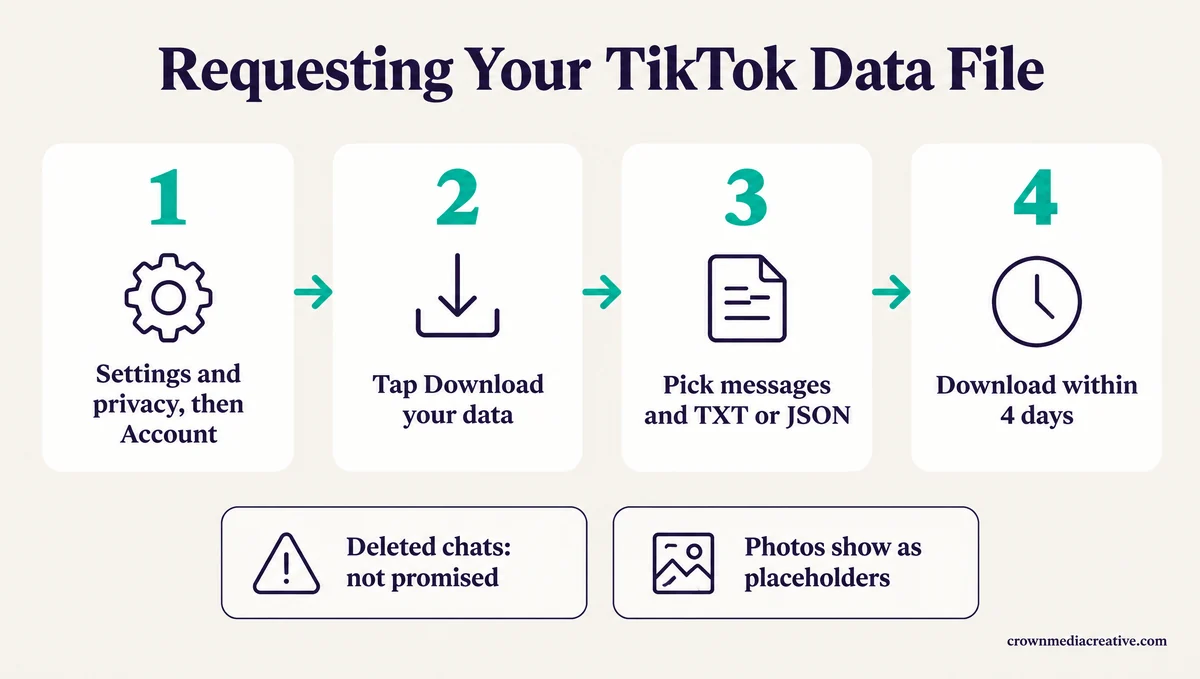
The file is still worth one request, mostly as a copy of chats TikTok still has. These steps follow TikTok’s Requesting your data page:
- Tap Profile, then the Menu button, then Settings and privacy.
- Tap Account, then Download your data.
- Choose which information to include, and make sure your messages are part of it.
- Pick a file format. TXT is easier to read on a phone, and JSON suits tools that parse it.
- Tap Request data, then wait for TikTok’s in-app notice that the file is ready.
- Open Download data and tap Download within 4 days, before the file expires.
TikTok warns that “it may take a few days to prepare the file.” The same page adds two limits that matter here. Some data, such as data that “affects the privacy of others,” may not be available to download, and “the last 24 to 48 hours of some data categories may not be included in your file.”
That page’s list of what the file may include names your username, watch history, comment history and privacy settings, and never names direct messages. The only TikTok help page that names messages in a download is the one for people who lose an age-restricted feature.
The file has a poor record as a rescue tool. These four Reddit threads, with posts from October 2024 to June 2026, describe people using it to get missing messages back, and none of them got everything they were missing:
| When | What the person tried | What the file held |
|---|---|---|
| October 2024 | Downloaded the files to find old and deleted messages | “I don’t get all the ones I want” |
| November 2024 | Requested the data many times | “not every message appears inside the dm file,” and a second person agreed in 2025 |
| September 2025 | Deleted and blocked a chat, then requested data | “there’s nothing there” |
| June 2026 | Tried the suggested data request in a thread about a late friend’s lost chat | “Didn’t work for me” |
Photos and videos are another gap. A DataHoarder thread on Reddit from April 2026 describes a messages file that listed sent photos as “camera_image” entries instead of the pictures themselves.
I request a fresh copy every few months for any account whose messages matter to me. A file saved while a chat still exists is a backup TikTok can’t take back, and the same request pulls your TikTok comment history too.
Why Did My TikTok Messages Disappear If I Didn’t Delete Them?
TikTok messages that vanish without a delete tend to follow one of four events. A different account is signed in, the app was reinstalled or moved to a new phone, the other account was deleted or banned, or your account lost access to messages.
Here is how the common symptoms line up:
| What you see | Likely cause | What to do |
|---|---|---|
| Every chat is gone after a reinstall or logout | A sync gap TikTok’s help never explains | Check the account, update the app, then check a computer browser |
| One chat is gone and you deleted nothing | The other account was deleted, banned or blocked | Ask a mutual friend, or check the data file |
| The inbox is locked or missing | Your registered age or a restriction | Check Account status and your age settings |
| Old messages stop partway up a chat | Older history didn’t load | Open the same chat in a computer browser |
Reinstalling is a common trigger. In a March 2024 thread, the poster wrote “Every time I delete the app, the messages just disappear,” and added that they had only been logging out.
Switching phones and accounts does it too. A July 2024 post describes pinned chats and the whole message history gone after switching back from a second account. An October 2026 post says that after signing in on another iPhone, “some messages don’t appear.”
Old chats can go missing as well. In a May 2026 thread, a reply reads “all my conversations before January 2024 have disappeared,” and TikTok’s help center names no time limit for keeping messages.
The other side of the chat matters too. TikTok’s deactivation help says “Direct messages you previously sent to others may remain visible to them,” but TikTok doesn’t say what happens to a chat when the other account is banned or deleted.
Your own age setting can lock the inbox. TikTok’s teen privacy settings say that for ages 13 to 15, “direct messaging isn’t available,” whether the account is private or public.
Reinstalling is the step I trust least here, because TikTok’s help says drafts “may be removed” when the app is uninstalled and reinstalled. Work through these first, in order:
- Check the username on your profile, and switch accounts if you have more than one.
- Update TikTok from the App Store or Google Play, then restart the phone.
- Log in at tiktok.com in a computer browser and open your messages there.
- Clear the cache under Settings and privacy, then Free up space, and leave Drafts alone. Clearing TikTok’s cache only removes temporary files, but it is a long shot. The one reply in the March 2024 thread that called it a fix paired it with a reinstall, and nobody there confirmed it worked.
- Report it through Settings and privacy, then Help Center, then Chat with us.
Can You Get TikTok Messages Back After Being Banned?
Through a successful appeal or Download your data, and only for a limited time. A banned account can still log in to appeal and download its data, and U.S. accounts banned as underage get 23 days to do both.
TikTok’s bans help says “If your account is banned, you can log in to the account to submit an appeal and download your personal data.” It also says TikTok deletes personal data “after a period of time,” so the request shouldn’t wait.
For underage bans, TikTok’s underage appeals page sets hard deadlines, and you start the data request by tapping Download your data in the ban notification. If the appeal is approved, the same page says “we’ll unban your account and your data won’t be deleted.”
| Where you are | Days to appeal and download | Account deleted on |
|---|---|---|
| United States | 23 | Day 30 |
| European Economic Area, U.K. or Switzerland | 180 | Day 187 |
| Everywhere else | 113 | Day 120 |
That 23-day U.S. window is the number I tell people about first, since it’s about a fifth of what TikTok allows elsewhere. If TikTok only took away messaging for age reasons, its minimum age appeals page gives 113 days, 180 in the European Economic Area and 23 in the U.S. “to request your direct messages,” limited to data “that doesn’t violate our Community Guidelines.”
If you can’t log in at all, the data request waits until you’re back in, and a locked TikTok account has its own recovery steps.
Can You Recover Messages From a Deleted TikTok Account?
Only within 30 days of deleting it. TikTok keeps a deleted account deactivated for 30 days, then erases it permanently, and the account’s own copy of its messages goes with it.
TikTok’s email and phone help says a deleted account “will be deactivated for 30 days and then erased permanently.” Signing back in inside that window is the only way back to the account’s own copy of its messages, and after day 30 there is nothing left to request.
Can a Recovery App Bring Back Deleted TikTok Messages?
No. A recovery app can’t pull a deleted TikTok message off TikTok’s servers. Phone scanners only search your phone’s storage, and spy apps only capture messages on a phone they were secretly installed on before the message was sent.
TikTok keeps messages on its own systems. Its direct messages help says messages are “kept safe through encryption as they’re being sent and stored,” but “end-to-end encryption isn’t currently available.” TikTok can also decrypt user data “in response to valid legal processes.”
Recovery software still dominates this search. On October 21, 2026, 8 of the 10 results on Bing’s first page for “how to see deleted messages on tiktok” came from companies selling recovery or monitoring software. Ads for Dr.Fone, EaseUS and Tenorshare sat beside the “recover” searches.
I don’t buy the pitch that a scan of your phone can find a chat TikTok removed on its side. Those pages mostly repeat the free routes, meaning the data download, notification history and asking the other person, before they pitch their own app.
Monitoring apps are a different problem. On mSpy’s own community forum, an answer to this exact question says “Your best bet is finding an app with a keylogger feature.” A keylogger only records what is typed after it is hidden on a phone, so it recovers nothing already deleted, and that advice is about spying on someone else’s phone.
The U.S. Federal Trade Commission treats that setup as surveillance. In September 2021 the FTC banned SpyFone and its CEO from the surveillance business over apps that let buyers see “photos, text messages, web histories, GPS locations” on other people’s phones.
Quick Takeaways
- Ask the other person for a screenshot first, because Delete for me leaves their copy in place.
- Check your phone’s notifications before you open TikTok, since tapping an alert can clear it. Android keeps 24 hours of history by default and only if it was already on, while iPhone keeps an alert until you clear it.
- Request Download your data and save the file within 4 days, but don’t count on it holding deleted chats.
- If your account is banned, appeal and request your data the same day, since U.S. underage bans allow only 23 days.
- If chats vanished without a delete, check the signed-in account and a computer browser before you reinstall anything.

