
How to Link Instagram to TikTok Now That the Button Is Gone
How to Link Instagram to TikTok Now That the Button Is Gone
TikTok removed its Instagram button in November 2025. See how to link Instagram to TikTok now, who can add a link, and what works under 1,000 followers.
- 1Can You Still Link Instagram to TikTok?
- 2How Do You Add Your Instagram Link to TikTok Now?
- 3Why Won’t TikTok Let You Add a Link to Your Profile?
- 4How Do You Share Your Instagram on TikTok Under 1,000 Followers?
- 5Why Does TikTok Show an Error When You Link Instagram?
- 6How Do You Put Your TikTok Link on Instagram?
- 7Quick Takeaways
The Short Answer: TikTok removed the Instagram and YouTube buttons from Edit profile in November 2025. Its help page now says it “no longer supports links that open or log you into other social media apps.” You can still link Instagram by adding your instagram.com address as a website link, which needs 1,000 followers or a Verified Business Account. Under 1,000 followers, put your handle in your bio as plain text.
If your Instagram icon vanished from your TikTok profile, nothing is wrong with your account. TikTok took that button away from everyone, so how to link Instagram to TikTok now comes down to one plain instagram.com link, once your account qualifies.
Plenty of guides still describe that button, including Sked Social’s 2026 guide, which tells you to “scroll to the Social section, and tap Instagram.” Google has not caught up either: as of October 24, 2026, the AI answer at the top of this search still says “Scroll down to the Social section and tap Add next to Instagram.”
TikTok’s own help page was slow to change, but it carries the new wording now, so I trust it over all of them. The steps below follow it, and so do the workarounds for accounts that cannot add a link yet.
Can You Still Link Instagram to TikTok?
You can still link Instagram to TikTok, but only as a website address, not as a connected account. TikTok removed the Instagram and YouTube buttons in November 2025 and now allows only plain web links to other social apps.
TikTok’s help page puts the change in two sentences: “TikTok no longer supports links that open or log you into other social media apps. You can still add links to your profile that direct people to those platforms’ websites.” In plain terms, the Instagram icon and the Instagram login are gone, while a normal link to your Instagram profile still works.
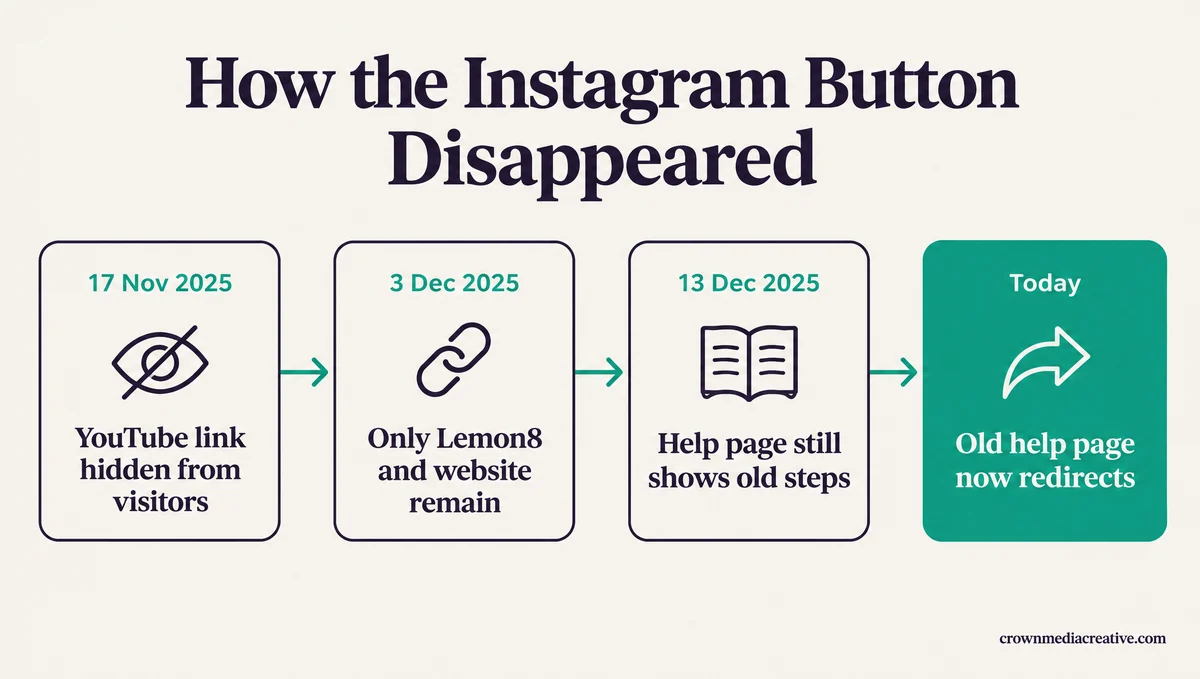
The change did not reach everyone on the same day. On November 17, 2025, a creator posted on Reddit’s r/NewTubers that their YouTube link still showed on their own account but disappeared when they checked from another one. A reply a few hours later said the YouTube link was gone for everyone, owners included.
Instagram went the same way. On December 3, a reply in another thread summed up the end state in one line:
“my ig and yt are both gone and the option to add them also gone. only lemon8 and my website link are options now.”
Lemon8 is a lifestyle app from TikTok’s owner, ByteDance.
TikTok’s Help Center kept teaching the old flow for almost four weeks after the first reports. On December 13, 2025, the archived help page still told people to “Select a social media account to add (Lemon8, Instagram, or YouTube) and follow the login steps.” That old page now redirects to the new one.
Support will not bring the button back. In the first thread, a creator with about 600 followers says TikTok support said the other app was at fault and that asking again “won’t change the outcome.” That matches the help page, so a support ticket is not worth my afternoon or yours.
YouTube went in the same change, so the same website-link fix works for a YouTube channel. Lemon8 is now the only other app TikTok lets you attach.
How Do You Add Your Instagram Link to TikTok Now?
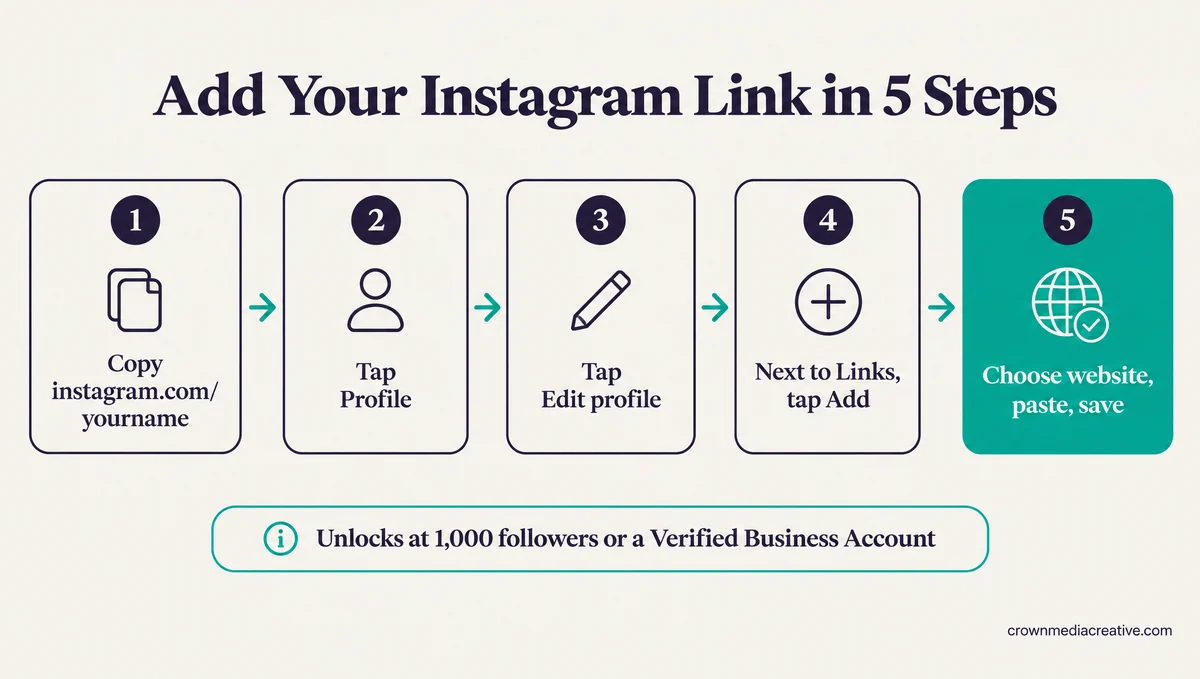
Add your Instagram profile address as a website link. In TikTok, tap Profile, then Edit profile, then Add next to Links, and paste https://www.instagram.com/yourname. The website option appears once your account has 1,000 followers or a Verified Business Account.
Your Instagram link is now an ordinary website link, so you add it the same way you would add any site. Here is the order I follow, starting with the address itself:
- Find your Instagram address. It is https://www.instagram.com/ followed by your username, such as https://www.instagram.com/yourname.
- Open the TikTok app and tap Profile at the bottom.
- Tap Edit profile.
- Next to Links, tap Add.
- Choose the website option, paste your Instagram address and save. Where it is available, the other choice in that menu is Lemon8.
When someone taps the link, TikTok opens it in its own in-app browser rather than the Instagram app. TikTok’s help page says it limits how people browse “external link chains” there, so a viewer may see “a message prompting you to open the page in your device’s web browser.”
TikTok also recommends direct links “so people can access the intended site in just a few steps.” A plain instagram.com address takes a viewer straight there, while a link page that sends them on to other sites is the kind of chain those checks limit.
If Instagram is the only place you want people to go, link it directly. If the one slot has to cover Instagram, YouTube and a shop as well, a free link-in-bio page you own, which you get through an email sign-up, can hold all of them. The cost is one extra tap and, sometimes, TikTok’s open-in-browser prompt.
After saving, check the link from a second account, because that is the view your followers get.
The link is a fixed address now, so it does not follow you if you rename your Instagram account. If you change your handle, or claim a taken one, update the TikTok link the same day, or it will lead nowhere or to whoever takes your old name.
Why Won’t TikTok Let You Add a Link to Your Profile?
TikTok only offers a website link to accounts with at least 1,000 followers or a Verified Business Account. TikTok’s wording names a verified account, so a plain business account is not enough. After you cross 1,000, the option can take about a day to appear.
The rule is one sentence on TikTok’s help page. It reads: “You can add a link to a website on your TikTok profile if you have at least 1,000 followers, or if you have a Verified Business Account.” Below 1,000 followers, the Add menu offers Lemon8 at most.
The business route got stricter on paper. In 2025, the old help page said a “Registered Business Account” could add a website. The current page says “Verified Business Account.”
Older advice has not caught up. Bitly’s October 2025 guide, for one, still says switching to a Business Account unlocks the link regardless of follower count.
Verification also costs something. Per TikTok’s account types page, Verified Business Accounts lose the general music library and keep only the Commercial Music Library. Business accounts also cannot join the Creator Rewards Program.
TikTok adds that verifying a business account is “a separate process from receiving a verified badge,” and that it “may ask you to verify your account” again to keep those features. For a creator account, I would not trade trending sounds and Creator Rewards for one link.
If you just crossed 1,000, give it a day before you assume something is broken. In one r/socialmedia thread from September 2025, a creator who had just reached 1,000 followers saw the website option appear “after a day of waiting.”
Match what you see on your screen to a row below:
| What you see | Most likely cause | What to do |
|---|---|---|
| The Instagram or YouTube icon vanished from your profile | TikTok removed app-to-app links in November 2025 | Add your instagram.com address as a website link |
| Add shows Lemon8 but no website option | Under 1,000 followers and no Verified Business Account | Put your handle in your bio until you reach 1,000 |
| You just passed 1,000 and still see no website option | The option can take about a day to appear | Wait a day, then check Edit profile again |
| You switched to a business account and still have no link | The business account is not verified | Finish business verification, or grow to 1,000 |
| A guide tells you to log in to Instagram from TikTok | The guide predates the November 2025 change | Skip that step and use the website option |
| Viewers get a prompt to open your link in their browser | TikTok’s safety check on external link chains | Link straight to instagram.com, not to a link page |
How Do You Share Your Instagram on TikTok Under 1,000 Followers?
Under 1,000 followers, a personal TikTok account cannot add a clickable Instagram link, so put your handle in your bio as plain text and say it in your videos. Viewers have to search for the name, but none of it needs a follower count.
There is no hidden toggle for this. In the r/NewTubers thread about the removal, one reply put it bluntly: “No workaround until you obtain 1,000 followers.”
The handle in your bio is the option I recommend first, because it costs nothing and takes a minute. Write it so a viewer can find you without guessing:
Vague: “more on my insta”
Specific: “IG: @yourname (same name on Instagram)”
These are the options, best first:
- Put “IG: @yourname” in your TikTok bio. It is not clickable, but a viewer can search for it on Instagram.
- Say your Instagram handle at the end of a video that is getting views, then pin a comment that repeats it.
- Use the same username on both apps, so a search for one finds the other.
- Keep growing, since the climb to 1,000 followers is what unlocks the website link on a personal account. If you would rather automate part of that climb, SMTasker is the tool I would look at, from $19 a month with a 5-day trial. It runs posts, likes, follows and comments from an Android phone, and no automation tool is ban-proof, so skip it if this TikTok is your only account.
- Attach Lemon8 only if you already post there. TikTok still allows a Lemon8 account “where available,” and Lemon8 has shared TikTok’s login since November 2024, TechCrunch reported. That link only ever opens Lemon8.
Here is how those routes compare side by side:
| Route | Who can use it | Clickable for viewers | The catch |
|---|---|---|---|
| Website link to your instagram.com address | Personal accounts with 1,000 or more followers | Yes, in TikTok’s in-app browser | You need 1,000 followers first |
| Handle in your bio as text | Anyone | No | Viewers have to search for the name |
| Handle in a video plus a pinned comment | Anyone | No | Reaches only people who watch that video |
| Verified Business Account | Businesses that pass verification | Yes | Commercial Music Library only, and no Creator Rewards |
| Lemon8 account | Where Lemon8 is available | Opens Lemon8 | Only useful if you post on Lemon8 |
Why Does TikTok Show an Error When You Link Instagram?
TikTok no longer connects to Instagram through a login, so an error on an Instagram sign-in or connection step has no fix inside TikTok. Skip that step, add your instagram.com address as a website link instead, and that error never comes up.
My rule: skip any tutorial that sends you to an Instagram login inside TikTok, because that screen belongs to the old system. Here is what the common messages point to now:
- A failed Instagram login or an “Instagram is not connected” message points to the old connection flow, which TikTok has switched off.
- An “invalid request” message on an Instagram step has no documented cause from TikTok, and the website route skips that step entirely.
- A link that opens a “not available” page usually means a typo in the address or an Instagram username that has changed.
- A prompt to open the page in your browser comes from TikTok’s link-chain check, and the link still works.
How Do You Put Your TikTok Link on Instagram?
Instagram lets you add up to 5 links to your profile, and its help page sets no follower minimum. In the Instagram app, tap Profile, then Edit profile, then Links, then Add external link, and paste https://www.tiktok.com/@yourname.
This direction is the easy one. Instagram’s help page says “You can add up to 5 websites to your Instagram profile,” and the steps are short:
- Tap Profile or your profile picture in the bottom right.
- Tap Edit profile at the top of the screen.
- Tap Links, then tap Add external link (Add link on Android).
- Paste https://www.tiktok.com/@yourname, then tap Done.
The same page notes that this feature isn’t available on computers, and that “anyone, on or off Instagram, can see your websites.” To move TikTok up the list, tap Links, then Options, then Reorder links.
For a one-off push, a link sticker on your Story works too. Per Instagram’s link sticker page, people who tap it are “redirected to the linked website.”
My advice is to put TikTok first in that list, so it is the first link a visitor sees. Instagram allows 5 links with no follower count, while TikTok gives a personal account 1 link at 1,000 followers.
Quick Takeaways
- TikTok removed the Instagram and YouTube buttons in November 2025, and no setting or support ticket brings them back.
- Add https://www.instagram.com/yourname as a website link under Profile, Edit profile, Links, Add.
- The website option needs 1,000 followers or a Verified Business Account, and a plain business account is not enough.
- Under 1,000 followers, put your handle in your bio and say it in your videos.
- Add your TikTok link to your Instagram profile today, under Edit profile, then Links.
If TikTok changes linking again, trust what Edit profile shows you over any guide, this one included. Last time, TikTok’s own help page was still teaching the old steps almost four weeks later.

