
Why Is My Instagram Story Not Saving to Camera Roll?
Why Is My Instagram Story Not Saving to Camera Roll?
Two separate Instagram problems produce the same complaint, and the fix for one does nothing for the other. Here is how to tell which one you have.
- 1Two Different Problems, One Symptom
- 2Fix 1: The Auto Save Toggle Is Off
- The archive toggle is not the gallery toggle
- Toggling it off and on fixes a stuck state
- 3Fix 2: When the Save Button Is Missing Before You Post
- That thread answered itself
- The workaround that actually works
- A second account works if you post a lot
- 4Check Photo Permissions Before You Blame the App
- 5Reels, Feed Posts and Edits Save Through Different Settings
- 6What Reinstalling the App Actually Does
- 7How to Protect Your Story Content Going Forward
- 8Frequently Asked Questions
- Why will my Instagram story not save to my camera roll?
- Where is the save to camera roll setting on Instagram?
- Does Save story to archive also save to my phone?
- Why did the save option disappear from my story camera?
- Why is my Instagram Reel not saving to my camera roll?
- Why are my Instagram edits not saving?
If your Instagram Story never lands in your phone gallery, you are almost certainly hitting one of two unrelated problems that produce the same complaint. One is a toggle that is switched off in your account settings. The other is a missing button on the story camera screen, which no setting controls at all.
Telling them apart takes about ten seconds, and it matters because the fix for one does nothing for the other. Most advice on this topic picks a side and never mentions that the other problem exists.
Two Different Problems, One Symptom
Instagram fails to save stories in two unrelated ways. Either the posted story never reaches your gallery, which an account toggle controls, or the save option is missing from the camera screen before you post, which your app build controls. One question separates them: are you trying to save the story before you post it, or expecting it to show up after?
| What you are doing | What is wrong | The actual fix |
|---|---|---|
| Story is posted, nothing appears in the gallery | The auto save toggle is off in your account settings | Turn on Save story to gallery under Archiving and downloading |
| Save option is gone from the story camera before posting | An app build fault on iOS, largely resolved by an Instagram update in April 2025 | Update the app, then cycle the Archiving and downloading toggles, then fall back to the DM route |
| Feed photos are not saved after posting | A separate toggle called Save original posts | Turn it on in the same settings menu |
Both problems get called “Instagram is not saving my story” by the people living through them. Most guides on this topic blend the two together, so readers end up running fixes that were never going to touch their version of the problem.
Fix 1: The Auto Save Toggle Is Off
If your story posts fine but never reaches your camera roll, the auto save setting is off. Open your profile, tap the menu at the top right, go to Settings and privacy, then Archiving and downloading, then turn on Save story to gallery. Instagram labels the same toggle Save story to camera roll on some builds.
That menu name is the reason people give up looking. These controls used to sit under a Story heading in the privacy settings, and a lot of guides still print the old path, so readers hunt through a menu that no longer holds the setting and conclude the feature was pulled.
The archive toggle is not the gallery toggle
Directly above it sits Save story to archive, which is on by default. Archive keeps a private copy inside Instagram where only you can see it, though Instagram warns that some stories are altered on the way in, muting music or freezing videos and gifs, and states that those changes are permanent.
This trips people up constantly. You check your archive, every story you ever posted is sitting there, so you reasonably conclude that saving is working. Nothing in the archive ever touches your phone storage, and the gallery toggle beneath it is the only one that does.
Toggling it off and on fixes a stuck state
If the gallery toggle already looks switched on and your stories still are not saving, switch it off, close Instagram fully, then switch it back on. Users report this clearing the problem instantly when nothing else did, which suggests the toggle can display one state while your account holds another.
It costs nothing to try and it cannot lose you any content, so run it before anything more drastic.
Fix 2: When the Save Button Is Missing Before You Post
The missing save button was a separate failure with a separate cause. Users would compose a story in the Instagram camera, look for the save control, and find the option simply absent. Instagram’s help centre currently puts that control at the top of the screen, telling users they can “tap Save at the top of the screen to save it to your phone” before sharing, and it serves that same wording to Android, iPhone and iPad alike.
This failure has a date attached. The button vanished for a large number of iOS users in April 2025, and Instagram shipped a build restoring it by 18 April 2025, reported by 9to5Mac at the time. Check your app version before you try anything else.
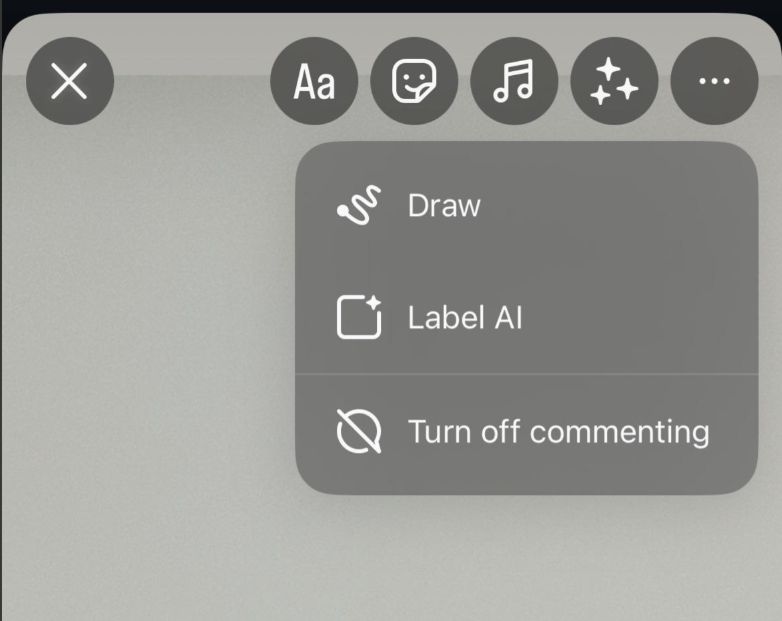
The most upvoted thread about this on r/Instagram ran past 170 comments, and it is worth reading what the person who started it had already tried. In their own words, they had checked that “Instagram has full access to my photos” and had “always deleted and redownloaded the app” before posting.
Permissions and a reinstall are the two fixes nearly every guide leads with. The person Google ranks first for this question had run both of them and was still stuck.
That thread answered itself
Read to the bottom and the problem resolves in real time. Within days of the original post, separate commenters wrote “Update your app yall they fixed it”, “They fixed it y’all!” and “Mine is working now!!! You have to update again and it should be fixed”.
Another commenter posted a settings fix: “I tried going to the settings, clicking ‘archiving and downloading’ and turned it all off and on again. It instantly fixed the issue for me.” That comment is what Google has been surfacing under the thread.
One person did report the button still missing months after updating, so treat this as widely fixed rather than universally fixed. An app update and a toggle cycle are the two cheapest steps, and both come before the workaround below.
The workaround that actually works
Send the shot to yourself in a direct message and save it from the chat, before you ever send it:
- Open Instagram Direct Messages and search for your own username
- Open that chat and tap the camera icon, then take your photo or video
- Apply whatever filters or text you wanted on the story
- Tap the download icon, usually at the top right, and save it
- Discard the message without sending
The file lands in your gallery at full quality and you can then post it as a story from your camera roll like any other clip. Pin your own DM thread so it stays at the top of your inbox.
A second account works if you post a lot
Set up a second Instagram account, add it to your Close Friends list, post the story there, then view and save it from the second account before deleting it. Slower than the DM route, but useful if you are batching a week of content in one sitting.
Check Photo Permissions Before You Blame the App
Instagram cannot write a file to a photo library it does not have permission to write to, and a system update can reset that permission without telling you. On iPhone, open the system Settings app, find Instagram, and check that Photos is set to full access rather than Limited or None.
Limited access is the one that catches people out. You can still pick photos to post, so the app looks like it has permission, and you never see an error when a save fails.
On Android the equivalent lives under Settings, Apps, Instagram, Permissions, where Photos and videos needs to be allowed. While you are in there, clear the app cache under Storage, which resolves stuck interface states on Android without touching your account or your drafts.
Storage space matters too. A phone with almost nothing free will fail the write with no visible warning.
Silent failures like this are common across Instagram’s interface, and they are easy to mistake for a shadowban or a punishment. We covered a similar case in Instagram comments and stories not showing, where the cause turned out to be equally mundane.
Reels, Feed Posts and Edits Save Through Different Settings
Stories are one of six separate save paths, and each has its own control. Getting the story toggle right does nothing for the other five, so people often fix one complaint and immediately hit the next.
- Feed posts: a toggle called Save original posts, in the same Archiving and downloading menu, keeps a copy of photos you publish to your grid
- Reels: tap Next on the reel you are recording, then tap Download at the bottom of the screen. Instagram warns that a downloaded reel will not carry any music you added from its own music library
- Edits, the separate Meta app: tap Projects at the bottom, open your project, tap Next at the top right, then tap Download to send the video to your camera roll
- Reel drafts: Instagram keeps these until you share or delete them, with no limit on how many you hold, though uninstalling the app destroys them
- Other people’s content: Instagram’s bookmark saves it to a private collection inside the app, never to your phone
Playback controls sit in this same family of settings people cannot find, and Instagram moves them without notice. Our walkthrough on how to pause Instagram Reels untangles two separate gesture launches that arrived twelve months apart.
If you publish reels regularly, saving a local copy before posting is worth the extra tap. Our guide on keeping Instagram Reels alive longer covers why having the raw file matters when you want to repost or recut later.
What Reinstalling the App Actually Does
Deleting and reinstalling Instagram is the most common advice on this problem and the least suited to it. Your account level settings live on Instagram’s servers, so a reinstall pulls down the same toggle state you already had, and it destroys every unposted draft on the device.
There is also evidence pointing the other way on app versions. One person in that r/Instagram thread reported the save button missing on an iPad where they had just installed the app, while it was still present on their iPhone, which was showing an update as pending.
One report is not a proven rule, so treat it as a reason for caution and nothing more. Before you uninstall anything, work through the toggle, the permission check and the DM workaround, since all three are reversible and none of them costs you your drafts.
How to Protect Your Story Content Going Forward
Shoot with your phone’s own camera app first, then bring the file into Instagram. You keep the original at full resolution, and no interface change on Instagram’s side can ever strip it from you.
Instagram’s help centre documents the manual route as well: open a live story, tap Options and then Save Photo or Video. Worth knowing, because the official page covers the manual save without mentioning the auto save toggle, which is exactly the step most people are missing.
Keep a copy somewhere outside the app too, whether that is Google Drive, Dropbox or a folder on a laptop. If you run client work or campaigns and need those assets organised rather than just backed up, a platform like Systeme.io gives you somewhere to keep templates and campaign files that is not tied to a social app you do not control.
Two minutes of setup covers most of this. Turn on Save story to gallery, confirm Instagram has full photo access, and shoot anything you care about in your phone camera first.
Frequently Asked Questions
Why will my Instagram story not save to my camera roll?
In most cases the auto save toggle is off. Go to Settings and privacy, then Archiving and downloading, then turn on Save story to gallery. If it already looks on, switch it off and back on, since the setting can desync between your phone and Instagram’s servers.
Where is the save to camera roll setting on Instagram?
It lives under Settings and privacy, then Archiving and downloading. It is labelled Save story to gallery on most Android builds and Save story to camera roll on some iPhone builds. Older guides point at a Story section inside privacy settings, which no longer holds it.
Does Save story to archive also save to my phone?
No. Archive keeps a private copy inside Instagram that only you can see, and it is on by default, but nothing in your archive is written to your phone storage. The gallery toggle directly beneath it is the only one that puts files on your device.
Why did the save option disappear from my story camera?
That button is controlled by your app build rather than by any account setting, and it went missing for a large number of iOS users in April 2025. Instagram restored it in an app update available by 18 April 2025, so update the app first, then try switching the Archiving and downloading toggles off and on. If it is still absent, send the shot to yourself in a direct message and save it from the chat before sending.
Why is my Instagram Reel not saving to my camera roll?
Reels use a separate save path from stories. Tap Next on the reel you are recording, then tap Download at the bottom of the screen. A downloaded reel will not carry any music you added from the Instagram music library, and the story gallery toggle has no effect on reels.
Why are my Instagram edits not saving?
Reel drafts are kept until you share or delete them, with no limit on how many you hold, though uninstalling the app destroys them. Instagram does not document the same behaviour for story edits, so save an edited story to your camera roll before you close the composer. If you mean Meta’s separate Edits app, open Projects, tap your project, tap Next at the top right, then tap Download.

