
Can You See Who Shared Your TikTok Video, and Who Else Can?
Can You See Who Shared Your TikTok Video, and Who Else Can?
TikTok never tells you who shared your video, but the people who get the link often see the sender. Here is what you can check instead.
- 1Can You See Who Shared Your TikTok?
- Does TikTok Tell You Who Shared Your Video?
- 2Who Can See That You Shared a TikTok?
- 3How Can You Tell Where Your TikTok Shares Went?
- 4Why Does My TikTok Have More Shares Than Likes?
- Is a Group Chat Making Fun of My TikTok?
- 5Can Post View History Show Who Watched a Shared Video?
- 6Do Apps That Show Who Shared Your TikTok Work?
- 7How Do You Stop a TikTok From Being Shared Around?
- 8Quick Takeaways
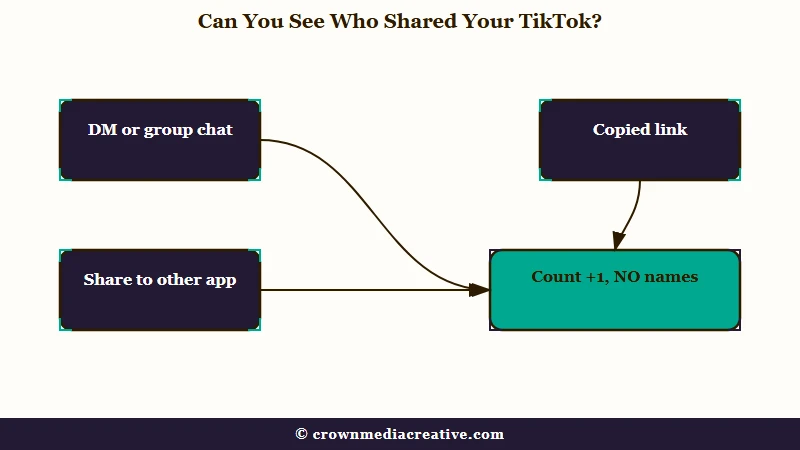
The Short Answer: No. TikTok shows how many times a video was shared and never who shared it, and its Activity inbox has no filter for shares. The people who receive a shared link often learn more than you do, since TikTok can also deliver the post to their TikTok inbox and suggest the sender’s account to them.
Can you see who shared your TikTok? No, and the question tends to show up when the numbers look lopsided. A video on a small account picks up 4 likes and 10 shares, and it is hard not to picture a group chat passing it around.
Names do travel with a shared TikTok. They go to the person receiving the link, while you, the creator, get a number.
That imbalance bothers me more than the missing list does. The video is yours, yet everyone in the chat knows more about where it went than you do.
Below is what TikTok shows you about shares and what each kind of share reveals to the people receiving it. After that come the traffic source check, the one setting that names some viewers, and the ways to narrow who can open a video at all.

Can You See Who Shared Your TikTok?
TikTok shows you a share count for each video and no names behind it. The number sits under the arrow icon on the video and in TikTok Studio, and no screen in the app ties it to a person.
TikTok’s guide to TikTok Studio lists shares beside likes and views under Manage, then Posts. The per-video analytics it describes cover an overview, your viewers and engagement, and none of them breaks shares down by person.
I read the share count on my own videos as a tally of sends and nothing more. It moves when someone taps Share and picks a destination, and it says nothing about who that someone was.
Here is how to find the count for one video:
- Open the video from your profile.
- Look at the number under the arrow icon on the right side. That is its share count.
- To see shares next to views and likes, open TikTok Studio from the menu on your profile, go to Analytics and pick the video. In older app versions this menu item was called Creator tools.
Does TikTok Tell You Who Shared Your Video?
TikTok does not notify you when someone shares your video. Its Activity inbox can filter likes and favorites, comments, Add Yours, and mentions and tags, per TikTok’s notifications help page, and shares are not one of the options.
Likes and favorites work differently, because both arrive with a username attached. That gap is why an accidental like can be spotted by the creator while a share to a group chat leaves no name on their side.
Who Can See That You Shared a TikTok?
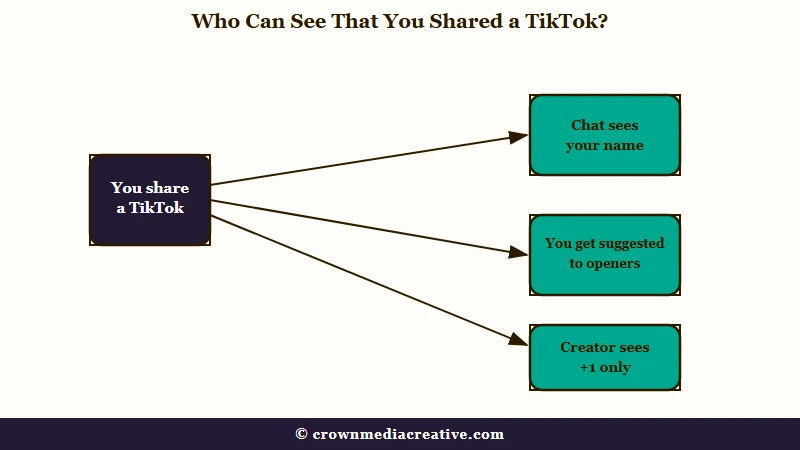
The person who receives a shared TikTok often sees who sent it, and the creator cannot. TikTok can suggest the sender’s account to whoever opens the link, and a privacy setting that ships switched on can add the sender’s profile to it.
The setting is called Display profile when sharing links, and Kaspersky’s TikTok privacy guide places it under Settings and privacy, then Privacy, and says it is enabled by default. Its example is sharing one of your own posts, where the link “will open in their app along with a link to your profile.”
A second setting runs the same way. With “People who open or send links to you” switched on under Suggest your account to others, TikTok can suggest your account to anyone who opened a link you sent. TikTok’s suggested accounts page says this “includes links that are shared off the TikTok platform,” and the setting is on by default for users 18 and older.
Both settings run sideways, from the sender to the people receiving the link.
If you share TikToks into group chats, I’d treat every link as signed with your name until both toggles are off. Both sit under Settings and privacy, then Privacy, and even with both off, TikTok may still suggest your account to people you interact with.
TikTok’s sharing help page describes a third way the sender shows up. When you send a post to a friend on another platform, TikTok also delivers it to them inside TikTok, as long as they tap the link and allow direct messages from others.
| How it was shared | What the creator sees | What the person receiving it sees |
|---|---|---|
| Sent in a TikTok DM or group chat | One more share on the count, and views from the chat can show up as Direct message traffic | The sender’s name on the message |
| Copy link, pasted anywhere | One more share on the count | Possibly the sender as a suggested account, plus the sender’s profile while Display profile when sharing links is on |
| Shared to WhatsApp, Instagram or a text | One more share on the count, and opened links can land in the Other traffic source | The post in their TikTok inbox if they tap it and allow DMs from others, and possibly the sender as a suggested account |
| Repost | TikTok’s repost page describes no alert to the original creator | The reposter’s photo and nickname on the post in their feed |
If you are the one sharing and want your name off the link, what saving and sharing reveal covers the toggle and the fallback of cutting the URL at the question mark. Sent something to the wrong chat? Unsending a TikTok message has its own rules about what the other person still sees.
How Can You Tell Where Your TikTok Shares Went?
A video’s traffic sources show where shared views came from, even though they never show who sent the link. Shared views land in two lines of that chart, Direct message and Other.
What is a traffic source: The part of a video’s analytics that shows where its views came from, such as the For You feed, your profile, search or a link opened outside the app.
Graphed’s Direct message explainer says that line, when it shows up, counts views from people who opened your video after it was sent in a DM.
The Other line is broader. Graphed’s guide to Other says it includes people clicking a link to your TikTok from outside the app, such as a text message, an email newsletter or an Instagram Story.
The traffic source chart is where I go first when a video’s shares jump. It separates a video moving through private chats from one moving through the feed, which the share count alone cannot do.
To check it on one video:
- Open TikTok Studio from the menu on your profile and go to Analytics.
- Pick the video from your list of posts.
- Scroll to the traffic source chart, labeled Traffic source type on some versions.
- Compare Direct message and Other against For You and Personal profile.
Before: “10 shares and 4 likes on a 50-follower account, so a group chat must be laughing at me.”
After: “10 shares, a big Direct message slice and three new followers from my class, so friends are sending this to each other and some of them followed me.”
A large Other slice means people are reaching the video from outside TikTok, and TikTok will never name them for you. If you post to build an audience, a sign-up page in your bio turns the outside viewers who choose to join into names you can see. The Creator Money Page is a ready-made template for one.
Why Does My TikTok Have More Shares Than Likes?
More shares than likes usually means your video is being sent to specific people, and the count alone cannot tell you why. Shares and likes measure different habits, so the two numbers drift apart easily.
Someone who sends a video to a friend often never taps the heart. The friend who opens it may watch it through and leave without liking it too.
The Digital Dept’s analytics guide says the share number includes link copies as well as DM shares, and Slipstream’s metrics breakdown says one share sent to several people at once still counts as one.
So the share count is a rough tally: one send to a whole group counts once, and a link copied to keep for later counts the same as one sent to a chat. The share sheet itself offers Create group chat with friends, which starts a new chat around the video with up to 31 friends, according to TikTok’s direct messages page. TikTok also nudges people to share: its sharing help page says that on some For You posts it may prompt viewers to share with “people you may know or someone you interacted with on TikTok.”
I don’t buy the idea that a lopsided count proves anyone is laughing at you. The table below matches what you see to the likeliest cause and the one thing worth checking.
| What you see | Likely cause | What to check |
|---|---|---|
| Shares above likes on a small account | Friends sending it to each other without liking it | Direct message views and new followers you know |
| Shares climbing while views stay flat | Link copies, or sends nobody has opened yet | Views over the next day |
| Shares high, few Direct message views | The link was pasted into texts or another app | The Other line in the traffic source chart |
| Shares jumping after a burst of views | A For You push, with TikTok prompting viewers to send it on | The For You line in the traffic source chart |
| Shares alongside odd comments or brand-new followers | Possible spam accounts, which the count cannot confirm | Who followed and what they wrote |
Is a Group Chat Making Fun of My TikTok?
Nothing in TikTok can tell you whether a group chat is mocking your video, and the share count cannot either. A number with no names on it is weak evidence in both directions.
What you can see is who is reacting and some of who is watching. Comments, new followers and Post view history all carry real usernames, and those are better signals than a counter.
If the video is one you would rather keep among friends, the last section below covers how to narrow who can open it.
Can Post View History Show Who Watched a Shared Video?
Post view history can show some of the people who watched a video in its first 7 days, and it holds no share data. It is the closest TikTok gets to naming the audience behind a share, and it misses a lot.
TikTok’s post view history page says it lists followers who have the setting on and viewed your post, plus anyone who liked or commented, whatever their own setting. It covers posts from the last 7 days and is limited to people 16 or older with fewer than 5,000 followers.
That leaves a gap exactly where the worry sits. If a friend of a friend opened your video from a group chat, does not follow you and never liked or commented, they will not appear.
For a small account worried about a group chat, Post view history is the one setting I’d turn on, with one catch: it works both ways. With it on, people you follow who also use it can see that you viewed their posts.
To switch it on:
- Tap Profile at the bottom of the app.
- Tap the menu icon at the top, then Settings and privacy.
- Tap Privacy, then Post views.
- Turn on Post view history.
TikTok was testing this as far back as June 2022, when TechCrunch reported a test of a feature showing which followers viewed a video, with the same seven-day window. Turning it off later does not hide your own likes and comments, which still show up as views to other creators.
Do Apps That Show Who Shared Your TikTok Work?
No app can show who shared your TikTok, because TikTok gives outside apps nothing that names who shared a video. An app that promises a list of sharers is asking for access it cannot turn into that list.
TikTok’s third-party apps page lists what a connected app can request: your profile photo, your profile name and your public content. It also says TikTok does not share your password with those apps, and it tells users to avoid linking TikTok to unknown apps.
A real Log in with TikTok button hands the sign-in to TikTok, so any app asking you to type your TikTok password into its own form is collecting it for itself.
None of them gets my login, whatever the app promises about sharers. Apps posing as TikTok extras are an old trick, and fake TikTok Pro apps follow the same pattern. If you already typed your password into one, change it and work through recovering a hacked account.
How Do You Stop a TikTok From Being Shared Around?
Every public TikTok can be shared by anyone, so the fix is shrinking the group that is able to open it. TikTok’s account privacy page says public posts may be “visible to, and shared by, anyone on or off TikTok.”
My take is that changing one post to Friends does more for peace of mind than any other setting here. It keeps the video up for the people you follow back and cuts off everyone else.
Your options, from lightest to heaviest:
- Change the post’s audience. Open the post, tap More options, then Privacy settings, and choose Friends (followers you follow back) or Only you.
- Turn off video downloads in your privacy settings, so the file cannot leave TikTok as a saved video.
- Make the account private, so only people you approve can watch your videos.
- Delete the post if you want it gone for good.
Quick Takeaways
- TikTok shows a share count on every video and no names, and its Activity inbox has no filter for shares.
- The person who receives a shared link often learns who sent it, since TikTok can suggest the sender’s account to anyone who opens it.
- Check the Direct message and Other lines in a video’s traffic sources, and turn on Post view history if you have fewer than 5,000 followers.
- Skip any app that promises a list of sharers, since TikTok gives outside apps nothing that names who shared.
- A lopsided share count is no proof anyone is mocking you, and if a video feels too exposed, switching that post to Friends does more for peace of mind than any other setting.

