
How to Unsend a Message on TikTok and What They Still See
How to Unsend a Message on TikTok and What They Still See
TikTok gives you 3 minutes to unsend a message for everyone, when your app shows the option. The exact steps, what they still see, and why blocking backfires.
- 1How Do You Unsend a Message on TikTok
- What If TikTok Only Shows Delete for Me?
- 2What Happens if the 3 Minutes Have Already Passed
- 3Can You Unsend a Message Request You Sent by Mistake
- 4Does Blocking Someone Unsend the Message
- 5Will They Still See It in Their Notifications
- Does the Other Person Know If You Unsend a TikTok Message?
- 6Why Do Some Guides Say TikTok Has No Unsend Button
- 7Are Your Deleted TikTok Messages Really Gone
- 8Quick Takeaways
The Short Answer: How to unsend a message on TikTok comes down to one number: 3 minutes. Press and hold the message, tap Delete, then Delete for everyone, and it goes from both sides. Miss that window, or use an app that only offers Delete for me, and only your own screen clears while the recipient keeps the original.
If you are looking up how to unsend a message on TikTok right now, you are probably watching a chat thread and hoping a button exists. TikTok documents one, the window is short, and most of the pages answering this question get it wrong in a way that costs you the fix.
The panic move most people reach for is blocking the person. That is the one I want to talk you out of first, because it does not pull the message back and it tells them something you would rather they did not know.
There is a second thing nobody mentions. Even a clean, successful unsend inside the window does not always mean the words are gone from their phone, and the reason has nothing to do with TikTok.
This covers the exact steps, the deadline, what stays visible afterwards, the message request case that no setting solves, and how much of it TikTok keeps on its own servers regardless of what you tap.

How Do You Unsend a Message on TikTok
Unsending a message on TikTok is a long press, then Delete, then Delete for everyone, and it only works within 3 minutes of sending.
After that the option disappears from the menu and the message is fixed on the other person’s side.
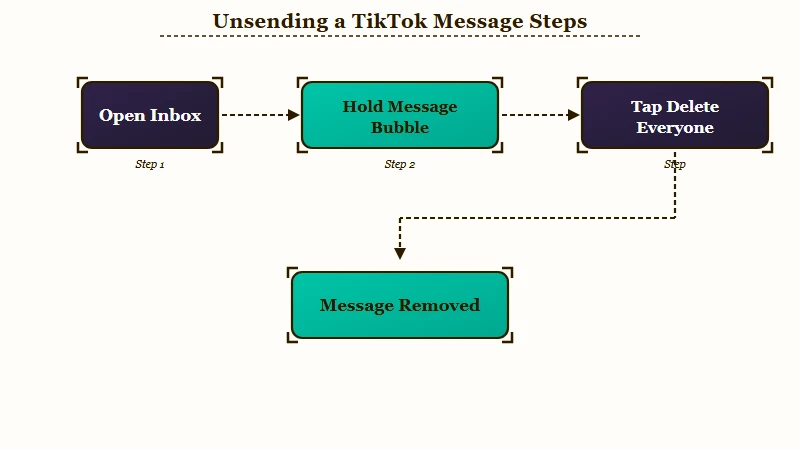
Three minutes is the whole game here, and it is the one number I tell people to memorize before they need it. TikTok’s own direct message documentation states the limit plainly: tap Delete for everyone “within 3 minutes of sending the message.”
The steps, in the order that matters when you are rushing:
- Tap Inbox at the bottom of the app and open the chat.
- Press and hold the specific message bubble you want gone.
- Tap Delete. A second choice appears with two options, Delete for me and Delete for everyone.
- Tap Delete for everyone. Delete for me only clears your own copy.
- Check the thread. If your original bubble is still there, the unsend did not go through.
The same 3-minute rule covers voice notes, which TikTok caps at 60 seconds, and its messaging help repeats that a voice message can be deleted “within 3 minutes of sending it.” A video you shared into the chat should come out the same way, with a long press on the video itself, though people who send one by accident through the “share with” popup often say they found no way to unsend it.
The gesture differs by phone once you move up to whole conversations rather than single messages. On iOS you swipe left on a chat to reach Delete and More, with Mute inside More, while on Android you press and hold the conversation to open its menu.
On a laptop, the sure route is your phone. TikTok documents unsending only inside the app, so open the same chat on your phone and use the menu there before the 3 minutes run out.
What If TikTok Only Shows Delete for Me?
If a message you sent seconds ago only offers Delete for me, you cannot unsend it from that app, and TikTok’s help lists no setting that adds Delete for everyone.
You are not misreading the menu. TikTok’s help does not explain why some accounts miss the option, and some users say they had Delete for everyone before it disappeared.
People have reported it on r/TikTok since at least October 2024. A July 2025 poster tested it with a couple of people and said the option was missing on fresh messages whether or not they had been read, while it still worked for others.
The complaint is still arriving. Of 5,504 low-rated TikTok reviews I pulled from Google Play on 30 September 2026, at least five, dated 29 August to 20 September, describe a chat with no Delete for everyone option or ask TikTok to add one. The newest, on app version 46.9.3, says holding the message showed only Delete for me.
Update the app and reopen the chat straight away, since the 3 minutes keep running while you do it. If the message still only offers Delete for me, treat it as sent for good, and in an open chat a short follow-up owning the mistake usually beats blocking them. A test message to a friend who will not mind shows whether your account has the option at all.
What Happens if the 3 Minutes Have Already Passed
After 3 minutes, the only option left is Delete for me, which removes the message from your screen only.
The recipient keeps the original text, the original timestamp, and any attached video, and gets no indication that you deleted anything on your end.
That asymmetry bothers me more than the short window does. Your thread looks clean, which produces a comfortable and completely false impression that the problem is handled.
This is the single biggest misunderstanding around TikTok messages. Deleting a whole chat has the same one-sided effect: it clears your inbox, and theirs is untouched.
Here is what each action does, so you can tell at a glance whether you fixed anything:
| What you tapped | What they see | Did it work |
|---|---|---|
| Delete for everyone, inside 3 minutes | Message removed from their thread | Yes |
| Delete for me, at any time | Original message, fully intact | No, your side only |
| Deleted the entire chat | Their copy of the conversation, untouched | No, your side only |
| Blocked the account | Your name plus a user not found state | No, and it signals the block |
| Nothing, message was never delivered | Nothing, if their settings refused it | Nothing to fix |
The bottom row is worth a second look before you spiral. TikTok’s messaging help limits direct messages to accounts aged 16 and over and sets message requests to Don’t receive by default for everyone under 18, so a message to a younger account may never have arrived.
Can You Unsend a Message Request You Sent by Mistake
A message request sent to someone who does not follow you cannot be withdrawn.
No delete option on your side removes it from their pending list. TikTok’s messaging help also limits you to one request until they accept it, and if they delete it or never reply, you cannot message them again.
Message requests are the ugliest case in this whole feature, and they are the one I get asked about most. The 3-minute rule is built for open conversations, and a pending request is not one.
Users who have hit this describe the same dead end repeatedly. One reported deleting the chat, getting a confirmation that the history was cleared, then discovering the request was still sitting on the other side untouched.
Deleting your copy produces a “chat history was deleted” confirmation, and that confirmation is the trap. It reads like success and changes nothing about what they can see.
If the request has already landed, the honest option is small: let it sit. TikTok will not let you send a second message until they accept the first, so there is no follow-up to send, and hunting for a hidden setting would waste twenty minutes.
Does Blocking Someone Unsend the Message
Blocking does not unsend anything, and it makes the situation more visible rather than less.
The message stays readable on their side, and your account resolves to a user not found state that reads unmistakably as a block.
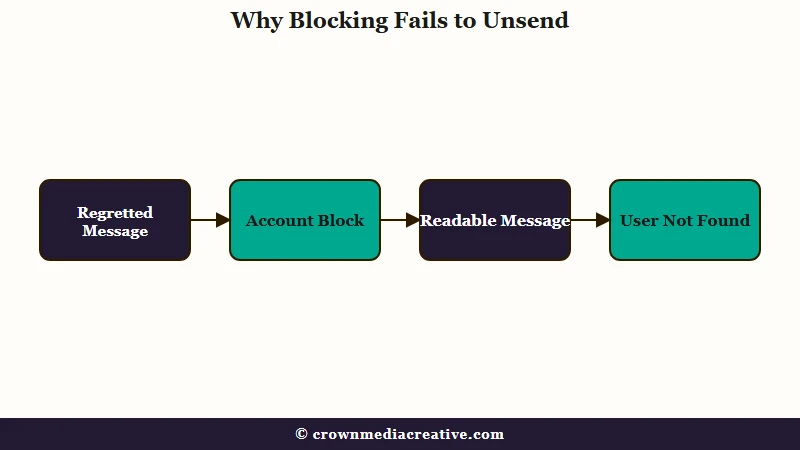
My take is that blocking is the worst move available here. It converts a message they might have scrolled past into a small mystery with your name attached to it.
Two users who tried it reported back on exactly this. One blocked and unblocked, checked again, and found the request still sitting there.
Accidental sends start some of these blocks. At least eight of the 5,504 low-rated TikTok reviews I pulled from Google Play, dated April to September 2026, blame a “share with” shortcut that pops up over the caption area. Four say the send could not be deleted or undone, including a May review, marked helpful by 50 people, that says the videos went out “without the option to delete or unsend”.
A March 2026 r/TikTok thread describes the same dead end and blocking people over it. If it happens to you, open that chat at once and long-press the video, because Delete for everyone lasts only 3 minutes when your app offers it.
Before: send the message, panic, block the account immediately, assume it is buried.
After: send the message, check the clock, and if you are inside 3 minutes press and hold the bubble, tap Delete, then Delete for everyone. If you are outside the window, leave the block alone, and in an open chat decide whether a short follow-up is better than silence.
The same instinct shows up elsewhere in the app and misfires the same way. It is the reason liking and unliking a TikTok causes so much anxiety, and the reason people hunt for a way to undo a Not Interested tap that does not exist.
Will They Still See It in Their Notifications
A successful unsend clears the message from the chat, but it cannot reach a push notification their phone already delivered.
On Android, the system Notification History log can retain the full text for about 24 hours after delivery.
I still check my own notification history before assuming anything vanished, because the app and the operating system are two different systems. TikTok controls the thread. It does not control the log your phone keeps.
That means the fastest possible unsend can still lose to a lock screen. If they had the phone in hand when it arrived, the preview was already read and no button undoes that.
What TikTok does not document anywhere is whether a placeholder stays behind in the thread after a successful Delete for everyone. Other apps are explicit about this: WhatsApp leaves “This message was deleted”, Messenger leaves “Message unsent”, and Telegram leaves nothing at all in one-to-one chats.
TikTok has never published its behaviour either way, and the guides asserting one answer are guessing. You can settle it for your own app version in about thirty seconds with a second account: send yourself a message, unsend it inside the window, and look at the receiving side.
Does the Other Person Know If You Unsend a TikTok Message?
TikTok’s help describes no alert for an unsend, but it never says whether the chat keeps a trace of the deleted message, so they may still be able to tell.
Group chats may be the clearest case. One r/TikTok reply from May 2026 says a group shows that you unsent a message, which is a single user report TikTok has not confirmed, so test it with a second account before counting on a quiet unsend in a group.
Why Do Some Guides Say TikTok Has No Unsend Button
Several widely-read guides state that TikTok has no unsend feature at all, and they contradict TikTok’s own current documentation.
Some were written before the feature existed and never corrected, and for some accounts the claim still holds, because they only get Delete for me.
I do not blame anyone for landing here confused. Three of the pages ranking for this question tell readers the feature does not exist.
One of the most-linked articles on the subject says you cannot unsend on TikTok and that pressing and holding only removes it from your own inbox. Its byline dates the last update to October 2024.
Two others are worse, because they carry 2026 update stamps from July of this year and still say the same thing. A reader who trusts the freshness date walks away believing a working feature is unavailable.
There is a second-order effect worth knowing about. Google’s AI summary for this query has cited that October 2024 article as a source while asserting the opposite of what it says, and its own summary has quoted the window inconsistently, giving a range in one line and 3 minutes in the next.
The practical takeaway: trust the menu in your app over any article, including this one. Press and hold a message you just sent and see which options appear.
Are Your Deleted TikTok Messages Really Gone
Unsending removes a message from the conversation, but TikTok’s servers can keep a copy.
TikTok’s messaging help says DMs are encrypted while they are sent and stored, that end-to-end encryption “isn’t currently available”, and that TikTok can decrypt user data in response to valid legal processes and to enforce its Community Guidelines.
I would not treat any of this as private. Removing something from a chat window changes what the other person sees and nothing more.
That readable-by-the-platform reality is the same one behind flagged TikTok comments, where automated review acts on what you wrote long after you stopped thinking about it.
TikTok’s law enforcement guidelines allow agencies to request preservation of account data for 90 days, extendable once for a further 90. A search warrant obtained by Forbes in June 2022 showed the FBI asking TikTok directly for deleted information tied to a suspect’s account.
The retention picture is vaguer than at other platforms. Google states it purges deleted data within roughly two to six months and Facebook clears it after about 90 days, while TikTok’s policy commits only to keeping data for as long as may be necessary.
If you want to see what your own account still holds, request a copy through Settings. Two limits catch people out: the export file stays available to download for only 4 days, and the most recent 24 to 48 hours of activity may not be included yet.
The app will not bring a deleted message back either. TikTok’s messaging help describes no restore option, so a message you cleared with Delete for me stays cleared on your side.
None of this should stop you using DMs. It should stop you believing that a deleted message is the same as a message that never existed, which is the assumption that gets people into trouble when an account is locked out or compromised.
Quick Takeaways
- You have 3 minutes to press and hold a message, tap Delete, then Delete for everyone. After that only your own copy goes.
- Some accounts only get Delete for me, including accounts that used to have Delete for everyone. Users have reported it since October 2024, TikTok’s help does not explain it, and no setting adds the option.
- Delete for me, and deleting an entire chat, are one-sided. The recipient’s view does not change.
- Blocking never unsends anything and displays a user not found state that makes the block obvious.
- Message requests to non-followers cannot be withdrawn, TikTok lets you send nothing more until they accept, and the “chat history was deleted” confirmation is misleading.
- Unsending changes what the recipient sees, and TikTok can keep its own copy: DMs are not end-to-end encrypted, and message data can be preserved for 90 days or longer on request.

