
You Cannot Undo Not Interested on TikTok but You Can Fix It
You Cannot Undo Not Interested on TikTok but You Can Fix It
One mistimed long press and the video is gone, with no undo and no confirmation. The tap cannot be retracted, but its effect on your feed can be
- 1Can You Undo Not Interested on TikTok?
- 2How Do You Find a Video You Marked by Mistake?
- 3Why Is Not Interested So Easy to Tap by Accident?
- 4Does the Not Interested Button Even Work?
- 5Why Does the Content You Blocked Keep Coming Back?
- 6How Do You Undo Not Interested on a TikTok LIVE?
- 7Which Feed Control Should You Use Instead?
- 8Frequently Asked Questions
- Does Not Interested block the creator or just the video?
- How long does a Not Interested tap last?
- Does tapping Not Interested hurt the creator?
- Can I see a list of everything I marked Not Interested?
- Is there an undo on Instagram or YouTube?
- 9Quick Takeaways
TL;DR: There is no undo button for Not Interested on TikTok. The tap is permanent as an action, but its effect on your feed is not, and you reverse it by finding the video in Watch history and engaging with it properly. Research published in 2026 found the button is the strongest feedback control TikTok gives you, which is exactly why an accidental tap stings.
Trying to undo Not Interested on TikTok is one of those small panics that feels much bigger than it should.
Your thumb lands wrong, the video vanishes, and there is no confirmation dialog and no little “Undo” toast at the bottom of the screen to catch the mistake.
The advice on most pages is thin. Half of them tell you to engage more with content you like, which is true but useless on its own, and the other half insist the button does nothing anyway, so relax.
Both answers skip the measurement. A peer-reviewed audit of TikTok’s feed put a number on what that single tap does, and it lands far above what most people assume, which changes what the fix has to look like.
Here you get the exact menu path to recover the video and the reason the button is so easy to hit. Then the measured data on how long the damage lasts, and which controls are worth using instead.
Can You Undo Not Interested on TikTok?
There is no undo button for Not Interested on TikTok.
TikTok ships no revert control, no confirmation step, and no list of previously marked videos you can unmark. The tap registers instantly and the video disappears from your feed.
The distinction I keep coming back to is between the action and its effect. You cannot retract the tap itself, and no setting anywhere in the app will remove it from your history.
What you can change is what the recommendation system does next. TikTok’s own documentation describes the feed as something the system “is designed to continuously improve, correct, and learn from” based on your engagement, and that word “correct” is the whole opening.
Override is the honest word for it, and the rest of this page is how you do that.
How Do You Find a Video You Marked by Mistake?
Your Watch history holds the video even after Not Interested removes it from your feed.
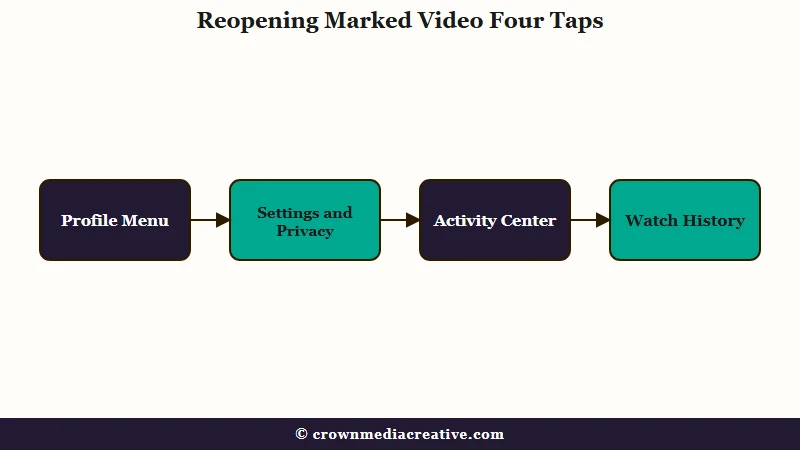
The path is Profile, then the menu button, then Settings and privacy, then Activity center, then Watch history. A date filter narrows it down if the tap was a while ago.
When someone tells me a video is gone forever, Watch history is the first place I send them, because the video is almost always sitting right there. Finding it again is what makes every other step possible.
Here is the sequence worth walking through, in order:
- Tap Profile in the bottom-right corner of the app.
- Tap the menu button in the top-right corner.
- Tap Settings and privacy.
- Tap Activity center, under the Content and Display heading.
- Tap Watch history, then use Filter to set a date range if you need it.
- Open the video and let it play through more than once.
Step six is the one people rush. Watch time carries more weight in TikTok’s ranking than any button, so letting the video loop does more work than a like does.
Before: you find the creator, tap follow, and scroll away satisfied.
After: you find the video in Watch history and let it loop three or four times. Then you like it, favorite it, and leave a comment, and open two more videos from the same creator and watch those fully.
The second version sends a cluster of strong positive signals attached to the exact content you accidentally rejected. The first version sends one weak one.
Why Is Not Interested So Easy to Tap by Accident?
Not Interested and Add to Favorites live behind the same long-press gesture.
TikTok’s own newsroom introduces the feature as working “just like you can long-press to add a video to your favorites,” then describes the long press that reaches Not Interested. Two opposite intentions, one gesture, one menu.
TikTok documents the collision in the act of describing the feature, which still strikes me as remarkable. Nobody had to reverse-engineer this one.
The design has a second problem stacked on top. Larger Not Interested and Follow buttons now surface at the bottom of videos during playback rather than at the start. A control that removes content appears under your thumb mid-scroll, without you asking for it.
Anyone who has fought with favorites and collections already knows how crowded that menu has become. The same crowding is why accidentally liking an old TikTok is such a common panic, though a stray like is far easier to reverse than this.
Does the Not Interested Button Even Work?
Not Interested is the most effective control TikTok gives you, by a wide margin.
Researchers at Northeastern University measured it directly: tapping Not Interested cut the unwanted topic to 4.75% of the feed, an 84.4% drop. Skipping past videos only got it to 16%, a 47.5% drop.
My read on that data is that the “it does nothing” complaint has the story backwards. Calling the button a placebo gets the mechanism exactly wrong. One tap does roughly twice the work of scrolling past something, which is precisely why a single misfire deserves fixing rather than shrugging off.
The Northeastern feed study ran 15 controlled experiments across cooking, fitness and sports betting, tracking 200 videos per phase on accounts the researchers controlled. Its authors describe the button as “the most effective explicit signal” while noting it sits “unintuitively buried in the interface.”
One of the researchers, Piotr Sapiezynski, put the reliability question in blunt terms: “If you offer a button that says it’s going to do something, then you have to do it, otherwise it’s a dark pattern and that’s a violation of the [E.U]’s Digital Services Act.”
Why Does the Content You Blocked Keep Coming Back?
The effect fades once you stop signalling, and lingering on a video to tap the button can feed the opposite signal.
In the same research, topics returned to dominate the feed in 2 of 5 runs even after explicit Not Interested taps, and in 5 of 5 runs when users had only been skipping.
What surprised me most is the mechanism underneath the complaint. Reaching Not Interested requires holding the video for a couple of seconds, and watch time is the strongest positive signal in the system.
So the gesture that rejects a video also tells the algorithm you stopped to look at it. People who tap it repeatedly on the same kind of content are, in a small way, feeding the thing they are trying to starve.
That resolves the argument you see in comment sections, where one person swears the button is broken and another swears by it. Both are describing real behaviour at different points on the same curve.
| What you did | What the feed does | What it means for you |
|---|---|---|
| Tapped Not Interested once | Topic drops toward the baseline fast | Strong effect, worth correcting if it was a mistake |
| Stopped tapping, watched similar videos | Topic returns in roughly 2 of 5 cases | The block is not permanent |
| Only scrolled past | Topic barely drops, returns almost always | Weakest signal, close to doing nothing |
| Held the video to reach the button | Adds watch time to that video | Can partly cancel the rejection you intended |
How Do You Undo Not Interested on a TikTok LIVE?
There is no documented undo for LIVE either, and TikTok publishes no viewer-facing guidance for it at all.
Users report marking a LIVE by pressing and holding it in the feed without entering the stream, and report no way to bring that creator’s streams back.
I treat the LIVE case as the weakest-documented corner of this whole feature. The moderation tools TikTok does publish for LIVE are for hosts muting or blocking viewers, a different thing entirely that gets confused with this constantly.
The practical approach is the same as for ordinary videos, with lower confidence attached. Search the creator’s name, open their profile, watch a full stream or several of their posted videos, and follow them.
Nobody should promise you a clean fix here. The recovery path that works for feed videos is the only lever available, and its results on LIVE are less predictable.
Which Feed Control Should You Use Instead?
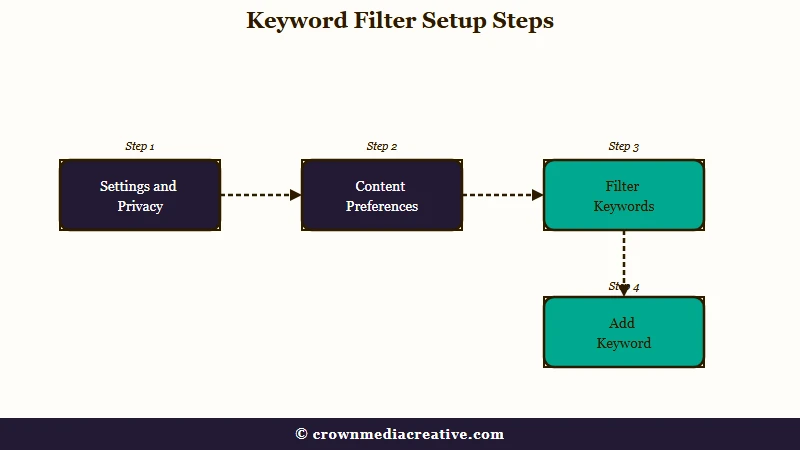
Manage Topics and keyword filters do the same job with none of the accident risk.
Both are deliberate, both live in Settings rather than under a scroll gesture, and both can be adjusted or reversed later, which is the single biggest advantage over Not Interested.
I stopped reaching for the long-press menu for anything I care about, and my feed has been calmer for it. A slider you can move back is a better tool than a button you cannot unpress.
| Control | What it does | Where it lives | Can you reverse it |
|---|---|---|---|
| Not Interested | Cuts one video’s topic hard and fast | Long press on a video, or the share sheet | No, only override it with engagement |
| Manage topics | Turns whole categories up or down | Settings and privacy, then Content preferences | Yes, move the slider back and save |
| Filter keywords | Blocks up to 100 words or hashtags | Content preferences, then Filter keywords | Yes, delete the keyword any time |
Keyword filtering is the sharpest of the three when a specific subject is bothering you, and it overlaps with how TikTok’s word bans shape what surfaces. If your feed has gone strange in ways no button explains, views dropping suddenly covers the other common causes.
Frequently Asked Questions
Does Not Interested block the creator or just the video?
It applies to the video and the signals attached to it, including topic and style, rather than blocking the account. Hiding a creator or a sound is a separate option in the same menu, and blocking is separate again.
How long does a Not Interested tap last?
There is no published expiry. Measured behaviour shows the topic drifting back in roughly 2 of 5 cases once you stop signalling disinterest and start watching similar content again.
Does tapping Not Interested hurt the creator?
It counts as a negative signal on that video’s performance, so it works against its reach in a small way. One tap among many viewers carries very little weight on its own.
Can I see a list of everything I marked Not Interested?
No. TikTok provides no list or history of marked videos, which is a large part of why the action feels irreversible. Watch history is the closest thing available.
Is there an undo on Instagram or YouTube?
Instagram has no undo either. YouTube does let you clear the feedback, though only all at once, through your Google Activity page under Other activity.
Quick Takeaways
- TikTok has no undo button for Not Interested, so the fix is overriding the signal rather than removing it.
- Find the video again in Profile, Settings and privacy, Activity center, Watch history, then let it loop before liking or commenting.
- The button is the strongest control TikTok offers, cutting an unwanted topic by 84.4% against 47.5% for skipping.
- Not Interested and Add to Favorites share one long-press gesture, which is why accidental taps are so common.
- Use Manage topics or keyword filters for anything deliberate, because both can be reversed and Not Interested cannot.

