
Why TikTok Auto Scroll Is Missing and What Works Instead
Why TikTok Auto Scroll Is Missing and What Works Instead
Auto scroll never shipped as a standard TikTok setting. It began as a 2023 test, still reaches only some accounts, and vanishes when you cross a border. Here
- 1Why Is TikTok Auto Scroll Missing From My Settings?
- 2Was TikTok Auto Scroll Ever Fully Released?
- Why Did My TikTok Auto Scroll Disappear?
- 3Why Does TikTok Auto Scroll Appear When You Travel?
- 4Why Did Auto Scroll Vanish on My Foldable or Tablet?
- 5How Do I Work Out Why My Auto Scroll Is Gone?
- 6What Works Instead of TikTok Auto Scroll?
- 7Why Does My Feed Scroll on Its Own Without Auto Scroll?
- 8Will the EU Force TikTok to Change How Scrolling Works?
- 9Quick Takeaways
The Short Answer: TikTok auto scroll is missing for most people because it has never been a released setting. It started as a limited test in early 2023, still reaches only some accounts, and TikTok has never listed it in any official documentation. Your phone’s own voice control and TikTok’s feed navigation buttons do not depend on the test, and both are covered below.
You went looking for TikTok auto scroll, followed a guide that promised a toggle, and the toggle was not there. Then you found five more guides, each pointing at a slightly different menu, and none of them matched your screen.
That is not you being bad at settings menus. The guides are describing something that was never finished, and most of them do not mention that part.
Here is what is going on, how to work out which version of the problem you have, and what to use in the meantime. Some of this is more definitive than what you have probably been told, including the part where waiting for the rollout is a bad plan.

Why Is TikTok Auto Scroll Missing From My Settings?
TikTok auto scroll is missing from your settings because it does not live in settings at all.
No version of the app has ever carried an auto scroll toggle in Settings and privacy. When it appears, it appears in the long-press menu on a video. If that menu still has no auto scroll button after you swipe through the whole row of icons, the test is not reaching you, and the checks below show whether your account, your phone or your country is the reason.
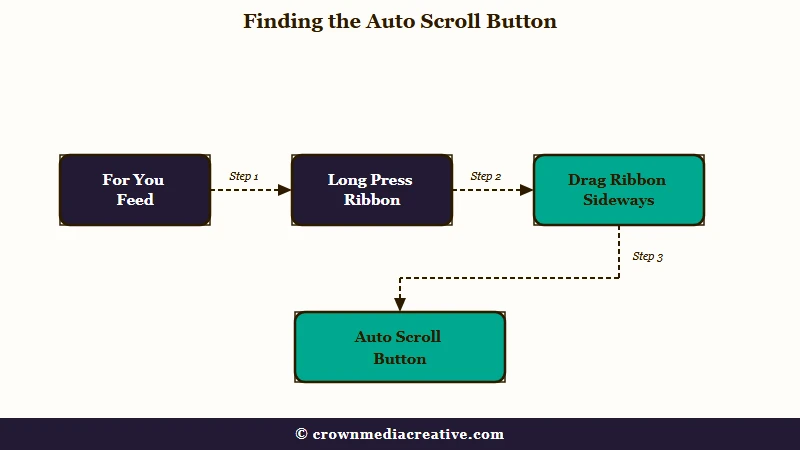
The reason so many guides send you to the wrong place is that they are guessing. One troubleshooting page tells readers to open Settings and privacy, then Accessibility, then look for “a toggle labeled AutoScroll, Auto-Scroll, Auto-Advance, Faster scroll speed or similar.” A list of four possible names for one setting is a strong sign nobody checked.
TikTok’s own accessibility help page for watching videos, read on 2 October 2026, covers ten settings: animated thumbnails, auto-generated captions, bold text, color contrast, dark mode, feed navigation buttons, photosensitivity, reduced motion, standard video playback and text size. Auto scroll is not one of them, and none of the 241 English help-center addresses listed in TikTok’s support sitemap contains the word scroll.
The first thing I check on any handset is whether the button is just out of view. On accounts that do have the feature, it sits in the horizontal ribbon that appears when you press and hold a video, and that ribbon scrolls sideways.
Published guides disagree on where it lands: one puts the button on the left of the menu, another puts it on the right and adds that you may need to scroll right past the circular icons to reach it.
Before: press and hold a video, glance at the menu, conclude auto scroll is gone.
After: press and hold a video, then drag the row of circular icons sideways in both directions to the end before deciding anything.
That takes five seconds and rules out the least interesting explanation. If the ribbon runs out and there is no auto scroll option, the rest of this article applies to you.
Was TikTok Auto Scroll Ever Fully Released?
TikTok auto scroll has never had a full public release. Press coverage on 17 February 2023 described it as a test running for a small group of accounts, with no announcement from TikTok. Three years later it is still described that way.
There was no launch post, no support article, and no changelog entry. A feature normally graduates from test to product with some kind of paperwork, and this one never did.
Look at what the guides promise. One instructional page still live in late 2025 tells readers auto scroll “is still being tested, so you might not find the option to turn it on just yet” and that “it should be rolled out to all accounts in the coming months.”
Those coming months have now been arriving for three years. That is what convinced me the standard advice to sit tight and wait for the rollout is worth ignoring. An account that has not received a test feature after three years is not in a queue.
Why Did My TikTok Auto Scroll Disappear?
Auto scroll you used to have usually disappears for one of three reasons: TikTok changed the test your account was in, you crossed a border, or you switched phones. TikTok has never documented any of the three, so each rests on user reports.
The test explanation fits the strangest reports. One r/TikTok user reinstalled the app in May 2026, got a new layout that included autoscroll, then watched the app revert to its old look and lose the button. Reports like it go back to at least 2024, including a June 2024 reply from a user who had the button in the morning and lost it by the evening.
Updating or reinstalling the app is worth one try, but in the May 2026 report the button lasted only until the app reverted.
Why Does TikTok Auto Scroll Appear When You Travel?
Auto scroll availability tracks your location, and users lose it when they fly home.
Reports of the feature appearing abroad and vanishing on return are consistent, specific, and come from separate communities that are not talking to each other.
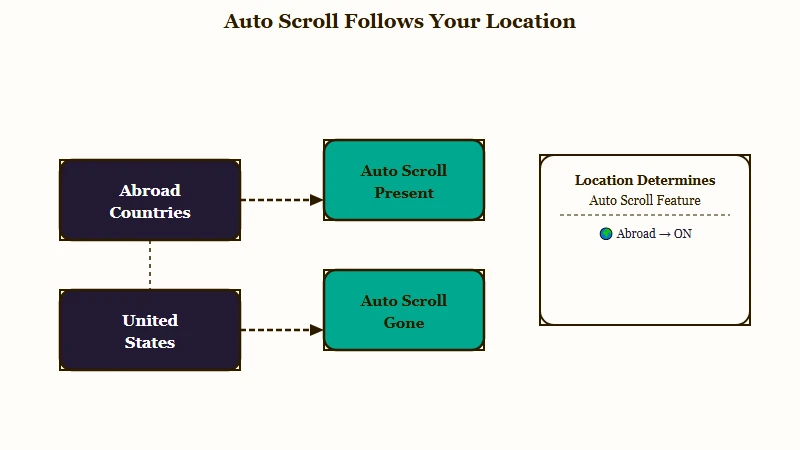
In one thread, four different people described the same sequence. One got it in Aruba and said that once they came home “now it’s not there.” Another wrote that it “appeared for me in Belgium a couple weeks ago” then “disappeared when I returned to the US,” and two more reported the same thing after trips to Mexico and Costa Rica.
A completely separate community of foldable-phone owners reported the identical pattern against different countries. One wrote “I had Autoscroll in Asia, as soon as I came back it’s gone.” Another, in Canada, said “when i in china i do have auto scroll.”
That corroboration is what makes me treat the region explanation as solid rather than folklore. Two groups with no overlap, naming five separate countries where the feature showed up, describing the same appearance and disappearance around a flight.
This is also where the popular VPN suggestion needs an honest answer rather than a confident one. One person in those threads reports it working first hand: “A vpn works, but its annoying to remember to turn one on every time i want to open tiktok.”
That is a single unverified account. TikTok has never documented region rules for this feature or published a list of the countries where it runs, so there is no official answer for Germany or anywhere else. The app also reads signals beyond your IP address, including SIM and location data, so a VPN alone does not always convince it you have moved.
If you already run one, it costs nothing to test. Treat it as worth a try rather than a fix, and if you are weighing a more permanent regional change, setting up a US account is a separate exercise with its own tradeoffs.
Why Did Auto Scroll Vanish on My Foldable or Tablet?
On foldables and tablets, auto scroll often disappears because the app serves a different layout.
Owners report that TikTok reads an unfolded inner screen as a tablet and loads a tablet interface, which drops the long-press options that phones get.
The same layout swap takes other gestures with it, including press and hold for double speed. If several long-press features went missing at once rather than auto scroll alone, the screen size is the likely culprit rather than your account.
The pattern is still turning up in 2026. One user lost auto scroll after they moved to an OPPO Find N6, a foldable, in June.
There is a second, stranger version of this on tablet layouts. Some users end up with a persistent floating auto scroll button pinned over the feed that no in-app setting will dismiss, which is the opposite complaint and equally unfixable from the menus.
One case documented by a Galaxy Fold owner sticks with me: auto scroll worked on their account, they sent the handset to the manufacturer for a physical repair, and the option was gone when the phone came back. That is one report rather than a pattern, so I would not build a theory on it. It does hint that eligibility is pinned to something about the device as well as the account.
If a foldable is also giving you stutter and dropped frames alongside the missing button, that is a different fault with its own fixes, and our guide to TikTok lag covers the performance side.
How Do I Work Out Why My Auto Scroll Is Gone?
Four checks will identify the cause in a few minutes. They separate a hidden button, a device layout problem, and an account that was never included, because each one has a different answer.
This is the sequence I walk through, in order, stopping as soon as one of them explains it:
- Scroll the ribbon. Press and hold a video and drag the circular icons fully left and fully right. If the button is there, you are done.
- Try a second account on the same phone. Log in as someone else, or a spare account, on the same handset. If auto scroll appears for them and not for you, the hardware is fine and your account was not included in the test group.
- Try your account on a second phone. Preferably a standard phone rather than a foldable or tablet. If it appears here, the first device’s layout is the problem.
- Think back to any recent travel. If the option was present abroad and went missing when you got home, you have the region answer and nothing local is broken.
| What you observe | Most likely cause | What to do |
|---|---|---|
| Button appears after scrolling the ribbon sideways | It was off-screen the whole time | Nothing, use it |
| Missing for you, present for another account on the same phone | Your account is outside the test group | Use an alternative below, waiting will not help |
| Missing on a foldable or tablet, present on a normal phone | App is serving the tablet layout | Use the phone, or use an alternative |
| Present while travelling, gone after returning home | Region gated | A VPN may help, unconfirmed |
| Never seen it anywhere, on any account or device | Never rolled out to you | Use an alternative below |
| Floating button stuck on screen and will not close | Tablet layout defect | Force close or reinstall the app |
If every check comes back negative, the honest conclusion is that your account was not selected and there is no setting that will change that.
What Works Instead of TikTok Auto Scroll?
Two real TikTok settings, your phone’s own voice control, and the desktop site cover most of what people want auto scroll for.
None of them is a perfect replacement, and one is documented but hidden behind a prerequisite almost nobody mentions.
Feed navigation buttons are the closest official equivalent, and they are in TikTok’s documentation rather than in folklore. They put on-screen controls in the feed to pause or play, go to the next or previous post, and refresh your For You and Following feeds.
There is a prerequisite that trips people up. You must switch on VoiceOver on iPhone or TalkBack on Android in your phone’s own system settings first, because when the screen reader is off, TikTok does not display the toggle at all. TikTok’s help page adds that if Stories show at the top of your feed, you may need to double tap the feed to go fullscreen before the buttons appear.
Faster scroll speed is the setting most often mistaken for auto scroll, and the two are unrelated. It changes how far the feed travels when you swipe, and your finger is still doing the work. Its location differs by platform, which is why people following the wrong walkthrough cannot find it.
| Option | Where to find it | Truly hands free | Catch |
|---|---|---|---|
| Feed navigation buttons | Settings and privacy, then Accessibility | No, tap to advance | Only appears once VoiceOver or TalkBack is on |
| Faster scroll speed | Display on iPhone, Accessibility on Android | No | Changes swipe distance only, not auto advance |
| Voice Control or Voice Access | Your phone’s own accessibility settings | Yes, spoken commands | You have to speak, so it suits home use |
| TikTok on desktop web | Any browser | Partly | Different feed behaviour to the app |
Voice Control on iPhone and Voice Access on Android are the ones I point people to when the goal is genuinely not touching the phone, since a spoken “scroll down” works regardless of whether TikTok ever gives you the button.
Third-party auto scroll apps and browser extensions deserve a warning rather than a recommendation, which is why none are linked here. They need Accessibility Service permissions, which let an unvetted app read everything on your screen, including passwords and banking details.
They also fire on fixed timers, so a five second clip and a three minute clip get the same treatment, and the result is worse than swiping.
One more expectation to reset for anyone still chasing the feature. Even on accounts that have it, auto scroll stops at photo carousel posts and requires a manual swipe through the gallery, and users report it stopping when an ad or a LIVE pops up too. On slideshows its toggle icon can also sit over the image counter, and in a January 2026 thread one user found that switching auto scroll off does not hide it, because the icon stays on screen either way.
One user described falling asleep to it and waking to “the same ad roll for as long as im asleep.” A phone left on TikTok all night also holds the app’s white buttons in one place for hours, which is how TikTok burns into OLED screens.
Why Does My Feed Scroll on Its Own Without Auto Scroll?
A feed that advances by itself with auto scroll switched off usually has a physical cause.
This is the mirror image complaint, and it is common enough that people searching for the feature and people trying to stop it end up on the same pages.
Two physical causes explain most of it. A screen protector with a lifted edge, an air bubble, or poor quality generates phantom touches that the app reads as swipes. Bluetooth accessories are the other one: earbuds, smartwatches and controllers send media “next track” commands, and TikTok obeys them.
The cause that catches me out most is the one that is working as intended. TikTok’s Sleep Hours feature, on by default for under-18 accounts, deliberately interrupts scrolling at night with a guided meditation prompt, and people reasonably read that as a malfunction.
If your feed is jumping past videos before you finish them, unpair the nearest Bluetooth device and peel back the screen protector before touching any app setting. A feed that moves on its own also registers taps you did not intend, which is how people end up with an accidental like on a post from years ago.
Will the EU Force TikTok to Change How Scrolling Works?
European regulators have preliminarily ruled that TikTok’s automatic feed mechanics breach EU law.
On 6 February 2026 the European Commission issued preliminary findings that TikTok’s addictive design breaches the Digital Services Act, naming infinite scroll, autoplay, push notifications and its personalised recommender system.
The Commission’s wording is direct. It found that TikTok “did not adequately assess how these addictive features could harm the physical and mental wellbeing of its users, including minors and vulnerable adults,” and that certain design features “fuel the urge to keep scrolling and shift the brain of users into ‘autopilot mode’.”
Two clarifications matter before anyone connects this to their missing button. These are preliminary findings with no fine imposed, and TikTok has the right to respond. Infinite scroll, the endless feed, is also a different feature from auto scroll, the hands-free advance, and the Commission has not ordered auto scroll removed.
My read is that this still answers the waiting question, just indirectly. The Commission says TikTok needs to change the basic design of its service, “for instance, by disabling key addictive features such as ‘infinite scroll’ over time,” and the maximum penalty under the Act reaches 6% of global annual turnover.
Shipping a new hands-free advance feature to everyone would cut against the direction that pressure is pushing.
Quick Takeaways
- Auto scroll has never been a released TikTok setting, which is why no Settings menu contains it and why competing guides all point somewhere different.
- Press and hold a video and drag the ribbon of icons sideways in both directions before concluding the button is missing, because it scrolls off-screen.
- Users across five countries report the feature appearing abroad and vanishing on return home, so travel is a genuine explanation and a VPN is worth testing but unproven.
- Waiting for the rollout is the weakest plan available after three years of “coming months,” especially with EU regulators pressing TikTok over automatic feed advancement.
- Turn on VoiceOver or TalkBack first, then enable feed navigation buttons, or use your phone’s voice control for genuinely hands-free scrolling.

