
Does TikTok Cause Screen Burn-In and Is the Damage Permanent
Does TikTok Cause Screen Burn-In and Is the Damage Permanent
TikTok can burn its icons into an OLED screen. Learn how to tell permanent burn-in from temporary image retention, and which popular fixes make it worse.
- 1Does TikTok Burn In Your Screen?
- 2Is It Burn-In or Just Image Retention?
- 3Can Your Phone Even Get Burn-In?
- 4Why Do TikTok’s Buttons Burn In and Not the Videos?
- 5Does Dark Mode Stop TikTok Burn-In?
- 6Which Burn-In Fixes Make It Worse?
- 7How Do You Check If Burn-In Protection Is Running?
- 8What Settings Prevent TikTok Burn-In?
- 9Will Apple or Samsung Replace a Burned-In Screen?
- 10Frequently Asked Questions
- How long does TikTok take to burn into a screen?
- Will my TikTok screen burn go away on its own?
- Does turning on dark mode fix TikTok burn-in?
- Are burn-in fixer apps safe to use?
- Can an iPhone with an LCD screen get burn-in?
- Does TikTok let you hide the buttons that cause burn-in?
- 11Quick Takeaways
The Short Answer: Yes, heavy TikTok use can burn the app’s icons into an OLED phone screen, because the bright white buttons sit in fixed positions while the video moves underneath them. Most faint marks people panic about are temporary image retention, which fades after the screen rests. True burn-in is permanent, and several of the most popular fixes online make it worse.
You open a mostly white app, a notes page or a browser, and there it is. A faint outline of the TikTok navigation bar, the search icon, the plus button, hanging over everything like a watermark nobody asked for.
That is how almost everyone discovers TikTok burn-in on their screen, because a white background is the only place the damage shows up at all.
The next question is the one that decides whether you need to spend money. Is that ghost permanent, or will it fade on its own if you leave the phone alone? Those two conditions look identical on day one and have completely different outcomes.
Most of the advice sitting at the top of search results for this problem is stale, contradictory, or wrong. One of the highest-ranking pages tells you to set your screen to maximum brightness, which accelerates the exact wear that caused the problem.
Another leads its prevention list with dark mode, which does very little for the specific pixels TikTok is wearing out.
This walks through the test that separates temporary from permanent, the reason TikTok’s interface is unusually good at causing this, the fixes that make it worse, and what your phone is already doing about it without telling you.
Does TikTok Burn In Your Screen?
TikTok burn-in is real on OLED and AMOLED phones, and it happens because TikTok’s bright white interface elements hold fixed screen positions for hours while the video content behind them constantly changes.
The damage comes from the buttons layered on top, while the videos underneath are harmless.
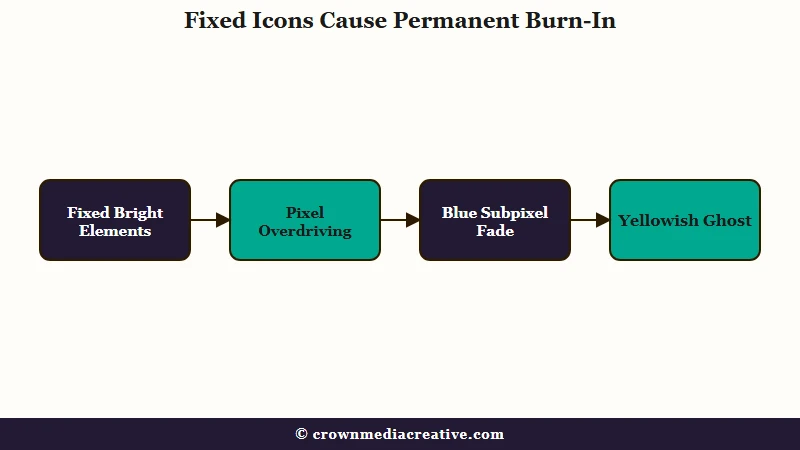
The pattern in user reports is consistent and specific. People find the bottom navigation bar, the white plus button in the centre, and the right hand column of like, comment and share icons ghosted into the panel.
One Galaxy S20 owner reported it after two months of heavy use, and a Galaxy S23 owner described the TikTok navigation bar as permanently visible on white backgrounds, with a yellowish tint to it.
That yellowish tint is a real diagnostic clue rather than a coincidence, and it points at which part of the pixel died first. The amount of use required is lower than most people assume. One iPhone user tracked roughly an hour a day in Screen Time and still ended up with the layout burned in, which points at brightness rather than raw hours as the aggravating factor.
This is one of the few phone complaints where the worry is proportionate to the problem. Screen replacement is expensive, the damage is invisible until it is permanent, and nothing in the app warns you it is happening.
Phone displays are far more resistant to this than they used to be, so treat it as an avoidable outcome rather than an inevitable one.
If your screen is showing other odd behaviour alongside the ghosting, rule out software first, the same way you would when TikTok runs slow for reasons that have nothing to do with hardware.
Is It Burn-In or Just Image Retention?
Image retention is temporary and fades once the pixels rest, while burn-in is permanent physical wear. The test is to rest the screen and look again, and Apple’s own documentation says image persistence “is temporary and disappears after a few minutes of normal use.”
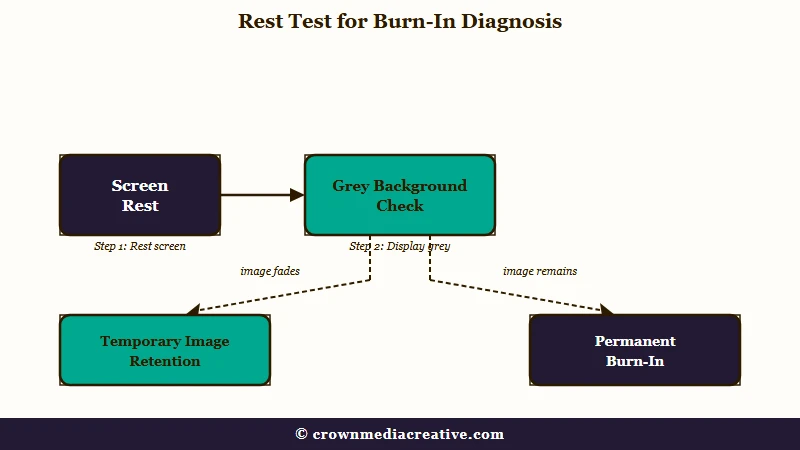
Run this before you spend a cent on repairs or a replacement, because the two conditions look the same and only one costs money.
- Open a plain mid grey or white full screen image at medium brightness, and note exactly where the ghost sits.
- Turn the screen fully off and leave the phone alone for at least 15 minutes, ideally a few hours.
- Open the same grey screen again at the same brightness and compare.
- If the ghost has faded or vanished, it was image retention and your panel is fine.
- If the outline is just as sharp as before, it is burn-in and it will not improve on its own.
The reason this test works is that the two problems have different physical causes. Retention is a temporary electrical charge sitting in the panel that dissipates once current stops. Burn-in is the organic material in the subpixels having chemically degraded, so those pixels emit less light than their neighbours forever.
Before: “There’s a faint TikTok bar on my screen, so my phone is ruined.”
After: “There’s a faint TikTok bar on a grey background. After four hours off, it’s gone, so that was retention and I need to drop my brightness.”
This misdiagnosis runs in both directions and explains most of the confusion online. A Galaxy S23 owner reported that TikTok burn-in “fixed itself” and disappeared one morning, and an iPhone owner said a game and an app folder had both ghosted in and faded away over time.
Neither of those was burn-in. They were retention, correctly resolved by doing nothing.
| Symptom | Likely cause | What to do |
|---|---|---|
| Ghost fades after hours of screen-off rest | Image retention | Lower brightness, shorten auto lock, no repair needed |
| Ghost unchanged after a full night off | Permanent burn-in | Prevention only, or panel replacement |
| Ghost looks yellow or warm on white | Blue subpixels worn down | Permanent, check warranty status |
| Ghost appears only when the phone is hot | LCD image persistence | Let the device cool, it recovers |
| Ghost appeared suddenly after an update | Software regression or overlay | Check protection settings before assuming damage |
Can Your Phone Even Get Burn-In?
Only OLED and AMOLED panels suffer true burn-in. LCD screens cannot get it, because they have a shared backlight rather than millions of individually ageing pixels, so an LCD ghost is temporary charge behaviour that clears on its own.
Settle this first, because it decides whether the rest of the article applies to you at all. Google’s suggested questions on this topic include “Can you reverse an LCD burn-in?”, which reveals how many people do not know which panel is in their own phone.
On the iPhone side, Apple’s official display documentation draws a hard line. OLED arrived with the iPhone X, XS and XS Max, and continues through the iPhone 11 Pro and every flagship since.
The iPhone XR, the base iPhone 11 and every iPhone SE use LCD, and Apple explicitly excludes the second and third generation SE from its OLED documentation.
Samsung is simpler. Galaxy flagships have used AMOLED for years, so if you own a recent S series or Note, you have a panel that can burn in. Most mid range Android phones from Xiaomi, Google and others now use OLED too, which is why burn-in reports have spread well beyond premium devices.
If you are on an LCD phone and seeing a ghost, the likely trigger is heat rather than wear. Let the device cool down and it should clear.
Why Do TikTok’s Buttons Burn In and Not the Videos?
Moving video spreads wear evenly across the panel, while TikTok’s interface holds bright, high-contrast icons in identical pixel coordinates for the entire session. Those fixed pixels age faster than everything around them, and the difference becomes visible as a ghost.
Apple’s documentation describes the mechanism in one line, saying burn-in occurs “when the same high-contrast image is continuously displayed at high brightness for prolonged periods of time.” TikTok’s layout matches that description almost exactly. The video changes every few seconds, the white plus button does not move for hours.
Contrast does more damage than duration. One user in a Samsung thread pinned the blame on how sharply the plus button stands out against the rest of the interface, and that instinct is correct. A bright white icon on a dark video is the highest-contrast arrangement a screen can be asked to hold in one place.
The right hand icon column does the same work, which is why the heart sits among the first shapes to ghost in. That column earns attention for a second reason, since it is also where accidentally liking an old post happens.
The colour of the damage gives away the physics, and I pay more attention to the colour of a ghost than to its shape. Blue subpixels are the weak link in OLED, needing meaningfully higher voltage than red or green to reach the same brightness, and research on blue emitter stability has made their shorter operating lifetime one of the best documented problems in display chemistry.
White icons drive all three subpixels hard, the blue ones fade first, and what remains reads as a yellowish stain. That is why the S23 owner saw yellow rather than grey.
This also produces a slower, sitewide version nobody notices. As blue output drops across the whole panel, the display’s white point drifts warm, and because the change is gradual most people never spot it until they hold their phone next to a new one.
Does Dark Mode Stop TikTok Burn-In?
Dark mode helps OLED panels in general, because true black pixels switch off entirely. It does almost nothing for TikTok specifically, since the feed is already a dark background and the elements that burn in are white icons that stay white in every theme.
Dark mode leads the prevention list on some of the highest ranking pages for this problem, and that is the weakest advice in the whole category. The OLED physics behind it are sound, and they do not describe the pixels at risk on this app.
Picture what dark mode changes on a TikTok feed. The video is already playing against black, so there is no bright background left to darken. The plus button, the like and share icons and the navigation bar remain exactly as bright as before, in exactly the same coordinates.
Keep dark mode on across the rest of your phone, where menus and message threads really do have large white areas. I don’t buy it as the fix for this particular app, and recommending it that way sends people off believing they have solved a problem they have not touched.
Which Burn-In Fixes Make It Worse?
Two widely shared fixes cause real damage. Running maximum brightness accelerates the pixel wear that creates burn-in, and third-party burn-in repair apps that flash colours can spread the damage to parts of the screen that were previously fine.
The maximum brightness advice is the more alarming of the two, because it sits high in Google’s results for this exact problem and was updated recently. It also contradicts Apple directly, whose documentation tells users to “avoid displaying static images at maximum brightness for long periods of time.” High brightness has one legitimate use here, which is diagnosis. Turn it up briefly to see a faint ghost, then turn it back down.
Repair apps are the second trap, and the sources genuinely disagree about them. Some mainstream guides recommend downloading a fixer app or playing a colour-cycling video. Google advises against apps claiming to reduce burn-in, and the documented outcomes back Google up.
A Redmi Note 13 owner posted a case that should end the debate. They had burn-in from the TikTok For You page, search and live buttons, and asked ChatGPT for help. After installing the repair app it recommended, they reported the damage had spread to their battery and clock icons too. The top reply was blunt about there being no way to fix burn-in and told them to uninstall the app.
These apps fail for a structural reason. They cannot regrow degraded material, so the only thing they can do is wear down the healthy pixels around the ghost until everything matches. Skip both. Levelling the whole panel down to meet the damage does not qualify as a repair.
How Do You Check If Burn-In Protection Is Running?
Your phone already runs quiet countermeasures, and they can silently stop working. Samsung shifts status bar and navigation elements by a pixel or two so they never sit still, and one Samsung software release disabled that protection for the status bar entirely.
Most guides never mention this, which is a real gap, because a software regression can cause burn-in on a phone whose owner did nothing differently. I re-run the check below after every major software update for exactly that reason.
Samsung users can verify it themselves in under a minute, using a test worked out by the community:
- Take a screenshot with the status bar visible.
- Turn the phone sideways and back upright five times, so the interface elements drift a meaningful distance.
- Take another screenshot and open both in Gallery.
- Compare the status bar and navigation elements between the two shots.
- If the icons sit in identical positions in both, pixel shifting is not running. If they have moved slightly, it is working.
When a Samsung interface update shipped with status bar shifting switched off, users found it with exactly this test, reported it, and Samsung restored the behaviour in a later release. Anyone still on an affected build has static icons burning in with no protection at all.
On iPhone the protection is different and not user-visible. Apple says its displays run “special algorithms that monitor the usage of individual pixels” and then adjust per-pixel brightness to compensate for uneven wear. You cannot inspect it, but keeping iOS current is what keeps it improving.
What Settings Prevent TikTok Burn-In?
Brightness is the single biggest lever, followed by screen timeout. Apple’s own recommendation is to leave auto-brightness on, shorten auto lock, and avoid static images at high brightness, and Google’s guidance for Pixel owners is close to identical.
Prevention is the whole game here, since permanent damage cannot be undone. Here is the order I would work through, strongest effect first.
- Turn auto-brightness on and stop overriding it upward. On iPhone this lives in Settings, then Accessibility, then Display and Text Size.
- Shorten your screen timeout. On iPhone that is Settings, then Display and Brightness, then Auto Lock. Google recommends 30 seconds or less for Pixel owners.
- Drop your manual brightness when scrolling indoors, where high brightness buys you nothing.
- Break long sessions. The damage is cumulative, so hours of unbroken scrolling at one brightness is the worst case.
- Keep the phone cool. Heat accelerates the chemical degradation behind burn-in, so scrolling while fast charging or in direct sun is the combination to avoid.
- Keep the operating system updated, since panel compensation and pixel shifting both ship through software.
A thick or poorly ventilated case can work against you too, trapping heat during long sessions. That matters most if you scroll while the phone is charging.
None of this requires giving up the app. Cutting brightness alone removes most of the risk, and it is the change I would make before any of the others.
Will Apple or Samsung Replace a Burned-In Screen?
Usually not under standard warranty. Both companies class image retention and burn-in as expected behaviour of OLED over time rather than a manufacturing defect, and Apple’s documentation states plainly that these “are characteristics of OLED and are normal behavior.”
That wording is doing a lot of work, and it is the sentence a store will lean on. Fast, severe burn-in on a nearly new device is the case most likely to get a goodwill replacement, so age and severity matter more than the policy text.
There is a specific hurdle worth preparing for. Store diagnostics check whether a display powers on and registers touch, and a burned-in panel passes both, so an automated test can come back clean while the damage is plainly visible. Go in with a photograph of the ghost on a plain grey background rather than a verbal description.
Samsung’s own position deserves a close read. Its official support page states that because Samsung “applied internal software algorithm to prevent image burn-in phenomenon”, the named Galaxy devices “are not affected by it.” Meanwhile the top result on Google for TikTok burn-in is a thread in Samsung’s own user community, and Samsung’s official community boards carry TikTok burn-in complaints too.
If it is permanent and out of warranty, the remaining options are living with it or replacing the panel, which typically runs a few hundred dollars depending on model. There is a resale cost as well, since trade-in programmes tend to reclassify a burned-in phone as defective rather than merely used, which knocks a meaningful chunk off the payout.
Keep an eye on the rest of your account health too, because a hardware problem is a bad week to also get locked out of TikTok.
Frequently Asked Questions
How long does TikTok take to burn into a screen?
There is no fixed number, since it depends on brightness, panel type and total hours. Reports exist from owners after roughly two months of heavy use, and from one user averaging about an hour a day at high brightness. Brightness matters more than hours.
Will my TikTok screen burn go away on its own?
If it fades after the screen rests for several hours, it was image retention and it is gone for good. If it looks identical after a full night with the screen off, it is permanent burn-in and it will not recover.
Does turning on dark mode fix TikTok burn-in?
No. Dark mode cannot repair existing damage, and it barely helps prevention on TikTok, because the feed already has a dark background and the white buttons that cause the problem stay bright in every theme.
Are burn-in fixer apps safe to use?
Google advises against apps that claim to reduce burn-in, and at least one documented case describes a repair app spreading damage to previously clean status icons. These apps cannot restore worn pixels, they can only wear down the healthy ones to match.
Can an iPhone with an LCD screen get burn-in?
No. The iPhone XR, base iPhone 11 and all iPhone SE models use LCD, which cannot suffer OLED-style burn-in. An LCD ghost is usually heat related and clears once the phone cools.
Does TikTok let you hide the buttons that cause burn-in?
Not currently. Users have asked TikTok to fade or auto-hide the overlay while scrolling and have not had a response, so brightness and session length remain the only controls you have.
Quick Takeaways
- Rest the screen for several hours and re-check on a grey background. Fading means harmless image retention, no change means permanent burn-in.
- The damage comes from TikTok’s static white icons, not the videos, which is why dark mode barely helps on this app.
- Ignore any advice telling you to run maximum brightness or install a burn-in repair app. Both make the problem worse.
- Turn auto-brightness on and shorten your screen timeout. That combination removes most of the risk without giving up the app.
- Samsung owners should run the rotate-and-screenshot test to confirm pixel shifting is still active after a software update.

